
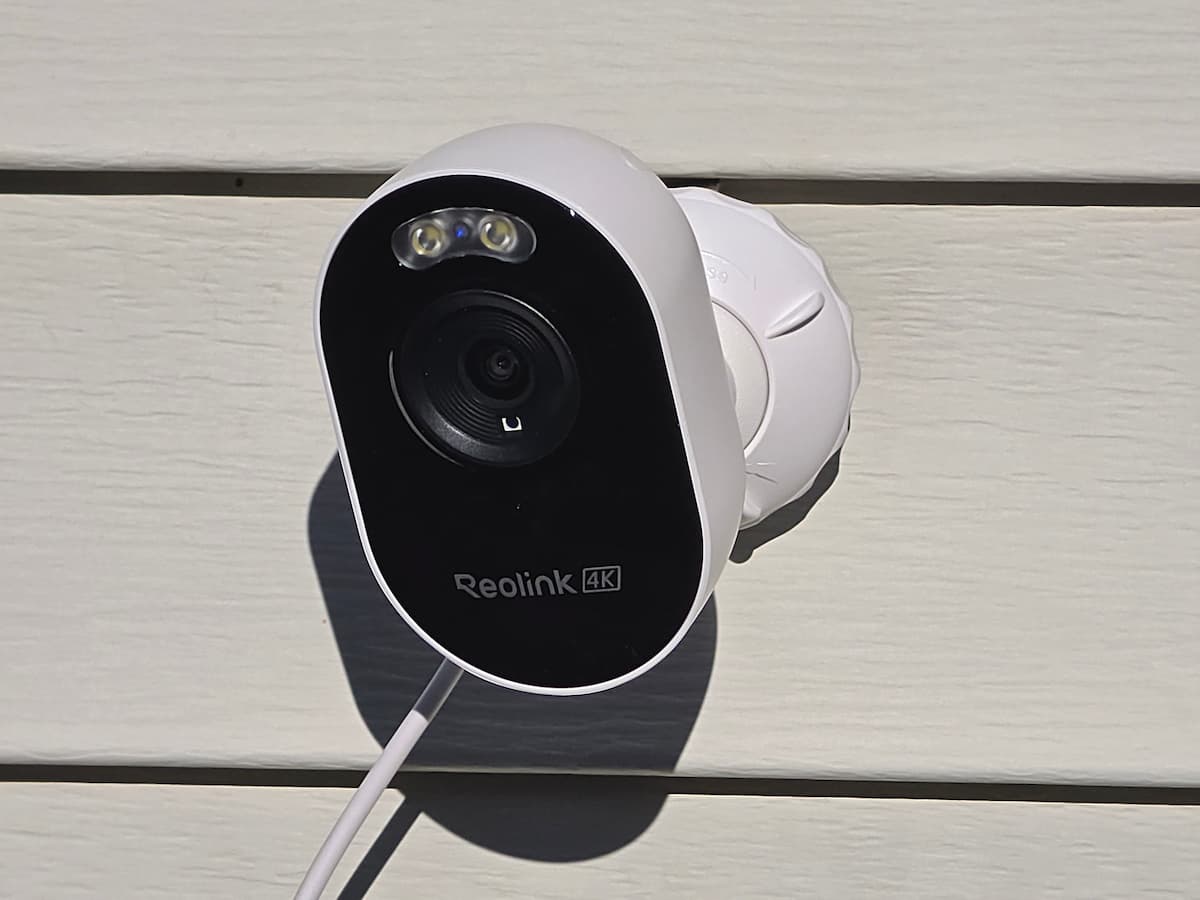
Upgrading to a sturdier Reolink Lumus mount is the first thing most owners wind up doing after unboxing the camera. In our hands-on testing of the 4K Reolink Lumus Pro (Model E450), the included ball-and-socket bracket did not stay tight enough and allowed the camera to flop over to the side far too easily. Fortunately, all three generations of the camera (the 4K Lumus Pro, the 4MP Lumus 2K E430, and the original 1080p Lumus) share the exact same 99 x 91 x 60 mm housing, 168-gram weight, and standard 1/4-inch-20 female threaded mounting hole on the back. That means any quality universal 1/4-inch-20 bracket will thread right in and hold your framing rock steady across flat walls, ceilings, vinyl siding, rain gutters, poles, and exterior corners.
Quick Answer: To replace the floppy factory bracket on flat walls, porch soffits, and ceilings, the YiePhiot 2-Pack Adjustable Metal Wall and Ceiling Mount threads directly into the camera’s 1/4-inch-20 socket and locks your angle tight. For one-piece no-drill 1/4-inch-20 installations, use the Holicfun No-Drill Vinyl Siding Mount on horizontal lap siding, the Wasserstein Weatherproof Gutter Mount on rain gutters, or the Augstci No-Drill Security Camera Pole Mount on downspouts and posts. For 90-degree building corners, bolt one of your YiePhiot 1/4-inch-20 wall arms onto the WiTi Universal Solid Metal Corner Bracket.
This guide explains why the factory bracket struggles in real-world installations, confirms mount compatibility across all three Lumus generations, and compares the five best aftermarket Reolink Lumus mounts by surface. To compare brackets and hardware for other camera brands around your property, visit our security camera mounts hub.
Quick Comparison: Best Reolink Lumus Mounts (Pro, 2K & Gen 1)
The table below compares the five best aftermarket Reolink Lumus mounts (compatible with the 4K Lumus Pro, 2K Lumus, and original 1080p Lumus) for flat walls and ceilings, vinyl siding, rain gutters, poles, and exterior corners. The first four picks feature a built-in 1/4-inch-20 male threaded stud that threads directly into the camera body, while the steel corner bracket serves as a 90-degree corner adapter plate for a 1/4-inch-20 wall arm.
| Mount | Fits / Attachment | Best For |
|---|---|---|
| YiePhiot 2-Pack Adjustable Wall & Ceiling Mount | Screw-in flat base with built-in 1/4-inch-20 threaded ball joint (360-degree swivel, 90-degree tilt slot) | Replacing the floppy factory mount on flat walls, porch ceilings, and soffits |
| Holicfun No-Drill Vinyl Siding Mount | Aluminum horizontal lap siding hook with built-in 1/4-inch-20 swivel stud | No-drill mounting on standard horizontal vinyl or aluminum siding |
| Wasserstein Weatherproof Gutter Mount | Dual-thumbscrew gutter clamp with built-in 1/4-inch-20 threaded ball-joint post | Elevated no-drill Reolink gutter mount on single-story rooflines |
| Augstci No-Drill Security Camera Pole Mount | Built-in 1/4-inch-20 swivel ball mount with 4 stainless band clamps (fits 2 to 17 inch poles and downspouts) | Direct no-drill Reolink pole mount for downspouts, fence posts, and columns |
| WiTi Universal Solid Metal Corner Mount | 90-degree steel corner adapter plate (requires bolting on a YiePhiot 1/4-inch-20 arm or factory base) | Outside house and garage corners where you want wide diagonal views |
Why You Will Likely Want to Replace the Factory Lumus Pro Mount
Every Reolink Lumus, Lumus 2K, and Lumus Pro ships with a small metal-and-plastic ball-and-socket wall bracket, a paper hole template, and a pack of mounting screws with drywall anchors. On paper, you screw the round base plate into a wall, thread the ball stud into the back of the camera, and twist the outer collar over the base to clamp the ball joint in place.
In our hands-on installation of the Reolink Lumus Pro, however, the included factory bracket proved to be the camera’s biggest physical weak spot:
- It does not stay tight and flops to the side: Even after cranking the plastic outer collar down firmly, the factory ball-and-socket joint lacks the clamping friction needed to hold the camera and the downward pull of its rear power pigtail cord. During our testing, the camera flopped over to the side far too easily, throwing off our framing and non-detection zones.
- Precise aiming matters on a 106-degree lens: As we noted in our testing, the Lumus Pro packs its 8-megapixel 4K resolution into a 106-degree horizontal field of view, which is noticeably narrower than wider 125-degree to 180-degree cameras. Because it will not cover a broad front yard from corner to corner without careful aiming, you need a rigid mount that locks the angle in place and never droops.
- Poor ceiling and soffit geometry: When you screw the stock bracket upside down onto a horizontal porch ceiling or eave soffit, its shallow collar slot prevents a clean 90-degree bend unless you invert the camera body upside down (which leaves the bottom rubber microSD card flap facing upward toward damp outdoor air).
Important: Because Reolink built a standard 1/4-inch-20 female tripod thread into the back of the Lumus housing, you do not have to put up with the floppy factory bracket. Any standard 1/4-inch-20 security camera mount with a dedicated metal locking collar will thread right into the back of the camera and hold your framing tight.
Do All Three Reolink Lumus Generations Use the Same 1/4-Inch-20 Mount?
Yes. Reolink has released three distinct camera generations under the Lumus name, and all three share the exact same outer shell and rear 1/4-inch-20 threaded socket:
- 1st Generation: Original Reolink Lumus (1080p / 2MP): Released as a compact plug-in spotlight camera with 2.4 GHz Wi-Fi and passive infrared (PIR) motion detection.
- 2nd Generation: Reolink Lumus 2K (4MP, Model E430): Upgraded the sensor to 2K 4MP Super HD (2560 x 1440), added dual-band 2.4/5 GHz Wi-Fi, and introduced free onboard AI person, vehicle, and animal detection.
- 3rd Generation: Reolink Lumus Pro (4K 8MP, Model E450): Upgraded to 4K Ultra HD (3840 x 2160) with a 1/2.7-inch CMOS sensor, f/1.6 aperture lens, dual-band Wi-Fi 6 (802.11ax), and Bluetooth setup.
Despite the resolution and wireless upgrades inside, every Lumus generation measures 99 x 91 x 60 mm (3.9 x 3.58 x 2.36 inches) and weighs 168 grams (5.9 ounces). Each model uses a single 1/4-inch-20 female threaded hole centered on the back panel just above the molded-in power pigtail cable. Any Reolink Lumus mount that fits the 4K Lumus Pro also fits the Lumus 2K (E430) and the original 1080p Lumus.
Best Reolink Lumus & Lumus Pro Mounts by Surface
1. Best Flat Wall, Ceiling & Factory Replacement Mount: YiePhiot 2-Pack Adjustable Wall Bracket
If your factory Reolink Lumus Pro bracket flops to the side during installation like ours did, or if you need a true upright ceiling mount for a porch soffit, the YiePhiot 2-Pack Adjustable Wall and Ceiling Mount is the best direct replacement. Constructed from powder-coated aluminum alloy and rigid ABS, this universal 1/4-inch-20 bracket threads straight into the back of the camera and uses a dedicated knurled locking ring around the ball joint that clamps down tightly to prevent the camera from drooping or twisting sideways under the weight of the power cord.
The YiePhiot bracket also solves the ceiling and under-eave mounting problem. A deep 90-degree side slot in the collar lets the stem hang straight down from a horizontal porch ceiling or soffit while the 1/4-inch-20 ball stud pivots forward 90 degrees. That geometry lets your Reolink Lumus Pro hang right-side up under an eave, keeping the bottom microSD card slot sheltered on the underside of the camera without needing to flip the video feed in the Reolink app.
On flat vertical walls, the longer arm pushes the camera further out past doorway trim, shutters, and brick molding so the camera’s six 850nm infrared LEDs and built-in color spotlight do not bounce glare off nearby surfaces at night. Because it comes as an inexpensive two-pack with screws and anchors included, you can use the first bracket as your primary wall mount and keep the second one for a second camera or a 90-degree corner bracket.
Best for: Replacing the floppy factory Lumus bracket on flat wood or masonry walls, porch ceilings, and under-eave soffits.
Limitation: Requires screw-in installation using the three included wall screws and anchors.
2. Best No-Drill Vinyl Siding Mount: Holicfun Outdoor Security Camera Vinyl Siding Mount
Driving screws directly into hollow vinyl siding leaves permanent holes that let rainwater behind the panels and often causes the camera bracket to loosen as the siding expands and contracts with seasonal temperature swings. If your home or garage is finished in standard horizontal lap vinyl or aluminum siding, the Holicfun No-Drill Vinyl Siding Mount lets you install any Reolink Lumus camera without drilling a hole and replaces the floppy stock bracket at the same time.
Unlike thin stamped sheet-metal siding hooks that require you to bolt on a separate camera base, the Holicfun mount is a complete, one-piece aluminum alloy and ABS assembly with its own built-in 1/4-inch-20 ball-and-socket arm. Its upward-curved aluminum lip slides directly into the horizontal seam between two siding panels, and two recessed set screws tighten against the bottom butt edge of the upper course to lock the plate onto the wall. You then thread your Reolink Lumus Pro straight onto the Holicfun 1/4-inch-20 stud, which swivels 360 degrees and tilts 90 degrees with a firm locking collar that will not flop sideways.
Because the Lumus series has a focused 106-degree horizontal field of view, being able to loosen two set screws and slide the camera two feet left or right along a siding seam makes dialing in your driveway or walkway framing effortless.
Best for: Homeowners and renters who want an all-in-one, non-flopping no-drill 1/4-inch-20 mount for standard horizontal vinyl or aluminum lap siding.
Limitation: Fits standard horizontal lap siding seams only; not compatible with vertical board-and-batten or cedar shake siding.
3. Best No-Drill Reolink Gutter Mount: Wasserstein Weatherproof Gutter Mount
When your exterior walls are brick, stone, stucco, or vertical siding where a siding clip cannot attach, clamping onto a single-story rain gutter gives the Reolink Lumus Pro an elevated vantage point over a driveway or patio without drilling into your fascia or masonry. A single-story gutter typically sits 8 to 10 feet off the ground, which puts the camera at the ideal height to take advantage of its 50-foot infrared detection range and 35-foot color spotlight trigger distance.
The Wasserstein Weatherproof Gutter Mount replaces the factory Reolink bracket altogether, combining a rust-resistant coated metal U-clamp with a rigid 1/4-inch-20 ball-and-socket swivel post. While Wasserstein includes a removable plastic snap-on adapter for Blink cameras in the box, popping that clip off exposes the standard 1/4-inch-20 threaded metal stud and locking collar that thread directly into the back of the Reolink Lumus, Lumus 2K, and Lumus Pro.
Because the ball joint swivels 360 degrees and tilts 180 degrees with a strong metal-threaded collar, you can hang the clamp over the outer lip of a K-style or box gutter and angle the Lumus Pro steeply downward toward your garage apron or walkway without the camera drooping over time. Two rear thumbscrews with protective backing pads tighten by hand against the inner gutter wall.
Best for: Elevated, tool-free 1/4-inch-20 Reolink gutter mount installations along single-story rooflines and detached garages.
Limitation: Requires an exposed, sturdy outer gutter lip and a power cord path to an outlet; solid helmet-style leaf guards prevent over-the-lip clamping.
4. Best No-Drill 1/4-Inch-20 Pole & Downspout Mount: Augstci No-Drill Security Camera Pole Mount
Many exterior house corners have a vertical aluminum gutter downspout running right down the corner trim, which can block a wall-mounted camera or bounce bright spotlight and infrared glare back into the lens at night. Strapping a Reolink pole mount directly onto the front of the downspout, or clamping onto a porch column, carport post, or fence post near an outdoor outlet, pushes the camera ahead of obstructions without drilling into your walls.
Unlike flat PTZ pole adapter plates that lack a camera screw, the Augstci No-Drill Outdoor Security Camera Pole Mount is a complete, ready-to-use 1/4-inch-20 pole mount. It combines a curved pole-cradle base with a built-in 1/4-inch-20 threaded ball-joint arm that swivels 360 degrees and tilts 180 degrees. You simply thread the Reolink Lumus, Lumus 2K, or Lumus Pro directly onto the 1/4-inch-20 stud and tighten the locking collar ring to hold your angle firm.
In the box, you get four stainless steel worm-gear band clamps in 2-inch, 4-inch, 6-inch, and 8-inch sizes that can also be linked end-to-end to fit round poles, square 4×4 fence posts, or rectangular gutter downspouts from 2 inches up to 17 inches in diameter. On hollow aluminum downspouts, snug the stainless bands with a screwdriver until the cradle cannot shift without cranking hard enough to crush the corners of the pipe.
For additional pole, magnetic, and clamp hardware across other camera styles, see our outdoor security camera mounts guide.
Best for: Direct 1/4-inch-20 no-drill mounting on aluminum gutter downspouts, porch columns, lamp posts, and fence posts between 2 and 17 inches wide.
Limitation: Stainless steel band clamps have a silver metallic finish that stands out against dark bronze or black downspouts unless painted to match.
5. Best Exterior 90-Degree Corner Adapter Plate: WiTi Universal Solid Metal Corner Mount
Because the Reolink Lumus Pro and Lumus 2K have a 106-degree horizontal field of view rather than a 180-degree panoramic lens, mounting the camera flat near the edge of a wall often wastes part of the frame on brick or corner trim. Installing a 90-degree exterior Reolink corner bracket projects the camera outward from the corner intersection so you can aim cleanly down a driveway or diagonally along two walls.
The WiTi Universal Solid Metal Corner Mount (Small Size, 5.31 x 4.33 x 2.95 inches) is a compact, heavy-gauge powder-coated steel bracket with two 90-degree mounting flanges that straddle the outside corner of wood trim, brick, or stucco. Its flat front faceplate comes pre-punched with universal vertical and horizontal oval slots and includes machine bolts, hex nuts, and masonry anchors.
Note that the WiTi bracket is a 90-degree steel corner adapter plate and does not have a 1/4-inch-20 camera screw of its own. To mount a Reolink Lumus on it, you bolt a 1/4-inch-20 wall arm onto the front plate of the WiTi bracket using the included nuts and bolts. While you can bolt Reolink’s included factory base plate to the WiTi bracket, we recommend bolting one of the YiePhiot 1/4-inch-20 metal wall mounts (Pick #1 above) onto the WiTi corner plate instead so your corner installation has a rock-solid ball joint that never flops sideways.
Best for: Outside 90-degree house, garage, and shed corners where you want to clear corner trim and aim diagonally along two walls.
Limitation: Adapter plate only (does not include a 1/4-inch-20 ball head); requires pairing with a 1/4-inch-20 wall arm like the YiePhiot bracket and drilling pilot holes into solid corner trim or masonry.
Reolink Lumus Cable Length, Power Supply & Placement Tips
Because every Reolink Lumus generation is a continuous plug-in Wi-Fi camera (supporting 24/7 microSD or Reolink NVR recording) rather than a battery camera, planning a clean Reolink Lumus installation means accounting for both your power cord and your aiming angle before fastening the mount.
1. Reolink Lumus Cable Length, Pigtail Strain Relief, and Power Supply
Every Reolink Lumus, Lumus 2K (E430), and Lumus Pro (E450) has a molded-in rear power pigtail cable on the camera body that connects to a plug-in 5V/2A AC power adapter with a 3-meter (10-foot) cord.
When the weight of that rear pigtail and adapter cord hangs unsupported below the camera, it pulls sideways on the mount (one reason the weak factory bracket flops over so easily). Clip the power cable to the wall, siding seam, or downspout a few inches below the bracket using a cable clip so the cord weight never tugs on the camera’s ball joint. If your mounting spot is more than 10 feet from an outlet, you can add a weatherproof 5.5 mm x 2.1 mm DC extension cord between the camera pigtail and power adapter.
2. Aim Carefully for the 106-Degree View and 35 to 50 Foot Night Range
In our real-world nighttime testing of the Reolink Lumus Pro, the six 850nm infrared LEDs detected moving subjects (including deer) at roughly 50 feet away, while the motion-activated spotlight triggered in Night Smart Mode once subjects approached to about 35 feet for full-color night vision. Because all eight megapixels are concentrated into a 106-degree horizontal view rather than a wide fisheye lens, mount the camera 8 to 10 feet high and aim it straight down your target approach zone (such as a driveway lane, walkway, or gate) before tightening your 1/4-inch-20 locking collar.
3. Test Wi-Fi Signal and Keep the Reset Button Accessible
The Lumus Pro supports dual-band 2.4 GHz and 5 GHz Wi-Fi 6 (and the Lumus 2K supports dual-band Wi-Fi, while the 1st-Gen Lumus is 2.4 GHz only). During our initial onboarding of the Lumus Pro, our unit required a physical press of the Reset button (located under the bottom rubber flap next to the microSD slot) to clear a Wi-Fi connection error. Always complete your app onboarding, test your Wi-Fi signal strength at the mounting spot, and verify your Night Smart Mode spotlight settings under the app’s Light menu before climbing a ladder to mount the camera high under an eave or gutter.
Common Reolink Lumus Mounting Mistakes
- Trusting the factory bracket in windy or ceiling installations: Because the included ball-and-socket mount does not stay tight and allows the camera to flop sideways, swap in a locking metal 1/4-inch-20 bracket like the YiePhiot mount right from the start.
- Buying a flat corner or pole plate without a 1/4-inch-20 ball head: Flat metal pole plates and 90-degree steel corner brackets (like the WiTi corner mount) do not have a built-in 1/4-inch-20 stud. Either choose a pole mount with an integrated 1/4-inch-20 ball joint like the Augstci Pole Mount, or bolt a 1/4-inch-20 wall arm onto the corner plate.
- Letting the power cord hang unsupported from the camera pigtail: Dangling cord weight pulls on the camera housing and can loosen the barrel plug. Secure the cord with a clip just below the bracket and form a small U-shaped drip loop so rainwater drips off the wire instead of running into the barrel connector.
- Mounting the camera upside down outdoors when you do not need to: Inverting the camera body on a porch ceiling leaves the bottom rubber microSD card and Reset button cover facing upward toward moisture. Use a 90-degree extended bracket so the camera hangs right-side up.
- Driving screws directly into hollow vinyl siding: Screws driven into unsupported vinyl panels crack the siding and loosen in the wind. Use the Holicfun no-drill siding clip instead.
Frequently Asked Questions
Do the Reolink Lumus, Lumus 2K, and Lumus Pro all use the same mounts?
Yes. All three generations (the original 1080p Lumus, the 4MP Lumus 2K E430, and the 4K Lumus Pro E450) share the exact same 99 x 91 x 60 mm housing, 168-gram weight, and rear 1/4-inch-20 female threaded socket. Any bracket that fits one generation fits all three.
Does the Reolink Lumus Pro use a standard 1/4-inch-20 tripod thread?
Yes. The Reolink Lumus Pro (along with the Lumus 2K and original Lumus) has a standard 1/4-inch-20 female tripod thread centered on the back of the camera body. If the included factory ball-and-socket mount flops to the side during your installation as it did in ours, any universal 1/4-inch-20 outdoor security camera mount will thread directly into the camera.
What is the best Reolink Lumus Pro ceiling mount option?
The YiePhiot 2-Pack Adjustable Wall and Ceiling Mount is the best ceiling and under-eave soffit option for the Lumus and Lumus Pro. Unlike the factory bracket, which cannot bend 90 degrees without turning the camera upside down and struggles to stay tight, the YiePhiot mount has a 90-degree side slot in the collar that lets the camera hang right-side up and locks the ball joint firmly in place.
How long is the Reolink Lumus power cable?
The Reolink Lumus, Lumus 2K, and Lumus Pro ship with a molded-in rear camera pigtail that connects to a 5V/2A AC power adapter with a 3-meter (10-foot) cord via a standard 5.5 mm x 2.1 mm DC barrel plug. If your mounting spot is further than 10 feet from an outlet, you can add an outdoor-rated 5.5 x 2.1 mm DC extension cable.
Can you mount a Reolink Lumus without drilling holes?
Yes. Use the Holicfun No-Drill Vinyl Siding Mount on standard horizontal vinyl or aluminum lap siding, the Wasserstein Weatherproof Gutter Mount on rain gutters, or the Augstci No-Drill Security Camera Pole Mount on gutter downspouts, porch columns, and fence posts. All three include a built-in 1/4-inch-20 threaded stud that screws straight into the back of the camera.
Bottom Line: Choosing the Right Reolink Lumus Mount
The Reolink Lumus Pro and Lumus 2K deliver strong 4K and 2K video with subscription-free AI detection, but the included factory ball-and-socket bracket is the weak link in the box because it does not stay tight enough to keep the camera from flopping sideways. Fortunately, the standard 1/4-inch-20 threaded socket on the back of all three Lumus generations makes swapping in a rigid aftermarket mount quick and inexpensive.
Match your bracket to your mounting surface: grab the YiePhiot 2-Pack Adjustable Wall and Ceiling Mount to replace the floppy stock bracket on flat walls, porch ceilings, and soffits, the Holicfun No-Drill Vinyl Siding Mount for horizontal lap siding, the Wasserstein Weatherproof Gutter Mount for elevated roofline clamping, the Augstci No-Drill Security Camera Pole Mount for direct 1/4-inch-20 mounting on gutter downspouts and posts, or the WiTi Universal Solid Metal Corner Mount (paired with a YiePhiot 1/4-inch-20 arm) for 90-degree building corners.
Outfitting additional Reolink cameras around your home? Check out our Reolink Argus battery camera mounts guide, our Reolink bullet camera mounting guide, and our Reolink Duo 3 PoE mounts guide.
