
Choosing the right Reolink TrackMix mount starts with understanding two hardware realities that separate this dual-lens pan-and-tilt camera from smaller home security cameras: its heavy motorized housing weighs between 2.67 and 3.08 pounds (1.21 kg for the TrackMix PoE and WiFi models, and 1.4 kg for the TrackMix Battery and LTE models), and it attaches through a four-hole rectangular metal L-bracket rather than a standard 1/4-inch-20 camera thread.
It’s not an easy camera to mount. The wide motorized dome needs clearance to pan 355 degrees horizontally and tilt 90 degrees vertically while auto-tracking people and vehicles, mounting it flush against a tight wall corner, hollow vinyl siding panel, or narrow fascia board without the right bracket can block its rotation or leave its thick three-way cable splitter exposed to weather.
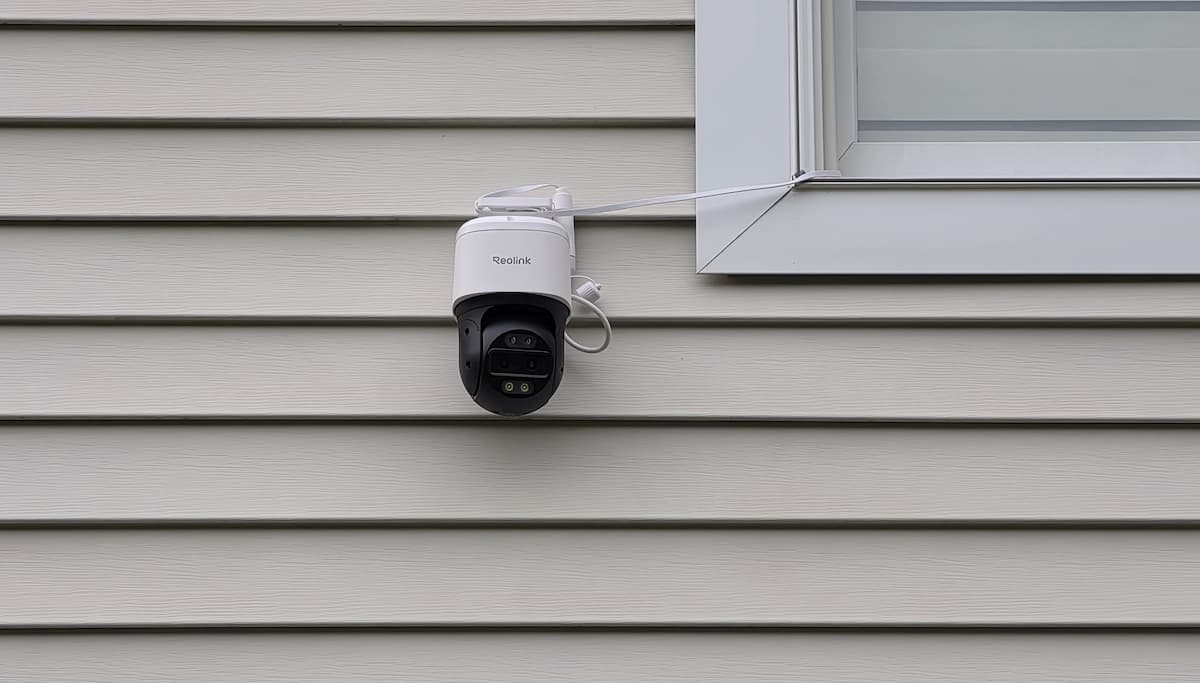
Quick Answer: For outside building edges, the official Reolink Corner Mount Bracket (RLA-BKC2) is the best all-in-one upgrade because its Pattern A hole layout bolts directly to every TrackMix model for 270-degree two-wall tracking. To hide the thick Ethernet and power pigtail on flat walls or soffits without drilling a 3/4-inch entry hole, use the Reolink Waterproof Junction Box (RLA-JBS1 V2.0), or pair the camera’s stock bracket with NACETURE Stainless Steel Vinyl Siding Hooks for a no-drill horizontal lap siding installation.
Below, we compare the five most reliable mounting solutions for the Reolink TrackMix PoE, TrackMix WiFi, TrackMix Battery, and TrackMix LTE series, explain the exact hole-pattern differences between Reolink’s small and large brackets, and walk through wall, ceiling, corner, siding, and pole installation setups. You can also explore our main security camera mounts hub to compare hardware across every major camera brand.
Quick Comparison: Best Reolink TrackMix Mounts at a Glance
Every bracket in the comparison table below is built from powder-coated aluminum or heavy-gauge stainless steel capable of supporting the TrackMix’s 2.67 to 3.08-pound motorized body and resisting outdoor wind loads year-round.
| Mount | Fits / Attachment | Best For |
|---|---|---|
| Reolink Corner Mount Bracket (RLA-BKC2) | Cast-aluminum 90-degree exterior corner bracket; Pattern A pre-tapped for TrackMix PoE, WiFi, Battery, and LTE | Official direct-fit 270-degree corner tracking across two adjacent walls |
| Reolink Waterproof Junction Box (RLA-JBS1 / B10) | Weatherproof aluminum box; V2.0 lid includes Pattern E (wall) and Pattern F (ceiling) for TrackMix PoE, WiFi, and Wired LTE | Concealing the thick PoE and power splitter cables on flat walls or soffits |
| NACETURE Stainless Steel Vinyl Siding Hooks | 1 mm 304 stainless steel roll-in seam clips with M4 machine screws (rated up to 12 lbs per hook) for horizontal lap siding | No-drill vinyl siding installation using the factory TrackMix L-bracket |
| HOLACA PTZ Camera Pole Mount Bracket | Pre-tapped metal adapter plate with stainless steel band clamps for 1.96-inch to 5.9-inch round poles, posts, and downspouts | No-drill mounting on yard posts, lamp posts, downspouts, and gate pillars |
| WiTi Universal Solid Metal Corner Mount | Heavy-duty white powder-coated stainless steel 90-degree corner bracket (5.31 x 4.33 x 2.95 inches) with machine bolt kit | Compact low-profile corner installations or stacking behind a junction box |
How the Reolink TrackMix Mounting System Works
Before ordering a mounting bracket, it helps to understand how the TrackMix attaches out of the box and why brackets designed for smaller cameras may not work well. Unlike compact wireless cameras that screw onto a single 1/4-inch-20 threaded stud, every camera in the TrackMix lineup hangs from a rigid metal L-bracket that bolts into the top of the camera’s upper collar.
Two-Orientation Factory L-Bracket (Wall vs. Ceiling Mount)
Reolink ships the TrackMix PoE, TrackMix WiFi, TrackMix Battery, and TrackMix LTE with a dual-orientation mounting arm and a paper drilling template printed with two separate hole layouts: one labeled Wall and one labeled Ceiling. The back flange of the bracket secures to a vertical wall using four screws, while the top flange secures upward into a horizontal roof soffit, porch ceiling, or eave overhang using four ceiling screws. Once the bracket is anchored to your surface, the top of the TrackMix slides into a keyed groove on the underside of the bracket and locks in place with two short machine screws.
Because the motorized pan mechanism rotates the lower sphere directly underneath that upper bracket, the camera must always hang upright below its arm. You should never mount the TrackMix upside down with the dome facing the sky, as doing so exposes the gimbal seam to standing rainwater and reverses the pan-and-tilt geometry.
Wired vs. Battery TrackMix Weight and Cable Differences
While all TrackMix variants share the same 228 x 147 x 129 mm footprint and four-hole rectangular base pattern, their weight and cable routing requirements differ by power source:
- TrackMix PoE and TrackMix WiFi (2.67 lbs / 1.21 kg): Both wired models have a thick, permanently attached three-way splitter cable exiting the top of the camera bracket. That harness divides into an RJ45 Ethernet jack with a twist-lock waterproof boot, a 12V DC power barrel connector, and a recessed reset button cap. Because the molded splitter block and waterproof Ethernet boot measure roughly 3/4 inch across, you cannot mount the camera flat against brick, stucco, or wood siding unless you either bore a 3/4-inch to 7/8-inch pass-through hole into the wall cavity or house the harness inside a weatherproof junction box.
- TrackMix Battery and TrackMix LTE (3.08 lbs / 1.4 kg): The wire-free battery and cellular 4G LTE versions pack an internal rechargeable battery inside the upper housing, pushing the bare camera weight to 3.08 pounds before adding the bracket. Instead of a thick Ethernet splitter tail, they use a weather-sealed USB-C charging port that pairs with the Reolink Solar Panel 2. Reolink also includes a metal loop-strap plate in the box with the Battery and LTE models so the factory bracket can be strapped to a tree or large timber post.
Important: Do not buy the smaller Reolink RLA-BKC1 Corner Mount Bracket or an older V1.0 Reolink B10 Junction Box for a TrackMix without checking the hole pattern first. The compact RLA-BKC1 is drilled only for standard bullet and Argus cameras and is too narrow for the TrackMix base. For official direct-bolt corner mounting, the TrackMix requires the larger RLA-BKC2 Corner Mount Bracket (Pattern A). For official junction box installations, only the updated RLA-JBS1 V2.0 Junction Box includes the Pattern E (wall mount) and Pattern F (ceiling mount) holes that match the TrackMix.
5 Best Reolink TrackMix Mounts by Installation Surface
Whether you are mounting your camera on a 90-degree brick house corner, over an exterior electrical box, onto horizontal vinyl lap siding, or around a driveway post, the five mounts below match the TrackMix’s four-hole base and weight rating.
1. Best Official Corner Mount: Reolink Corner Mount Bracket (RLA-BKC2)
A motorized auto-tracking PTZ camera delivers its biggest coverage advantage when mounted on an outside 90-degree corner of your home or garage. Installed flat on a single wall, the TrackMix can only sweep 180 degrees from left to right before staring into the siding behind it. Bolting the camera to an exterior corner unlocks a 270-degree rotational sweep, allowing the 104-degree wide-angle lens and 6x hybrid zoom telephoto lens to follow a person or vehicle all the way down a front driveway, around the corner of the house, and down a side walkway without handing off to a second camera.
The official Reolink Corner Mount Bracket (RLA-BKC2) is purpose-built for Reolink’s largest PTZ cameras, including the TrackMix PoE, TrackMix WiFi, TrackMix Battery, TrackMix LTE, TrackMix Wired LTE, and RLC-830A. Cast from heavy-duty white powder-coated aluminum alloy weighing just over 2 pounds (0.93 kg), its two angled side flanges straddle any 90-degree exterior masonry, wood, or stucco corner, while the flat front faceplate projects the camera outward away from both walls. That forward offset gives the TrackMix’s motorized dome full clearance to spin 355 degrees without rubbing against trim boards or adjacent gutter downspouts.
On the front faceplate of the RLA-BKC2, the four pre-tapped Pattern A mounting bosses align directly with the four wall-mount screw holes on the factory TrackMix bracket, with a large center pass-through opening to route the PoE or USB-C solar cable cleanly behind the bracket.
- Compatible TrackMix Models: TrackMix PoE, TrackMix WiFi, TrackMix (Battery), TrackMix LTE, and TrackMix Wired LTE via Pattern A.
- Best Use Case: Homeowners who want an official, pre-tapped aluminum Reolink TrackMix corner mount with matching white paint and zero adapter guesswork.
- Limitation: The RLA-BKC2 is an open-backed corner stand-off bracket rather than a sealed enclosure; if your PoE splitter cable cannot pass into the wall behind the corner, wrap the unused 12V DC and reset leads in self-fusing silicone tape or stack a junction box on the faceplate.
2. Best for Hiding PoE & Power Cables: Reolink Waterproof Junction Box (RLA-JBS1)
If you are installing a wired TrackMix PoE, TrackMix WiFi, or TrackMix Wired LTE on a brick wall, fiber-cement facade, or finished wood soffit where you do not want to drill a 3/4-inch hole to shove the three-way cable harness into your wall cavity, the Reolink Waterproof Junction Box (RLA-JBS1) solves the cable management problem cleanly. Constructed from cast aluminum alloy with a thick weather-sealing perimeter gasket and threaded side and bottom conduit glands, the RLA-JBS1 gives you a hollow waterproof chamber right behind the camera where you can coil the RJ45 waterproof coupler, the unused 12V power tail, and the reset lead out of sight and out of the rain.
When ordering the RLA-JBS1 for a TrackMix, pay close attention to the lid version and mounting orientation. Reolink updated the original Junction Box B10 into the RLA-JBS1 V2.0 by adding two dedicated hole patterns for the TrackMix series on the removable front cover:
- Pattern E (Wall Mount): Uses four pre-tapped M4 bosses arranged in a vertical rectangle so the TrackMix’s rear wall-mount bracket bolts flat onto the face of the junction box.
- Pattern F (Ceiling / Soffit Mount): Uses four pre-tapped bosses matched to the top flange of the TrackMix bracket when the RLA-JBS1 is screwed upward into an overhead eave or porch ceiling.
If you receive an older V1.0 B10 lid in stock rotation that only stamps Patterns A through D for standard Reolink bullet camera mounts and Reolink Duo 3 PoE mounts, you can either attach the TrackMix ceiling flange using two diagonal bolts or drill and tap two matching M4 holes into the soft aluminum cover plate using your TrackMix paper template.
- Compatible TrackMix Models: TrackMix PoE, TrackMix WiFi, and TrackMix Wired LTE (direct bolt-on with RLA-JBS1 V2.0 Pattern E for walls and Pattern F for ceilings).
- Best Use Case: Flat masonry walls, stucco exteriors, and under-eave soffits where you only want a tiny 1/4-inch Ethernet hole entering the wall or surface-run Cat6 cable entering the side gland.
- Limitation: Not needed for the wire-free TrackMix Battery or standard TrackMix LTE unless you want a spacer block to push the camera out past deep trim.
3. Best No-Drill Vinyl Siding Option: NACETURE Stainless Steel Vinyl Siding Hooks
Drilling four long mounting screws straight through hollow horizontal vinyl siding panels is one of the most common DIY camera installation mistakes: the brittle PVC cracks in winter cold, moisture seeps behind the housewrap if the holes are not caulked, and hollow siding panels flex unless you hit a wood stud directly behind the seam. Worse yet, thin sheet-metal siding clips sold for 4-ounce indoor cameras will bend under the TrackMix’s 2.7 to 3.1-pound motorized body.
The NACETURE Stainless Steel Vinyl Siding Hooks are built from extra-thick 1 mm 304 (18/8) rustproof stainless steel rather than thin stamped tin, giving each hook a 12-pound load rating. Because the TrackMix’s factory wall bracket uses four screw slots (two upper and two lower), you simply roll two NACETURE hooks into an upper horizontal lap siding seam and two hooks into the seam below it (or hang the top flange from two side-by-side hooks directly beneath an eave soffit) and fasten the factory TrackMix bracket straight onto the hooks’ pre-threaded M4 machine screw studs. The result is a rigid, zero-drill vinyl siding mount that supports the heavy TrackMix without puncturing a single panel.
Important: Roll-in vinyl siding hooks require a standard horizontal lap siding seam with a slight upward lip gap. They will not clip onto flat fiber-cement plank (HardiePlank), vertical board-and-batten siding, brick, stucco, or vinyl seams that have been caulked shut. On wired TrackMix PoE or WiFi installs, place the hooks on the top siding course right beneath an overhanging roof eave so you can tuck the waterproof Ethernet coupler up under the soffit J-channel.
- Compatible TrackMix Models: All TrackMix models (PoE, WiFi, Battery, and LTE) using their included factory mounting bracket, plus the Reolink Solar Panel 2 bracket.
- Best Use Case: Renters and homeowners with standard horizontal vinyl or aluminum lap siding who want a damage-free installation that can be relocated in minutes.
- Limitation: Requires an accessible horizontal siding seam; you must still route and weather-protect the PoE or power cable along the siding J-channel.
4. Best for Poles, Posts & Downspouts: HOLACA PTZ Camera Pole Mount Bracket
While the battery-powered TrackMix Battery and TrackMix LTE include a basic nylon loop strap in the box, the wired TrackMix PoE and TrackMix WiFi do not ship with a pole adapter plate, and nylon straps can weather or loosen over time on smooth metal poles. If you want to mount any TrackMix camera on a round driveway gate post, yard lamp post, carport support column, or aluminum gutter downspout without drilling into the post, the HOLACA PTZ Camera Pole Mount Bracket provides a complete all-metal clamping platform.
Engineered specifically for multi-screw PTZ security cameras and solar panels, the HOLACA kit pairs a powder-coated aluminum multi-hole adapter plate with heavy-duty stainless steel worm-gear band clamps that wrap around vertical poles from 1.96 inches to 5.9 inches (50 mm to 150 mm) in diameter. A smart installer detail is that the HOLACA faceplate has pre-tapped machine-screw holes across its grid and ships with an assortment of machine bolts (plus a pair of work gloves to protect your hands from the stainless clamp tails). You bolt the TrackMix’s factory wall bracket (and, on Battery or LTE setups, the Reolink Solar Panel 2 bracket) directly into the threaded metal plate without fumbling with loose nuts on a ladder, then cinch the stainless band clamps around your pole.
- Compatible TrackMix Models: TrackMix PoE, TrackMix WiFi, TrackMix Battery, TrackMix LTE, and Reolink Solar Panel 2.
- Best Use Case: Mounting a TrackMix (and optional solar panel) on round or square posts, chain-link gate posts, lamp posts, or 2×3 and 3×4 gutter downspouts without drilling.
- Limitation: Tighten the stainless band clamps snugly until the bracket cannot twist on the pole, but avoid over-torquing with an impact driver so you do not strip the worm-gear slots.
5. Best Compact Steel Corner Bracket: WiTi Universal Solid Metal Corner Mount
One frequent observation from Reolink owners is that the official RLA-BKC2 corner bracket is physically large (measuring over 7 inches tall and weighing 2.05 pounds). If you are mounting a TrackMix on narrower corner trim boards, brick pilasters, or tight fascia corners where the oversized RLA-BKC2 looks too industrial, the WiTi Universal Solid Metal Corner Mount offers a more compact, heavy-duty steel alternative.
Measuring 5.31 x 4.33 x 2.95 inches and stamped from thick white powder-coated stainless steel, the WiTi corner bracket bolts across any 90-degree outside wall edge and features multiple pre-punched vertical and horizontal mounting slots along with a bag of machine screws, lock washers, and hex nuts. You can bolt the TrackMix’s factory L-bracket directly to the flat front face (using the top two or four aligned slots), or bolt the Reolink RLA-JBS1 Junction Box to the front of the WiTi corner bracket first so you get both 270-degree corner tracking and fully enclosed PoE cable storage in a compact footprint.
- Compatible TrackMix Models: All TrackMix models (either bolted directly via the factory TrackMix bracket or stacked behind an RLA-JBS1 junction box).
- Best Use Case: Installers who want a lower-profile, rustproof stainless steel 90-degree corner bracket that costs less and takes up less wall space than the oversized official RLA-BKC2.
- Limitation: Because it is a universal slotted CCTV plate rather than a Reolink-specific casting, you secure the camera bracket using the included through-bolts and rear nuts before screwing the corner flanges to the wall.
Reolink TrackMix Model & Bracket Compatibility Reference
Use the lookup table below to verify how each camera in the Reolink TrackMix family matches up with factory and aftermarket mounting hardware before you start drilling.
| TrackMix Model | Weight & Tail Cable | Confirmed Mount Compatibility |
|---|---|---|
| TrackMix PoE | 2.67 lbs (1.21 kg); 3-way PoE / 12V DC / Reset splitter tail | RLA-BKC2 (Pattern A), RLA-JBS1 V2.0 (Pattern E Wall / Pattern F Ceiling), NACETURE Siding Hooks, HOLACA Pole Mount, WiTi Corner Mount |
| TrackMix WiFi | 2.67 lbs (1.21 kg); 3-way 12V DC / RJ45 / Reset splitter tail | RLA-BKC2 (Pattern A), RLA-JBS1 V2.0 (Pattern E Wall / Pattern F Ceiling), NACETURE Siding Hooks, HOLACA Pole Mount, WiTi Corner Mount |
| TrackMix (Battery WiFi) | 3.08 lbs (1.4 kg); USB-C port for Solar Panel 2 (includes loop strap) | RLA-BKC2 (Pattern A), NACETURE Siding Hooks, HOLACA Pole Mount, WiTi Corner Mount, Factory Loop-Strap Plate |
| TrackMix LTE / Wired LTE | 3.08 lbs (1.4 kg); USB-C solar port or wired harness | RLA-BKC2 (Pattern A), RLA-JBS1 V2.0 (Wired LTE via Pattern E/F), NACETURE Siding Hooks, HOLACA Pole Mount, WiTi Corner Mount |
Wall vs. Ceiling & Soffit Mounting: How to Orient the TrackMix Bracket
One of the most frequent questions during a Reolink TrackMix installation is whether you need a separate ceiling bracket to hang the camera under a roof eave or porch soffit. You do not need to buy a special ceiling arm because the included L-bracket is already engineered for both vertical walls and horizontal ceilings:
- For Vertical Wall Mounting: Hold the back vertical flange of the L-bracket flat against your wall (or against the front of the RLA-BKC2 corner bracket or RLA-JBS1 Pattern E bosses). Route the camera’s tail cable either straight through the center hole into the junction box or downward through the bottom cable notch on the bracket. Anchor the four wall screws, slide the top of the TrackMix into the bracket’s underside groove, and lock the camera to the arm with the two short machine screws.
- For Ceiling, Eave & Soffit Mounting: Instead of using the back plate of the L-bracket, hold the top horizontal flange of the L-bracket flat against the underside of your roof soffit or porch ceiling (or align it with the four Pattern F bosses on the RLA-JBS1 V2.0 junction box lid). Drive the four mounting screws straight up into solid wood framing or ceiling anchors, route the cable through the top channel notch, and slide the TrackMix onto the underside groove of the arm.
- Check Pan and Tilt Clearance Before Final Tightening: Because the TrackMix housing measures 5.78 inches (147 mm) wide and rotates 355 degrees, leave at least 2.5 inches of clearance between the camera body and any overhanging fascia lip, gutter downspout, or adjacent wall so the dual lenses and dual spotlights never collide with the structure during auto-tracking.
Practical Installation Tips for the Reolink TrackMix Series
- Mount at 8 to 10 Feet Above the Ground: Mounting the TrackMix between 8 and 10 feet high keeps the 3-pound camera out of easy reach of tampering while giving both the 2.8 mm wide-angle lens and the 8 mm telephoto zoom lens a natural downward angle to capture faces and license plates. On the Battery and LTE models, an 8 to 10-foot height also keeps the passive infrared (PIR) motion sensor inside its most accurate 33-foot detection zone.
- Form a Drip Loop on All Exterior Cables: When routing an Ethernet cable, 12V DC power cord, or USB-C Solar Panel 2 lead into the TrackMix bracket or RLA-JBS1 junction box, let the wire dip 2 inches below the entry notch before rising into the bracket. That U-shaped drip loop forces rainwater to drip off the bottom of the curve rather than running down the jacket into the camera connectors.
- Seal Unused Pigtail Leads on PoE and WiFi Installs: On the TrackMix PoE, you only use the RJ45 Ethernet connector (which includes Reolink’s twist-lock waterproof boot), leaving the 12V DC barrel jack and reset button cap unused. On the TrackMix WiFi, you use the 12V DC barrel plug and leave the RJ45 jack unused after setup. Even when tucking those spare leads inside an RLA-JBS1 junction box, wrap the unused connectors in self-fusing silicone tape so condensation cannot corrode the pins.
- Angle Dual-Band Wi-Fi or 4G LTE Antennas Upward: On the TrackMix WiFi, TrackMix Battery, and TrackMix LTE, pivot the twin external antennas so they point vertically upward on either side of the L-bracket without crossing into the path of the rotating lower dome.
- Separate the Solar Panel 2 When Mounting Under Deep Eaves: If you mount a TrackMix Battery or TrackMix LTE under a shaded north-facing soffit or porch overhang, use the 13-foot (4-meter) Reolink solar extension cable to mount the Solar Panel 2 separately on a sun-facing fascia board, corner bracket, or gutter edge tilted at 35 to 45 degrees toward the south.
What Does Not Work with the Reolink TrackMix
- Standard 1/4-Inch-20 Tripod Ball Mounts: Unlike the Reolink Lumus series mounts or Reolink Argus battery camera mounts, the TrackMix does not have a 1/4-inch-20 threaded socket on the back or top of its housing, and a single mini ball joint cannot safely support a 3-pound motorized PTZ camera in high winds.
- The Smaller Reolink RLA-BKC1 Corner Bracket: Reolink’s compact RLA-BKC1 is drilled only for 3-hole and 4-hole bullet cameras and small Argus brackets. Its faceplate is too narrow for the TrackMix L-bracket; always order the larger RLA-BKC2 (or the universal WiTi Corner Mount) for a TrackMix.
- Peel-and-Stick Adhesive Pads on Exterior Siding or Brick: Double-sided foam tape will peel off textured siding, brick, or painted wood under the lever torque of a 2.67 to 3.08-pound motorized camera that shifts its weight every time it pans and tilts.
- Flimsy Single-Clip Gutter Clamps Without a Backing Plate: Clamping a heavy TrackMix to a thin aluminum gutter lip using a miniature 1/4-inch-20 thumbscrew clip will twist the gutter edge and cause the camera feed to shake during wind gusts.
Frequently Asked Questions
Does the Reolink TrackMix come with a wall and ceiling mount in the box?
Yes. Every Reolink TrackMix PoE, WiFi, Battery, and LTE camera ships with a heavy-duty metal L-bracket that supports both vertical wall mounting (using the four rear flange holes) and horizontal ceiling or under-eave soffit mounting (using the four top flange holes). You only need an additional mount when installing the camera on a 90-degree outside corner, concealing the thick PoE and power splitter harness inside a junction box, clipping onto horizontal vinyl siding without drilling, or clamping around a round pole.
Which Reolink junction box fits the TrackMix PoE and WiFi?
The updated Reolink RLA-JBS1 V2.0 Waterproof Junction Box is the official box for the TrackMix PoE, TrackMix WiFi, and TrackMix Wired LTE. On the V2.0 front cover, use the four pre-tapped Pattern E holes when mounting the TrackMix on a vertical wall, or the four Pattern F holes when mounting the box upward into a ceiling or roof soffit. The round Reolink D20 (RLA-JBL1) dome junction box is designed for turret and vandal-dome cameras and does not fit the TrackMix L-bracket.
What is the difference between the Reolink RLA-BKC1 and RLA-BKC2 corner mounts?
The RLA-BKC1 is Reolink’s small corner bracket (13.1 ounces) built for standard PoE bullet cameras, the Duo 3 PoE, and compact Argus battery cameras. The RLA-BKC2 is Reolink’s large heavy-duty corner bracket (2.05 pounds) engineered specifically for the TrackMix PoE, WiFi, Battery, and LTE series (via Pattern A) as well as large RLC-823S1/S2 PTZ cameras. Only the RLA-BKC2 has the hole spacing and wall stand-off depth required for the TrackMix.
Can I mount the Reolink TrackMix on vinyl siding without drilling holes?
Yes, provided your home has standard horizontal lap vinyl or aluminum siding with an accessible seam gap. Because the NACETURE 304 stainless steel vinyl siding hooks are 1 mm thick and rated up to 12 pounds per clip, sliding two to four hooks into the horizontal siding seam and bolting the factory TrackMix bracket to their M4 screw studs holds the camera securely without drilling through the vinyl panels.
Can the Reolink TrackMix be mounted upside down on top of a ledge or fence post?
No. The TrackMix must always hang upright underneath its L-bracket with the black motorized pan-and-tilt sphere facing downward. Mounting the camera upside-down with the dome on top allows rainwater to pool inside the rotating gimbal collar and inverts the camera’s auto-tracking controls. To mount the camera on a post, strap the HOLACA PTZ Camera Pole Mount Bracket to the side of the post so the TrackMix hangs in its normal upright position.
Bottom Line: Choosing the Best Reolink TrackMix Mount
Matching your Reolink TrackMix mount to your exact wall surface and cable path ensures your dual-lens PTZ camera stays rock-steady while tracking motion across your property. For 90-degree outside building corners, the official Reolink Corner Mount Bracket (RLA-BKC2) gives every TrackMix model a direct Pattern A bolt-on fit and 270-degree two-wall visibility, while the WiTi Universal Solid Metal Corner Mount offers a compact stainless steel corner alternative. For wired TrackMix PoE and WiFi installations on flat masonry, stucco, or soffits, the Reolink Waterproof Junction Box (RLA-JBS1) hides the thick three-way splitter harness without boring a 3/4-inch hole into your home. Finally, choose the NACETURE Stainless Steel Vinyl Siding Hooks for damage-free horizontal lap siding installs, or the HOLACA PTZ Camera Pole Mount Bracket for round yard posts, gate pillars, and downspouts.
Also installing other Reolink cameras around your property? Check out our companion guides to the best Reolink Duo 3 PoE mounts for 180-degree panoramic cameras, our Reolink bullet camera mount and junction box guide for RLC-810A and RLC-1212A setups, our best Reolink Lumus, 2K, and Pro mounts, or our Reolink Argus battery camera mounts guide.