
Knowing how to mount a GPS on a motorcycle starts at the back of the device, not at the handlebar. Identify the cradle or socket your GPS requires, choose a mounting point that stays clear through the full steering sweep, and then connect the two with compatible hardware. That order prevents the most common mistake: buying a sturdy bar mount that has no way to attach to the GPS.
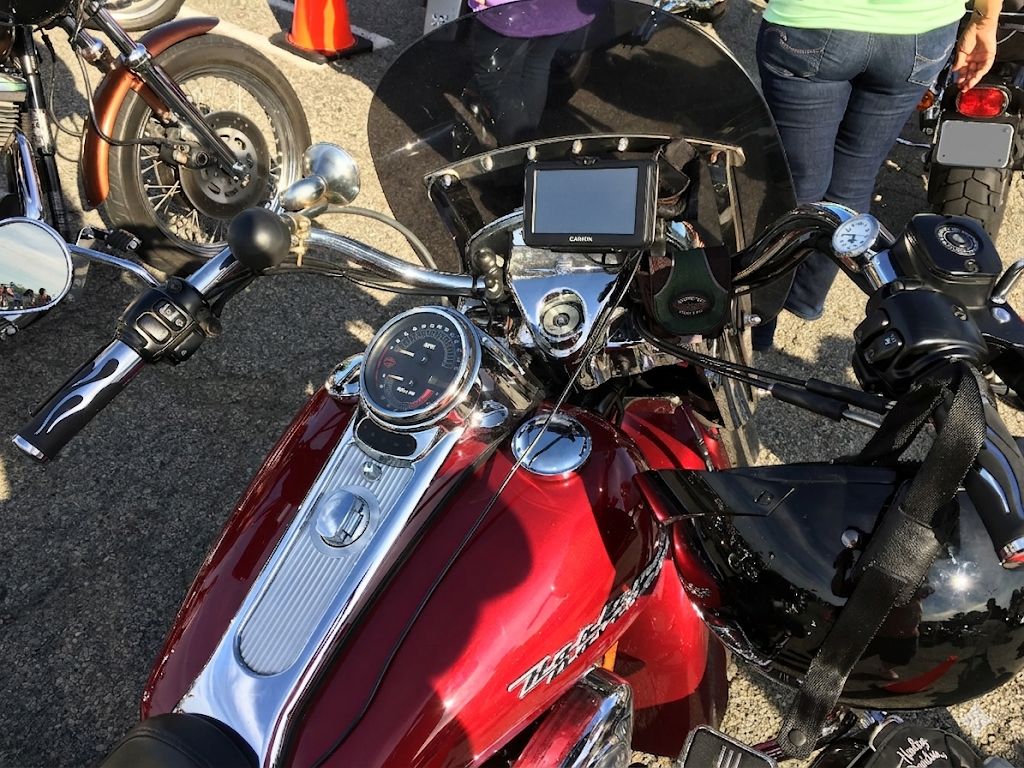
This is an installation guide for a GPS you already own or plan to mount. For a comparison of complete mounting products, use our motorcycle GPS mounts guide. Here, we will work through the connection from GPS to motorcycle, position the screen, route power when needed, and test the setup before riding.
Step 1: Identify the attachment on your GPS
Do not shop from the name “Garmin mount” alone. Garmin’s motorcycle navigators, automotive navigators, and handheld GPS units can attach in different ways. Look at the mount or cradle supplied with your specific model and consult its installation instructions. The important part is the interface between that cradle and the hardware attached to the bike.
| What you have | What to check | Next piece |
|---|---|---|
| Motorcycle GPS with a powered cradle | Hole spacing and supplied cradle hardware; many use an AMPS arrangement | A plate whose holes align with that specific cradle |
| Automotive GPS cradle with a snap-on socket | Actual ball diameter; 17 mm is common on many Garmin automotive cradles | A matching ball attached to a motorcycle-rated base |
| Garmin handheld | Whether it uses a spine clip or a model-specific cradle | The matching holder, then its compatible arm and base |
An AMPS pattern is a bolt-hole layout, not a ball diameter. A two-hole diamond plate may line up with two of a four-hole AMPS cradle, but it does not magically give you four attachment points. If the device maker calls for four bolts, use a matching four-hole plate and the specified hardware. A RAM B-size ball measures one inch; it cannot snap into a 17 mm socket. Keep those three dimensions separate: bolt pattern, ball size, and the diameter of the bar or stem on the bike.
Step 2: Decide where the screen belongs
Sit on the bike in your normal riding position and hold the GPS where you would read it. Check that it does not hide speed, warning lights, mirrors, or the road ahead. Consider the windscreen at every adjustment position. If you wear a tank bag, check clearance with that too. A location that looks fine while standing beside the motorcycle can be awkward once you sit behind the bars.
Exposed handlebar
This is often the simplest mounting point. Measure the section you intend to clamp, because tapered bars change diameter along their length. Keep the clamp away from cables, controls, heated grip wiring, and spots where the bar bends. A RAM handlebar base and arm kit can supply the bike-side clamp and adjustment, but its included diamond plate is a two-hole part. Verify that it matches your cradle; use a suitable four-hole plate if your cradle calls for all four holes.
Fork stem, perch, or accessory bar
Clip-on sport bikes may have little exposed bar space. A fork stem mount can put the GPS near the center, but first measure the inside of the stem and confirm that the insert is compatible. Avoid a location that interferes with the ignition, steering damper, or steering lock. A brake or clutch perch base is another option when the center is crowded; follow the motorcycle and mount manufacturers’ instructions when working near control fasteners.
On an adventure bike, a navigation bar above the instruments may give a natural sightline. Measure its tube diameter and confirm the bar is intended to support the extra load. A tall navigation position can still shake if the bar or windscreen bracket flexes, so try the shortest practical arm before adding extension pieces.
Step 3: Build the connection from the cradle down
Lay the parts out on a bench before installing the base on the motorcycle. Start with the GPS cradle, align its holes with the device-side plate, and confirm the screws engage without bottoming out or pressing into the cradle. Use the fasteners specified for that cradle. Then fit the plate’s ball into an arm of the same ball size, and fit the other end of the arm to the ball on the bike-side base.
For a compatible four-hole cradle in a RAM B-size setup, the RAM four-hole AMPS plate with one-inch ball is a device-side component. It is not a complete handlebar mount: you still need a B-size arm and a bike-side base. If you already own a base and arm, this may be the only part needed. Check the cradle’s actual holes before assuming four-hole compatibility.
A powered cradle must hold the GPS mechanically; the electrical contacts are not the retaining mechanism. Seat the device according to its manual, engage its latch, and give it a gentle pull to check retention. If the latch feels uncertain, fix that before riding. A tether can add a backup on rough rides, but it cannot repair an incompatible or loose primary mount.
Step 4: Set the angle and check steering clearance
Fit the base loosely enough to reposition it. Sit on the motorcycle, set the screen angle to reduce glare, and choose an arm length that places the GPS within a short glance of the instruments. A longer arm may clear a windscreen but also creates more movement. Begin with the shortest arm that provides the necessary reach.
Now turn the bars slowly from lock to lock. Check the GPS body, cradle, arm, power lead, brake lines, clutch cable, throttle cables, and windscreen at both extremes. On a bike with an adjustable windscreen, repeat the test at its high and low settings. Bounce the front end gently with the bike stationary and check nearby clearances again. You should still be able to operate every switch, see warning lights, and use the ignition.
Once the position works, tighten each part to its manufacturer’s specification. Do not guess at torque for a fork stem insert or a control perch fastener. Use thread locker only where the hardware instructions call for it. Marking the final position with a small piece of tape can help you spot a mount that begins to rotate during the first few rides.
Step 5: Add power without stressing the cable
If your GPS has a motorcycle power cradle, use the power cable designed for that exact model and cradle. A generic Garmin USB cable is not a substitute for the XT2’s motorcycle cradle power lead. Some navigators can run from their internal battery, but a permanent installation is more convenient when its power feed is correctly installed.
Plan the cable route before making an electrical connection. Leave enough slack at the steering head for full lock in both directions, but keep the lead away from hot engine parts, sharp edges, suspension travel, and pinch points. Follow your GPS and motorcycle manuals for fuse protection, connection point, polarity, and whether a switched accessory circuit is available. If you are unsure about motorcycle electrical work, have a qualified installer make the connection.
Use the motorcycle USB charger guide if you are powering a USB device. It is a different job from wiring the contacts in a dedicated GPS motorcycle cradle.
Step 6: Test the install before a long ride
- With the motorcycle parked, latch the GPS and confirm that it cannot lift out without releasing the cradle.
- Turn the bars fully both ways. Watch for a cable becoming tight and for the mount touching the screen, tank bag, or fairing.
- Start the bike and confirm that the device charges if you wired a power cradle. Check again after switching the ignition off according to your wiring arrangement.
- Take a short local ride. Stop and inspect the clamp, arm, cradle bolts, and cable routing. Recheck them after the next few rides.
If the display moves enough to be distracting, shorten the arm or change the mounting point before tightening it harder. Tightening cannot make a flexible accessory bar rigid. If the GPS powers intermittently, inspect the cradle seating and wiring with the bike parked rather than trying to correct it on the road.
Common compatibility questions on how to mount a GPS on a motorcycle;.
Can I use a 17 mm mount for a Zumo?
Not by snapping a typical Zumo motorcycle cradle onto a 17 mm ball. The 17 mm connection is associated with many automotive GPS cradles. Check your specific Zumo cradle’s mounting holes and use a matching plate, arm, and base. An adapter is only useful when both ends are specified and compatible.
Does an AMPS plate include everything?
No. It is the interface that bolts to a compatible cradle. To complete a modular setup you also need an arm and a base appropriate for the bike. The existing RAM arm size guide helps you compare reach once you know the ball size and have chosen the base.
What if I use a car GPS?
Verify its cradle socket before ordering a matching motorcycle mount, and check the unit’s weather protection and power arrangement. A mount that fits its socket does not make the GPS itself weatherproof. Our car GPS on a motorcycle guide covers that separate decision.
Final check
The install succeeds when the cradle retains the correct GPS, every joint matches the next, the screen sits within an easy glance, and nothing binds at full steering lock. Work from the device toward the bike, test the dry fit before wiring, and check the hardware after the first rides. Once those pieces are right, choosing a specific mount becomes much simpler.
