
The best eufy S340 mount depends on where you want to put the camera. The official name is the eufy SoloCam S340, and the stock wall bracket works well on a normal flat surface. But the SoloCam S340 becomes much more flexible with a siding mount, gutter mount, corner bracket, or pole mount. The photo below deploys a siding mount. This saved me from drilling into my siding. For me, this was the best Eufy S340 mount.
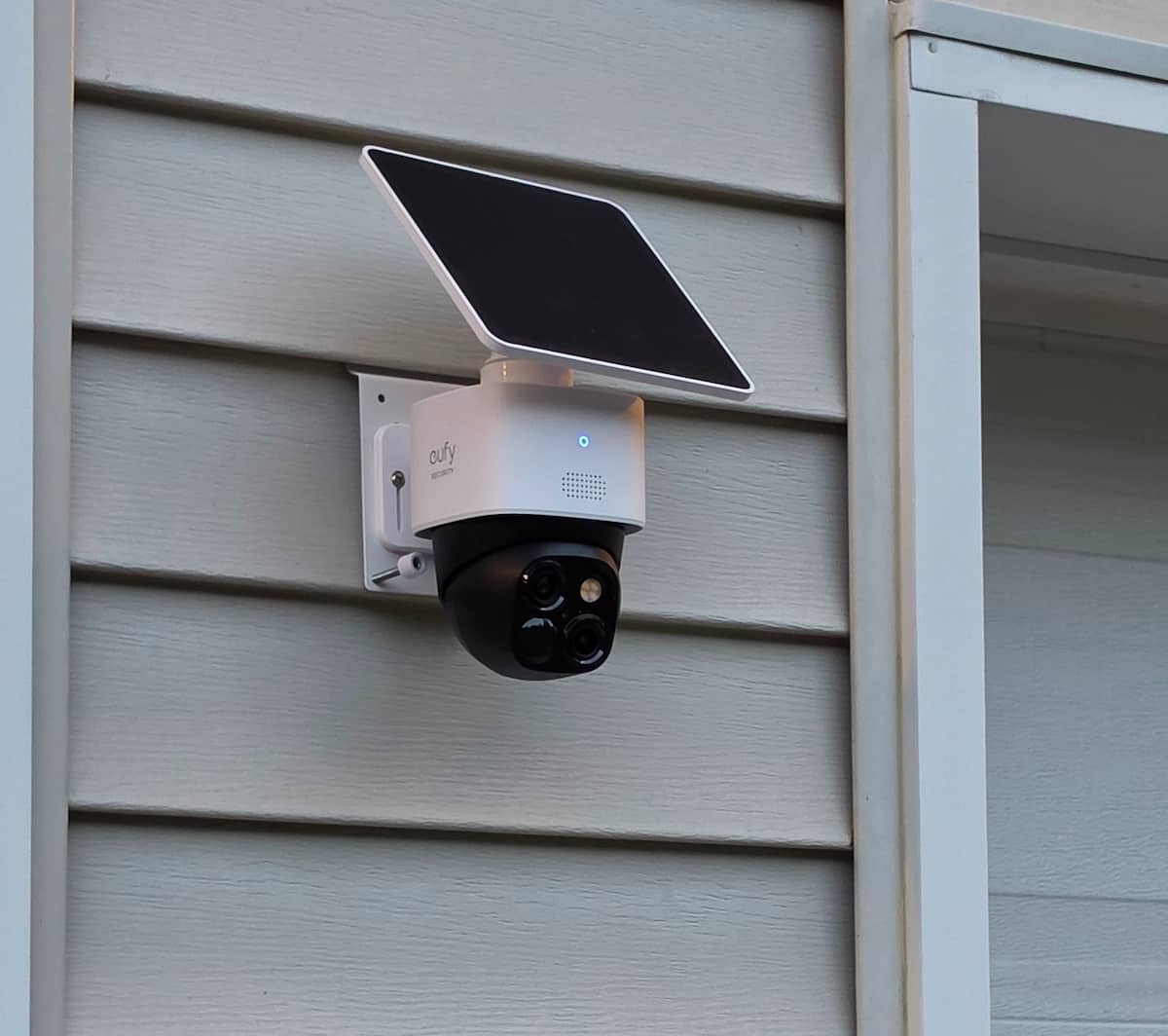
I own and use the SoloCam S340, and mounting location matters more with this camera than it does with a basic fixed security camera. The S340 can pan around a large area, track movement, and use its second lens for a closer look, but those advantages are reduced if a wall blocks part of its movement or the camera is installed where the included solar panel gets poor sun exposure.
This guide covers four different mounting problems rather than four versions of the same bracket. The siding and gutter mounts are useful when you want to avoid drilling into the house. The corner bracket takes better advantage of the S340’s pan-and-tilt design, while the pole mount lets you position the camera away from the house entirely.
Table of Contents
Best eufy S340 Mounts at a Glance
| Mount | Best For | Drilling? | Why Use It |
|---|---|---|---|
| S340 Siding Mount | Vinyl siding | No | Clean installation without putting holes in siding |
| Koroao S340 Gutter Mount | Gutters and eaves | No | Gets the camera higher and farther away from the wall |
| eufy T870B Corner Mount | Outside corners | Yes | Improves usable pan-and-tilt coverage around a corner |
| eufy T870C Pole Mount | Posts and poles | No wall drilling | Allows installation away from the house |
1. S340 Siding Mount: Best for Vinyl Siding
If your house has vinyl siding, a siding mount is one of the cleanest ways to install the eufy SoloCam S340 without drilling holes through the exterior.
The mount shown in the photo at the top of this article is this style of S340 siding mount. It hooks into the seam between siding panels and provides a flat mounting surface for the camera bracket.
That is useful if you want the installation to remain removable or if you are still experimenting with the best position for the camera. You can move the camera later without leaving screw holes behind in several sections of siding.
It also gives the S340 a more suitable mounting surface than fastening the camera bracket directly against a flexible siding panel.
Best for: Vinyl siding installations where you want to avoid drilling into the exterior.
Skip it if: You have fiber cement, brick, stucco, wood siding, or another exterior that does not have the overlapping siding seam the mount needs.
2. Koroao Gutter Mount: Best No-Drill High Mount
A gutter mount is another useful way to install the SoloCam S340 without drilling into the house. It also places the camera farther away from the exterior wall, which can be a real advantage with a pan-and-tilt camera.
The Koroao bracket clamps onto the gutter and provides a mounting point for the S340. This can put the camera above a garage, driveway, side yard, or walkway without making permanent holes in the siding or fascia.
The biggest advantage is clearance.
When the S340 is mounted flat against a wall, part of its pan range can be wasted looking at the side of the house. Moving the camera outward toward the roof edge gives it more useful space to rotate.
A gutter location can also give the included solar panel better exposure than a position tucked underneath an eave.
Best for: Garages, driveways and side yards where you want a higher no-drill camera position.
Skip it if: Your gutter is loose, damaged, unusually shaped, or too thin to support the camera securely.
For more gutter, siding, pole and universal camera options, see our guide to outdoor security camera mounts.
3. eufy T870B Corner Mount: Best for House Corners
The official eufy T870B corner bracket is one of the more useful SoloCam S340 mounting options because a pan-and-tilt camera benefits more from a corner installation than a fixed camera does.
Instead of attaching the camera to one flat wall, the bracket creates a mounting surface across the outside corner of the building.
That gets the S340 away from both adjoining walls and reduces the amount of its pan range wasted looking directly at siding, brick, or stucco.
This can be especially useful if one camera needs to watch two areas. For example, you might want the S340 to follow activity across the driveway while still being able to rotate toward a side walkway or backyard.
The T870B is an official eufy metal corner bracket, and eufy lists the SoloCam S340 among the compatible cameras.
Best for: Exterior house or garage corners where you want one S340 covering adjoining areas.
Skip it if: The camera only needs to watch one direction. The standard wall bracket is simpler in that situation.
Corner mounting can also make sense with other pan-and-tilt cameras. Our Tapo C575D mount guide covers a similar outside-corner setup.
4. eufy T870C Pole Mount: Best for Posts and Poles
The official eufy T870C pole bracket gives the SoloCam S340 mounting options beyond the exterior wall of the house.
It uses adjustable stainless steel straps to attach the mounting plate to a vertical pole. eufy specifies compatibility with poles roughly 50 to 150 mm in diameter and lists the SoloCam S340 among the supported cameras.
That makes it useful for locations such as:
- Fence posts
- Lamp posts
- Deck posts
- Large vertical pipes
- Suitable tree trunks
- Detached structures where a flat wall is not available
The benefit is freedom of placement. Sometimes the best camera position simply is not attached to the house.
Before moving the S340 farther out into the yard, check its Wi-Fi connection from the proposed location. A great viewing angle is not much help if the camera has an unreliable wireless connection.
Best for: Properties where the best surveillance position is on a post or pole away from the house.
What About the Included Solar Panel?
The eufy SoloCam S340 already includes its solar panel, so buying another panel is not part of the mounting decision for most owners.
What matters is that the included solar panel does not have to remain directly above the camera.
The S340 allows the camera and its panel to be installed separately using the supplied extension cable. That can solve a common placement problem when the best camera location is shaded or tucked underneath an eave.
Mount the camera where it gives you the coverage you want, then make sure the included solar panel gets enough sunlight.
If the camera location already has good sun exposure, leaving the panel attached above the S340 produces the cleanest installation.
If it does not, separate the two and move the panel to a sunnier position.
Where Should You Mount the eufy SoloCam S340?
eufy recommends installing the SoloCam S340 roughly 7 to 10 feet above the ground. That is usually high enough to reduce easy access to the camera while keeping people and vehicles at a useful viewing angle.
Do not assume higher is always better.
Mounting a camera fifteen or twenty feet up can produce a wide overview, but it can also reduce useful identification detail and make cleaning, repositioning, or troubleshooting the camera much harder.
For most homes, I would start with these locations:
- Vinyl siding: Use a siding mount when you want a removable installation without drilling.
- Garage gutter: A good choice when you want height and more clearance from the wall.
- Outside corner: One of the strongest locations when you want the S340 covering two sides of the property.
- Fence or deck post: Use the pole mount when the ideal viewing position is away from the house.
- Under an eave: Keep the camera there if it gives you the best coverage, then relocate the included solar panel if sunlight is poor.
If you are working with another battery camera, our Tapo C425 mounting guide covers many of the same siding and gutter placement issues.
Camera Position and Solar Panel Position Are Separate Decisions
The camera needs a clear field of view. The solar panel needs sunlight.
Those requirements do not always point to the same location.
Choose the camera position based on coverage, motion detection, Wi-Fi signal and the S340’s ability to pan without running into a wall or another obstruction.
Then look at the solar exposure.
If the included panel gets enough sun while attached to the camera, leave it there.
If it does not, use the extension cable and mount the panel separately.
This is especially useful with a siding or corner installation where the best camera position may spend much of the day in shade.
Is a Siding Mount Better Than the Stock Mount?
It depends on the exterior of your house.
The stock SoloCam S340 mount works well when you have a solid, flat mounting surface and do not mind drilling into it.
A siding mount becomes more useful when you have vinyl siding and want to avoid putting screw holes through the exterior.
It is also easier to move the camera later. If the original location turns out to have poor Wi-Fi, weak solar exposure, or a less useful viewing angle than expected, you can reposition the siding mount without leaving holes behind.
Is a Gutter Mount Better Than a Wall Mount?
Not always, but the SoloCam S340 can benefit from a gutter mount more than many fixed cameras do.
The biggest advantage is clearance.
Because the S340 rotates, moving it away from the exterior wall can increase how much usable area the camera sees without the wall filling part of the frame.
A gutter installation can also improve solar exposure because the camera and panel are no longer sitting directly underneath a roof overhang.
The stock wall mount still makes more sense when you already have a clear sightline, good sunlight, and a solid mounting surface.
For another example of a no-drill gutter setup, see our guide to mounting a Blink camera on a house.
Is a Corner Mount Worth It for the S340?
A corner mount makes a lot of sense when you bought the SoloCam S340 for wide-area coverage.
Mounting the camera across an outside corner moves it away from both walls, giving the pan mechanism more useful space to work with.
That can allow one camera to watch areas on opposite sides of the same corner rather than dedicating separate cameras to each wall.
If your S340 watches a single driveway or backyard from one fixed direction, the corner bracket is unnecessary.
Do These Mounts Fit the Costco eufy SoloCam S3?
Yes. Costco sells this camera under the eufy SoloCam S3 name, but Costco identifies the camera in its bundle information as the S340 Solar Security Cam.
That means the SoloCam S340 mounts covered in this guide are also the mounts to look at if you bought the camera from Costco under the SoloCam S3 name.
The naming can be confusing because eufy also sells the eufyCam S3 Pro. That is a different camera and should not be treated as another name for the SoloCam S340.
For third-party mounts, look for the SoloCam S340 or the corresponding S340 compatibility listing rather than assuming an S3 Pro mount will fit.
Which eufy S340 Mount Would I Choose?
If I had vinyl siding and wanted to avoid drilling, I would start with the siding mount. It is easy to reposition, leaves the siding intact, and it is the same mounting style shown in the photo at the top of this article.
For mounting near the roofline, the gutter mount is my next choice. Getting the S340 away from the wall can help it make better use of its pan-and-tilt movement.
For an exterior corner, the eufy T870B is the better fit. That is one of the situations where the mounting hardware can materially improve how much useful area the camera can cover.
When the best camera position is away from the house entirely, the T870C pole mount gives you considerably more placement freedom.
Whichever option you use, remember that the camera and its included solar panel do not have to stay together. Get the camera position right first, then make sure the panel gets the sunlight it needs.
Related Mount Guides
For more camera mounting options, see our guide to outdoor security camera mounts, our Tapo C575D mounts, our Tapo C425 mounts, and our guide to mounting a Blink camera on a house.
