
The TP-Link Tapo C425 MagCam is more flexible than its included magnetic base makes it seem. The back of the camera has a standard 1/4″-20 threaded hole, so a Tapo C425 mount does not have to be a camera-specific plastic accessory. You can attach the C425 to a secure wall bracket, a no-drill siding or gutter mount, or a universal pole mount made for cameras.
The best choice depends on where the camera will go. The included magnetic setup is convenient at an accessible location, while a threaded bracket is a better choice for a high wall or any spot where you do not want the camera knocked loose. If you are mounting a smaller wired Tapo model, see our separate guide to Tapo indoor and outdoor camera mounts.
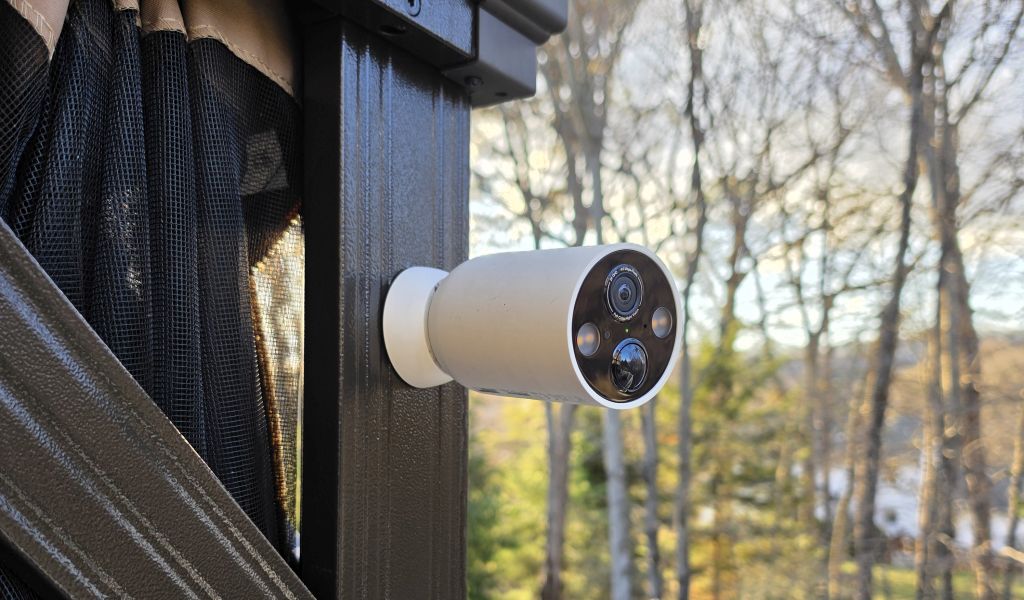
Best Tapo C425 Mounts at a Glance
| Mount | Best For | Installation |
|---|---|---|
| Included magnetic base and metal plate | Easy access and quick camera removal | Direct magnetic or wall-mounted plate |
| Zwolf Metal Wall Mount | High walls and a firmer anti-drop connection | Screws to wall; 1/4″-20 camera connection |
| Koroao Vinyl Siding Mount | Vinyl siding homes | No drilling |
| Koroao Gutter Mount | Eave-height placement | Clamps to gutter |
| Holicfun 2-in-1 Pole Mount | Posts, poles, downspouts, and solar setups | No drilling; fits 1.5″-5.9″ poles |
How the Tapo C425 Mounting System Works
The C425 has a magnet built into its base. It can attach directly to a suitable metal surface, or you can fasten the included metal plate to a wall and snap the camera onto it. That arrangement makes the camera easy to aim and easy to remove for charging.
The more important feature for aftermarket mounting is the 1/4″-20 threaded socket on the back of the camera. This is the same common thread used by many cameras, tripods, and security-camera brackets. A compatible mount screws into the camera body instead of holding it only by magnetic force.
TP-Link recommends installing the C425 7 to 10 feet above the ground for effective motion detection. At that height, I would use the threaded socket and a mechanically secured mount when possible. The magnet is convenient, but a screwed connection provides more protection from wind, vibration, and an accidental bump.
Tapo C425 Mount Recommendations
1. Included Magnetic Base and Metal Plate: Best for Convenience
Before buying anything, decide whether the included hardware already solves the problem. The magnetic base gives you fast angle changes and tool-free camera removal. That is useful when the C425 is mounted where you can reach it easily for charging.
The camera can attach directly to a compatible metal surface. On a wall, the included metal plate creates the surface the magnetic base needs. This is the cleanest setup for a protected porch, garage, shed, or other location where the camera is unlikely to be bumped or grabbed.
2. Zwolf Metal Wall Mount: Best Secure Wall Option
The Zwolf wall mount is the best choice here when you want a conventional wall installation with a firmer camera connection. This is a two-pack of adjustable aluminum-alloy brackets with stainless-steel mounting hardware. Each bracket screws directly into the C425’s rear 1/4″-20 socket rather than relying on the magnetic base.
The bracket provides broad angle adjustment, including rotation and tilt, so you can place the camera on a vertical wall and aim it across a driveway, walkway, or yard. The threaded connection helps prevent an accidental fall and makes the camera harder to remove in one quick motion. I would still call it tamper-resistant rather than theft-proof because the camera remains removable with time and tools.
Choose the Zwolf for a permanent wall location, especially at the C425’s recommended 7-to-10-foot height. The two-pack also makes sense if you have a pair of C425 cameras covering opposite sides of the house.
3. Koroao Vinyl Siding Mount: Best No-Drill Siding Option
The Koroao siding mount hooks into the seam between horizontal vinyl siding panels. It gives the camera a supported mounting point without putting screw holes through the siding. Koroao lists the C425 among the compatible Tapo cameras.
This is the better choice for a rental, a newer home, or any installation where preserving the siding matters more than having a permanently anchored wall bracket. It can also be moved to another siding course if your first camera angle does not cover the area you expected.
Check that the hook is fully seated and that the siding panel is in good condition before attaching the camera. The mount is no-drill, but the siding itself is carrying the load.
4. Koroao Gutter Mount: Best No-Drill Eave Placement
The Koroao gutter mount clamps to a rain gutter and places the C425 near eave height without drilling into the fascia or soffit. That often puts the camera close to TP-Link’s recommended detection height while keeping it clear of doors and walkways.
A gutter mount is useful when the best viewing angle is at a corner or along the front edge of a roof. You can loosen the clamp, slide the assembly along the gutter, and retighten it after testing the live view.
The tradeoff is exposure. A gutter bracket sees more wind than a wall mount, so tighten all adjustment points and recheck them after the first strong storm. Do not place it where the camera or bracket blocks normal water flow.
5. Holicfun 2-in-1 Pole Mount: Best for Posts and Solar Power
The Holicfun 2-in-1 pole mount replaces the incorrect pole-mount recommendation in the earlier draft. It clamps around poles, pipes, and downspouts from approximately 1.5 to 5.9 inches in diameter and requires no drilling. Its camera bracket uses a universal 1/4″-20 screw, which matches the threaded hole on the back of the C425.
The second adjustable arm can hold a compatible solar panel. That makes this the most useful option for a detached fence post, driveway pole, or yard location where the camera and panel need to share one support. The camera and solar panel arms can be aimed independently, so the camera can face the monitored area while the panel faces the best available sunlight.
If you are not using solar, the mount still works as a camera-only pole bracket. Use the included cable-management straps if you later add the Tapo panel, and leave enough slack for angle adjustments without pulling on the charging connector.
Tapo C425 Mount Placement Tips
- Start at 7 to 10 feet. TP-Link recommends this range for effective detection. Test the live view and detection before making final holes.
- Tilt the camera down about 20 degrees. This is TP-Link’s starting recommendation. The exact angle depends on distance and the area you need to cover.
- Keep the motion sensor level. Excessive sideways rotation can reduce detection consistency even if the video still looks level enough.
- Capture motion crossing the view. Battery-camera detection is generally more reliable when a person moves across the frame instead of directly toward the lens.
- Avoid windows, swaying trees, and direct light. Glass can interfere with motion sensing, while branches, streetlights, and direct sunlight can create unwanted triggers or poor images.
- Use a compatible Tapo solar panel for continuous charging. TP-Link warns that third-party panels may compromise weather protection at the charging connection.
Frequently Asked Questions
Does the Tapo C425 have a standard mounting thread?
Yes. The C425 has a standard 1/4″-20 threaded hole on the back of the camera. This allows it to connect directly to many camera, tripod, wall, and pole mounts with a male 1/4″-20 screw.
Can I mount the Tapo C425 without drilling?
Yes. The camera can attach magnetically to a suitable metal surface. The Koroao siding mount hooks into vinyl siding, the Koroao gutter mount clamps to a gutter, and the Holicfun pole mount clamps around a pole or pipe.
Is the included magnetic base safe outdoors?
The C425 and its magnetic mounting system are designed for outdoor use. The important question is location. The magnetic base is convenient in a protected and accessible spot, but a threaded bracket is the more secure choice for a high, exposed, or easily disturbed installation.
What is the best mounting height for the Tapo C425?
TP-Link recommends mounting the camera 7 to 10 feet above the ground and starting with approximately 20 degrees of downward tilt. Position the camera so people cross the field of view rather than walk directly toward it.
Can the Tapo C425 use a solar panel on the same pole?
Yes. The Holicfun 2-in-1 pole mount has separate adjustable arms for a camera and solar panel. The C425 connects to the camera arm through its 1/4″-20 socket. Use a compatible Tapo solar panel and follow TP-Link’s instructions for sealing the charging connection.
