
Choosing the right Tapo C660 mounts takes more planning than mounting a fixed bullet camera because the TP-Link Tapo C660 KIT is a solar-powered 4K pan-and-tilt security camera that tracks people, vehicles, and pets across a 326-degree horizontal sweep. Since the camera moves constantly and pairs with the companion Tapo A201 solar panel, a poor mounting location restricts both motion tracking and solar charging. Furthermore, because the C660 uses a proprietary slide-and-click bracket rather than a standard 1/4-20 tripod thread, any aftermarket Tapo C660 mount must either match TP-Link’s slide-click footprint or provide a slotted adapter plate that accepts the factory bracket.
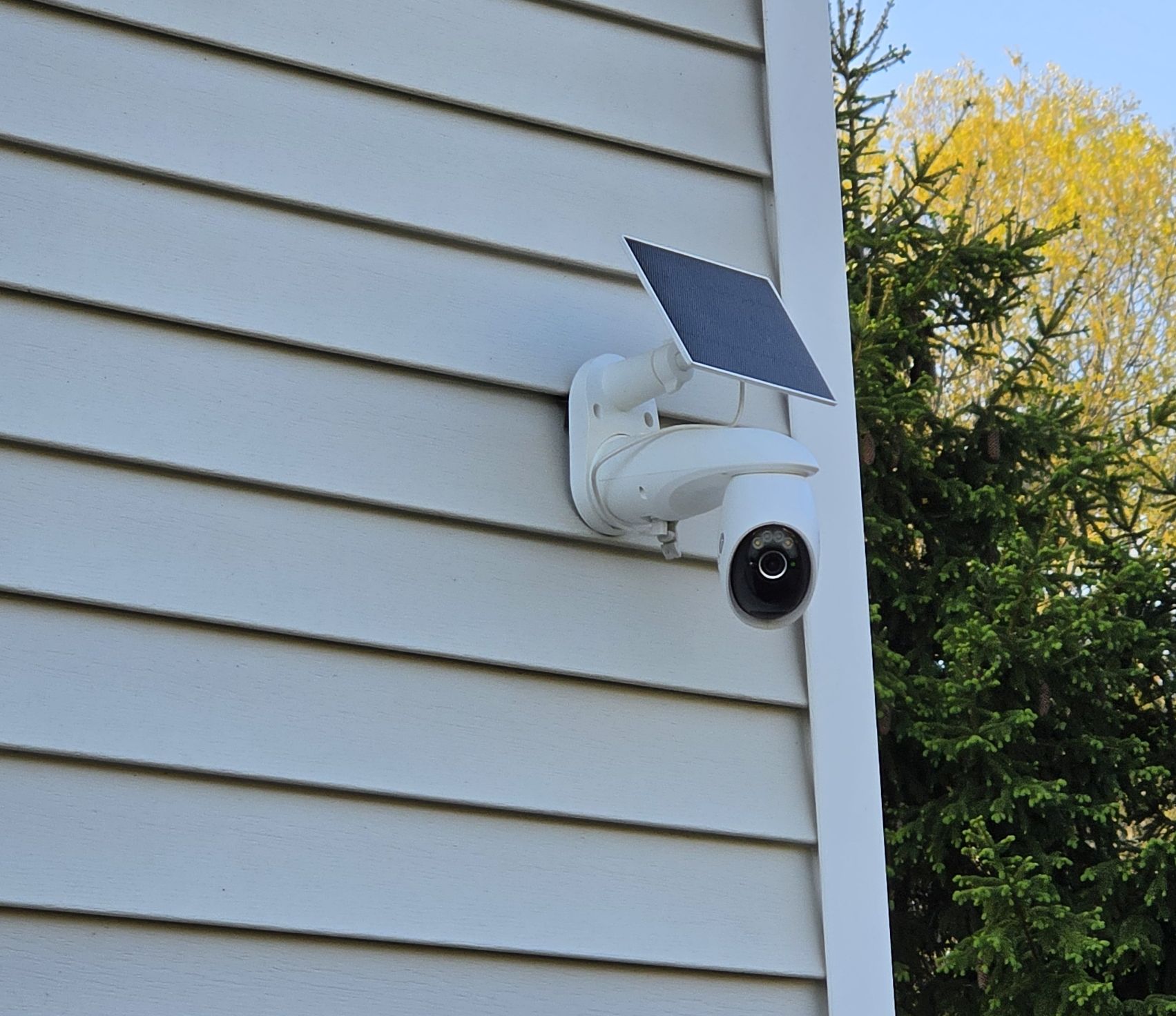
Quick Answer: The factory bracket included in the Tapo C660 KIT handles standard screw-in installs on flat wood, brick, stucco, and eave soffits. For no-drill installations, choose the Koroao Vinyl Siding Mount for horizontal lap siding, the Koroao Gutter Mount for roofline eaves, or the HOLACA PTZ Pole Mount for 2-inch to 5.9-inch posts and downspouts. To monitor two walls of your home at once, the Koroao Corner Mount Bracket positions the camera and solar panel on an outside 90-degree wall corner.
This guide covers how the factory TP-Link C660 mounting assembly works, four vetted aftermarket mounting solutions for siding, gutters, corners, and poles, and the placement rules that prevent blind spots and drained batteries. To compare hardware for other cameras across your property, visit our security camera mounts hub. If you are still evaluating the camera’s video quality and tracking performance, read the Tapo C660 KIT review on HomeCamCafe.
Best Tapo C660 Mounts at a Glance
The table below compares the factory bracket that ships inside the Tapo C660 KIT against the four best aftermarket mounts for specialized exterior surfaces.
| Mount | Fits / Attachment | Best For |
|---|---|---|
| Included TP-Link Factory Bracket | Screw-in wall or ceiling/eave bracket (drilling required) | Flat wood trim, fascia, brick, stucco, or solid soffits |
| Koroao Vinyl Siding Mount | No-drill aluminum seam hook for Tapo C660 & A201 panel | Homes and rentals with standard horizontal vinyl siding |
| Koroao Gutter Mount | No-drill thumbscrew clamp for rain gutters | Single-story eave height placement without drilling fascia |
| Koroao Corner Mount Bracket | Screw-in 90-degree exterior corner bracket (Model DF1297) | Unlocking a 270-degree view around two walls of a house |
| HOLACA PTZ Camera Pole Mount | No-drill stainless steel band clamps (1.96 to 5.9 in. diameter) | Mounting the C660 on round poles, fence posts, or downspouts |
How the Tapo C660 Mounting System Works
Before buying accessories, it helps to understand how TP-Link designed the Tapo C660 KIT hardware. The C660 camera body attaches to an L-shaped plastic mounting bracket via a proprietary slide-and-click interface. You align the top of the camera base with the bracket tracks, slide the camera forward until it clicks into the locking tab, and secure it. Pressing the rear release button on the bracket lets you unclip the camera without tools, which is convenient if you ever need to bring the unit indoors for USB-C charging after weeks of winter cloud cover.
The factory bracket supports both vertical wall mounting and horizontal overhead ceiling or eave mounting. Inside the box, TP-Link includes a peel-and-stick drilling template, four mounting screws, four masonry wall anchors, and two smaller machine screws. Those two machine screws allow you to bolt the Tapo A201 solar panel’s bracket directly to the top of the camera bracket so both pieces install as a single combined assembly.
If your best camera angle is shaded by an overhang, you do not have to attach the solar panel directly above the camera. The Tapo A201 solar panel comes with its own independent tilting bracket and a 4-meter (13-foot) extension cable with a weatherproof rubber gasket seal. You can mount the camera in the shade under a soffit and run the 13-foot cable to a sunlit fascia board, roof edge, or south-facing wall.
Where to Mount the Tapo C660 for Best Results
Height and PIR Detection Angle
TP-Link recommends mounting the Tapo C660 between 7 and 10 feet (2.1 to 3 meters) above the ground. At this elevation, the passive infrared (PIR) motion sensor and onboard AI detection have the proper downward angle to recognize people, vehicles, and pets while keeping the camera out of easy reach of tampering. Mounting the camera too low causes passing cars or neighborhood animals to fill the frame and trigger constant alerts. Mounting it on a second-story peak above 12 feet forces you to tilt the lens steeply downward, which shortens the effective reach of the PIR sensor and cuts off the horizon.
Whenever possible, position the camera Slightly off to the side of a driveway or walkway rather than aiming straight down the approach path. Passive infrared sensors detect motion much faster when a person or vehicle moves laterally across the sensor zones rather than walking directly toward the lens.
Solar Panel Orientation
The camera lens needs an unobstructed view of your yard or driveway, while the Tapo A201 solar panel needs direct, unshaded sunlight. In the northern hemisphere, facing the solar panel south or southwest tilted at roughly 30 to 45 degrees delivers the strongest year-round harvest. In most US climates, 45 minutes of direct daily sunlight keeps the C660’s 10,000mAh internal battery topped off. If your camera is mounted on a north-facing garage wall or deep under an eave, detach the solar panel from the top of the camera bracket and use the 4-meter extension cable to place the panel around the corner in full sun.
Dual-Band Wi-Fi Range
Unlike many battery cameras that only support 2.4 GHz connections, the Tapo C660 supports both 2.4 GHz and 5 GHz Wi-Fi. The 5 GHz band delivers snappier 4K live-view loading and lower latency when panning the motorized head, but 5 GHz signals lose strength rapidly through exterior brick, stucco, and insulated siding. If you mount the C660 on a detached garage, fence post, or distant house corner, connect it to a 2.4 GHz network for steadier wall penetration.
Tip: After mounting the camera, configure two to four targeted patrol viewpoints in the Tapo app instead of leaving continuous 360-degree patrol running all day. Fixed preset points reduce motor wear, conserve battery power during cloudy weeks, and prevent false alerts from adjacent properties.
Mount Recommendations for the Tapo C660
1. Standard Wall or Eave Install: Use the Included Bracket
For flat wood trim, wood soffits, brick, concrete, or stucco, the bracket included in the Tapo C660 KIT is purpose-built for the job and requires no aftermarket purchase. It locks tightly into the camera’s slide-and-click base, supports both vertical wall and overhead ceiling orientations, and links directly to the Tapo A201 solar panel bracket using the two included machine screws for a clean single-unit footprint.
For brick, stucco, or mortar, drill 6 mm pilot holes using the paper template, tap in the included plastic wall anchors, and drive the mounting screws flush. When screwing into wood fascia or studs, drive the screws directly into the wood without the plastic anchors. If you are mounting over vinyl siding with screws, never rely on the thin PVC siding panel alone to hold the combined weight of the motorized C660 and solar arm; use longer exterior screws that reach into the wood sheathing or wall stud behind the siding.
Best for: Permanent screw-in installations on wood fascia, soffits, brick, or stucco where drilling is permitted.
Limitation: Requires drilling holes and only sits flat on planar surfaces, limiting field of view on flat walls to 180 degrees.
2. Koroao Vinyl Siding Mount: Best No-Drill Option for Siding Homes
The Koroao Vinyl Siding Mount for the Tapo C660 is the cleanest no-drill solution for homes finished in standard horizontal lap vinyl siding. Instead of puncturing your exterior weather barrier with screws, the low-profile hook slides upward into the horizontal seam between two overlapping courses of vinyl siding and grips the bottom lock of the upper panel. Because it is formed from rustproof, powder-coated aluminum rather than bare steel, it will not corrode or leave rust streaks down light-colored siding after rainstorms.
Compatibility is what separates this bracket from generic siding clips. Koroao engineered the mounting plate specifically around the hole pattern of the TP-Link Tapo solar lineup, including the Tapo C660, C615F, C645D, C675D KIT, and the Tapo A201 solar panel. You bolt the C660’s factory bracket directly to the Koroao plate using the included hardware, then snap the hook into the siding seam in minutes without power tools. It is an ideal match for renters and homeowners who want to test a camera position for a week before committing to a final spot.
Best for: Renters and homeowners with standard horizontal vinyl siding who want a zero-drill, repositionable mount.
Limitation: Designed for standard horizontal lap vinyl siding seams; does not fit vertical board-and-batten, shake, or Dutch-lap siding with tight sealed joints.
3. Koroao Gutter Mount: Best for Eave-Height No-Drill Placement
The Koroao Gutter Mount clamps directly over the outer lip of a residential rain gutter without drilling into your fascia board or soffit. On a single-story house or garage, the gutter line typically sits right inside TP-Link’s recommended 7 to 10 foot mounting window, giving the C660 a commanding overhead view of a driveway or backyard while placing the Tapo A201 solar panel above eave shadows where it receives full sun.
This heavy-duty aluminum bracket secures to the gutter lip with dual thumbscrews and backing plates that distribute clamping pressure evenly so thin aluminum K-style or half-round gutters do not crease. Like Koroao’s siding bracket, it is explicitly drilled to fit the Tapo C660, C615F, C645D, C402, C403, and Tapo A201 solar panel assembly. If you ever rearrange your yard or want to shift coverage toward a side gate, you simply loosen the thumbscrews and slide the clamp along the gutter channel.
Important: Most generic Tapo gutter mounts sold online are built exclusively for wired flat-base outdoor pan/tilt cameras covered in our Tapo C520WS and C510W mounts guide. Those flat-base brackets do not match the C660’s slide-click bracket footprint. Always verify that a gutter mount explicitly lists the Tapo C660 before ordering.
Best for: Single-story eaves and garages where a rain gutter provides the ideal 8 to 10 foot elevation and unobstructed sunlight.
Limitation: Requires an exposed, sturdy gutter lip without full-coverage mesh leaf guards blocking the top edge.
4. Koroao Corner Mount Bracket: Best for 270-Degree Two-Wall Coverage
Mounting a 360-degree pan/tilt camera flat against the middle of a wall wastes nearly half of its mechanical rotation because the wall itself blocks the rear 180 degrees. The Koroao Corner Mount Bracket (Model DF1297) solves that geometry problem by straddling the outside 90-degree corner of your house or garage. With two angled mounting flanges that screw into the intersecting corner trim boards or masonry walls, it projects the Tapo C660 outward past the corner edge.
From an exterior corner, the C660’s 326-degree horizontal pan range can sweep around the corner to monitor two perpendicular sides of your property at once, such as the front driveway and a side walkway, doing the work of two fixed cameras. Crafted from powder-coated white aluminum weighing 1.5 pounds, the bracket handles wind loads without flexing and supports the integrated Tapo C660 and A201 solar panel assembly as well as sibling models like the C615F and C675D KIT.
Best for: Outside house and garage corners where one Tapo C660 needs to track movement along two adjacent walls.
Limitation: Requires screw-in installation into solid corner trim boards, wood framing, or masonry on both sides of the corner.
5. HOLACA PTZ Camera Pole Mount: Best for Posts, Poles, and Downspouts
Because the Tapo C660 runs on solar power and Wi-Fi without power cables, many homeowners want to mount it away from the house on a yard lamp post, driveway gate post, porch column, or aluminum gutter downspout looking back toward the home. Standard pole mounts that only offer a 1/4-20 threaded stud will not fit the C660, which is why the HOLACA PTZ Camera Pole Mount is the right choice for round or square posts.
Instead of a single tripod screw, the HOLACA kit pairs a curved pole-cradle adapter with a heavy-duty powder-coated aluminum mounting plate pre-drilled with multiple tapped hole patterns. It includes an assortment of machine bolts that thread directly into the metal plate without requiring loose nuts behind the bracket, plus stainless-steel worm-gear hose clamps that adjust from 1.96 inches to 5.9 inches (50 mm to 150 mm) in diameter. You bolt the Tapo C660’s factory bracket directly onto the HOLACA plate, wrap the stainless steel straps around your post or downspout, and tighten them with a screwdriver or the included hex key. HOLACA even includes a pair of work gloves in the box to protect your hands from the edges of the steel bands during installation.
Best for: Zero-drill mounting on round poles, 4×4 fence posts, lamp posts, and gutter downspouts between 1.96 and 5.9 inches wide.
Limitation: Tighten the metric stainless band clamps firmly until the plate cannot twist, but avoid over-torquing with power tools so the worm-gear threads do not strip.
What Does Not Work with the Tapo C660
Because TP-Link uses three different mounting systems across its outdoor camera lineup, many universal accessories sold as “Tapo compatible” will not attach to the C660. Avoid these four hardware types when shopping for Tapo C660 mounts:
- Magnetic camera bases: Unlike the compact Tapo C425, the Tapo C660 does not have a magnetic base or a curved iron cup. Magnetic mounts cannot hold the C660.
- 1/4-20 tripod thread mounts: The C660 camera body and its factory slide-click bracket do not have a standard 1/4-20 female threaded insert. Universal ball-head wall mounts, gooseneck clamps, and tripod adapters that rely on a single 1/4-20 screw will not connect to this camera.
- Flat-base Tapo C510W / C520WS brackets: Wired Tapo outdoor pan/tilt cameras use a different screw footprint than the solar C660 KIT. Gutter and pole brackets built exclusively for the C500, C510W, or C520WS will not line up with the C660 bracket holes unless they offer a multi-hole universal PTZ plate like the HOLACA mount above.
- Peel-and-stick VHB adhesive mounts: Between the 10,000mAh battery, the motorized pan-and-tilt assembly, and wind leverage against the Tapo A201 solar panel, the C660 is far too heavy for adhesive tape outdoors. Always use mechanical clamps, siding hooks, or screws.
Practical Installation Tips for the Tapo C660 KIT
- Top off the battery via USB-C before climbing the ladder: Fully charge the C660 indoors with a 5V/2A USB-C cable before installation so the 10,000mAh battery starts at 100 percent and the solar panel only needs to maintain the charge.
- Check the live view before tightening your bracket: Open the Tapo app on your phone while holding the bracket in position and pan the camera from left to right to verify that downspouts, soffit trim, or the solar panel itself do not block the lens.
- Seat the waterproof USB-C gasket firmly: When plugging the Tapo A201 solar panel cable into the camera’s charging pigtail, push the ribbed silicone waterproof seal completely into the housing so rain and melting snow cannot wick into the USB-C port.
- Be careful with the included locking zip tie: TP-Link includes a heavy-duty cable tie to bundle excess slack from the 4-meter solar extension cord, but its locking pawl cannot be released once tightened. Use a releasable hook-and-loop strap first until your cable routing is final.
- Use the Invert Image toggle for ceiling installs: If you mount the factory bracket overhead to a horizontal soffit or porch ceiling, verify the camera orientation in the Tapo app under Device Settings and Video & Display so footage and pan controls are not upside down.
Frequently Asked Questions
Can I mount the Tapo C660 without drilling holes?
Yes. You have three reliable no-drill options depending on your exterior surface: the Koroao Vinyl Siding Mount clips into standard horizontal vinyl siding seams, the Koroao Gutter Mount clamps onto rain gutter lips with thumbscrews, and the HOLACA PTZ Camera Pole Mount straps around posts, poles, or downspouts using stainless-steel band clamps. None of these three options leaves permanent screw holes in your home.
Can I mount the Tapo A201 solar panel separately from the C660 camera?
Yes. While the two brackets can bolt together into a single unit using the two included machine screws, the Tapo A201 solar panel also mounts independently using its own tilting base and the included 4-meter (13-foot) extension cable. Separating the two is the best strategy when your ideal camera location sits under a shaded porch ceiling or north-facing eave.
Does the Tapo C660 have a 1/4-20 tripod thread like the Tapo C425?
No. The Tapo C660 does not have a 1/4-20 threaded hole on the camera body or bracket, nor does it use a magnetic base. It relies on TP-Link’s slide-and-click bracket interface, which means third-party mounts must match the C660 bracket hole pattern or provide a multi-hole PTZ adapter plate.
Can you mount the Tapo C660 upside down under an eave or ceiling?
Yes, the included L-shaped factory bracket has screw holes on both its vertical backplate and its top horizontal flange so it can screw directly into the underside of a flat wood soffit or eave. Make sure the eave sits roughly 7 to 10 feet above the ground, as high second-story eaves require a steep downward tilt that reduces PIR motion detection distance.
Will the included TP-Link bracket work on vinyl siding?
Only if you drill through the siding and drive longer exterior screws into the solid wood sheathing or wall stud behind it. Fastening the heavy C660 and solar panel assembly into hollow vinyl siding alone allows the bracket to sag and pull loose in high winds. For a damage-free vinyl siding installation, use the Koroao Vinyl Siding Mount instead.
Bottom Line
If you are mounting the Tapo C660 KIT onto flat wood trim, brick, stucco, or a solid soffit and do not mind drilling pilot holes, the factory bracket in the box has everything you need. When drilling is off the table, match your bracket to your surface: pick the Koroao Vinyl Siding Mount for horizontal lap siding, the Koroao Gutter Mount for single-story rain gutters, or the HOLACA PTZ Camera Pole Mount for posts, poles, and downspouts. And if you want a single C660 to watch two sides of your home at once, installing the Koroao Corner Mount Bracket on an exterior 90-degree wall corner maximizes its 326-degree pan range.
Outfitting additional TP-Link cameras around your property? Compare our best mounts for the Tapo C425, our Tapo C615F floodlight camera mounts guide, and our Tapo C120 2K QHD mounts guide.
