If you own one of the Uniden handheld scanners that supports location-based scanning, the Uniden BC-GPSK GPS Antenna is the accessory that makes it all work. Plug it into your scanner, and the unit can determine where you are, then prioritize frequencies from nearby towers and systems within a set radius. For scanner hobbyists who take their gear on the road, this little puck is essential.
But here is the part that trips people up: the BC-GPSK does not come with a dedicated vehicle mount. It has a magnetic base, which is great for sticking it on a roof or trunk, but less useful inside the car where most people end up running it. This guide covers how to mount the Uniden BC-GPSK GPS Antenna inside your vehicle properly, which mounts work, and why interior placement is usually the smarter choice.
Quick Comparison: BC-GPSK Mounting Options
| Mount | Best For | Placement |
|---|---|---|
| Arkon BT010 Windshield Mount | Most installations, magnetic base attachment | Windshield, upper corner |
| Bracketron NavMat Dash Pad | No-adhesive dashboard placement | Dashboard |
| Hook and Loop Strip | Budget option, fixed permanent placement | Dashboard |
Inside vs. Outside: Where Should You Mount the BC-GPSK?
The Uniden BC-GPSK GPS Antenna was designed with exterior roof or trunk mounting in mind. The magnetic base is meant to grip sheet metal, and the cable runs through a door or window into the vehicle. That setup works well, but it comes with real-world complications: routing the cable cleanly is a project, running it out a cracked window looks sloppy and gets old fast once passengers get involved, and leaving an antenna puck sitting on your roof makes it obvious you have radio gear inside the car.
Here is the thing: for most scanner users, interior mounting works just as well. The same principle that lets a Garmin GPS navigate from inside your windshield applies here. The antenna just needs a reasonable view of the sky. Mount it near the front windshield, aim it upward, and it will acquire a solid GPS lock in most vehicles. If your car has a sunroof, positioning the antenna near it can improve reception further, though it is rarely necessary.
One thing that does not work is simply setting the antenna on your dashboard without any mount. The BC-GPSK is light enough that it will slide around on every turn and bump, and a loose antenna dragging its cable across the dash is a nuisance. A proper mount, even a simple one, makes a real difference here.
Compatible Scanners and the BC-UTGC Cable Note
Before getting into mounts, one important point about scanner compatibility. The BC-GPSK uses a serial connection, which works directly with several older Uniden models. If you are running it with the Uniden SDS100, you will also need the Uniden BC-UTGC USB adapter cable, which translates the serial signal to USB for the SDS100’s input. The Uniden BCD436HP also supports the BC-GPSK. Check your scanner’s documentation to confirm which connection method applies to your model before purchasing.
Best Mount: Arkon BT010 Windshield Suction Mount
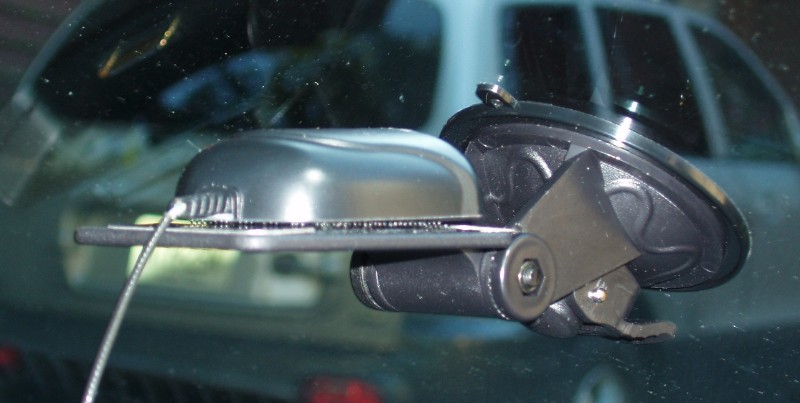
The Arkon BT010 is the mount shown in the photo accompanying this article, and it remains the best all-around option for the BC-GPSK. It is a windshield suction mount with a flat 2.625 by 2-inch platform that holds devices using either the included metal strips or hook-and-loop tape.
The BC-GPSK’s magnetic base attaches directly to the metal strips on the platform. No adhesive, no modification needed. The suction cup uses a one-touch lever to lock against the windshield, and it holds reliably in summer heat. Because it sits on the windshield rather than the dash, the antenna gets a clear view of the sky with nothing obstructing signal acquisition. Installation takes about two minutes and requires no tools.
One practical note: mount it near an upper corner of the windshield rather than center. That keeps it out of your sightline and positions it close to the A-pillar where you can route the cable cleanly down toward the scanner.
Dashboard Option: Bracketron NavMat GPS Dash Pad
If you would rather keep the antenna on the dashboard and avoid putting anything on your windshield, the Bracketron NavMat is the cleanest way to do it. The NavMat is a weighted beanbag pad with an anti-skid underside that sits on your dash without adhesive, screws, or suction cups. You place it, set your device on the center disc, and it stays put through turns and bumps.
For the BC-GPSK, the workflow is the same as with the Arkon mount: use the antenna’s magnetic base to attach to the center disc of the NavMat’s surface, or use a small strip of hook-and-loop tape if you want a more positive connection. The 8-inch base conforms to contoured or textured dashboards that a flat suction cup pad would never sit on properly.
The trade-off compared to windshield mounting is sky view. On a low or steeply angled dashboard, the antenna may have a more limited view upward, which can affect lock time. For most vehicles with a standard dash height, this is not a problem in practice. If you have ever had a Garmin GPS sitting on a NavMat work fine, the BC-GPSK will do the same.
Budget Option: Hook and Loop Fastener Strips
Hook and loop fastener strips are the no-cost option if you already have some in a junk drawer. One side adheres to the dashboard, the other attaches to the bottom of the antenna. The BC-GPSK sits on the dash, stays in place, and you are done.
It works. The limitations are that it is a semi-permanent installation, the antenna is not going to adjust angle, and if the cable has any tension on it, that drag can gradually pull the lighter adhesive strip loose over time. For someone who parks the scanner and antenna in the same vehicle indefinitely, it is a reasonable budget approach. For someone who moves the gear between vehicles regularly, one of the mounts above will serve better.
Frequently Asked Questions
Does the Uniden BC-GPSK work through glass?
Yes. The antenna picks up GPS signal through standard automotive glass without meaningful performance loss. Tinted or metallized windshields can reduce signal, but most vehicles with standard tint will have no issue.
Does the BC-GPSK work with the Uniden SDS100?
Yes, but it requires the Uniden BC-UTGC USB adapter cable in addition to the antenna. The SDS100 uses a USB input rather than the direct serial port found on older Uniden models.
What is the point of GPS scanning?
When GPS is active and configured in the scanner, the unit automatically prioritizes systems and talk groups near your current location. As you drive, the scanner adjusts in real time so you are always hearing local traffic without manually switching systems.
Can I mount the BC-GPSK outside the vehicle?
The antenna’s magnetic base is designed for exterior mounting on the roof or trunk. Running the cable inside through a door or window gap works, but requires more effort to route cleanly. Interior placement is simpler for most users and performs comparably.
Will the Arkon BT010 suction cup hold in summer heat?
The BT010 uses a PVC suction cup with a locking lever, which holds better in heat than older-style suction cups. Like any suction mount, reseating it periodically during hot months is good practice.
Final Thoughts
The Arkon BT010 is the right call for most BC-GPSK installations. It is inexpensive, attaches cleanly using the antenna’s own magnetic base, and positions the antenna high on the windshield where it gets the best sky view. If you prefer a dashboard-only setup with no suction cups involved, the Bracketron NavMat is a solid alternative that handles uneven dash surfaces well and stores easily when you want the antenna out of sight.
If you are building out a full mobile scanner setup, also check out our articles on Uniden SDS100 mounts and Uniden BCD436HP mounts for guidance on mounting the scanner itself.