
The factory bracket included with the Tapo C520WS works well on a flat wall or under an eave, but it isn’t your only option. There are now Tapo C520WS mounts for gutters, vinyl siding, metal surfaces, poles and outside corners, giving you far more freedom to put the camera where it provides the best view.
Many of these same mounts also fit the closely related Tapo C500, C530WS and C510W. That’s useful if you own more than one model or simply want a mounting solution that isn’t limited to drilling the original bracket into the side of your house.
Tapo C520WS
Tapo C500
Tapo C530WS
Tapo C510W
If you have a different Tapo camera, don’t assume these brackets will fit. MountGuys also has separate guides for the Tapo C425 and Tapo C615F, which use different mounting arrangements.
Table of Contents
Best Tapo C520WS Mounts at a Glance
| Mount Type | Best Location | Drilling? | Our Pick |
|---|---|---|---|
| Gutter Mount | Roof edge / driveway | No | Koroao Gutter Mount |
| Vinyl Siding Mount | House or garage siding | No | VOMENC Siding Mount |
| Magnetic Mount | Steel posts / sheds | No | Holicfun Magnetic Mount |
| Pole Mount | Posts / poles / fences | No | KOROAO Pole Mount |
| Corner Mount | Outside building corners | Yes | HOLACA Corner Mount |
1. Gutter Mount: Best No-Drill Option
A gutter is one of the most useful places to mount an outdoor pan-and-tilt camera. You get a high viewing position without drilling holes through siding, fascia or masonry, and the camera can be moved later if the original angle doesn’t work as well as expected.
Depending on the height of the roof, this can be an excellent position for covering a driveway, side yard or backyard. Avoid placing the camera unnecessarily high, however. The farther the camera is from the activity below, the less useful fine image detail and motion detection can become.
The Koroao gutter mount is designed for this family of Tapo outdoor cameras and lists the C520WS, C500, C530WS and C510W among its compatible models.
The bracket clamps directly to the gutter, creating a secure mounting platform without modifying the house.
This type of mount makes particular sense when the wall itself doesn’t provide the right viewing angle. It also avoids one of the biggest objections people have to installing an outdoor camera: drilling permanent holes into the house.
Best for: driveways, backyards, side yards and installations where you don’t want to drill.
Keep in mind: the camera is only as stable as the gutter it is attached to. Check the clamp occasionally, particularly after severe weather, snow or ice.
For more ideas beyond these Tapo-specific brackets, see our guide to outdoor security camera mounts, which covers gutter, wall, siding, corner and pole mounting options.
2. Vinyl Siding Mount: Best for Siding Without Drilling
Vinyl siding presents a different problem. Driving screws directly through it can leave permanent holes, and the siding itself expands and contracts as outdoor temperatures change.
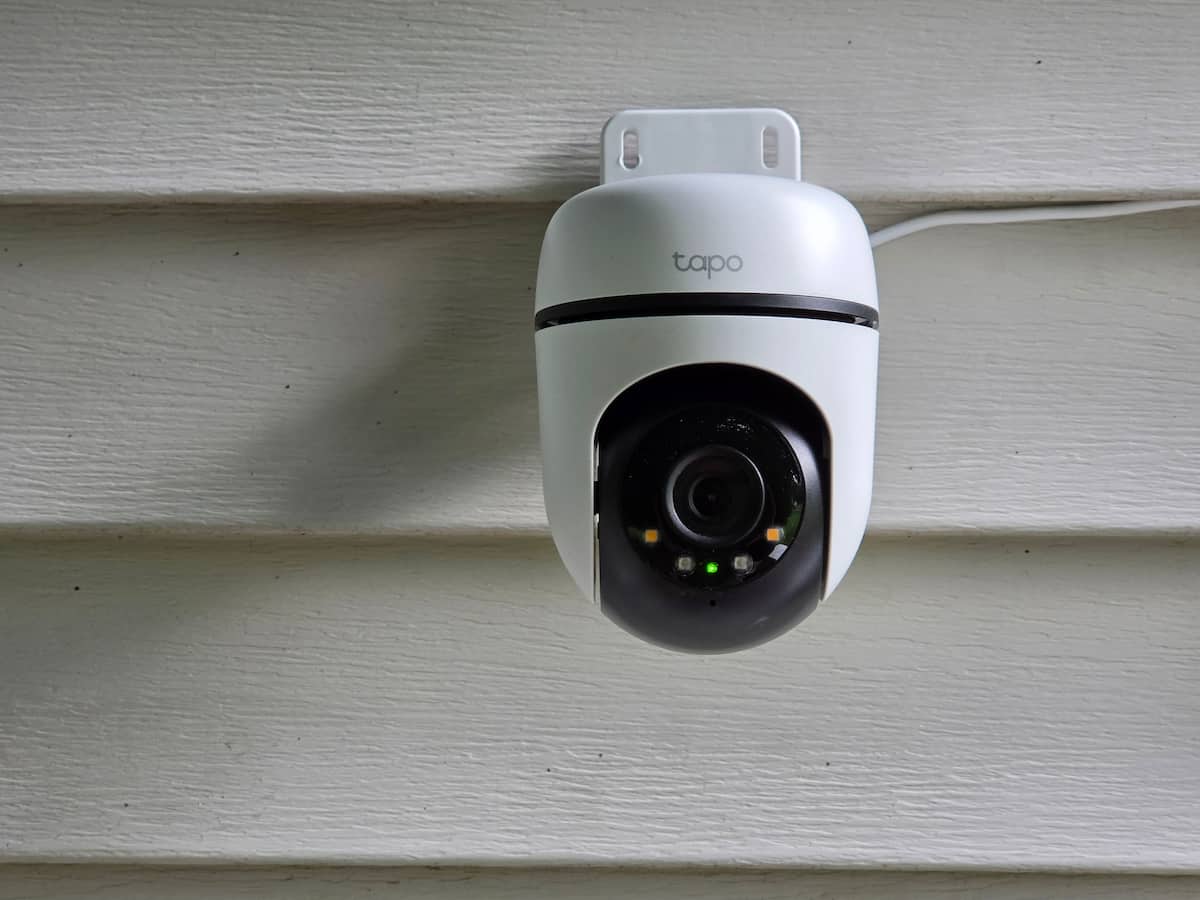
The photo at the top of this article shows this type of installation using a siding clip. It’s a particularly useful temporary or no-drill location because the camera can be installed, moved or removed without making holes in the siding.
The VOMENC Universal Vinyl Siding Mount provides a flat mounting surface without requiring you to drill through the siding. It lists the Tapo C520WS, C500, C530WS and C510W as compatible cameras.
This is a particularly useful option when the ideal camera position is halfway along the side of a house or garage and there isn’t a convenient soffit or gutter directly above it.
Best for: vinyl-sided houses, garages and sheds.
3. Magnetic Mount: Easiest to Install and Reposition
If you have a suitable steel surface, a magnetic mount can make installation almost ridiculously easy.
Possible locations include:
- Steel posts
- Metal sheds
- Metal gazebos
- Steel beams
- Metal garage structures
- Metal fencing
The Holicfun magnetic PTZ camera mount is compatible with the C520WS and the other Tapo models covered here. The magnetic base holds the camera mounting plate against a suitable metal surface without requiring screws.
One underrated advantage of a magnetic mount is the ability to experiment. You can try several camera positions and angles before settling on the one that gives you the best coverage.
There is a tradeoff, however. A camera attached magnetically is easier to remove than one bolted to a building, so I wouldn’t use this setup within easy reach from the ground.
Best for: steel structures, sheds, metal posts and installations that may need to be repositioned.
4. Pole and Post Mount: Best for Fences and Detached Areas
Sometimes the best camera position isn’t on the house at all.
A pole or post mount can place the Tapo farther into the yard or closer to the area you actually want to monitor.
Possible mounting locations include:
- Fence posts
- Deck posts
- Light poles
- Round structural posts
- Posts near gates or detached buildings
The KOROAO pole mount is designed for the C520WS, C500, C530WS and C510W and uses adjustable bands to secure the camera mounting plate around a pole.
It supports a useful range of pole sizes, giving you considerably more flexibility than a conventional wall-only installation.
This can be an excellent way to monitor a gate, detached garage or long driveway where mounting the camera on the house would result in a poor viewing angle.
Best for: fences, gates, driveways, posts and detached structures.
5. Corner Mount: Make Better Use of Pan-and-Tilt Coverage
An outside corner is a particularly good mounting location for a pan-and-tilt camera.
Mounting flat against a wall means the building itself occupies part of the area around the camera. Moving the camera outward onto a corner can open the view toward two sides of the property.
The HOLACA outside corner mount is made for the Tapo camera family covered in this guide.
A corner between the driveway and backyard is a good example. From one mounting point, the camera can potentially monitor activity approaching from either direction.
Unlike the gutter, siding and magnetic options, this is not a no-drill installation. The advantage is the viewing position rather than avoiding screws.
Best for: covering two sides of a house, garage or other structure.
Do You Need an Aftermarket Tapo C520WS Mount?
Not necessarily.
The bracket included with the camera remains the simplest choice when a normal wall or eave already provides the view you need.
Stick with the factory bracket when:
- You are mounting directly to wood or masonry.
- You have a suitable location under an eave or soffit.
- You don’t mind drilling mounting holes.
- The side of the building already gives the camera a clear view.
An aftermarket Tapo C520WS mount becomes more useful when:
- You don’t want to drill into the house.
- You need to mount on vinyl siding.
- A gutter provides a better viewing position.
- You have a usable steel surface.
- You want the camera on a fence or pole.
- An outside corner would improve pan-and-tilt coverage.
If you’re comparing mounting approaches rather than shopping for one specific Tapo model, start with the MountGuys camera mounts hub.
Do C500, C530WS and C510W Mounts Fit the C520WS?
Often, yes, and that’s one reason these cameras work well in a single mounting guide.
Many aftermarket manufacturers sell one bracket for the Tapo C520WS, C500, C530WS and C510W rather than offering separate versions for every model.
That does not mean every accessory advertised for a Tapo camera will fit.
This matters especially with magnetic and tripod-style accessories. Don’t assume that a mount using a standard camera thread will work with the C520WS simply because another Tapo model uses one.
The Tapo C425, for example, has a standard 1/4″-20 threaded mounting socket that opens it up to many universal camera brackets. That’s a different mounting situation from the C520WS family covered here.
Don’t Forget About Power and Cable Routing
The best camera angle isn’t useful if you can’t get power to the camera cleanly.
Before committing to a mounting position, decide:
- Where the power cable will run
- How exposed connectors will be protected
- Whether you plan to use Ethernet on models that support it
- Whether any cable can interfere with pan movement
- Whether you can still reach the camera for cleaning or maintenance
Whenever possible, leave a drip loop so rainwater travels downward before reaching a connector or entry point.
This becomes especially important with gutter and pole installations because the camera may be farther away from the wall and power source than it would be with the original bracket.
How High Should You Mount a Tapo C520WS?
For most homes, roughly 8 to 10 feet above the ground is a useful starting point.
That is generally high enough to discourage casual tampering without placing the camera so high that people approaching the property are viewed mostly from the top of the head.
Higher isn’t automatically better.
One advantage of the C520WS and the related pan-and-tilt models is that you can adjust the viewing direction after installation. Even so, the physical mounting location still determines what the camera can ultimately see.
Which Tapo C520WS Mount Should You Choose?
For most installations, the mounting surface makes the decision.
Choose the Koroao gutter mount if you want a high outdoor position without drilling into the house.
Choose the VOMENC siding mount when the ideal position is directly on vinyl siding.
Choose the Holicfun magnetic mount when a suitable steel surface is available and easy installation or repositioning is the priority.
Choose the KOROAO pole mount when you want to place the camera on a fence, post or away from the main building.
Choose the HOLACA corner mount when positioning the camera between two sides of a building would make better use of its pan-and-tilt coverage.
And when an ordinary wall or eave already gives you the view you need, there is nothing wrong with saving your money and using the original Tapo bracket.
The growing selection of Tapo C520WS mounts means you are no longer limited to that basic installation. Whether the best location turns out to be a gutter, vinyl siding, steel post, fence or building corner, there is now a purpose-built way to put the C520WS there, with many of the same options also working with the C500, C530WS and C510W.
