
The Blink Sync Module is the hub of every Blink camera system. All Blink cameras connect to the Sync Module first, which then connects them to your Wi-Fi network and the Blink cloud service. Because it acts as the central hub, where you place the Sync Module matters as much as where you place the cameras. A poorly positioned module causes weak signal, delayed alerts, and missed recordings — none of which have anything to do with the cameras themselves.
This guide covers the best ways to mount and position every current Blink Sync Module. This includes the Sync Module 2, the Sync Module XR, and the new Sync Module Core so you get the cleanest installation and the most reliable performance from your system.
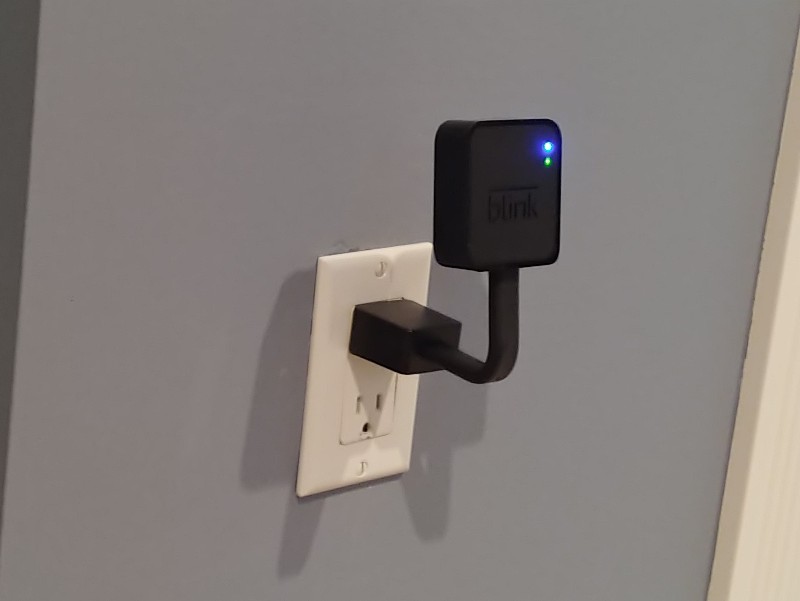
Which Blink Sync Module Do You Have?
Before choosing a mount, confirm which module you own. The three current models are different shapes with different connectors, and outlet mounts are not interchangeable between them.
The Blink Sync Module 2 is the previous generation module, still widely in use. It uses a USB-A power connection, supports up to 10 cameras within roughly 100 feet, and accepts a standard USB flash drive for local video storage. It is a rectangular unit that sits flush on a surface or plugs into an outlet with an adapter.
The Blink Sync Module XR is the current flagship module. It uses a USB-C power connection, supports up to 10 cameras, and stores footage locally on a microSD card rather than a USB flash drive. The key differentiator is Extended Range: when paired with Blink Outdoor 4 cameras, the XR extends the camera-to-module range to 250 feet in standard XR mode and up to 400 feet in XR+ mode. This uses a proprietary 900MHz radio that operates independently of your home Wi-Fi. The extended range feature only works with Outdoor 4 cameras. All other Blink cameras connect at the standard 100-foot range regardless of which module you use.
The Blink Sync Module Core, released in 2025, is a newer entry-level option. It is compatible with all Blink cameras and uses its own outlet mount accessories, which are not compatible with the Module 2 or XR mounts. If you own the Core, make sure any outlet mount you order explicitly lists Core compatibility.
Quick Comparison: Best Blink Sync Module Mounts
| Mount | Best For | Compatible Module |
|---|---|---|
| Gresur Outlet Wall Mount | Best Outlet Mount (Module 2) | Sync Module 2 |
| Gresur Outlet Wall Mount (XR) | Best Outlet Mount (XR) | Sync Module XR |
| Brainwavz W01 Adhesive Shelf | Best Wall Shelf (All Models) | All Models |
Where to Place Your Blink Sync Module
Placement is the most important decision you will make with the Sync Module, and it is worth spending a few minutes on before mounting anything permanently.
The Sync Module needs to maintain two connections simultaneously: one to your Wi-Fi router and one to each of your cameras. The ideal position is somewhere between the router and the cameras, centrally located so no single camera is significantly farther away than the others.
For Sync Module 2 users, the standard range is roughly 100 feet indoors between the module and each camera. Walls, floors, and large metal objects reduce this range. If you have cameras that regularly show a weak signal in the Blink app, moving the Sync Module closer to those cameras is usually more effective than any other troubleshooting step.
For Sync Module XR users with Outdoor 4 cameras, the extended range dramatically changes the placement equation. You can position the module much deeper inside the house near a central outlet while still reaching cameras at the property perimeter. The 900MHz radio in the XR penetrates walls and obstacles significantly better than standard 2.4GHz Wi-Fi. Even so, keeping the module in a central position rather than tucked in a corner remains the best practice.
A few placement rules that consistently improve performance across all module versions:
Keep the module elevated rather than near the floor. Wireless signals travel better when the transmitting device is higher in the room. An outlet at counter height outperforms one at baseboard level.
Avoid placing the module inside cabinets, behind large appliances, or against exterior walls where it is surrounded by insulation. These locations interrupt the signal path to cameras and to the router.
Check the signal strength indicators in the Blink app after placement. The app shows both the camera-to-module signal and the camera-to-Wi-Fi signal for each camera. Both should be strong before you consider the placement final.
Best Outlet Mount for Sync Module 2: Gresur Wall Mount
The most popular mounting solution for the Sync Module 2 is an outlet wall mount — a bracket that wraps around the Sync Module’s power adapter and holds the module against the wall directly at the outlet. The result is a clean, compact installation with no surface space used and no cable dangling from the module to the outlet.
The Gresur outlet wall mount for the Sync Module 2 is a reliable option in this category. It wraps around the USB-A power adapter that ships with the module and secures the module body using a buckle clip. A custom short USB-A cable is included that replaces the longer stock cable, keeping everything tight against the outlet with no slack. No tools or drilling required. The module can be moved to any outlet in your home in seconds.
View Gresur Outlet Mount for Sync Module 2 on Amazon
Best Outlet Mount for Sync Module XR: Gresur XR Wall Mount
The Sync Module XR uses a USB-C power connection rather than the USB-A of the Module 2, which means it needs its own dedicated outlet mount. The Gresur outlet mount for the Sync Module XR follows the same design principle as the Module 2 version — a bracket that secures the XR against the outlet with a buckle clip and a short USB-C cable included. No tools, no drilling, plug-in installation in seconds.
The XR’s compact shape fits cleanly in this style of mount, and the USB-C cable keeps everything tidy with no exposed cord. As with the Module 2 version, the module can be moved to any outlet location if you decide to change the placement later.
View Gresur Outlet Mount for Sync Module XR on Amazon
Best Wall Shelf Option (All Models): Brainwavz W01
If your ideal module position does not have an outlet nearby, or if the available outlet is at an awkward height, an adhesive wall shelf is the most flexible alternative. The Brainwavz W01 is a small flat shelf that attaches to any wall surface using 3M VHB adhesive tape or optional screws. The Sync Module sits on the shelf with its cable routed through a hole in the back, keeping the cord hidden and the installation clean.
This approach works particularly well when you want the module higher on the wall than the nearest outlet allows. Run an extension cable from the outlet up to the shelf, route it through the cable hole, and the setup is tidy with the module at whatever height gives you the best signal. The shelf can also be screw-mounted for a more permanent installation if you prefer not to rely on adhesive.
Compatible with all Sync Module versions since the module simply sits on the platform — no connector-specific fit required.
View Brainwavz W01 Shelf on Amazon
The Sync Module XR Extended Range: What It Means for Placement
If you own the Sync Module XR and are using it with Blink Outdoor 4 cameras, the extended range feature changes how you should think about module placement entirely.
Standard Blink systems require the module to be reasonably close to each camera — within roughly 100 feet indoors. That often means compromising on module placement to stay within range of cameras at the edges of your property. The XR eliminates most of that constraint for Outdoor 4 cameras. With 250 to 400 feet of range in XR mode, you can place the module near your router in the center of your home and still reach cameras at the far corners of your property.
The practical implication: with the XR, optimize module placement for the router connection first and camera range second. A module with an excellent router connection but moderate camera signal will outperform one placed close to cameras but with a poor router connection, because video upload speed depends on the router link.
One important limitation: the extended range only works with Outdoor 4 cameras. If you mix Outdoor 4 cameras with Mini, Indoor, or older Blink models on the same XR module, the non-Outdoor-4 cameras still connect at the standard 100-foot range. Plan your camera placement accordingly.
Frequently Asked Questions
Can I use a Sync Module 2 outlet mount on the Sync Module XR?
No. The Module 2 and XR have different shapes and different power connectors — USB-A for the Module 2 and USB-C for the XR. The outlet mounts are designed around these specific shapes and are not interchangeable. Order the mount that explicitly lists your module model.
Does the Sync Module XR extended range work with all Blink cameras?
No. Extended Range is exclusive to Blink Outdoor 4 cameras. All other Blink camera models — including Outdoor 3rd Gen, Mini, Indoor, XT, and XT2 — connect to the XR at the standard 100-foot range. The XR is still compatible with all Blink cameras, it just does not extend the range for non-Outdoor-4 models.
How many cameras can one Sync Module support?
All current Sync Modules — Module 2, XR, and Core — support up to 10 Blink cameras per module. If you have more than 10 cameras, you need a second module.
What storage does each module use?
The Sync Module 2 uses a standard USB flash drive inserted into its USB-A port for local storage. The Sync Module XR uses a microSD card. The Sync Module Core uses USB storage. Local storage allows you to save clips without a Blink subscription plan. Storage devices are sold separately.
Should I get the Sync Module XR or Sync Module 2?
If you own or plan to buy Blink Outdoor 4 cameras and have a large property where range is a concern, the XR is worth the extra cost. If you are using any other Blink camera models, the extended range feature does not apply and the Module 2 provides all the same core functionality at a lower price.
Can the Sync Module be placed outdoors?
No. The Sync Module is an indoor device and is not weatherproof. It requires a powered AC outlet and should be kept inside the home, garage, or a weatherproof enclosure with power access.
