
The RAM Mount system is built on one idea: every component connects to every other component. That modularity is the whole point. You’re not buying a mount, you’re buying into a construction system where bases, arms, adapters, and holders are interchangeable building blocks. Once you understand that, extending a setup becomes straightforward. Until you understand it, you keep buying the wrong parts.
The most common mistake is treating a RAM Mount extension like a traditional telescoping rod: something you simply pull out to get more length. That’s not how this works at all. What you’re actually doing is inserting new connection points into a chain. Each point adds reach and articulation, but also introduces a potential flex. Get the chain right and it locks solid. Get it wrong and it wobbles, sags, or fails under vibration at exactly the moment you need it most.
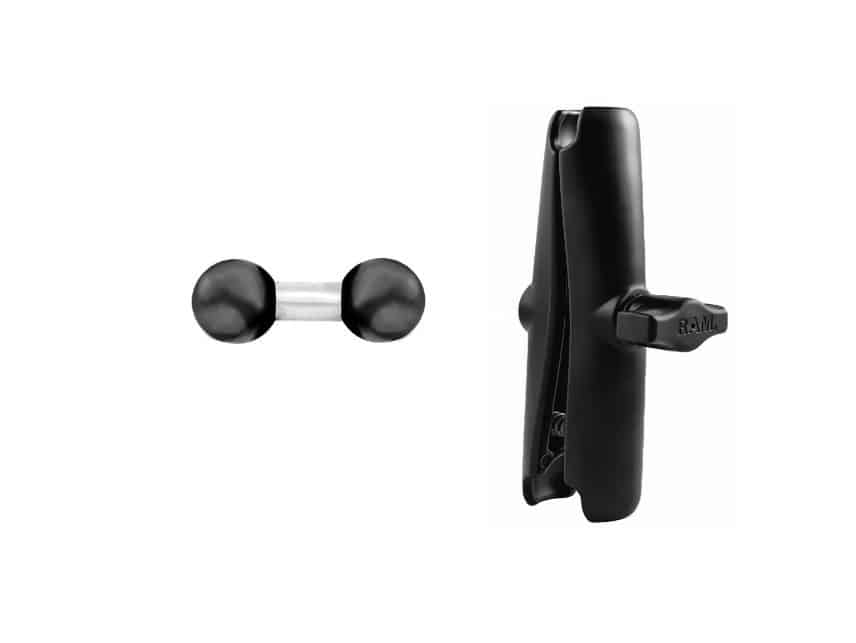
| Component | Best For | Ball Size |
|---|---|---|
| RAM Double Socket Arm (B Size Medium) | Primary arm for phones, GPS units, and light tablet setups | B Size (1″) |
| RAM Swivel & Ratchet Arm (RAP-B-200-2U) | Installs requiring 360° rotation and fixed-angle ratchet positioning | B Size (1″) |
| RAM-B-230U Double Ball Adapter (B Size) | Joining two B-size arms into a single extended chain | B Size (1″) |
| RAM-230U Double Ball Adapter (C Size) | Extending C-size systems for marine electronics and heavy loads | C Size (1.5″) |
Why the Ball-and-Socket Design Is Different
Most budget mounts use a threaded rod or a friction clamp to hold position. RAM uses a rubber ball pressed into a socket and locked with a single knob. That difference is not cosmetic. It changes how the mount behaves under stress.
A threaded connection holds in one axis. A ball-and-socket connection holds in every axis simultaneously. When you tighten that knob, you’re compressing the rubber ball into a tapered socket, which distributes clamping force in all directions at once. The rubber itself also acts as a damper, absorbing the high-frequency vibration that loosens conventional mounts over time. This is why RAM mounts are the default for law enforcement, military vehicles, and marine electronics, not because they’re expensive, but because the geometry of the joint is genuinely superior under continuous vibration.
The implication for extension setups is important: each joint you add is not just another connection point, it’s another damping stage. A two-arm extension with one adapter actually has three separate vibration-absorbing joints in the chain. That’s both a strength and a vulnerability. Properly tightened, those joints work together. Under-tightened, each one becomes an independent failure point, and a slight looseness at the base multiplies into visible wobble by the time it reaches the device.
How a RAM Extension Chain Is Built
The correct extension configuration is not complicated, but it has to be understood precisely:
Base → Arm → Double Ball Adapter → Arm → Device Holder
The double ball adapter is not an extension on its own. It’s a connector, two balls on a short post, that gives each arm a ball to grip on either side. Without it, two socket arms cannot be joined because both arms have sockets at both ends and nothing to receive them. The adapter solves that. But it adds almost no length by itself (1.75 inches ball-center to ball-center on the B-230U). All meaningful reach comes from the arms. This is the part most people get wrong: they order the adapter thinking it will solve a length problem, then discover it doesn’t arrive with a second arm.
Ball Size: Why There Are Two and What It Means
RAM didn’t choose two ball sizes arbitrarily. They’re sized to load capacity. The 1-inch B-size ball system supports up to roughly 2 pounds, which covers phones, small GPS units, and action cameras comfortably. The 1.5-inch C-size ball system handles significantly heavier loads: large chartplotters, 10-inch tablets, rugged laptop mounts in commercial trucks. The larger ball means more contact surface inside the socket, which means higher clamping force before slip occurs.
This load-based sizing has a practical implication most guides skip: if you’re on the edge of B-size capacity, an extension chain makes things worse, not better. Every inch of arm length between the base and the device creates leverage that multiplies the effective load at the base. A 1-pound phone at the end of a 12-inch chain puts more rotational stress on the base ball than that same phone would sitting directly in a single-arm setup. Longer chain, heavier device, or both: that’s when you should be thinking about moving to C-size components rather than extending further in B.
- B Size (1-inch ball): phones, GPS units, small tablets, action cameras, radar detectors. The standard for most vehicle and motorcycle installs.
- C Size (1.5-inch ball): large tablets, marine chartplotters, rugged laptop mounts, heavy commercial installs. Arms are physically larger; connections are more robust.
The two sizes are not interchangeable at any point in the chain. That includes the adapter. The B-230U only works with B-size arms. The C-size RAM-230U only works with C-size arms. Part numbers make this easy to verify: B in the model (RAM-B-xxxU) means 1-inch, C means 1.5-inch. If the letters don’t match across your components, the chain won’t lock.
The Four Core Components
1. Double Socket Arm, B Size Medium (RAM-B-201U)
The medium B-size arm at 3.73 inches overall is the default component for almost every standard install. It connects two 1-inch balls through a single tightening knob and articulates freely until that knob is tightened. In an extension chain, it’s the right choice for both positions, from base to adapter and from adapter to device holder, because it locks completely rigid when tightened, with no independent pivot points that could introduce vibration.
The arm comes in three lengths: short (roughly 2 inches), standard/medium (3.73 inches), and long (6 inches). When building an extension, resist the instinct to use two long arms. Two medium arms with an adapter typically gives more than enough reach while keeping the chain stiffer and easier to manage. The long arm is better deployed as a single arm when you can get away without an extension at all.
2. Swivel & Ratchet Arm, B Size (RAP-B-200-2U)
The RAP-B-200-2U is a fundamentally different type of arm, and it matters to understand exactly how. The standard double socket arm locks solid at whatever angle you position it. The swivel-ratchet arm has two distinct mechanisms: a 360-degree rotation point at the center and a 180-degree ratchet joint that clicks into fixed positions. You’re not setting an angle freely. You’re choosing from a set of preset stops. That’s the key distinction.
The ratchet mechanism is actually an advantage in specific situations. On a motorcycle, where you take the mount on and off repeatedly, a ratchet lets you snap the arm back to the same angle every time without readjusting. On a dash install where vibration is constant, the ratchet stops prevent slow angular drift that a friction-only joint can develop over time. The tradeoff is that ratchet joints, by definition, can’t be infinitely fine-tuned the way a clamped ball-and-socket can. You’re locked to the nearest click.
In an extension chain, the most effective placement for the swivel arm is at the device end, not the base end. A standard arm from the base to the adapter gives you a rigid foundation. The swivel arm from the adapter to the device holder gives you the angular flexibility to aim the screen precisely, with the ratchet holding that angle under vibration. Putting the swivel arm at the base and the standard arm at the device end reverses the geometry and tends to feel loose, because all the articulation is happening at the heavy anchor point rather than at the lighter display end.
3. Double Ball Adapter, B Size (RAM-B-230U)
The B-230U is two 1-inch rubber balls connected by a 0.75-inch aluminum post. Ball-center to ball-center, the total length is 1.75 inches. That measurement matters because it’s easy to overestimate how much an adapter contributes to overall reach. The answer is almost nothing. Its job is purely structural: it gives the two socket arms something to clamp onto from either side. The length in an extended chain comes entirely from the arms.
One thing the B-230U does that a longer single arm cannot: it creates an independent pivot point in the middle of the chain. That pivot is what allows the two arms to be angled relative to each other rather than running in a straight line. This is useful when you need to bend the chain around an obstacle (a thick A-pillar, a handlebar clamp, a protruding console trim piece) rather than running the arm in a straight extension toward the driver. If your install requires routing rather than just reaching, the adapter-and-two-arms setup gives you that geometry. A single longer arm does not.
4. Double Ball Adapter, C Size (RAM-230U)
The C-size adapter follows the same logic as the B-230U but scales to the 1.5-inch ball system. Where it earns its place is in marine installs and heavy commercial vehicle setups, where the displays are larger, heavier, and exposed to more sustained vibration. A large Garmin chartplotter or a 10-inch Humminbird display at the end of a C-size extension chain puts real stress on every joint. The larger ball diameter distributes that stress over more contact surface, which translates directly to better grip and less creep over time.
If you’re running a C-size base (which most serious marine and commercial installs do), don’t be tempted to introduce a B-size arm to save a few dollars on the adapter. The entire chain needs to be C-size to perform as designed. One undersized component degrades the whole system to the weakest link’s capacity.
How Many Joints Before It Becomes a Problem
Every joint in a RAM chain is a potential flex point. A properly tightened joint is essentially rigid, but “essentially” is doing real work in that sentence. Under sustained vibration, over many miles, with the natural heat cycling that loosens hardware, joints that start tight can develop micro-movement. That micro-movement amplifies with distance from the base. The further the device is from the anchor, the more any small looseness at the base translates into visible shake at the screen.
| Setup | Arms | Verdict |
|---|---|---|
| Single arm, no extension | 1 arm | Maximum rigidity; use this whenever arm length is sufficient |
| Single extension | 2 arms + 1 adapter | Solid for all standard devices when tightened properly |
| Double extension | 3 arms + 2 adapters | Acceptable for phones and small GPS only; check tightness frequently |
| Triple extension or more | 4+ arms | Avoid entirely; vibration and lever arm forces become unmanageable |
Why Longer Isn’t Always the Answer, and When It Is
Before buying an adapter and second arm, it’s worth being honest about whether a longer single arm would solve the problem more cleanly. A single long arm (the 6-inch B-size, RAM-B-201U-C) gives you roughly the same reach as two medium arms in series, with one fewer joint. Fewer joints means better rigidity, less to maintain, and a cleaner install. If the only problem is that the arm is too short in a straight line, the long arm is the right answer.
Where a longer single arm falls short is anything that requires the chain to bend. A longer arm extends in one direction. An extension chain can be angled at the adapter so the two arms point in different directions. That bend is what lets you clear obstacles, route around fixed hardware, or change direction between the base and the device. It’s also what allows you to bring a device up from a low-mounted base to a higher, eye-level position without a riser or secondary mount. If you need direction change, not just length, the extension chain is the right tool. See our overview of RAM arms for 1-inch balls for the full length comparison before deciding.
Common Mistakes That Wreck the Install
- Ordering the adapter without a second arm. The double ball adapter is a junction piece. It has two balls and no sockets. It cannot connect to a base or a device holder on its own. You need a socket arm on each side, and if you only have one arm in your existing setup, you need to order both the adapter and a second arm at the same time.
- Mixing B and C size in the same chain. A B-size arm socket is sized for a 1-inch ball. A C-size arm socket is sized for a 1.5-inch ball. The sockets are different diameters and won’t clamp correctly on the wrong ball size. Some people try to force a B-size arm onto a C-size ball and find it either won’t seat properly or strips under tightening. Match every component in the chain, including the adapter.
- Under-tightening the knob. This is probably the most common cause of vibration complaints about RAM mounts. The knob requires genuine hand pressure, not a casual snug, but a firm tighten that compresses the rubber ball into the socket. A setup that feels stable in your hand on the driveway will reveal looseness the first time you hit a rough road. When in doubt, tighten more. The rubber ball is designed to take it.
- Ignoring lever arm forces on heavy devices. A 1-pound device on a 4-inch arm puts about 4 inch-pounds of torque at the base connection. That same device on a 12-inch chain puts 12 inch-pounds at the base, three times as much stress on the joint that matters most. This isn’t theoretical: it’s why long chains with heavy devices fail at the base socket over time, even when they feel solid initially. The fix is either a shorter chain or a move to C-size components with higher clamping force.
- Building a chain when a longer arm would work. An extension chain has more potential failure points, more components to maintain, and more opportunities for gradual loosening. If you don’t genuinely need the chain to bend around an obstacle, save yourself the complexity and install a longer single arm instead.
- Placing the swivel arm at the base instead of the device end. The swivel arm is most useful at the device end of the chain, where its angular flexibility lets you aim the screen. Placing it at the base means all the articulation is happening at the heaviest anchor point in the chain, which is both less useful and less stable.
When a RAM Mount Extension Is the Right Call
There are four specific situations where an extension chain is genuinely the better solution, and one where it’s tempting but wrong:
Routing around fixed hardware. A motorcycle with a thick handlebar riser, a truck with a deep center console, a boat with a helm console that juts out: these are installs where a single arm can’t reach the right position because there’s physical hardware in the way. The chain’s bend point lets you route around the obstacle rather than over it.
Changing direction between base and device. When the best available base location doesn’t face the driver (a VESA plate on the side of a console, a bolt-down base on the floor of a cab), a single arm can only extend away from that base. An extension chain with an angled adapter can redirect the device toward the driver regardless of which way the base points. This is a more common scenario than people realize in RV cockpits, commercial trucks, and boats where the mounting surface isn’t driver-facing.
Bringing a device to eye level from a low base. If the only viable base location is low on the dash or console, a single arm may not lift the device high enough for comfortable viewing without extreme upward angle. Two arms with a bend at the adapter can climb upward more effectively than a single arm at a steep angle, which tends to create a wobbly setup at anything beyond a 45-degree tilt.
Dual-device setups off a single base. With the right holder, one base can support two arms running in different directions, each with its own extension chain. This is a legitimate use case for touring motorcycles and boat helms where a GPS and a phone both need dedicated positions without competing for surface real estate.
Where it’s tempting but wrong: pure length. If your arm is too short in a straight line (no obstacles, no direction change needed, just more reach), an extension chain is the more complicated, less stable solution to a problem that a longer single arm solves better. See our RAM mount bases guide for help choosing the right foundation before building upward.
RAM Mount Extension: Frequently Asked Questions
What is a RAM mount extension?
A RAM mount extension is a chain of components, typically two double socket arms joined by a double ball adapter, that adds reach and a bend point between your base and device holder. Unlike a telescoping rod, it works by inserting additional connection points into the system.
Do I need the double ball adapter to extend a RAM mount?
Yes. Two socket arms cannot connect to each other directly because both have sockets at each end. The double ball adapter provides two balls on a short post that each arm can clamp onto. Without it, the chain cannot be assembled.
What is the difference between B size and C size RAM components?
B size uses a 1-inch rubber ball and handles loads up to roughly 2 pounds, covering phones, GPS units, and small tablets. C size uses a 1.5-inch ball for heavier loads like large chartplotters and rugged laptop mounts. The two sizes are not interchangeable anywhere in the chain.
How many RAM arms can I chain together?
One extension (two arms plus one adapter) is the practical ceiling for most installs. A second extension is acceptable for lightweight devices only, with frequent tightness checks. Three or more arms creates lever forces and vibration that no amount of tightening reliably controls.
Should I use a longer single arm or build an extension chain?
If you only need more reach in a straight line, a longer single arm is the better choice: fewer joints, better rigidity, simpler install. An extension chain earns its place when you need to bend around an obstacle or change direction between the base and the device.
Related Mount Guides
Bottom Line
The mental model that unlocks the whole system is this: RAM extensions are about direction, not just distance. A longer arm gives you more reach. An extension chain gives you a bend point, and that bend point is what lets you route around obstacles, change direction between base and device, and bring a display to eye level from a base that isn’t ideally positioned.
When you need a bend, build the chain: standard arm to adapter, adapter to arm or swivel arm at the device end. Keep it to one extension if you can, match ball sizes throughout, and tighten every knob firmly. When you don’t need a bend, use a longer single arm. The simpler the chain, the more stable the install. Stable is the whole point.
