
Mounting an iPad or tablet to a microphone stand is an easy way to make a performance, rehearsal, studio, classroom, or recording setup more useful. Instead of balancing your tablet on a chair, music stand, desk, or amplifier, a microphone stand tablet holder keeps lyrics, chord charts, sheet music, notes, backing tracks, mixer controls, or livestream tools directly in front of you.
Our guide will help you to find the best iPad holder for Microphone stands. The majority of the content is equally applicable to non-iPad models as well.
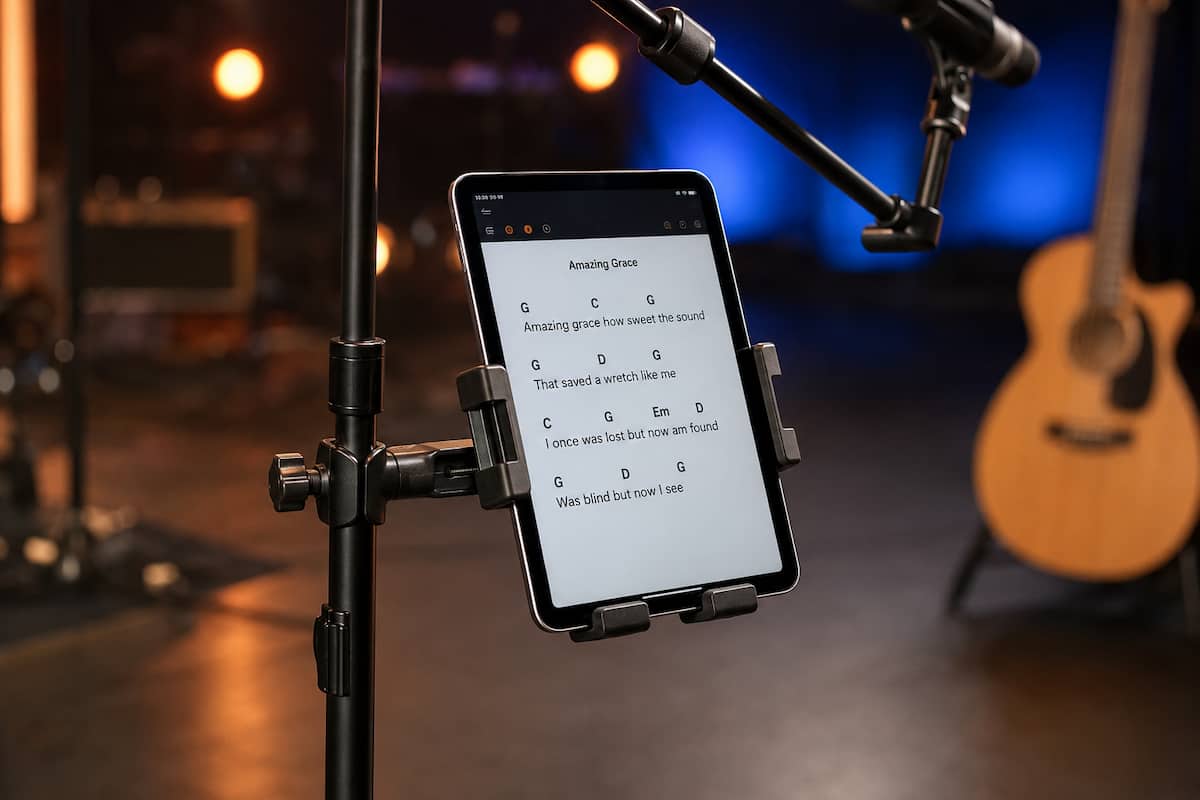
iPad or tablet mounted securely to the vertical shaft of a microphone stand.
This setup works especially well for singers, guitarists, worship teams, speakers, teachers, podcasters, DJs, and content creators. The trick is choosing a holder that fits your tablet securely while keeping the microphone stand balanced. If you are putting together a larger setup, you can also browse our tablet mount guides and phone mount guides for other mounting options.
Quick answer: For most people, the best way to mount an iPad or tablet to a microphone stand is to clamp the holder to the main vertical shaft of the stand. Keeping the tablet close to the center of the stand generally provides better stability than mounting a heavy tablet far out on a boom arm.
Why Mount a Tablet to a Microphone Stand?
A microphone stand tablet mount solves several problems at once. Most importantly, it puts information where you can see it without looking down at the floor, a chair, or a nearby table. That can make a big difference when you are singing, speaking, teaching, playing an instrument, or controlling audio software.
It also saves floor space. A traditional music stand works well for paper charts, but it adds another stand to an already crowded area. If you already have a microphone stand in front of you, attaching the tablet to that stand can create a much cleaner setup.
Common uses include:
- Lyrics and chord charts
- Digital sheet music
- Setlists
- Sermon or speaking notes
- Backing-track controls
- Digital mixer apps
- Podcast notes and scripts
- Livestream controls
- Teaching material
- Recording-session notes
For musicians in particular, a good mic stand tablet holder can eliminate the need to carry a separate music stand to rehearsals and smaller gigs.
Best iPad Holder for Microphone Stands Comparison Table
| Mount | Best For | Tablet Fit |
|---|---|---|
| IK Multimedia iKlip Xpand | Best overall for musicians | 7 to 12.9-inch tablets |
| Hercules DG307B | Best heavy-duty versatile pick | Phones and tablets up to about 13 inches |
| Amazon Basics Adjustable Tablet Holder | Best simple value option | Most 7 to 11-inch tablets |
| elitehood Aluminum Tablet Holder | Best metal adjustable option | Wide phone and tablet range |
1. IK Multimedia iKlip Xpand: Best Overall
The IK Multimedia iKlip Xpand is the first microphone stand tablet holder I would look at for a musician or performer. Unlike many generic clamp mounts, the iKlip Xpand was designed specifically around using a tablet on a microphone stand.
It accommodates tablets with screen sizes from approximately 7 to 12.9 inches, which covers everything from smaller tablets and iPad mini models to larger iPads. Its expandable bracket uses rubber contact surfaces to grip the tablet without putting hard plastic directly against the device.
The ball-joint design lets you rotate the tablet between portrait and landscape orientations and fine-tune the viewing angle. That is especially useful on stage, where a small change in angle can reduce glare from overhead lighting.
The microphone stand clamp works with poles up to about 1.2 inches in diameter. Although the manufacturer permits attachment to either the vertical shaft or a horizontal boom, I would still favor the vertical section for larger or heavier tablets because it keeps the added weight closer to the stand.
Best for: Singers, guitarists, keyboard players, worship musicians, DJs, and anyone using lyrics, chord charts, sheet music, or performance apps.
2. Hercules DG307B: Best Heavy-Duty Versatile Pick
The Hercules DG307B is a strong alternative if you want a holder that can accommodate both phones and tablets and move between different types of stands or tubing.
Hercules rates the holder for devices from roughly 6.1 to 13 inches and uses its TightVice locking system to hold the device securely. The mount can clamp to round or square tubing, giving it more flexibility than holders designed only around a traditional round microphone stand shaft.
Another advantage is its rated load capacity of about 6.6 pounds. Your tablet will weigh considerably less than that, but the capacity tells you that Hercules designed the mounting hardware for more than an ultra-light device.
This makes the DG307B particularly appealing for larger tablets, protective cases, church installations, teaching environments, rehearsal rooms, and setups where the holder is going to be moved or adjusted frequently.
Case warning: Always check the total outside dimensions of your tablet with its case installed. Screen size alone does not tell you whether a thick rugged case will fit properly inside a particular holder.
Best for: Larger devices, frequent adjustments, shared equipment, studios, churches, teachers, and users who want one holder for both phones and tablets.
3. Amazon Basics Adjustable Tablet Holder: Best Simple Value Pick
The Amazon Basics Adjustable Tablet Holder is a simpler choice for users who do not need the heavier-duty construction or wider device range of the Hercules or iKlip mounts.
It is designed for common tablets in roughly the 7 to 11-inch range and attaches directly to a microphone or music stand. The holder can rotate, making it suitable for both portrait and landscape use.
This makes sense for a home practice room, lesson space, home studio, small podcast setup, or occasional performance where the tablet is mainly being used to display lyrics, notes, or sheet music.
Pay particular attention to case thickness with this model. A tablet that fits comfortably without a case may become too thick once a rugged protective shell is installed. Users with a large iPad Pro or thick case should look at the iKlip, Hercules, or elitehood options instead.
Best for: Practice rooms, lessons, home recording, smaller tablets, and basic lyric or sheet-music use.
4. elitehood Aluminum Tablet Holder: Best Metal Adjustable Option
The elitehood Aluminum Tablet Holder is worth considering if you want a more substantial metal-style mount with a wide adjustment range.
It is designed for microphone stands and can accommodate a broad range of phones and tablets. This is useful if several people share the same stand or if you regularly switch between different devices.
The adjustable positioning also makes it a good choice when the tablet needs to sit slightly off to one side of the microphone rather than directly below it. That can help singers and speakers keep the screen visible without putting it directly in front of their face.
Because larger tablets put more force on the stand, keep the holder reasonably close to the stand shaft rather than extending it farther than necessary. The farther the tablet sits from the center of the stand, the easier it becomes to make the entire setup top-heavy.
Best for: Mixed-device setups, larger tablets, performers who want more positioning flexibility, and users who prefer a metal-style mount.
What to Look for in a Microphone Stand Tablet Holder
Tablet Size
Check more than the advertised screen size. Two tablets with the same screen measurement can have different outside dimensions, and a protective case adds both width and thickness.
Clamp Range
Most traditional microphone stand shafts are easy to accommodate, but not every stand uses the same tubing. Make sure the clamp opens wide enough for your stand, especially if you are attaching it to an unusual boom, square tube, keyboard stand, or other support.
Portrait and Landscape Rotation
Rotation is more useful than it might seem. Lyrics, scripts, and reading apps usually work best in portrait mode, while mixers, backing-track applications, split-screen apps, and wider interfaces can work better in landscape.
Access to Buttons and Charging Ports
A good holder should not cover the charging connector, volume controls, power button, or headphone and accessory connections you plan to use.
Stand Stability
The tablet holder is only as stable as the stand underneath it. Lightweight microphone stands with narrow tripod bases can become noticeably less stable after a large tablet is added.
How to Attach an iPad or Tablet to a Microphone Stand
- Choose the main vertical shaft. This is generally the most stable mounting location.
- Position the clamp below the microphone. Keep enough clearance so the tablet does not interfere with the microphone, boom adjustment, or your hands.
- Tighten the stand clamp. It should be secure enough that the mount cannot rotate around the shaft when you tap the screen.
- Insert the tablet. Confirm that every retaining arm or grip is fully seated against the device.
- Adjust the screen angle. Tilt it slightly upward or downward until it is easy to read from your normal position.
- Test the setup. Tap and swipe the screen several times and check for movement before using it during a performance.
Stability tip: On a tripod-style microphone stand, position one of the legs toward the side carrying the tablet. This helps place more of the base underneath the added weight.
Should You Mount the Tablet on the Boom Arm?
Some microphone stand tablet mounts can be attached to the boom arm, but that does not always mean it is the best location.
A boom already places the microphone away from the center of the stand. Adding a large tablet farther out increases the amount of force working against the base. That can increase wobble and make a lightweight stand easier to tip.
If you have a small tablet and a sturdy stand, boom mounting can work. For a full-size iPad or larger Android tablet, attaching the holder to the vertical shaft is generally the safer and more stable starting point.
Portrait or Landscape?
Portrait orientation is usually best for lyrics, scripts, sermon notes, sheet music, and other reading-heavy applications because more text fits vertically on the screen.
Landscape orientation is often better for digital audio mixers, backing-track controls, recording software, split-screen apps, and interfaces containing wide rows of controls.
Screen angle matters as much as orientation. Overhead lights can cause glare when the tablet sits too flat. A holder with good tilt adjustment lets you change the angle instead of turning the screen brightness all the way up.
Common Microphone Stand Tablet Mounting Mistakes
Mounting the tablet too high: The screen should be easy to read without blocking your face, the microphone, or your sightline toward the audience.
Ignoring the weight of the tablet: Large tablets mounted on lightweight stands can make the entire setup top-heavy.
Forgetting about the case: Always measure the tablet with the case installed if you intend to leave the case on while mounted.
Extending the tablet too far from the shaft: Keeping the device close to the stand usually reduces movement.
Failing to test before performing: Tap, swipe, rotate, and adjust the tablet before going on stage. A clamp that seems tight can still rotate when pressure is applied to the screen.
Blocking the microphone adjustment: Leave enough room to change microphone height or boom position without having to remove the tablet holder.
Can You Use a Large iPad Pro on a Microphone Stand?
Yes, but the holder and the microphone stand both matter. Larger tablets put more weight higher on the stand, especially when the holder positions the device several inches away from the shaft.
For a larger iPad, I would favor the iKlip Xpand, Hercules DG307B, or another mount specifically rated for the device size. I would also use a reasonably sturdy tripod or round-base microphone stand and keep the tablet as close to the main shaft as practical.
A thick case adds additional size and weight, so confirm holder compatibility before ordering.
More Microphone Stand Mount Guides
If you are building a more complete microphone stand setup, these related MountGuys guides may help:
Bottom Line
For most musicians, speakers, teachers, and creators, mounting an iPad or tablet to the vertical shaft of a microphone stand is the simplest and most stable approach.
The IK Multimedia iKlip Xpand is our best overall choice because it was designed specifically for tablet use on microphone stands and supports a wide range of tablet sizes. The Hercules DG307B is the better choice if you want heavier-duty construction and the flexibility to hold both phones and tablets.
The Amazon Basics Adjustable Tablet Holder makes sense for lighter-duty use with common tablets, while the elitehood Aluminum Tablet Holder is a good alternative when you want a metal-style holder with broad device compatibility and plenty of positioning adjustment.
Whichever holder you choose, match it to the size of your tablet, account for any protective case, and pay attention to the balance of the microphone stand. Get those details right and a tablet-mounted mic stand can become one of the most useful pieces of gear in your performance, rehearsal, or recording setup.
