
A good GoPro bike mount can make the difference between smooth, watchable cycling footage and a video filled with vibration, crooked horizons, and constant camera movement. The best mounting position depends on where you ride, how rough the terrain is, and whether you want a traditional forward-facing view or a more immersive point-of-view shot.
Road cyclists, mountain bikers, gravel riders, and casual riders can all use the same GoPro, but they may need very different mounting setups. A GoPro handlebar mount works well when you want a clean view down the road or trail. Chest and helmet mounts isolate the camera from much of the vibration coming directly through the bike while creating a more immersive perspective.
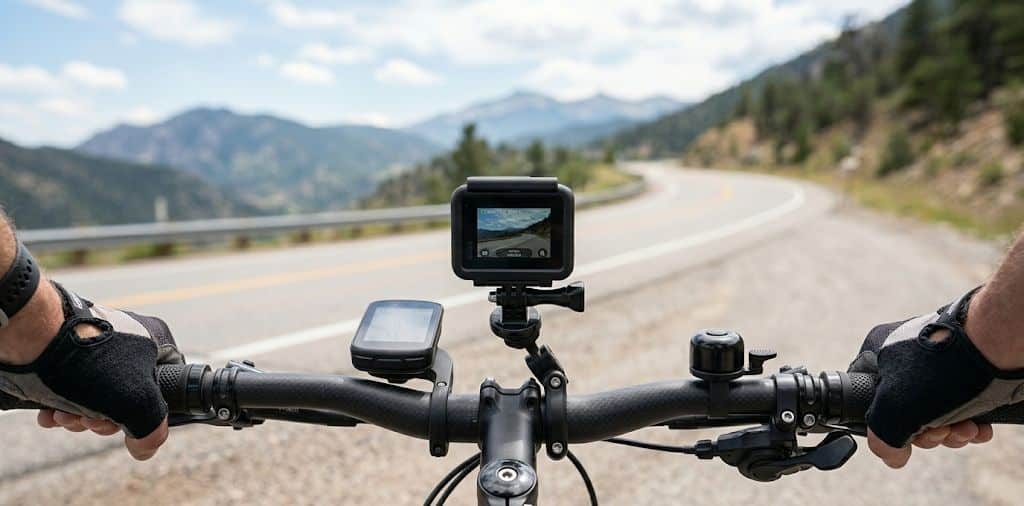
Quick answer: For most riders, the official GoPro Handlebar / Seatpost / Pole Mount is the easiest place to start. Mountain bikers often prefer a chest or helmet position because it isolates the camera from direct bike vibration. Riders who want more positioning flexibility should consider a RAM ball-and-socket setup.
Best GoPro Mount Locations on a Bike
Where you put the camera affects your footage at least as much as the mount itself.
Handlebars: Provides a clean forward-facing view and keeps the camera easy to reach. This is one of the best positions for road bikes, gravel bikes, e-bikes, and casual riding.
Helmet: The camera follows your head, so the footage shows where you are looking rather than only where the bike is pointed. This can work especially well on technical trails.
Chest: Produces a lower POV that can include the handlebars, rider movement, and trail ahead. Since the camera is mounted to your body rather than directly to the bike, it avoids much of the high-frequency vibration coming through the frame.
Seatpost: Useful for rear-facing footage, recording another rider, or adding a second angle to an edited video.
Frame or fork: Creates dramatic low-angle footage but can expose the camera to considerably more vibration, dirt, water, and debris.
There is no single best location for every ride. Many cyclists use a handlebar mount for normal recording and add a chest or helmet mount when they want a more immersive angle.
Best GoPro Bike Mounts
| Mount | Type | Best For | Main Advantage |
|---|---|---|---|
| GoPro Handlebar / Seatpost / Pole Mount | Clamp | Road, gravel, casual riding | Compact and easy to reposition |
| RAM Tough-Strap Action Camera Mount | Strap + ball system | Adjustability and mixed terrain | Near-infinite positioning |
| GoPro Chesty | Chest harness | Mountain biking and POV | Isolates camera from bike vibration |
| GoPro Curved + Flat Adhesive Mounts | Adhesive | Helmet POV | Low-profile mounting |
GoPro Handlebar / Seatpost / Pole Mount
For most cyclists, the official GoPro Handlebar / Seatpost / Pole Mount is the logical starting point.
It uses a hinged, non-slip clamp that fits round tubes from approximately 0.35 to 1.4 inches (9 to 35 mm) in diameter. That covers many bicycle handlebars and seatposts.
The rotating base provides 360-degree rotation with multiple locked positions, making it easy to change from a forward-facing shot to a side or rear-facing perspective without dismantling the entire setup.
Keeping the camera close to the handlebar is important. The farther the camera sits away from its mounting point, the greater the potential for movement.
For pavement, rail trails, gravel roads, and moderately rough terrain, this is a clean setup that does not require assembling several separate components.
RAM Tough-Strap GoPro Bike Mount
Riders who want more control over camera positioning should look at the RAM Tough-Strap Double Ball Mount with Universal Action Camera Adapter.
Instead of a fixed camera angle, the RAM system uses its familiar B-size ball-and-socket design. The short socket arm can be loosened, repositioned, and tightened without removing the entire mount.
The Tough-Strap version is particularly appropriate for bicycles. RAM lists it for mountain bikes, road bikes, and e-bikes, with included strap sizes covering handlebars from approximately 0.875 to 1.38 inches in diameter.
RAM’s rubber ball design also provides some isolation from shock and vibration. That does not mean it can eliminate vibration from a rough trail, but the system provides considerably more positioning flexibility than a basic fixed clamp.
Another advantage is modularity. If you already own RAM components for a motorcycle, GPS, phone, or other device, many of the B-size components can be used together.
Our take: Choose the RAM setup when adjustability and modularity matter more than having the smallest possible mount. For a simple compact installation, the official GoPro handlebar mount remains hard to beat.
GoPro Chesty Performance Chest Mount
The GoPro Chesty is an excellent choice for mountain biking because the camera is attached to your body rather than directly to the bicycle.
That distinction matters on rough terrain. A camera attached to the handlebars receives vibration through the tire, fork, frame, and bar. A chest-mounted GoPro is isolated from much of that high-frequency bike vibration, although normal upper-body movement will still appear in the footage.
The lower camera position also gives viewers more context. Depending on your camera angle, the footage can include your arms, handlebars, front wheel, and trail.
GoPro’s Chesty uses padded, breathable material and is adjustable enough to fit a wide range of body sizes and clothing.
For technical mountain biking, downhill riding, or trail footage where you want the viewer to feel part of the ride, this can be one of the best perspectives.
GoPro Helmet Mount
A helmet-mounted GoPro captures what you are looking at instead of simply recording the direction the bicycle is traveling.
That makes helmet POV particularly useful for mountain biking and technical riding, where riders constantly look toward upcoming turns, obstacles, and terrain.
GoPro’s curved adhesive mounts can be attached to appropriate curved surfaces and provide a low-profile camera base.
The adhesive needs a clean, properly prepared surface and should be installed according to GoPro’s instructions. Do not drill holes into a helmet to install a camera mount.
It is also worth checking the helmet manufacturer’s instructions before adding accessories. Helmet construction varies, and manufacturers may have specific guidance about adhesive accessories and attachment locations.
How GoPro HyperSmooth Changes Bike Mounting
Physical mounting is only part of the equation. Modern GoPro cameras use electronic stabilization to compensate for camera movement.
GoPro’s HyperSmooth technology analyzes movement and crops part of the recorded image so the camera has room to stabilize the final footage. Depending on the camera model, different stabilization levels may be available.
For normal road riding, you may not need the maximum stabilization setting. On rough gravel or mountain-bike trails, stronger stabilization can make a significant difference.
Keep in mind that higher stabilization settings can crop more of the image. If you are using a chest or helmet mount, check your framing before the ride so important elements such as the handlebars or trail are not cropped unexpectedly.
Tip: Do a short test ride before recording an important trip. Ten seconds of test footage can reveal a bad camera angle, loose mount, excessive vibration, or an unwanted stabilization crop.
How to Reduce GoPro Vibration on a Bike
Vibration is the most common problem with bike-mounted action cameras. A few simple changes can make a noticeable difference.
Keep the Camera Close to the Mount
Long extension arms act like levers. Small movements at the handlebar can become much larger movements by the time they reach the camera.
Use the shortest practical arm and keep the GoPro close to the mounting point whenever possible.
Tighten Every Connection
Check the clamp, thumb screw, buckle, ball joint, and camera attachment before riding. A slightly loose connection can cause far more camera movement than the bicycle itself.
Choose a Solid Mounting Location
Not every section of a handlebar behaves the same way. Mounting close to the stem generally provides a more rigid base than placing the camera near the end of a wide handlebar.
You should also make sure the mount does not interfere with brake levers, shifters, cables, lights, computers, or normal hand placement.
Be Careful With Carbon Handlebars
Carbon components should not be treated like ordinary metal tubing.
Follow the bicycle or handlebar manufacturer’s instructions before clamping accessories to carbon components, and never exceed specified torque limits. If there is any uncertainty, use an approved mounting location or ask the bicycle manufacturer or shop.
Use a Body Mount When Necessary
If bike vibration remains excessive, moving the GoPro to your chest or helmet can solve the problem at its source by removing the camera from the vibrating bicycle.
Best Camera Angle for Cycling
One of the most common mistakes is pointing the camera too far downward.
For a handlebar mount, start with the camera close to level and then tilt it slightly depending on how much of the front wheel or cockpit you want in the frame.
For a chest mount, the camera may need to point slightly upward because a cyclist’s torso naturally leans forward while riding.
Helmet mounts are particularly sensitive to camera angle because the angle changes as your head moves.
Whichever position you choose, record a short clip while sitting in your normal riding position before heading out.
Best GoPro Setup by Riding Style
Road cycling: Start with the official GoPro Handlebar / Seatpost / Pole Mount. It is compact, easy to remove, and provides a clean forward-facing view.
Gravel riding: Either the GoPro handlebar mount or RAM Tough-Strap works well. HyperSmooth becomes more important as the road surface gets rougher.
Mountain biking: Chest mounts and helmet mounts are excellent choices because they isolate the camera from much of the vibration coming through the bike.
E-bikes: Handlebar mounts work well, but check carefully that the GoPro does not interfere with the bike’s display, controls, cables, or lighting.
Casual riding: A simple GoPro handlebar mount is usually all you need.
Multi-camera filming: Combine a forward-facing handlebar camera with a chest, helmet, or rear-facing seatpost camera to create different angles from the same ride.
Should You Use a Camera Tether?
A secondary tether is worth considering whenever losing the camera would be expensive or dangerous.
A tether does not replace a properly installed mount. It simply provides a second connection if the primary mount or camera attachment fails.
This can be especially useful on mountain-bike trails, long road rides, bridges, or other locations where a dropped camera could be difficult to recover.
Make sure any tether is short enough that a detached camera cannot swing into a wheel, brake rotor, chain, or rider.
Bottom Line
The best GoPro bike mount depends on both the bicycle and the type of footage you want to capture.
For most riders, the GoPro Handlebar / Seatpost / Pole Mount is the best starting point. It is compact, easy to use, and designed specifically for mounting GoPro cameras to round tubing.
The RAM Tough-Strap setup makes more sense when you want additional angle adjustment or already use RAM components.
For mountain biking and technical trails, the GoPro Chesty or a properly installed helmet mount can provide a much more immersive perspective while isolating the camera from direct bicycle vibration.
Whichever mount you choose, keep the camera close to the mounting point, tighten every connection, verify the camera angle, and use your GoPro’s stabilization features when conditions get rough.
