
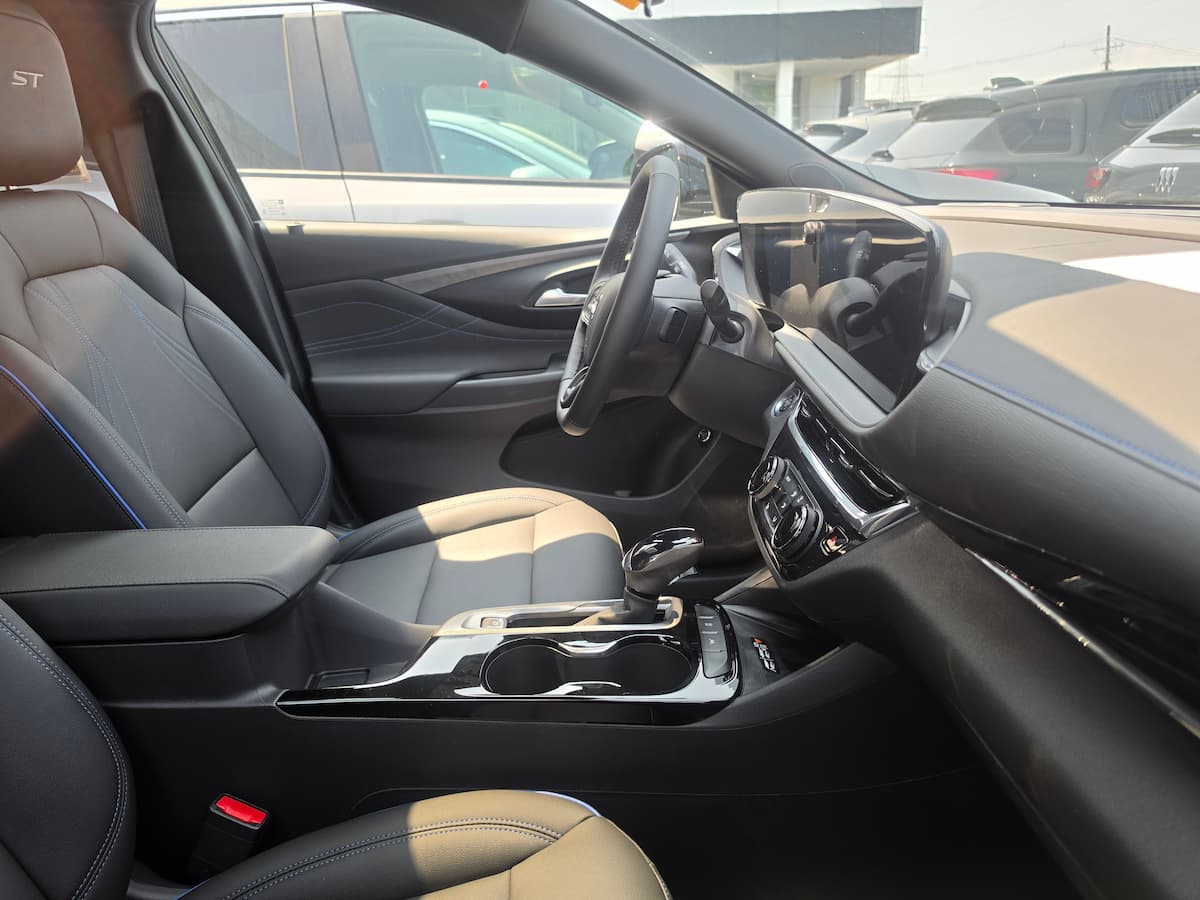
If you have sat in a 2024 or newer Buick Envista and tried to find a spot for a phone mount, you already know the problem. The dash is dominated by a single wide panel that houses both the 8-inch driver display and the 11-inch infotainment touchscreen, and that panel leaves almost no flat surface for a traditional dashboard mount to grip. Finding the right Buick Envista phone mount means working around that console instead of fighting it, and the good news is that a few manufacturers have already built solutions custom-scanned for this exact dashboard.
Below we cover two custom dash mounts that solve the console problem directly, plus a cup holder mount and a vent mount for drivers who would rather skip dashboard hardware altogether and instead opt for a universal pick. If you are also outfitting a larger Buick, our Buick Enclave phone mount guide and Buick Envision phone mount guide cover those cabins in the same level of detail.
Why the Envista Dash Is a Tight Fit for Phone Mounts
The Envista’s dashboard was designed around that ultrawide display panel, and Buick did not leave much of a ledge, vent stack, or flat molded surface anywhere near it for aftermarket hardware. Universal dash mounts that rely on an adhesive pad or suction cup and a flat target area often end up either too far from the driver’s sightline or perched awkwardly against a curved trim piece that was never meant to hold weight. That is why the custom-scanned options below outperform anything generic here. They are built from a 3D scan of the actual Envista dash, so the base sits exactly where Buick left a usable seam instead of guessing.
Comparison: Best Buick Envista Phone Mounts
| Mount | Best For | Years/Trim |
|---|---|---|
| MaserWeller Custom Dash Mount | MagSafe users who want eye-level placement | 2024-2026, all trims |
| LUNQIN Custom Dash Mount | Non-MagSafe phones needing a gravity clamp | 2024-2026, all trims |
| eSamcore Cup Holder Mount | Drivers who want zero dash contact | 2024+, all trims |
| A2C Magnetic Vent Mount | Budget backup or second vehicle use | 2024+, all trims |
MaserWeller Custom Dash Mount: Best for Eye-Level Viewing
This is the mount that solves the Envista’s console problem. It is scanned specifically to the 2024-2026 dashboard contour, so the base clips into a seam next to the display panel instead of sitting on top of it or blocking any controls. Because it lands so close to the driver’s natural line of sight, glancing at turn-by-turn directions takes a fraction of the eye movement a cup holder or vent mount requires. It uses a MagSafe-style magnetic head with a ring of magnets strong enough to hold the phone through potholes and hard braking, and it rotates a full 360 degrees for portrait or landscape orientation.
Installation is tool-free and reversible. It clips into the existing seam rather than relying on adhesive, so there is no risk of damaging the trim if you decide to remove it later. The one thing to watch is fitment precision: because this is a single-year-range scan, double-check that your Envista falls within the 2024-2025 window before ordering.
LUNQIN Custom Dash Mount: Best for Non-MagSafe Phones
If your phone is not MagSafe-compatible and you would rather not carry a metal ring or plate, the LUNQIN mount solves the same dash-fitment problem with a different holding mechanism. It uses a gravity slide-in clamp instead of magnets, so the phone drops in and the arms close automatically without any adhesive plates to attach. Like the MaserWeller option, this base is molded to the Envista’s specific dashboard contour and covers the 2024 through 2026 model years, which makes it the safer pick if you are not certain which exact model year you own.
The clamp accommodates phones up to roughly 7 inches with most cases attached, and the folding arm design means it collapses down small when not in use. Viewing position is nearly identical to the MaserWeller mount since both attach at the same dashboard seam near the display.
eSamcore Cup Holder Mount: Best for Skipping the Dash Entirely
Not every driver wants hardware anywhere near the dashboard, and the Envista’s front cup holders give you a solid alternative. This mount uses a twist-to-expand base that locks into the cup holder without adhesive, then extends a 15-inch arm up toward the driver so the phone sits closer to eye level than a typical cup holder mount manages. It is not going to match the viewing angle of the custom dash mounts since it is still originating from down near the console, but it keeps the dashboard completely untouched and moves easily between vehicles if you switch cars often.
The tradeoff is that it does occupy one of the Envista’s two front cup holders, which is worth considering if you regularly use both for drinks. The quick-release button makes swapping the phone in and out simple, and the silicone grips at the base keep it from twisting during turns.
A2C Magnetic Vent Mount: Best Budget Backup
A vent mount is the simplest option on this list and the easiest to justify as a spare for a second car or a backup if a dash mount ever fails. It clips onto the vent blades and holds the phone with a magnetic plate, requiring no adhesive and taking seconds to install or remove. On the Envista, the vent placement sits lower and further from the driver’s sightline than either custom dash mount, so it is a reasonable fallback rather than a first choice for this particular vehicle.
Keep in mind that any vent mount adds some weight to the vent fins themselves, so heavier phones with thick cases may cause more sag over time than they would on a dash-mounted or cup-holder-mounted option.
Which Buick Envista Phone Mount Should You Choose
This is one of few vehicles where the placement of a universal mount is a far second choice on the list.
For most Envista owners, one of the two custom dash mounts is the right call. They solve the problem with this cabin, which is that the display console leaves no natural spot for a phone at eye level, and both mounts are scanned specifically to work around it.
Choose the MaserWeller mount if you use MagSafe or do not mind adding a metal ring to your case, and choose the LUNQIN mount if you want a clamp-style holder. The cup holder and vent mounts remain solid choices if you would rather leave the dashboard alone entirely, with the cup holder mount offering the better viewing angle of the two.
Common Questions About Envista Phone Mounts
Does the Envista have a wireless charging pad instead of needing a mount?
Wireless charging is available on the Avenir trim and optional on other trims, but it is a flat charging pad rather than a viewing mount, so most drivers still want a mount for navigation even if they also use the charging pad for power.
Will a mount block the 11-inch touchscreen?
Both custom dash mounts in this guide are scanned to sit in a seam beside the display, not over it, so the touchscreen stays fully accessible.
Can I use the same mount across Preferred, Sport Touring, and Avenir trims?
Yes. The dashboard layout is identical across all three Envista trims, so fitment depends on model year rather than trim level.
