
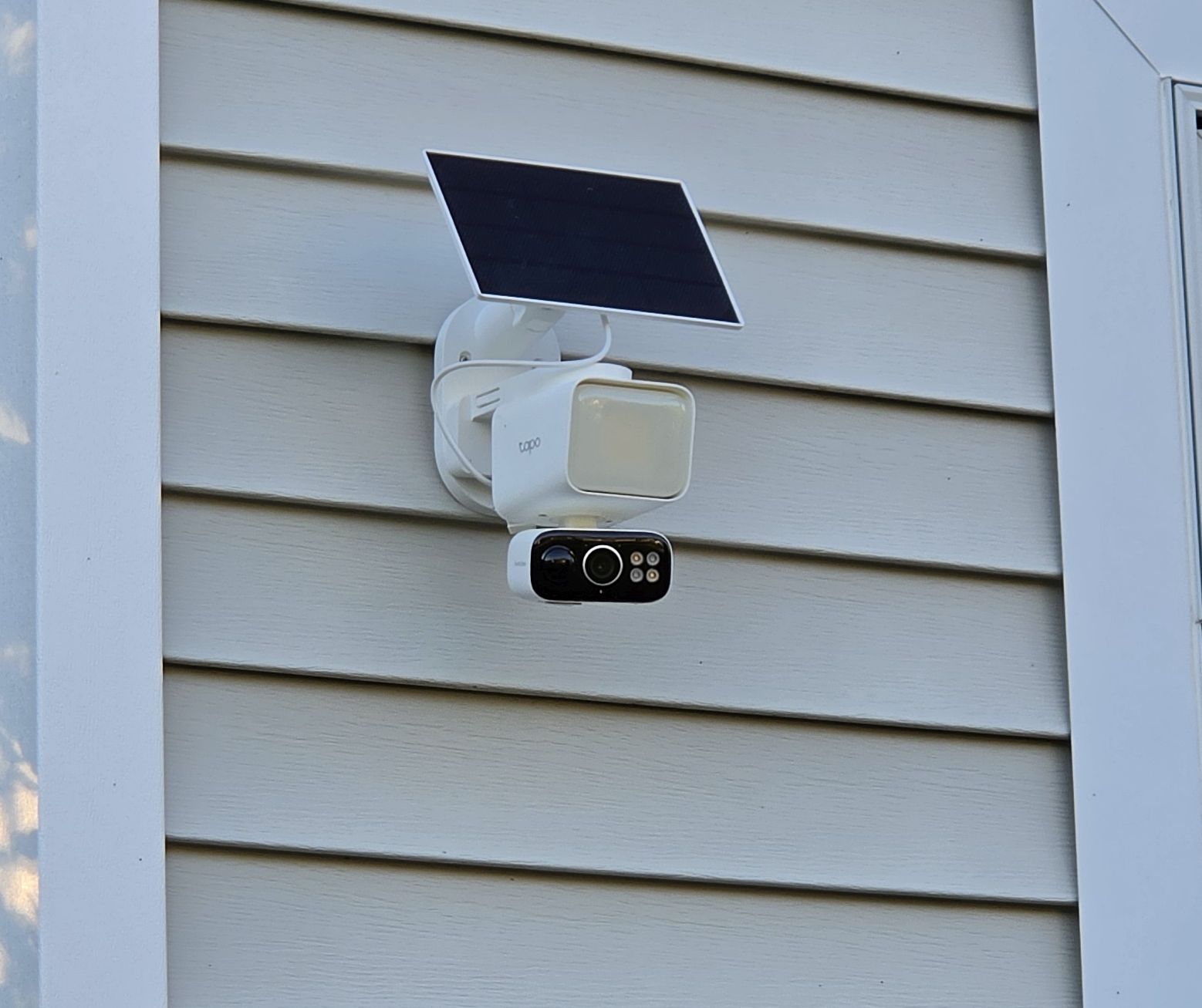
The TP-Link Tapo C615F is a solar-powered 2K pan/tilt floodlight camera that runs entirely on battery power, which means it can go places most floodlight cameras can’t. No electrician required, no running wire through walls. The mounting system is more conventional than the magnetic C425 or the slide-click C660, which actually works in your favor as Koroao makes a confirmed set of accessories that fit the C615F specifically, covering gutter, vinyl siding, and corner mounting without any drilling.
Mount Options at a Glance
| Mount | Best For | Drilling Required |
|---|---|---|
| Included bracket | Wall, soffit, any solid flat surface | Yes |
| Koroao Vinyl Siding Mount | Vinyl siding homes, no drilling | No |
| Koroao Gutter Mount | Eave-height placement, no drilling | No |
| Koroao Corner Mount | Building corners, includes solar panel bracket | Yes |
How the C615F mounting system works
The C615F ships with a standard bracket that screws into any flat surface using included anchors, screws, and a mounting template. Unlike the C425 which relies on a magnetic connection, the C615F bracket is a conventional screw-in design. The camera sits on top of the bracket with a pan/tilt base underneath, so the bracket itself is fixed while the camera rotates freely on top of it.
The solar panel mounts separately using its own bracket. TP-Link includes a 12-foot extension cable so you can position the camera and panel independently when they can’t both face the ideal direction from the same spot. This is worth planning for before you drill anything as the camera needs a clear view of your coverage area, and the solar panel needs sun. Those two requirements often point different directions.
Mount recommendations for the Tapo C615F
1. Included bracket — best for standard wall and eave installs
For a flat wall, wood soffit, stucco, or brick install, the bracket that comes in the box is the right choice. It’s weatherproof, built specifically for this camera, and includes everything you need for a clean install. Use the included template to mark your drill points before drilling. Anchor into a stud or solid blocking where possible. The C615F with its floodlight assembly is heavier than a standard camera and needs a solid anchor point.
The solar panel bracket installs separately using the same hardware approach. Position the camera first to get your viewing angle right, then figure out the best solar panel location within reach of the 13-foot extension cable.
2. Koroao Vinyl Siding Mount — best no-drill option for siding homes
The Koroao Vinyl Siding Mount slides into the horizontal seam of standard vinyl siding without any drilling. Made from aluminum, it won’t rust or stain the siding finish. No tools required. Attach the mount to the camera bracket and slide it into the siding seam. The mount is also repositionable, so if you change your mind about camera placement you can slide it to a new spot along the seam without any damage.
View Koroao Vinyl Siding Mount on Amazon →
3. Koroao Gutter Mount — best for eave-height placement without drilling
The Koroao Gutter Mount clamps directly to the gutter without drilling and positions the camera at eave height. For single-story homes, eave height typically puts the camera right in the 7 to 10 foot range that works best for motion detection coverage. The mount is compatible with the C615F and built from aluminum for long-term outdoor use. No holes in your soffit, no holes in your fascia, and the camera can be repositioned by loosening the clamp and sliding it along the gutter.
One thing to keep in mind with the C615F specifically: the floodlight is mounted above the camera body. At gutter height, the floodlight angle will be fixed by the bracket position, so spend a few minutes in the Tapo app adjusting the floodlight angle via the app’s manual controls before you finalize the bracket placement.
View Koroao Gutter Mount on Amazon →
4. Koroao Corner Mount — best for building corners with solar panel
The Koroao Corner Mount Bracket is the most useful of the three for the C615F specifically because it has a built-in solar panel bracket integrated into the design. One bracket holds both the camera and the Tapo solar panel together at the corner of a building. Building corners are typically the best location for a pan/tilt camera anyway. A corner position maximizes the 360° coverage area and eliminates the need to swing all the way around to cover the same ground a flat-wall camera would need to cover. The bracket is made from powder-coated aluminum and requires screwing into the wall at the corner.
View Koroao Corner Mount on Amazon →
Placement tips for the Tapo C615F
- Building corners are the best location. A pan/tilt camera at a corner covers two sides of a building. A camera mounted flat on one wall covers only one side. If you have a corner option, use it.
- Mount at 7 to 10 feet. This is the height range where the PIR motion sensor and camera angle work together most effectively. Too low and you get excessive close-range false triggers. Too high and the downward angle limits effective detection range.
- Solar panel placement matters as much as camera placement. Use the 13-foot extension cable to position the panel separately if the camera’s ideal spot is shaded or north-facing. A south or west-facing surface that gets reliable afternoon sun will keep the battery topped off year-round in most US climates.
- Adjust the floodlight angle before finalizing the install. The floodlight on the C615F is adjustable via the Tapo app. Test the angle while the camera is still accessible on the ground or at a comfortable height before mounting it at full eave height.
- Set patrol positions in the app. Rather than leaving the camera on continuous 360° scan, set specific patrol positions for the entry points and zones you care about. This uses battery more efficiently and reduces the number of irrelevant motion alerts.
Frequently Asked Questions
Can I mount the Tapo C615F without drilling?
Yes. The Koroao vinyl siding mount and Koroao gutter mount are both confirmed no-drill options for the C615F. The vinyl siding mount slides into the siding seam and the gutter mount clamps to the gutter. Neither requires drilling into your home’s exterior.
Can I mount the solar panel separately from the camera?
Yes. The included 13-foot extension cable lets you position the Tapo A201 solar panel independently of the camera. This is especially useful when the ideal camera location is shaded or faces north. The Koroao Corner Mount has a built-in solar panel bracket if you want both mounted together at a corner location.
Can the C615F be mounted on a ceiling or inverted?
No. The C615F is designed exclusively for wall, soffit, and eave mounting. There is no way to invert the image in the camera settings, so ceiling mounting is not a practical option for this camera.
What height should I mount the Tapo C615F?
TP-Link recommends 7 to 10 feet above the ground for optimal motion detection performance. At this height the PIR sensor and AI detection have the correct downward angle to detect people and vehicles reliably.
Does the C615F have a 1/4″-20 threaded hole like the C425?
No. The C615F uses a conventional wall bracket system rather than the magnetic base or 1/4″-20 thread of the C425. Standard tripod adapters and universal camera mounts that rely on a 1/4″-20 thread are not compatible with the C615F.
