
Finding a stable overhead phone mount or top-down camera rig is the fastest way to film a workbench, desk tutorial, cooking counter, engine bay, or gym set without tripod legs blocking your hands. Standard desktop stands and traditional floor tripods are built to aim horizontally at eye level; when you tilt them straight down, the legs creep into the frame or the top-heavy center of gravity tips the entire stand forward. Often referred to as a periscope-style mounting setup, a purpose-built overhead mount uses a C-clamp boom arm, a weighted tabletop articulating stand, a heavy-duty gooseneck, or a modular ball-and-socket extension arm to suspend your smartphone or camera directly above your workspace with repeatable framing.
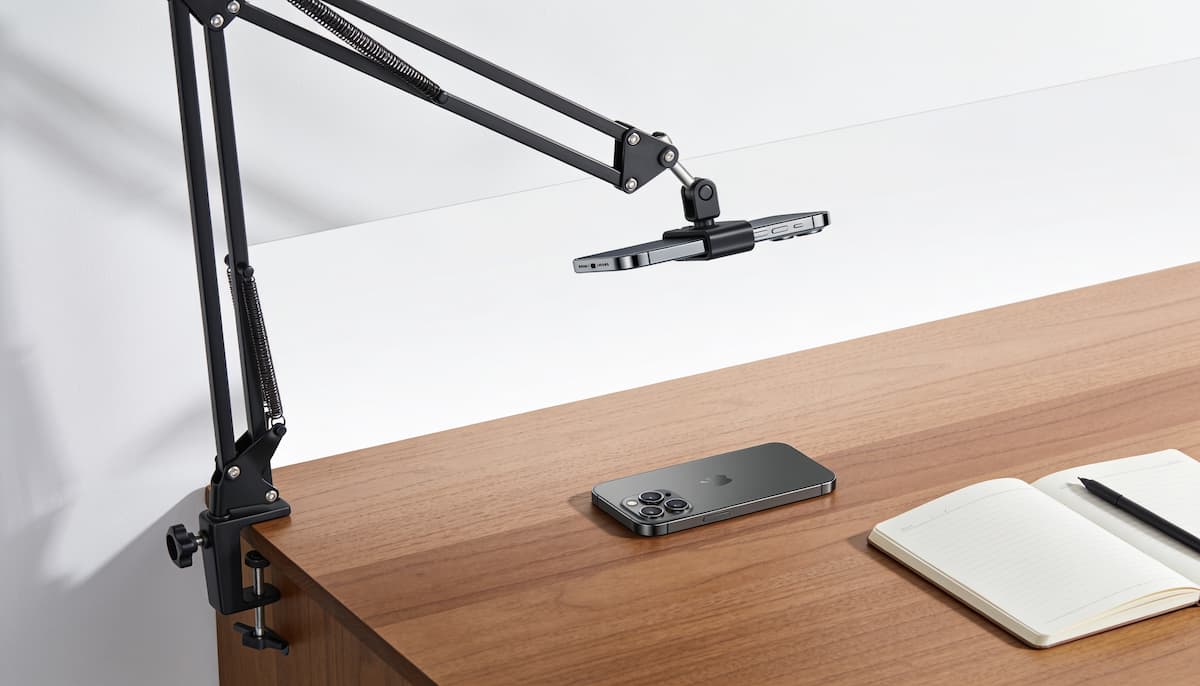
Quick Answer: For most desks, workbenches, and gym racks, a multi-joint Clamp Boom Arm Mount is the best overall overhead phone mount because it anchors rigidly to a table edge and reaches straight out over your subject without taking up surface space. If you cannot clamp to a counter edge, choose the weighted Arkon Creator Series Overhead Stand for tabletop content creation, or step up to a modular RAM Mount Extension System for heavy phones, action cameras, and high-vibration garage or mechanical work.
Not every overhead camera mount handles cantilever weight the same way. Extending a smartphone or compact camera 12 to 24 inches horizontally away from its base multiplies rotational force on the joints and anchor point. Below, we compare the four main overhead mounting styles, explain how to keep top-down shots from bouncing or tipping, and break down which hardware fits your workspace. For broader mounting options across vehicles, desks, and tripods, you can also browse our Phone Mounts Hub and our Camera Mounts Hub.
Best Overhead Phone Mounts and Periscope-Style Rigs Compared
The table below compares the four primary overhead mounting architectures by how they attach to your surface and the filming environments where each design excels.
| Mount | Fits / Attachment | Best For |
|---|---|---|
| 1. Articulating Clamp Boom Arm Mount | C-clamp base for flat desks, workbenches, and shelving; multi-section hinged boom arm with universal phone holder | Best overall overhead phone mount for desks, unboxings, and workbench tutorials |
| 2. Gooseneck Flexible Overhead Mount | Spring or screw jaw clamp with bendable metal-core gooseneck arm and rotating phone clip | Portable, budget-friendly top-down phone setups and quick angle adjustments |
| 3. RAM Mount Extension System | Modular marine-grade aluminum ball-and-socket extension arm (pairs with RAM base and X-Grip cradle) | Zero-droop mechanical bays, gym racks, heavy phones in thick cases, and action cameras |
| 4. Arkon Creator Series Overhead Stand | Free-standing weighted tabletop base with vertical riser, three ball-and-socket joints, and spring-loaded phone grip | Kitchen islands, craft tables, and countertops where edge clamps cannot fit |
1. Articulating Clamp Boom Arm Mount (Best Overall Overhead Phone Mount)
Best for: Desk creators, electronics repair benches, overhead tutorials, and stationary setups where a flat table lip is available.
An articulating clamp boom arm is the most practical and space-efficient overhead phone mount for everyday top-down video. Instead of placing a wide tripod footprint in the middle of your workspace, a C-clamp fastens to the rear or side edge of your desk, workbench, or shelf, while a multi-section hinged metal arm reaches up and out to suspend your phone directly over the action. Because the arm uses mechanical hinge points and locking knobs or tension springs rather than a single bendable wire, it supports modern large-screen smartphones (including Pro Max and Ultra models in protective cases) without slowly sagging toward the table during a long recording session.
The multi-joint geometry also makes framing far more repeatable than a standard tripod. Once your C-clamp is tightened onto a solid desk edge (typically up to 2 inches thick), you can swing the boom arm out over your subject to record, raise or lower the height in seconds to switch between wide tabletop shots and tight close-ups, and fold the entire arm flat against the back of the desk when you finish filming. Most boom arms terminate in a standard 1/4″-20 threaded ball head paired with a spring-loaded phone clamp, allowing 360-degree rotation between vertical Reels or TikTok framing and horizontal YouTube widescreen video, while also letting you swap the phone clip for a compact webcam, ring light, or action camera adapter.
2. Gooseneck Flexible Overhead Mount (Best Portable & Budget Pick)
Best for: Light smartphones, travel kits, bedside or compact desk corners, and casual top-down filming where fast repositioning matters most.
Gooseneck flexible mounts remain popular because they are light, inexpensive, and effortless to bend into unconventional angles. A single flexible metal tube connects the base clamp to a ball-joint phone cradle, allowing you to curve the neck up and over a book, sketchpad, small craft project, or gym upright in a single motion. Unlike rigid boom arms with fixed elbow joints, a gooseneck can snake around monitors, desk lamps, or shelving uprights where straight arm segments would collide with obstacles.
The physics limitation with any gooseneck overhead phone holder is harmonic bounce and cantilever droop. When you stretch a gooseneck straight out horizontally, the weight of a heavy phone creates constant downward torque on the flexible core, and tapping the screen to start or stop recording causes the arm to oscillate for several seconds. To get sharp, steady footage from a gooseneck mount, loop the neck into a compact “S” or “C” curve rather than pulling it out to full length, anchor the clamp as close to your subject as possible, and use your phone’s voice control, a Bluetooth shutter remote, or an Apple Watch camera remote so you never have to touch the screen mid-shot.
3. RAM Mount Extension System (Best Heavy-Duty & Garage Setup)
Best for: Garage workbenches, engine-bay and mechanical filming, power racks in home gyms, and heavy-duty setups where plastic joints fail.
When you need an overhead phone mount or camera rig that locks in place with zero flex under vibration or heavy loads, a modular RAM Mount extension system is in a class of its own. Manufactured in the USA from powder-coated marine-grade aluminum and high-strength composite with a lifetime warranty, RAM’s elastomeric ball-and-socket architecture clamps down with mechanical T-knobs that will not slip, even when cantilevered straight out or upside down over an engine bay, CNC machine, or squat rack.
Because RAM is a modular ecosystem, it is important to understand how the pieces fit together when ordering. The extension link below provides the modular double-socket extension arm hardware, which you pair with a compatible base (such as a RAM Tough-Claw for tool-free clamping onto round or square gym racks and bench frames, or a 4-hole AMPS drill-down base for a permanent workshop bench) and a device holder like the spring-loaded RAM X-Grip cradle (which includes a rubber safety tether for inverted overhead use). If you are building your first modular rig and want to match 1-inch B-size vs. 1.5-inch C-size balls, arms, and bases properly, see our step-by-step guide on how to assemble a RAM Mount.
Important: Whenever you suspend a phone face-down in a RAM X-Grip over concrete floors, machinery, or cast-iron gym weights, always stretch the included rubber X-Grip tether around the four corners of your phone. While the spring-loaded stainless steel arms grip tightly, the rubber tether acts as a secondary mechanical lock when the cradle is inverted.
4. Arkon Creator Series Overhead Tabletop Stand (Best Free-Standing Counter Mount)
Best for: Cooking and baking counters, kitchen islands, nail art, sketching, jewelry making, and thick tables with beveled or lip-free edges.
Many kitchen islands, stone countertops, dining tables, and drafting desks have thick bullnose edges, flush aprons, or glass tops that make C-clamps impossible or risky to attach. For those environments, this Arkon Creator Series overhead stand solves the problem with a heavy, free-standing weighted tabletop base paired with a vertical riser shaft and an articulating multi-joint overhead arm. Because the base sits flat on the counter and relies on ballast weight rather than a jaw clamp, you can pick up the entire stand and move it across a kitchen island or studio table in seconds.
Designed specifically for tabletop content creators, this Arkon mount uses three ball-and-socket sections along its overhead arm so you can position your camera straight down at 90 degrees or tilt it slightly forward for a natural three-quarter viewing angle. The spring-loaded phone grip holds smartphones securely even when inverted face-down over a cutting board or craft mat. Because it is a self-contained weighted stand, it requires more tabletop footprint than an edge-clamped boom arm, and you should always keep the extended phone aligned over the footprint of the weighted base plate so the stand stays balanced.
What Is a Periscope-Style or Overhead Phone Mount?
A periscope-style or overhead phone mount is not a single proprietary gadget; it is a cantilevered mounting geometry designed to get the support column out of your camera’s field of view. Instead of placing legs directly beneath the lens like a conventional tripod, an overhead camera rig anchors to the side or rear of your workspace, rises vertically, and extends a horizontal boom or articulating arm outward so your phone or action camera looks straight down at a 90-degree angle (or a steep 60-to-80-degree downward pitch).
This top-down perspective is essential whenever your hands and tools are the subject of the video. When you film soldering on a circuit board, assembling a carburetor, decorating a cake, unboxing hardware, or checking barbell path on a squat rack, an eye-level tripod either blocks your elbows or hides fine details behind your hands. Suspending the camera overhead clears the entire work surface and locks in a consistent focal distance so every clip in your video matches.
The primary engineering challenge with any overhead camera mount is rotational torque. A modern flagship smartphone in a rugged case weighs between 8 and 10 ounces (225 to 285 grams). Held directly over a vertical stand, that weight is negligible. Extended 18 inches horizontally at the end of a boom arm, that same phone exerts significant downward bending force on the elbow joint and prying force on the desk clamp. Choosing the right mount comes down to matching arm rigidity and base anchor strength to how far you need to reach.
Best Use Cases for Overhead Phone and Camera Mounts
Different filming environments place very different demands on an overhead phone tripod or boom arm. Here is how to match your mounting style to the five most common top-down applications:
- Desk Tutorials, Unboxings, and Live Streaming: A desk C-clamp boom arm (Pick #1) or weighted Arkon tabletop stand (Pick #4) keeps the base behind your monitor or off to the side of your mat while positioning the lens 16 to 24 inches above the desk. If you run a multi-camera broadcast with a second device for reading chat or comments, compare dedicated dual-device rigs in our Best Phone and Tablet Mounts for Live Streaming guide.
- Gym Filming and Form Checks: Recording squats, deadlifts, bench press bar paths, or cable work from a high angle prevents walkers from stepping in front of a floor tripod. Clamping a modular RAM extension arm or heavy-duty clamp mount high on a 2×2-inch or 3×3-inch steel power rack upright gives you a clean, unobstructed high-angle view. For cardio machines, spin bikes, and magnetic rack holders, see our Best Phone and Tablet Mounts for Gym Use guide.
- Workshop, Garage, and Mechanical Repairs: Filming engine-bay diagnostics, woodworking joints, or small-engine rebuilds requires hardware that shrugs off grease, vibration, and accidental bumps with a wrench. A RAM ball-and-socket extension system (Pick #3) clamped to a roll cart, lift post, or workbench riser holds position without drifting when you hammer or torque fasteners on the same bench.
- Cooking, Baking, and Crafting Counters: Kitchen islands and granite counters rarely have thin overhang lips suitable for C-clamps, and you need to move the camera frequently between the prep board and the stove. The weighted Arkon Creator Series tabletop stand (Pick #4) sits flat on any counter without clamping and wipes clean easily.
- Action Camera and POV Overhead Rigs: When you need an ultra-wide field of view in tight spaces (such as inside a vehicle cabin, above a drum kit, or over a kayak cockpit), mounting a lightweight GoPro or DJI Osmo Action camera on an extension arm cuts payload weight in half compared to a heavy smartphone. You can explore dedicated 3-prong finger and 1/4″-20 action camera hardware in our GoPro Mounts Hub.
How to Set Up an Overhead Mount Without Wobble or Tipping
Even a rigid boom arm or weighted stand will shake or sag if the geometry is set up poorly. Follow these six mechanical setup rules to keep your overhead footage rock-solid:
- Keep Horizontal Reach as Short as Possible: Every extra inch of horizontal extension increases rotational force on the elbow joint. Anchor your clamp or stand at the closest edge of the work zone so the arm rises mostly vertically and only reaches outward as far as necessary to clear the frame.
- Align the Phone Over the Weighted Base Footprint: On free-standing weighted stands like the Arkon Creator series, always point the horizontal overhead arm in the same direction as the heavy base plate (or forward leg) below it. Never swing the arm 180 degrees backward past the rear edge of the base, which shifts the center of gravity outside the footprint and causes the stand to tip over.
- Anchor to Independent Surfaces When Working Heavy: If you are pounding dough, hammering leather, typing aggressively, or dropping tools on a thin folding table, any mount clamped to that same tabletop will pick up vibrations. Whenever possible, clamp your overhead boom arm to an adjacent shelf upright, wall stud bracket, or secondary bench that does not move when you work.
- Use Your 2x Telephoto Lens Instead of Lowering the Arm into Your Hands: Lowering a phone mount 8 inches above your project leaves no room for your hands or tools. Instead, position the overhead phone mount 20 to 26 inches above the surface and switch your phone camera from the wide (1x) lens to the 2x optical zoom setting. This gives you a tight, distortion-free close-up while keeping the mount high out of your way, and prevents the shadow of your phone from falling across your work.
- Lock Up the Smartphone Camera Grid Crosshairs: When you point an iPhone or Android camera straight down at 90 degrees, two small crosshair “+” icons (one white, one yellow) appear in the center of the screen if the camera grid setting is enabled. Adjust your ball head until the two crosshairs overlap into a single yellow “+” to confirm your phone is perfectly parallel to the tabletop.
- Pitch 10 to 15 Degrees Forward for Depth: Pure 90-degree flat-lay shots work well for documents, circuit boards, and sketching, but can look flat for taller objects like engine parts, gym lifts, or tall kitchen bowls. Tilting the camera 10 to 15 degrees off vertical gives viewers a more natural three-dimensional perspective while keeping the mount out of the way.
Frequently Asked Questions
How do I stop my overhead phone mount from shaking when I tap Record?
First, shorten the horizontal extension of the arm and tighten all hinge knobs firmly before inserting the phone. Second, avoid touching the phone screen once it is framed overhead: use a cheap Bluetooth camera shutter button, an Apple Watch Camera Remote app, or voice commands (such as Apple’s Voice Control or Samsung’s voice shutter) to start and stop video hands-free. Third, if you are using a flexible gooseneck mount, bend the neck into an “S” curve rather than a straight line to absorb micro-vibrations.
What is the difference between a clamp boom arm and an overhead phone tripod?
A clamp boom arm attaches directly to the edge of a desk, table, or rack with a C-clamp or jaw clamp, taking up almost zero surface area and keeping floor legs out of your way. An overhead phone tripod or weighted tabletop stand rests on the floor or counter on its own base; it takes up more space and requires careful counterweight balance, but works on kitchen islands, glass tables, and open floors where no clamping lip exists.
Can I use a microphone stand as an overhead phone mount?
Yes, if you already own a boom-style floor microphone stand with a heavy cast-iron round base or wide tripod legs, you can attach a phone holder to the boom arm or vertical shaft for overhead filming. However, avoid placing a heavy smartphone at the far end of a lightweight mic boom arm without counterweighting the back of the boom, as it can slowly droop or tip the stand. For dedicated hardware that fits standard mic tubing and 5/8″-27 threads, check out our Best Phone Mounts for a Microphone Stand guide.
How do I avoid phone shadows in top-down overhead videos?
Phone shadows happen when your overhead room light sits directly above the phone mount while the phone is positioned only 10 to 12 inches over the table. To eliminate shadows, raise the mount higher (20 to 24 inches above the desk) and zoom in slightly with your camera, or place your key light at a 45-degree angle to the side rather than directly above the boom arm.
Bottom Line
A reliable overhead phone mount turns awkward, shaky top-down filming into a repeatable, hands-free workflow. For most desks, workbenches, and studio tables with an accessible edge, start with the Articulating Clamp Boom Arm Mount for the best balance of reach, rigidity, and zero desk clutter. If you film on a kitchen island or thick counter where clamps will not fit, choose the weighted Arkon Creator Series Overhead Stand, and if you need industrial locking strength for a garage bay, mechanical shop, or gym rack, build a modular RAM Mount Extension System.
If you are setting up a broader creator or multi-device workspace, compare our Best Phone and Tablet Mounts for Live Streaming, our Best Phone Mounts for a Microphone Stand, and our Tablet Mounts Hub for larger iPad and tablet workstation arms.
