
The TP-Link Tapo 2K QHD Home Security Camera — model C120 — is one of the better budget indoor cameras available right now. Two-megapixel 2K resolution, color night vision, two-way audio, and a clean app make it a solid choice for anyone getting into home security without spending a lot. It works indoors and can handle outdoor use as long as you can run power to it.
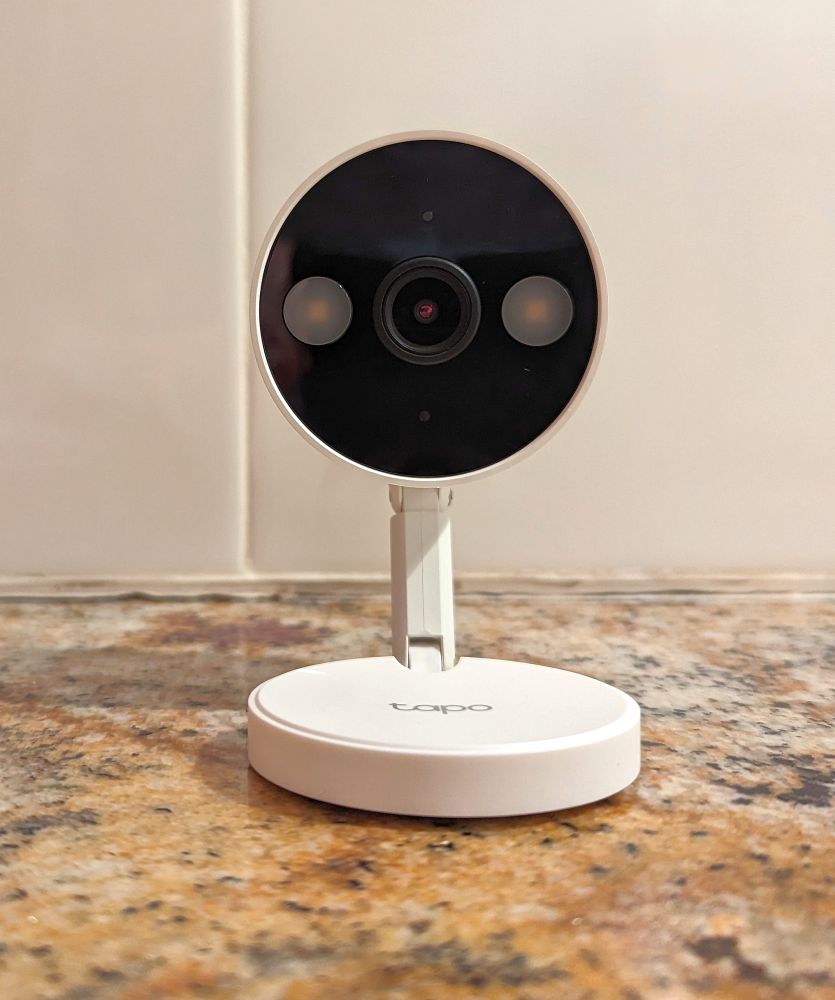
Mounting the C120 is where things get interesting. The camera ships with a magnetic weighted base that works well on flat surfaces, but TP-Link didn’t include a standard 1/4″-20 threaded screw hole — the universal tripod thread that opens up hundreds of third-party mount options. That limits your choices compared to cameras like the Wyze Cam that do include this thread. This guide covers what the included hardware does, and the three best aftermarket mounting options for situations the stock base doesn’t handle well.
How the included mount works
The C120 comes attached to a magnetic weighted metal base. The base is heavy enough to keep the camera stable on any flat surface without tipping over. The magnetic connection between the camera and base means you can detach and reattach the camera quickly for repositioning.
The base itself can also attach directly to any metal surface like a steel beam, a metal shelf, a filing cabinet, a refrigerator without any additional hardware. For non-metal surfaces, TP-Link includes an adhesive metal disk. Stick the disk to a flat surface, let the adhesive cure for 24 hours, and the magnetic base will hold to it the same way it holds to bare metal.
The mounting plate is versatile enough to be used upside down on a ceiling. Just enable the image flip option in the Tapo app settings so the video displays correctly.
If a flat surface or metal wall is all you need, the included setup is completely sufficient. The recommendations below are for situations where you need more such as a specific wall location, a window view, or a surface the magnetic base can’t handle.
Mount recommendations for the Tapo C120
1. BRAINWAVZ Drill Free Wall Mount Shelf — best for wall placement without drilling
The BRAINWAVZ Drill Free Wall Mount Shelf for Security Cameras is a small wall shelf specifically designed for home security cameras. It attaches to the wall using a VHB (Very High Bond) adhesive strip — no drilling, no anchors, no tools. The shelf gives the C120 a raised wall position that the magnetic base alone can’t achieve, and it includes built-in cable management to keep the power cable tidy.
VHB adhesive is strong enough to hold the C120 without any concerns, but it’s a one-time installation — once it’s stuck, removing it cleanly is difficult and it may pull paint. Set the shelf exactly where you want it before committing. Let the adhesive cure overnight before placing the camera on it.
View BRAINWAVZ Wall Shelf on Amazon →
2. Window Mount for Tapo C120 — best for window placement
Mounting the C120 to a window is a smart move for monitoring a driveway, front yard, or entry point from inside — no outdoor weatherproofing needed, no exterior drilling. The Window Mount compatible with the Tapo C120 is an adhesive frame designed specifically for this camera’s form factor. Remove the camera from its base, insert it into the mounting pocket, and the frame adheres directly to the glass.
Allow the adhesive to cure for at least 12 hours before putting the camera into the mount. Two important tips for window use: turn off the night vision in the Tapo app settings, because IR LEDs will create glare and reflection on the glass at night and ruin the image. Also turn off any status indicator lights for the same reason.
View Tapo C120 Window Mount on Amazon →
3. Metal surface mounting — use the included magnetic base creatively
Before buying anything additional, think about what metal surfaces are already in your space. The C120’s magnetic base is strong and holds reliably to any ferrous metal surface — steel shelving, filing cabinets, metal door frames, HVAC equipment, steel garage doors, and more. For garages in particular, the magnetic base on a steel beam or wall bracket can give you excellent coverage without any additional hardware.
For non-metal surfaces where you want magnetic attachment without the adhesive metal disk, a larger adhesive steel plate gives you a bigger magnetic footprint and a more secure hold than the small disk TP-Link includes.
Placement tips for the Tapo C120
- Height matters. Wall-mount or shelf-mount the camera 7 to 9 feet above the floor for the best downward angle on entry points, hallways, and rooms. Eye-level placement misses a lot and is easier to block or interfere with.
- Corner placement maximizes coverage. A camera in a corner of a room covers far more area than one mounted flat on a wall. If a corner shelf or corner wall position is available, use it.
- Turn off night vision for window use. IR night vision bounces off glass and produces a washed-out image at night. Disable it in Camera Settings when using the camera behind a window.
- Cable management. The C120 requires a continuous power connection. Run the cable along the wall or baseboard using cable clips to keep the install looking clean — a dangling cable draws attention to the camera.
Frequently Asked Questions
Does the Tapo C120 have a 1/4″-20 tripod hole?
No. The C120 uses a proprietary magnetic base and does not have a standard tripod thread. Third-party mounts need to be designed specifically for the C120 or use the magnetic base as the attachment point.
Can I mount the Tapo C120 on a ceiling?
Yes — the included magnetic base can be used upside down on a ceiling. Attach the adhesive metal disk to the ceiling surface, let it cure for 24 hours, then attach the magnetic base. Enable the image flip option in the Tapo app settings so the video displays correctly.
Can I use the Tapo C120 outdoors?
The C120 can handle outdoor conditions but requires a continuous power connection — it’s not battery powered. Make sure you can route the power cable to an outdoor outlet and that the camera is sheltered from direct rain exposure. It is not rated for submersion or heavy rain exposure.
Why does my window image look bad at night?
The IR night vision LEDs reflect off the glass and create glare that washes out the image. Disable night vision in Camera Settings → Night Vision → Always Off when using the camera behind a window. If there is enough ambient light outside, the camera will still produce a usable color image without IR.
