
Most Starlink connectivity problems that look like a dish or router issue actually come down to the cable running between them. A pinched power cord, an undersized ethernet run, or a cable that is simply too short for where you need to route it will cause dropouts and slow speeds that no amount of dish repositioning will fix. This guide covers Starlink cable options worth knowing about, from short adapters that extend or repair the factory setup to long-run replacements for roof-to-router distances that stretch well past the stock cable.
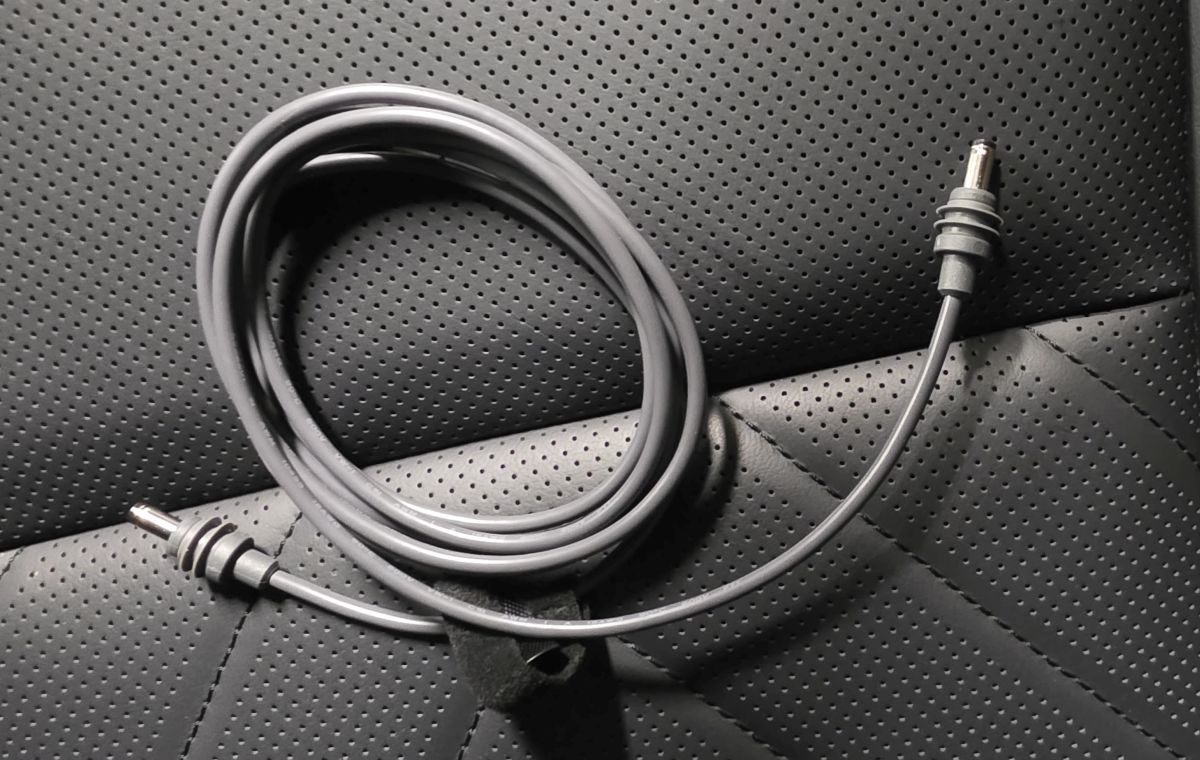
Whether you are wiring a single device directly to the dish, running power from a USB-C source instead of a wall outlet, or extending the run from a roof-mounted dish down to a router two floors away, the right cable makes the difference between a stable connection and a recurring headache. If you are powering a Starlink Mini from a vehicle instead, our Starlink Mini car adapter guide covers that setup specifically.
| Cable or Adapter | Best For | Length / Type |
|---|---|---|
| Nedul USB-C to DC Power Cable | Powering the Mini from a PD power bank or USB-C source | 6.5ft, USB-C to DC |
| STARGEAR Ethernet Adapter | Extending or repairing the factory ethernet run | 1FT, single RJ45 port |
| Hugener 4-Port Ethernet Adapter | Wiring multiple devices directly to the dish | 4 RJ45 ports |
| STARGEAR 49FT Replacement Cable | Mid-length replacement or extension runs | 49FT, RJ45 male-to-male |
| FIUTY 150FT Long-Run Cable | Long-distance runs from roof to router | 150FT, RJ45 |
Why the Right Starlink Cable Matters
The factory cable that ships with a Starlink Mini or Gen 3 kit is built for a typical install: dish on a roof or in a yard, router a reasonable distance away. The moment your setup deviates from that, whether it is a roof-to-basement run, a dish mounted further out than expected, or a need to power the Mini from something other than a wall outlet, the stock cable stops being enough. A Starlink cable extension or replacement solves the distance problem. A dedicated power cable solves the source problem. Trying to force the stock setup to do both usually ends in a cable that is stretched, spliced, or routed somewhere it should not be.
If you are still working out where the dish itself will live, our guides to Starlink RV mounts, Starlink boat mounts, and Starlink truck mounts cover mounting hardware for each of those situations, and pairing the right mount with the right cable length is what actually makes a permanent install work.
Nedul USB-C to DC Power Cable: Best Power Cable
This cable solves a specific problem: powering a Starlink Mini from something other than the included power supply. It converts a USB-C PD source into the DC output the Mini expects, which makes it useful for anyone running the dish off a power bank, a solar setup, or an existing USB-C PD charger instead of a wall outlet or vehicle adapter. The cable is waterproof and built on 18AWG wire, and the PD chip inside negotiates the correct voltage automatically once it is connected to a compatible source.
The catch is the power requirement. The source needs to support at least 65W at 20V PD, which rules out lower-wattage phone chargers and older USB-C ports. Check the wattage rating on whatever you plan to power it from before assuming this will work, the same way you would for the vehicle-based options in our Starlink Mini car adapter guide.
STARGEAR Ethernet Adapter: Best Starlink Ethernet Cable Adapter
For most people, the actual need is not a whole new cable, it is a way to extend or repair the factory ethernet run without cutting into the original Starlink cable. This adapter solves that with a waterproof RJ45 coupler built specifically for the Gen 3 and Mini connector, using soldered contacts instead of standard crimped ends to cut down on contact resistance. It lets you connect a standard ethernet cable to extend your run, using whatever length you need up to about 175ft before signal quality starts to suffer.
Because it is a coupler rather than a full replacement cable, it pairs with a standard outdoor-rated ethernet cable you supply separately, which makes it flexible for repair jobs or custom-length runs that a fixed-length replacement cable cannot match.
Hugener 4-Port Ethernet Adapter: Best for Multiple Wired Devices
Wi-Fi from a Starlink router is fine for most everyday use, but wired connections still matter for anything latency-sensitive or bandwidth-heavy: a gaming console, a security camera system, a desktop workstation. This adapter splits the Starlink connection into four RJ45 ports, letting you wire up several devices at once instead of competing for wireless bandwidth or adding a separate switch to the setup.
It is compatible with the Gen 3, Mini, and Standard 4X dishes, and each port runs at full gigabit speed independently, so plugging in multiple devices does not mean splitting bandwidth between them the way a basic splitter would.
STARGEAR 49FT Replacement Cable: Best Mid-Length Cable
When the factory cable is simply too short but you do not need anything close to a 150ft run, a fixed-length replacement in the 49ft range is usually the better fit than stacking couplers and extensions together. This cable uses welded, gold-plated RJ45 connectors on both ends instead of standard crimped terminals, which improves conductivity and helps resist the oxidation that eventually degrades a cheaper cable run over time.
It is a straight swap for the factory cable rather than an add-on, so installation is the same as replacing the stock cable: unplug the old one, run the new length, plug it back in.
FIUTY 150FT Long-Run Cable: Best Starlink 150 Ft Cable
Roof-mounted dishes on larger homes, detached garages, and multi-story installs often need far more cable than the factory length provides. This 150ft cable is built for exactly that gap, using 26AWG copper with a double-layer waterproof design and a CMR flame-retardant rating that makes it suitable for routing through walls or attics as well as outdoor runs.
At this length, routing matters as much as the cable itself. Plan the path before running it, avoid tight bends near the connectors, and keep it away from anything that generates heat if it is running through an interior wall or attic space.
Check Your Dish Generation First
Starlink Mini and Gen 3 use the same connector type, but older Gen 2 rectangular dishes use a different interface entirely. Before buying any replacement cable or adapter, confirm which dish you have. A cable built for Gen 3 and Mini will not fit a Gen 2 Standard Actuated system, and vice versa.
Starlink Cables FAQ
Do I need a special ethernet cable for Starlink, or will any cable work?
A standard Cat6 or better ethernet cable will work for extending or replacing a Starlink run, as long as you are using it with a coupler or adapter built for the Starlink connector. The dish and router themselves do not require a proprietary cable, but the connector interface on the dish end is specific to Starlink hardware.
How long can a Starlink ethernet cable run be before it affects performance?
Most manufacturers recommend staying under about 175ft for a standard ethernet extension before signal quality starts to degrade. If you need a longer run than that, a fiber-based solution becomes a better option than copper ethernet.
Can I power my Starlink Mini from a USB-C power bank instead of the included adapter?
Yes, as long as the power bank supports at least 65W at 20V PD output. A USB-C to DC power cable handles the conversion, but the power source itself has to meet that wattage threshold or the Mini will not get stable power.
Why does my Starlink keep disconnecting even though the cable looks fine?
Cable issues are not always visible. A pinched cable, a connector that is not fully seated, or a run that exceeds the recommended length can all cause intermittent drops without any obvious physical damage. Check connections first, then consider whether the cable length or routing might be the actual cause.
Whether the fix is a longer cable, a multi-port adapter, or a dedicated power source, matching the cable to the actual problem, distance, power source, or device count, is what solves these issues permanently instead of temporarily.
