
Finding the right GMC Terrain phone mount is easier once you separate the SUV into its two very different recent interiors. The 2018-2024 Terrain uses the previous-generation dashboard, while GMC completely redesigned the cabin for 2025 with a large vertical infotainment display and a different center stack.
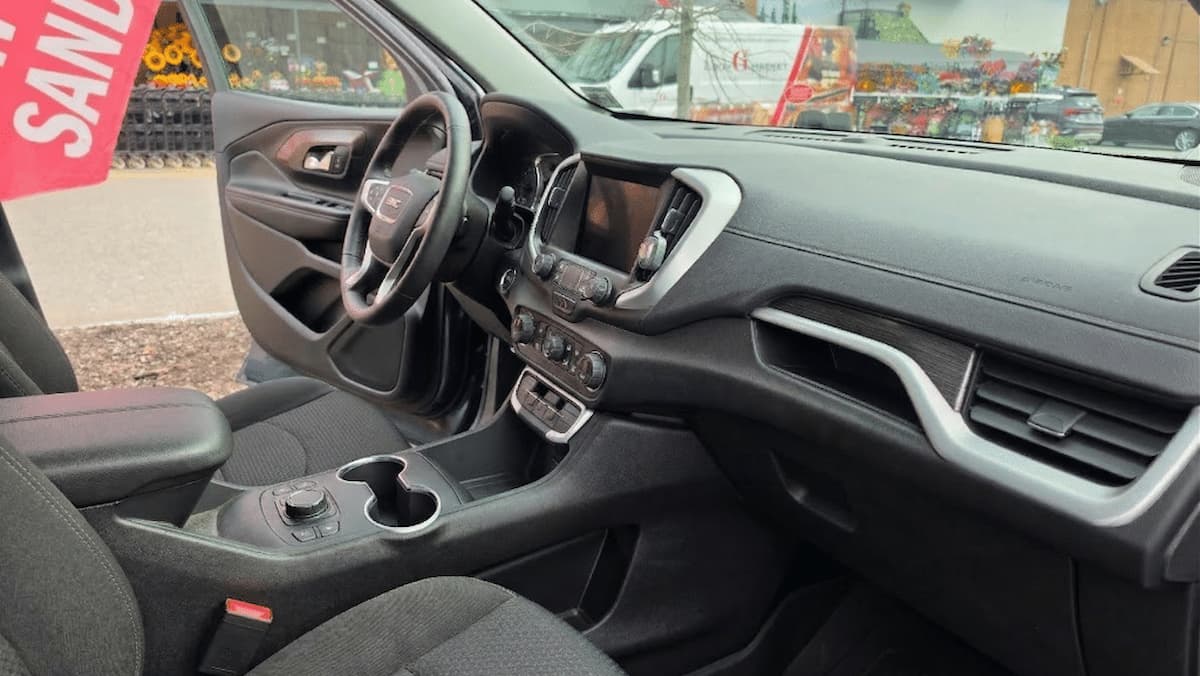
Insert your photo: 2025-2026 GMC Terrain interior.
That distinction matters. A custom mount designed around the 15-inch screen in a 2025 or 2026 Terrain will not fit a 2018-2024 model, while the excellent Course Motorsports bracket for the earlier generation stops at 2024. Instead of recommending one generic mount for every Terrain, this guide matches each mount to the generation where it makes sense.
If you own another GMC, MountGuys also has dedicated guides for the GMC Acadia, GMC Canyon, and GMC Yukon.
Best GMC Terrain Phone Mounts at a Glance
| Mount | Best For | Years / Trim |
|---|---|---|
| SKYLOTEC Magnetic Phone Holder | Best magnetic custom-fit pick | 2025-2026 Terrain with 15-inch screen |
| SKYLOTEC Car Phone Mount | Best custom cradle | 2025-2026 Terrain with 15-inch screen |
| Course Motorsports Direct Fit Phone Mount | Best OEM-style bracket | 2018-2024 Terrain |
| iOttie Easy One Touch Advanced | Best universal windshield/dash mount | Most Terrain models |
| APPS2Car Cup Holder Tablet and Phone Mount | Tablets and secondary devices | Most Terrain models |
The GMC Terrain Interior Changed for 2025
This is the most important thing to understand before buying a mount. The 2025 redesign introduced a much different dashboard centered around a tall 15-inch infotainment screen. The 2026 Terrain continues that basic layout.
That large screen occupies prime mounting territory, but it also creates an opportunity. Manufacturers can build brackets specifically around the screen instead of forcing you to attach something to a vent, windshield or random section of the dashboard.
The 2018-2024 Terrain has a completely different center stack. Fortunately, Course Motorsports makes a dedicated bracket for that generation that uses existing factory hardware behind the radio trim.
SKYLOTEC Magnetic Phone Holder for 2025-2026 GMC Terrain
For owners of the redesigned Terrain, the SKYLOTEC Magnetic Phone Holder is our first choice. Unlike a universal mount that happens to fit somewhere in the cabin, this version is sold specifically for the 2025-2026 GMC Terrain with the 15-inch infotainment screen.
It is also listed for the Elevation, AT4 and Denali, which is important because GMC expanded the redesigned Terrain lineup across those trims for 2026.
The big attraction here is positioning. A screen-specific mount can place the phone alongside the center display instead of sticking it high on the windshield or hanging it from an air vent. That keeps the phone closer to the natural line of sight while preserving the cleaner appearance of the new Terrain interior.
This version uses a magnetic phone interface, making it the better of the two SKYLOTEC choices for drivers who prefer quick one-handed attachment and removal. It is especially appealing for a MagSafe-compatible phone or case.
SKYLOTEC Car Phone Mount for 2025-2026 GMC Terrain
The second SKYLOTEC option uses the same basic vehicle-specific approach but replaces the magnetic head with a more traditional phone holder. It is likewise listed specifically for the 2025-2026 Terrain with the 15-inch display.
This is the version I would choose if you do not want to rely on magnets or if you frequently switch between phones and cases. A conventional cradle is also easier to recommend when several family members drive the same vehicle and use different devices.
The biggest advantage is still the custom mounting location. You get a phone position designed around the Terrain dashboard without committing to a windshield suction cup or sacrificing a cup holder.
Between the two SKYLOTEC models, the decision is simple: choose the magnetic version for faster attachment and the cradle version for broader phone and case compatibility.
Course Motorsports Direct Fit Phone Mount for 2018-2024 GMC Terrain
Owners of a 2018 through 2024 Terrain arguably have the most substantial custom option in this guide. The Course Motorsports Direct Fit Phone Mount uses a vehicle-specific metal bracket rather than adhesive, a suction cup or a basic vent clip.
The bracket mounts using factory hardware located behind the trim surrounding the radio. Course Motorsports describes the installation as a no-drill setup, and the vehicle-specific bracket is CNC cut and powder coated. The system also uses a machined pivot ball so the phone angle can be adjusted after installation.
That approach gives it a major advantage over a universal mount. Once installed, the bracket becomes part of the dashboard instead of depending on suction, adhesive or the strength of an air-vent blade.
The standard configuration uses a magnetic head, although Course Motorsports also offers other head configurations in its Direct Fit system. For someone keeping a 2018-2024 Terrain for several years, this is the mount I would look at before anything universal.
iOttie Easy One Touch Advanced Universal Mount
Not everyone wants a vehicle-specific bracket. If you lease the Terrain, move a mount between several vehicles or simply prefer a windshield position, the iOttie Easy One Touch Advanced is the universal option I would use.
It combines a suction mounting base with iOttie’s familiar one-touch phone cradle. Because it can be positioned on the windshield or a suitable dashboard surface, you have much more freedom to place the phone where it is comfortable for your seating position.
This becomes particularly useful if you frequently use the phone for navigation. A higher windshield position can be easier to glance at than a phone mounted low near the center console.
The downside is appearance. A custom SKYLOTEC or Course Motorsports bracket integrates better with the Terrain interior. A suction mount also occupies more visual space and should always be positioned where it does not interfere with the driver’s view.
APPS2Car Cup Holder Tablet Mount
The APPS2Car Cup Holder Tablet and Phone Mount fills a completely different role. It uses an expandable cup-holder base and can hold both smartphones and tablets, including devices up to approximately 11 inches.
I would not make this my first choice for a phone that you constantly reference while driving. The cup holders are naturally much lower than the infotainment screen, which means you have to look farther away from the road.
Where it makes sense is with a tablet, a second device, a passenger’s phone or an app that does not require constant visual attention. It also avoids adhesives and windshield suction entirely.
For someone who occasionally wants to use an iPad Mini or similar tablet in the Terrain, it gives you an option the smaller custom phone mounts cannot provide.
Which Mounting Location Works Best?
The best mounting location depends heavily on the Terrain generation.
| Location | Advantages | Drawbacks |
|---|---|---|
| Custom dash/screen mount | Clean position, vehicle-specific fit, does not use cup holder | Must match exact Terrain generation |
| Windshield | Excellent adjustability and line of sight | More visible and can obstruct view if poorly positioned |
| Dashboard | Keeps phone off glass | Surface shape and material can limit placement |
| Cup holder | Excellent support for larger devices and tablets | Low viewing position and uses a cup holder |
Common GMC Terrain Phone Mount Problems
Buying the wrong generation-specific mount: This is now the biggest potential mistake. The 2025 redesign means you cannot assume a mount labeled simply “Terrain” fits every recent model year.
Blocking part of the infotainment screen: On the 2025-2026 Terrain, check the phone position before tightening everything. The 15-inch display is large enough that an oversized phone or poorly adjusted mount can overlap part of the screen.
Putting a windshield mount too high: Higher is not always better. The phone should be easy to glance at without occupying important windshield space.
Expecting a cup-holder mount to work like a navigation mount: Cup-holder mounts are stable, but they usually position the screen much lower. That is fine for a tablet or secondary device and less desirable for frequent turn-by-turn navigation.
Choosing magnetic versus cradle without considering your case: If you use MagSafe-compatible hardware, the magnetic SKYLOTEC is convenient. If you use an unusual or particularly thick case, the cradle version may be the safer choice.
Best Mount by Terrain Model Year
2018-2024 GMC Terrain: Start with the Course Motorsports Direct Fit mount. It was designed specifically for this generation and attaches through existing factory hardware.
2025 GMC Terrain: The SKYLOTEC magnetic and cradle mounts are both designed around the new 15-inch infotainment display. Choose according to whether you prefer magnetic attachment or a gripping cradle.
2026 GMC Terrain: The same two SKYLOTEC mounts remain the most interesting custom options. Their listings specifically include the 2026 Terrain and the Elevation, AT4 and Denali trims.
Any generation where you do not want a custom bracket: Use the iOttie Easy One Touch Advanced. If the device is a tablet rather than a phone, use the APPS2Car cup-holder mount instead.
Bottom Line
The best GMC Terrain phone mount is no longer a generic windshield or vent mount. There are good custom-fit choices for both major recent Terrain interiors.
For a 2025 or 2026 GMC Terrain, the two SKYLOTEC mounts should be at the top of the list because they are designed specifically for the redesigned dashboard and 15-inch screen. Pick the magnetic version for fast attachment or the cradle version if you want a conventional grip.
For a 2018-2024 GMC Terrain, the Course Motorsports Direct Fit mount is the standout. Its vehicle-specific bracket and factory-hardware installation provide a much more integrated solution than a universal clip or suction mount.
The iOttie remains a good universal alternative, while the APPS2Car earns a place here primarily because it can handle tablets as well as phones.
The key is simple: buy for your Terrain’s generation first and your preferred mounting style second.
