
Adding a Garmin backup camera lets your compatible Garmin automotive, truck, or RV GPS navigator double as an automatic rear-view monitor without cluttering your dashboard with a second screen. When you shift into reverse, the live rear camera feed appears right on the same Garmin display you use for turn-by-turn navigation, then returns to your map as soon as you shift back into drive. Because Garmin has released four distinct generations in its wireless BC lineup (the BC 30, BC 35, BC 40, and BC 50), picking the wrong model for your specific GPS navigator is an expensive compatibility mistake. This guide compares every camera in the Garmin BC series, shows you how to match the right model to your navigator, and explains how license plate mounting and transmitter wiring work.
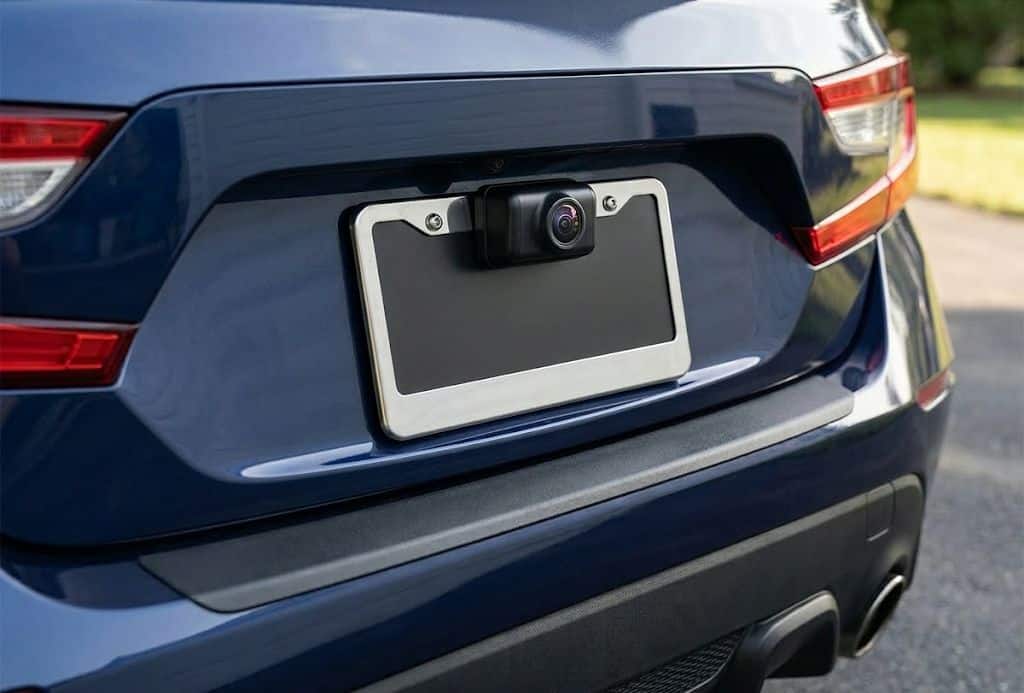
Quick Answer: Match the camera to your exact Garmin GPS generation first. For current navigators (including the DriveSmart 66/76/86, RV 795/895/1095, dēzl OTR 610/710/810/1010, Tread, and Zumo XT2/XT3), get the Garmin BC 50 for a 50-foot range and 720p HD video, or step up to the Garmin BC 50 with Night Vision if you back up in unlit areas. Want a zero-wiring installation on a car, SUV, or pickup within 26 feet? Choose the AA battery-powered Garmin BC 40. Running an older Garmin Nuvi, Drive, or DriveSmart 50/55/61/65? The Garmin BC 30 is your required match.
If you are outfitting an RV, pickup truck, or commuter car with a rear camera, it is also worth checking how your navigator is secured up front in the cab. Explore our GPS mounts hub and our camera mounts hub for heavy-duty dashboard, windshield, and exterior mounting hardware, or see our Starlink RV mount guide if you are building out a complete motorhome connectivity rig.
Garmin Backup Camera Comparison: BC 30 vs. BC 35 vs. BC 40 vs. BC 50
Use the comparison table below to see how Garmin’s current and legacy wireless backup cameras differ in video resolution, wireless range, power source, and navigator compatibility.
| Camera Model | Resolution & FOV | Wireless Tech & Range | Power & Weather | Best For / Primary GPS Fit |
|---|---|---|---|---|
| Garmin BC 50 | 720p HD, 160 degrees | Wi-Fi (2.4 GHz), 50 ft (100 ft w/ ext. cable) | Hardwired 12V/24V, IP67 | Most buyers with DriveSmart 66/76/86, RV 795/895/1095, dēzl OTR, Tread, Zumo XT2/XT3 |
| Garmin BC 50 with Night Vision | 720p HD, 160 degrees + 20 ft NightGlo IR | Wi-Fi (2.4 GHz), 50 ft (100 ft w/ ext. cable) | Hardwired 12V/24V, IP67 | Backing trailers, RVs, or trucks in dark campsites and unlit loading zones |
| Garmin BC 40 | 720p HD, 160 degrees | Wi-Fi (2.4 GHz), 26 ft | 2 AA Lithium batteries (no wiring), IPX7 | Fast no-wire license plate installs on cars, SUVs, and pickups (DriveSmart 55/65/66/76/86, RV 780/890, Tread) |
| Garmin BC 30 | 240p SD (640×480 sensor), 140 degrees | RF (2.4 GHz) to receiver power cable, 45 ft | Hardwired 12V/24V, IPX7 | Older Garmin Nuvi, Drive 50/51/52/60/61, DriveSmart 50/51/55/61/65/71, RV 660/770/780 |
| Garmin BC 35 | 480p SD (640×480), 160 degrees | Wi-Fi (2.4 GHz), 45 ft | Hardwired 12V/24V, IPX7 | Commercial and legacy RV units only: dēzl 780, dezlCam 785, RV 785/890/1090, Fleet 770/780/790 |
How the Garmin Wireless Backup Camera System Works
While all four cameras in the BC lineup send live rear video to your Garmin GPS without running a video cable from the rear bumper to the dashboard, Garmin uses two different hardware architectures depending on whether you buy a hardwired model or the battery-powered BC 40:
- Hardwired Models (BC 30, BC 35, and BC 50): The compact camera mounts at the rear of your vehicle (either on the included metal license plate bracket or screwed directly into a body panel) and connects via an attached lead cable to a small weather-resistant wireless transmitter module. That transmitter wires into a 12V or 24V DC power circuit at the rear of the vehicle and beams the video signal forward to the cab.
- Battery-Powered Model (BC 40): The BC 40 eliminates the separate transmitter box and wiring harness altogether. The camera, 2.4 GHz Wi-Fi transmitter, and two AA lithium battery bays are sealed inside a single tubular bar that snaps into a stainless steel license plate bracket.
How your GPS receives the wireless video signal also depends on the camera generation. On the newer BC 35, BC 40, and BC 50, the camera transmits over 2.4 GHz Wi-Fi directly to the internal Wi-Fi receiver built into your compatible Garmin navigator. On the older BC 30, the GPS unit itself does not have an internal camera receiver; instead, the BC 30 kit includes a specialized 12V vehicle power cable with an inline RF receiver module that replaces your standard Garmin cigarette-lighter charger cord.
When a hardwired BC 30, BC 35, or BC 50 is spliced into your vehicle’s reverse-light circuit, the camera powers up and switches your GPS screen to the rear view automatically every time you shift into reverse, then drops back to the navigation map when you shift into drive. Alternatively, you can wire the transmitter to a switched 12V constant power source and tap the on-screen camera icon on your GPS whenever you want to check behind your rig, which is helpful for monitoring a towed car or trailer while cruising down the highway.
Important (Live Video Only): Garmin BC cameras display real-time video for backing up and blind-spot checks, but they do not record or save video clips to a memory card. If you want continuous incident recording, pair your setup with a dedicated forward or rear dash cam; see our Garmin dash cam mounts guide for windshield and adhesive mounting options.
All four BC systems allow you to pair up to four wireless cameras to a single compatible Garmin navigator. RV, fifth-wheel, and commercial truck drivers frequently mount one camera on the rear bumper, a second camera looking down at the hitch, and side cameras covering blind spots, toggling between camera feeds right on the GPS touchscreen.
Detailed Breakdown of Every Garmin BC Backup Camera
1. Garmin BC 50: The Best Choice for Most Current Buyers
The Garmin BC 50 is Garmin’s current flagship wireless backup camera and the right match for almost anyone buying a modern Garmin automotive, truck, RV, or powersports navigator. It delivers 720p HD video resolution across a wide 160-degree field of view and transmits over 2.4 GHz Wi-Fi at up to 15 frames per second. Most importantly, Garmin engineered the BC 50 with a 50-foot true working wireless range, the longest native reach of any camera in the BC lineup.
That 50-foot range makes a major difference on long-wheelbase pickups, Class A and Class C motorhomes, fifth-wheel trailers, and commercial semi-tractors where the camera transmitter sits 35 to 50 feet behind the windshield mount. For extra-long truck-and-trailer combinations, Garmin offers an optional 50-foot extension cable (Garmin part number 010-13119-00, sold separately) that lets you relocate the Wi-Fi transmitter up to 100 feet forward toward the cab. The camera housing carries a full IP67 dust-tight and waterproof rating and includes both a metal license plate bracket and a standalone surface-mount bracket. Compatible devices include the DriveSmart 66, 76, and 86, DriveCam 76, RV 795, 895, and 1095, dēzl OTR 610, 620, 710, 720, 810, 820, 1010, and 1020, the Tread series, and the Zumo XT2 and XT3.
2. Garmin BC 50 with Night Vision: Best for Dark Campsites and Trailers
Standard backup cameras rely entirely on the white glow of your vehicle’s factory reverse bulbs to light up the pavement at night. On a long travel trailer, box truck, or utility bed where reverse lights are dim or partially blocked by a bumper or spare tire, a standard camera view quickly turns grainy and dark. The Garmin BC 50 with Night Vision solves that problem by building Garmin’s infrared NightGlo illumination directly into the camera housing, casting a clear 20-foot beam of invisible infrared light behind your vehicle in total darkness.
Because the integrated infrared LED array sits alongside the lens, the Night Vision camera body is slightly wider at 1.7 inches across compared to 1.0 inch on the standard BC 50. Every other specification matches the standard BC 50: 720p HD resolution, a 160-degree field of view, a 50-foot Wi-Fi transmission range (expandable to 100 feet with the 010-13119-00 extension cable), IP67 weather protection, and identical GPS compatibility. The Night Vision upgrade is well worth the price difference if you regularly back an RV into unlit wooded campsites after sunset, hook up a trailer before dawn, or back into dark commercial loading bays.
3. Garmin BC 40: Best Battery-Powered No-Wire Option
The Garmin BC 40 is the easiest backup camera in the lineup to install because it requires zero electrical wiring. Instead of splicing into taillight wiring or drilling cable pass-through holes in your trunk, you bolt the included flat metal mount behind the top of your rear license plate, insert two AA lithium batteries into the cylindrical camera body, and snap the camera into the bracket until it clicks. Pairing over Wi-Fi takes under two minutes, and you can activate the live 720p HD, 160-degree camera view either by tapping the screen or using voice commands such as “Show Video” on voice-enabled Garmin navigators.
To preserve battery life without a reverse-light trigger wire, the BC 40 uses internal motion and vibration sensing and automatically times out after 2.5 minutes or as soon as your vehicle accelerates forward. A fresh pair of AA lithium batteries lasts up to three months of normal daily driving, and swapping them at the license plate takes thirty seconds without unbolting the bracket. The primary tradeoff is wireless reach: because the compact battery-powered transmitter sits down at the rear bumper, the BC 40 has a maximum range of 26 feet. That is plenty of reach for passenger sedans, crossovers, minivans, and standard pickup trucks, as well as UTVs and side-by-sides using the tube-mount variant, but it is too short for travel trailers and Class A motorhomes. For rigs longer than 26 feet, step up to the hardwired BC 50.
Battery Chemistry Tip: Always use non-rechargeable 1.5V AA lithium batteries (such as Energizer Ultimate Lithium) inside the BC 40. Standard alkaline AA batteries lose voltage rapidly in freezing winter temperatures, and 1.2V rechargeable NiMH batteries start at too low a voltage for the Wi-Fi transmitter to operate reliably.
4. Garmin BC 30: Essential Match for Nuvi, Drive, and Earlier DriveSmart Units
The Garmin BC 30 was Garmin’s most widely supported wireless backup camera for nearly a decade, and it remains the only compatible backup camera for millions of older Garmin navigators still on the road today. Unlike newer Wi-Fi models, the BC 30 uses a 2.4 GHz RF link that transmits up to 45 feet from the rear transmitter box to a dedicated receiver power cable up front at the dashboard. That RF link penetrates metal trunk lids and pickup beds well, though the analog-to-digital receiver pipeline limits on-screen display resolution to 240p standard definition with a 140-degree field of view. While the image is noticeably softer than the 720p BC 40 and BC 50, it is completely clear enough in daylight and under reverse lights to spot cars, bicycles, hitch balls, and curbs behind your bumper.
Although Garmin has retired the BC 30 from active production in favor of the BC 50, kits remain available on Amazon for owners of legacy devices. If you rely on a Garmin Nuvi (such as the 55/57/65/67 or 24xx/25xx/26xx/27xx series), a Garmin Drive 50/51/52/60/61, a DriveAssist 50/51, a DriveLuxe 50/51, an RV 660/770/780, or an earlier DriveSmart 50/51/55/61/65/71, the BC 30 is the camera built for your hardware because the BC 50 will not pair with those older units.
Important (DriveSmart 66, 76, and 86 Adapter Requirement): If you already own a BC 30 installed on your vehicle and upgrade your dashboard GPS to a newer DriveSmart 66, 76, or 86, RV 795, or dēzl OTR 610/710, note that those newer navigators use a USB-C power port while the BC 30 receiver cable ends in a Mini-USB plug. To connect an existing BC 30 receiver cord to those USB-C units, you must add the official Garmin Mini-USB to USB-C Adapter Cable (part number 010-13199-01, sold separately). If you are buying a brand-new camera for a DriveSmart 66, 76, or 86, skip the adapter and buy the native Wi-Fi BC 50 instead.
5. Garmin BC 35: Narrow Compatibility for Specific dēzl and RV Models
The Garmin BC 35 served as Garmin’s transitional bridge between the RF-based BC 30 and the current HD BC 50. It upgraded video clarity to 640×480 (480p), widened the lens to a 160-degree field of view, retained a 45-foot hardwired transmission range, and switched from a receiver power cord to direct 2.4 GHz Wi-Fi pairing with the GPS head unit.
However, the BC 35 has the narrowest device compatibility list of any camera in the Garmin ecosystem. Garmin built it specifically for a single generation of commercial trucking, fleet, and large-screen RV navigators: the dēzl 780 LMT-S, dezlCam 785 LMT-S, RV 785, RV 890, RV 1090, Overlander, and Fleet 770/780/790 series. It does not work with consumer Nuvi, Drive, or DriveSmart models, nor does it pair with the newest RV 795/895/1095 or dēzl OTR 610/710/810/1010 series. Note that if you own a dēzl 780, dezlCam 785, or RV 785 and cannot find a discontinued BC 35 (part number 010-01991-00) in stock, those specific magnetic-mount docks also support third-party wired NTSC/PAL backup cameras via the 3.5mm video-in port on the powered mount.
GPS Compatibility: Match the Camera to Your Garmin Navigator
Checking compatibility is the single most important step before ordering. Garmin’s four backup cameras are not universally cross-compatible, and even consecutive model numbers within the same GPS family often require different cameras. Use the lookup table below to match your navigator, and always double-check your exact device name on Garmin’s official backup camera compatibility chart before buying.
| If You Own This Garmin GPS… | Compatible BC Camera(s) | Fitment & Adapter Notes |
|---|---|---|
| Garmin Nuvi (55/56/57/58, 65/66/67/68, 24xx, 25xx, 26xx, 27xx, nuviCam) | BC 30 | Uses the included BC 30 Mini-USB receiver power cable; incompatible with Wi-Fi BC 35/40/50 |
| Garmin Drive (40, 50, 51, 52, 60, 61) & DriveLuxe 50/51 | BC 30 (Drive 52 also supports BC 40) | BC 30 works across all listed Drive units; Drive 52 adds Wi-Fi support for the battery BC 40 |
| Garmin DriveAssist 50, 51 | BC 30 | Live BC 30 rear view displays on screen, but rear footage is not recorded by the front dash cam |
| Garmin DriveSmart 50, 51, 61, 70 | BC 30 | Direct plug-and-play with the included BC 30 Mini-USB receiver power cable |
| Garmin DriveSmart 55, 65, 71 EX | BC 30 or BC 40 | Choose BC 40 for easy AA battery setup (up to 26 ft) or BC 30 for hardwired 45 ft range |
| Garmin DriveSmart 66, 76, 86 & DriveCam 76 | BC 50, BC 50 Night Vision, BC 40, or BC 30 (with adapter) | BC 50 and BC 40 pair natively via Wi-Fi. Using an older BC 30 requires the 010-13199-01 Mini-USB to USB-C adapter cable |
| Garmin RV 660, 770, 780 | BC 30 (RV 770/780 also support BC 40 within 26 ft) | For RVs longer than 26 feet, use the hardwired 45-foot BC 30 rather than the 26-foot BC 40 |
| Garmin RV 785, RV 890, RV 1090 | BC 35 (RV 890/1090 also support BC 40 within 26 ft) | RV 785 also supports wired third-party cameras via its magnetic mount video-in jack |
| Garmin RV 795, RVcam 795, RV 895, RV 1095 | BC 50 or BC 50 Night Vision (RV 795 also supports BC 40) | BC 50 is the primary 50-foot HD camera for current Garmin RV navigators |
| Garmin dēzl 570, 580, 770, OTR500, OTR700 | BC 30 (dēzl 580 and OTR700 also support BC 40) | Verify exact dēzl generation before ordering |
| Garmin dēzl 780, dezlCam 785, Fleet 770/780/790 | BC 35 | Built for the commercial Wi-Fi BC 35 or wired video-in dock accessories |
| Garmin dēzl OTR 610, 620, 710, 720, 810, 820, 1010, 1020 | BC 50 or BC 50 Night Vision | Supports the 50-foot BC 50 plus the optional 50-foot extension cable for 100-foot tractor-trailer reach |
| Garmin Tread Series & Zumo XT / XT2 / XT3 | BC 50 / BC 50 Night Vision (Tread & Zumo XT2/XT3); BC 40 (Tread & Zumo XT) | Original Zumo XT pairs with BC 40; newer Zumo XT2 and XT3 pair with the BC 50 series |
If you are also upgrading the cab mount for a large-format 8-inch or 10-inch Garmin navigator, remember that those larger screens use a heavier 22mm ball socket rather than Garmin’s consumer 17mm ball. See our Garmin 17mm vs. 22mm mount compatibility guide, our Garmin DriveSmart 86 mounts guide, and our Garmin dēzl OTR 800 and 1000 mounts guide for heavy-duty dashboard, drill-down, and windshield options.
Mounting and Installation Overview
While the battery-powered BC 40 installs in minutes with a screwdriver and two AA lithium batteries, Garmin recommends professional installation for the hardwired BC 30, BC 35, and BC 50 models. That said, anyone comfortable removing an interior trunk panel and tapping into a 12V taillight wire can complete a clean DIY installation in about an hour.
1. Camera Placement and License Plate Mounting
The most popular mounting spot on passenger cars, SUVs, and pickup trucks is centered at the top edge of the rear license plate. The BC 40 and BC 50 include flat metal brackets that slip behind the upper license plate ear and secure using your existing top license plate screws, avoiding the need to drill into painted sheet metal. If your vehicle only uses two top screws and your plate rattles or bends after adding a camera bracket, see our 2-hole license plate frame and bracket guide for anti-rattle backing plates and silicone frames.
On RVs, utility bodies, and cargo trailers where the license plate sits off-center on the left bumper, you can bypass the plate bracket and screw the standalone camera bracket higher up on the center rear panel. Before tightening screws permanently or drilling a cable pass-through hole, power the camera up temporarily and inspect the live framing on your Garmin screen. Angle the lens slightly downward so the edge of your rear bumper or hitch ball is visible at the very bottom of the screen while the horizon sits in the upper third of the frame. You can then fine-tune the colored on-screen distance guidance lines directly inside the Garmin GPS settings menu.
2. Reverse Light vs. Constant 12V Wiring
For the hardwired BC 30, BC 35, and BC 50, you have two ways to wire the red positive (+12V) and black ground (-12V) leads coming off the wireless transmitter harness:
- Reverse Light Circuit (Recommended for Automatic Switching): Splicing the red power wire into your vehicle’s positive reverse-lamp wire (and securing the black wire to a clean bare-metal chassis ground) powers the transmitter only when the transmission is in reverse. Your Garmin navigator senses the incoming signal and switches from the map to the backup camera view automatically within a couple of seconds, then switches back to the map when you shift out of reverse.
- Switched 12V Constant Power (For Anytime Rear Monitoring): Wiring the transmitter to an ignition-switched 12V accessory circuit keeps the camera powered whenever the vehicle is running. Instead of popping up automatically in reverse, you tap the camera button on your Garmin screen whenever you want to check a towed trailer, horse trailer, or rear cargo rack while driving forward. Never wire a BC transmitter to an unswitched battery circuit that stays live when the ignition is off, or it will drain your starter battery while parked.
3. Wireless Transmitter Placement for Maximum Range
On hardwired models, the short lead attached to the camera head connects to the rectangular wireless transmitter box (roughly 30 to 60 inches from the camera, depending on the model). Where you mount that transmitter determines whether your video feed stays rock-solid or drops frames.
Radio and Wi-Fi signals travel poorly through solid steel panels, cast-iron frame crossmembers, rear-mounted spare tires, and dense fiberglass or aluminum RV walls. Whenever possible, route the camera cable inside the dry trunk lid, tailgate shell, or interior cargo trim and mount the wireless transmitter vertically on a flat surface away from thick metal structural beams. On fifth-wheels, travel trailers, and long box trucks, run Garmin’s optional 50-foot BC 50 extension cable (010-13119-00) from the rear camera toward the front bulkhead of the trailer and mount the transmitter near the front hitch nose so the wireless jump to your windshield GPS is only a few feet.
Frequently Asked Questions
Does a Garmin backup camera record video like a dash cam?
No. Every camera in the Garmin BC series (BC 30, BC 35, BC 40, and BC 50) transmits a live video stream for real-time backing up and blind-spot visibility only. None of the BC cameras have an SD card slot or save recorded footage. Even if you pair a BC camera with an integrated dash cam navigator such as the Garmin DriveCam 76, DriveAssist 51, or dēzlCam, the built-in dash cam records only the front windshield camera while displaying the rear BC camera live on screen.
Can I pair a Garmin BC backup camera with my smartphone, Apple CarPlay, or a non-Garmin screen?
No. Garmin BC cameras use proprietary wireless pairing protocols designed exclusively for compatible Garmin GPS navigators. They do not pair with iOS or Android phones, do not work with Apple CarPlay or Android Auto head units, and do not output a standard RCA video signal for aftermarket dash monitors.
How many Garmin backup cameras can I connect to one GPS?
You can pair up to four BC cameras of the same compatible generation to a single Garmin navigator. When multiple cameras are active, on-screen arrow buttons let you cycle between Camera 1, Camera 2, Camera 3, and Camera 4, and you can rename each camera (for example, “Rear Bumper,” “Hitch,” or “Right Blind Spot”) in the settings menu. Note that the GPS displays one camera feed at a time rather than a four-way split screen.
Why won’t my Garmin DriveSmart 66, 76, or 86 connect to my BC 30 camera?
The BC 30 wireless receiver is built into its included Mini-USB vehicle power cable, whereas the DriveSmart 66, 76, and 86 (along with the DriveCam 76, RV 795, and dēzl OTR 610/710) use a USB-C power input on the cradle. You cannot plug the BC 30 receiver cord directly into those units without adding the official Garmin Mini-USB to USB-C Adapter Cable (part number 010-13199-01). Once that adapter cable connects the BC 30 receiver cord to the USB-C port on the GPS cradle, the camera feed works normally.
Will the battery-powered Garmin BC 40 work on a travel trailer or fifth-wheel?
Not reliably on most full-size trailers. The BC 40 has a maximum wireless range of 26 feet in open air, and mounting the camera on the rear bumper of a travel trailer puts the combined length of the tow vehicle and trailer well beyond 26 feet while placing multiple metal walls between the bumper and the dashboard. For trailers, fifth-wheels, and motorhomes, choose the hardwired Garmin BC 50 (50-foot range, expandable to 100 feet with the extension cable).
Can I install a hardwired Garmin BC 50 or BC 30 myself?
Yes, if you have basic 12V automotive wiring experience. The job involves bolting the camera bracket to the license plate, feeding the thin camera wire into the trunk or rear panel of the vehicle, mounting the transmitter box away from heavy metal obstructions, and splicing the two power leads into your reverse-light power and ground wires. If you want to avoid cutting or tapping into vehicle wiring altogether and your vehicle is under 26 feet long, choose the AA battery-powered Garmin BC 40 instead.
Bottom Line: Choosing the Right Garmin Backup Camera
Picking the right Garmin backup camera comes down to two questions: which exact Garmin navigator sits on your dashboard, and how far is it from your windshield to your rear bumper? If you own a current-generation navigator (DriveSmart 66/76/86, RV 795/895/1095, dēzl OTR, Tread, or Zumo XT2/XT3), the Garmin BC 50 is the best all-around choice for its 720p HD clarity and 50-foot wireless reach, while the Garmin BC 50 with Night Vision is worth every penny if you back up trailers or RVs in the dark. If you drive a standard car, SUV, or pickup truck with a compatible Wi-Fi navigator and want a five-minute installation with zero wiring, get the battery-powered Garmin BC 40. And if you are keeping a trusted older Nuvi, Drive, or earlier DriveSmart in service, the Garmin BC 30 remains your dedicated match.
Once your backup camera is paired, make sure your navigator is anchored securely up front where you can see the screen clearly while reversing. Check our Garmin automotive GPS car mount guide for 17mm windshield, beanbag, air vent, and CD slot mounts, or visit our Garmin 17mm vs. 22mm mount guide if you run an 8-inch or 10-inch RV or truck display.
