
A RAM mount lock can make a motorcycle, vehicle, boat, or equipment mount considerably harder to remove. That matters because the standard adjustment knob on a RAM double socket arm can be loosened by hand in seconds.
The modular design that makes RAM Mounts so convenient also creates several potential theft points. Someone may be able to loosen the socket arm, unbolt the base, or release the phone or GPS from its holder. Securing only one component does not necessarily protect the entire installation.
Fortunately, you usually do not need to replace your existing mount. A keyed locking knob or RAM Pin-Lock security knob can replace the standard arm knob, while better base hardware and the right device holder can protect the rest of the system. If you are unfamiliar with how the components fit together, see our RAM Mount assembly guide first.
RAM Mount Lock Options Compared
RAM offers two primary ways to prevent someone from turning the socket-arm knob by hand. The keyed locking knob uses a conventional key. The Pin-Lock uses a removable patterned key knob.
| RAM Mount Lock | Best For | Compatibility and Limitation |
|---|---|---|
| RAM-KNOB3LU Key Lock Knob | Motorcycles, boats, open vehicles, and other exposed installations | Fits 1-inch B-size socket arms. Its brass insert offers better corrosion resistance. |
| RAM-KNOB3LSU Key Lock Knob | Enclosed vehicle interiors and indoor installations | Fits 1-inch B-size socket arms. Its steel insert is less corrosion-resistant than the brass version. |
| RAM RAP-S-KNOB3-4U Four-Pin Pin-Lock | B-size mounts using the four-pin key pattern | Fits 1-inch B-size arms and requires a matching four-pin key knob. |
| RAM RAP-S-KNOB3-5U Five-Pin Pin-Lock | B-size mounts using the five-pin key pattern | Fits 1-inch B-size arms and requires a matching five-pin key knob. |
| RAM RAP-S-KNOB5U C-Size Pin-Lock | Larger tablets, marine electronics, and other C-size systems | Fits 1.5-inch C-size arms. It will not fit a 1-inch B-size arm. |
How a RAM Mount Can Be Stolen
A typical RAM installation has three separate sections:
- The base: This attaches to a handlebar, dash, console, windshield, rail, or other mounting surface.
- The socket arm: This connects the base ball to the ball attached to the device holder.
- The holder or cradle: This grips the phone, GPS, tablet, camera, or marine electronics.
The standard socket-arm knob is the most obvious weakness because it requires no tool. Loosening it releases both ball joints, allowing the arm and holder to be removed from the base.
Installing a locking knob addresses that weakness, but someone may still be able to remove a clamp base, undo exposed mounting hardware, or release the device from its cradle. Effective theft deterrence means examining the entire path from the mounting surface to the device.
Keyed RAM Locking Knob: Best Conventional Lock
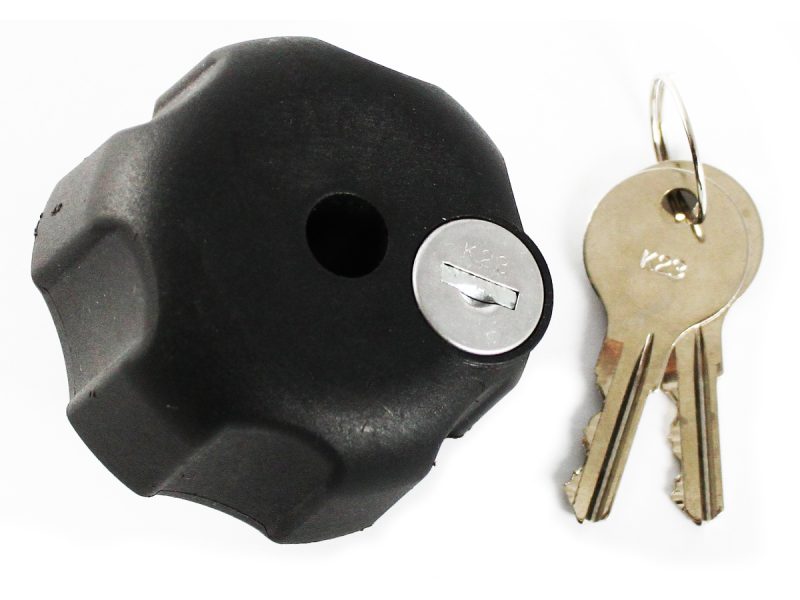
A keyed RAM locking knob directly replaces the standard knob on a compatible double socket arm. After the arm has been positioned and tightened, turning the key disengages the knob from the threaded insert. The outer knob can then rotate without loosening the arm.
This is the most familiar choice for anyone who prefers a conventional lock and metal key. RAM offers different versions based on ball size and insert material.
For a 1-inch B-size arm, the important distinction is between the brass-insert and steel-insert models:
- RAM-KNOB3LU: The brass insert is the better choice for motorcycles, boats, open-cab vehicles, and other locations exposed to rain or humidity.
- RAM-KNOB3LSU: The steel insert provides the same locking function but is better suited to enclosed cockpits, vehicle interiors, and indoor installations.
Both versions secure the arm adjustment point. They do not prevent someone from removing a phone from an X-Grip, releasing a Garmin unit from its powered cradle, or unbolting an inadequately secured base.
B-Size RAM Pin-Lock Options
RAM Pin-Lock security knobs replace the standard hand knob with a low-profile security knob. A separate patterned key knob engages the pins when you need to tighten, loosen, or reposition the arm. After adjustment, the key knob is removed and stored elsewhere.
The four-pin and five-pin versions perform the same basic job. The pin count identifies the key pattern and should not be treated as a security ranking. A five-pin model is not automatically stronger or more theft-resistant than a four-pin model.
RAM RAP-S-KNOB3-4U Four-Pin Pin-Lock
The four-pin version fits 1-inch B-size socket arms and requires the matching four-pin key knob. It is a useful choice when you already own other four-pin RAM security components or want several mounts that use the same key pattern.
RAM RAP-S-KNOB3-5U Five-Pin Pin-Lock
The five-pin model also fits 1-inch B-size socket arms. It is the better choice when your existing RAM security components already use the five-pin pattern or when you want replacement five-pin keys to work across several mounts.
Advantages shared by both B-size versions include:
- Lower profile than the larger keyed locking knob
- No conventional lock cylinder exposed to the weather
- Lower cost than most keyed alternatives
- Replacement patterned key knobs are available
- Matching-key units can simplify installations with several mounts
The main disadvantage is that you must keep track of the patterned key knob. Store it on your key ring, in a locked compartment, or with your motorcycle tools rather than beside the mount.
C-Size RAM Pin-Lock for 1.5-Inch Arms
The RAM RAP-S-KNOB5U is the corresponding Pin-Lock security knob for 1.5-inch C-size socket arms. C-size systems are commonly used for tablets, marine electronics, heavier GPS equipment, and other devices that need more support than a B-size system provides.
This is not an alternative key pattern for a B-size arm. It is a physically different component made for a larger socket arm.
Before ordering, measure the rubber ball at either end of the arm:
- A 1-inch ball indicates a B-size system.
- A 1.5-inch ball indicates a C-size system.
Many negative experiences with this component result from ordering it for the wrong arm size. The product cannot tighten properly on a B-size arm because its dimensions and thread are different.
Secure the Mounting Base
A locking arm is useful only when the base is difficult to remove. The most secure base usually attaches with hardware that cannot be reached or turned easily.
Better choices include:
- Drill-down bases installed with bolts, washers, and locking nuts behind the mounting surface
- AMPS-pattern bases secured with tamper-resistant pin-in Torx fasteners
- Handlebar U-bolt bases with the nuts positioned where tools cannot easily reach them
- Vehicle-specific bases attached behind trim or fastened to factory hardware
Suction cups, adhesive bases, Tough-Claw mounts, and other hand-operated clamps are designed for convenience and portability. A locking arm cannot convert one of these removable bases into a permanent installation.
A standard Torx screw is also not a security fastener. If theft resistance is the objective, use a tamper-resistant version with the center pin and keep the matching driver somewhere secure.
Does a RAM Mount Lock Protect the Device?
Sometimes, but not by itself.
A locked socket arm can keep the holder attached to the base. It does not necessarily stop someone from removing the device from that holder.
For example:
- A phone can still be pulled from an open X-Grip or Quick-Grip holder.
- A Garmin zūmo may still release from its powered cradle unless the cradle or GPS has a separate locking mechanism.
- A tablet may remain removable from an open spring-loaded holder.
- A camera can potentially be unscrewed from a threaded adapter.
For expensive electronics that must remain unattended, use a holder or enclosure designed to lock the device itself. Otherwise, remove the phone, GPS, tablet, or camera when leaving the vehicle.
A RAM mount lock should be described as theft deterrence, not a guarantee against theft.
How to Install a RAM Security Knob
The security knob installs in place of the standard knob on a compatible double socket arm:
- Support the device and arm so they do not fall when the existing knob is removed.
- Turn the standard RAM knob counterclockwise until it comes completely off the threaded shaft.
- Confirm that the replacement security knob matches the arm’s ball size and thread.
- Install the locking or Pin-Lock knob and position both ball joints.
- Tighten the arm firmly enough to prevent movement without overtightening it.
- For a keyed knob, turn the key to disengage the outer knob.
- For a Pin-Lock, remove the patterned key knob and store it securely.
- Pull and twist the arm gently to confirm that it cannot be loosened by hand.
Keep a spare key in a safe location. For motorcycles or boats, carrying a spare away from the vehicle can prevent a lost key from ending a trip early.
Where a Lockable RAM Mount Makes Sense
A locking knob is most useful when a mount remains visible or unattended:
- Motorcycles: A locked arm can deter someone from quickly removing a GPS cradle or phone mount while the bike is parked.
- Boats: Pin-Lock components and corrosion-resistant hardware help discourage tampering with marine electronics mounts.
- Open vehicles: Jeeps, UTVs, golf carts, and other open-cab vehicles leave mounting equipment exposed.
- Fleet vehicles: Security knobs can prevent drivers or passengers from repositioning or removing assigned equipment.
- Public installations: Kiosks, counters, workshops, and shared equipment stations benefit from tool-controlled adjustment.
A lock adds less value inside a privately parked vehicle if the device and mount are already hidden. In that situation, removing the device and storing the mount out of sight may be the simpler choice.
Frequently Asked Questions
Can a RAM locking knob fit any RAM Mount?
The locking knob should match the socket arm’s ball size and thread. A B-size locking knob may not fit a C-size arm.
What is the difference between a keyed knob and RAM Pin-Lock?
A keyed knob uses a conventional metal key to engage or disengage the outer knob. A Pin-Lock uses a removable patterned key knob that fits a specific pin arrangement.
Is a five-pin RAM Pin-Lock better than a four-pin version?
Not necessarily. The pin count primarily identifies the matching key pattern. Choose the pattern used by your existing RAM security components or select one pattern for all new installations.
Why doesn’t the C-size Pin-Lock fit my RAM arm?
The C-size security knob is designed for 1.5-inch arms. Many phone and motorcycle GPS mounts use smaller 1-inch B-size arms and require a B-size Pin-Lock.
Should I choose a brass or steel locking knob?
Choose the brass-insert version for exposed outdoor, motorcycle, or marine installations. The steel-insert version is more appropriate for enclosed cockpits and indoor environments.
Will a locking knob stop someone from stealing my Garmin GPS?
It can secure the RAM socket arm, but it does not automatically lock the Garmin device into its cradle. Use a locking GPS cradle or remove the GPS when the vehicle is unattended.
Can I secure a suction-cup RAM Mount?
You can lock the socket arm, but the entire suction-cup base can still be released from the glass. Suction mounts are not appropriate when a permanent theft-resistant installation is required.
Related Mount Guides
Bottom Line
For most 1-inch B-size installations, the choice comes down to a keyed RAM mount lock or a four-pin or five-pin RAM Pin-Lock. Choose the brass keyed version for exposed outdoor installations, the steel version for enclosed environments, or a Pin-Lock when you want low-profile tamper resistance without a conventional lock cylinder.
Owners of 1.5-inch C-size systems need the larger C-size Pin-Lock. Confirm the ball diameter before ordering because B-size and C-size security knobs are not interchangeable.
The locking knob is only one part of the installation. Secure the base with appropriate hardware, verify that the arm cannot be loosened, and determine whether the device holder needs its own lock. When the phone, GPS, tablet, or camera can be removed easily, taking it with you remains the safest option.
