
In this Displine Companion Wall 2.0 review, we take a hands-on look at one of the best-made tablet mounts we have come across. Manufactured in Germany by Displine GmbH from CNC-milled solid aluminum, the Companion Wall 2.0 replaces bulky plastic spring cradles and exposed charging cords with a slim, two-piece metal enclosure that looks like architectural hardware on the wall.
We installed the black powder-coated model in landscape orientation above a residential wall switch with a blue Apple iPad to evaluate its machining tolerances, eight-magnet grip and snap-over frame retention, anti-theft locking screw, and integrated USB-C cable setup. Displine sent us this mount for testing and sponsored our review time, though all installation photos, hands-on impressions, and conclusions below are 100 percent our own.
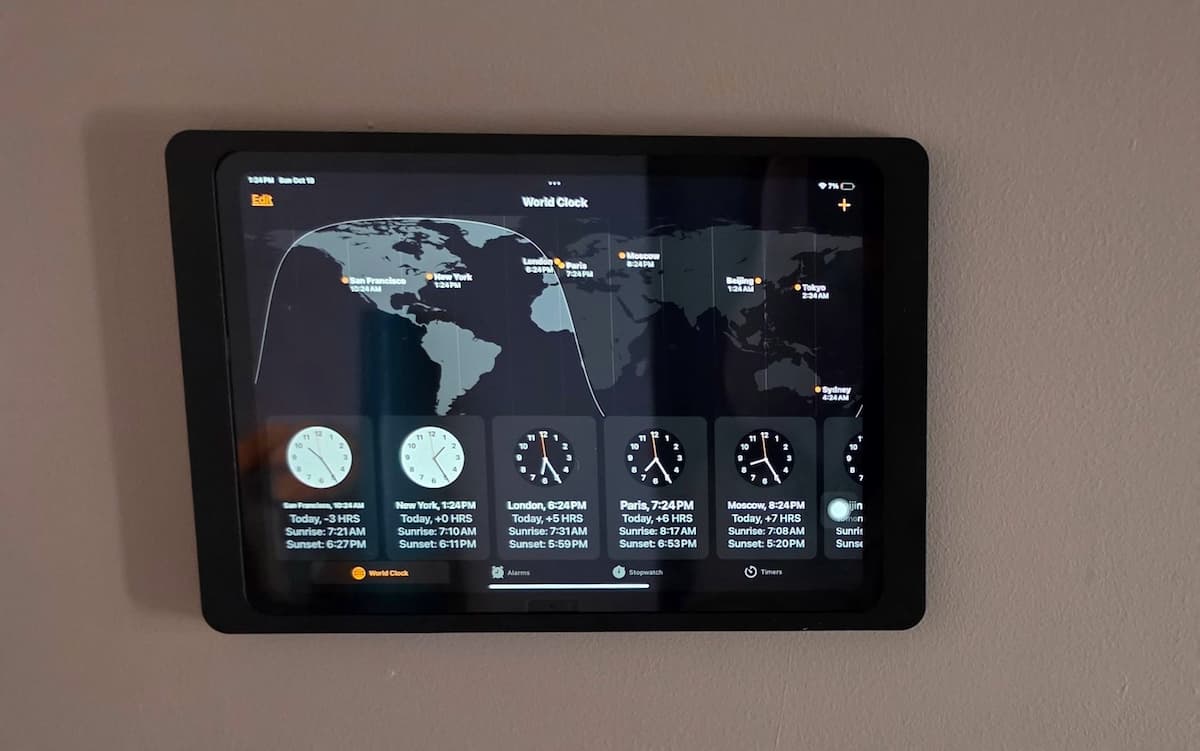
Quick Answer: As our Displine Companion Wall 2.0 review details below, this CNC-machined aluminum frame is an exceptional wall mount for smart-home dashboards, kitchens, and commercial rooms. The black powder-coated finish completely hides the tablet’s outer body color, and the magnetic grip with its snap-over top bracket feels rock-solid. Because the built-in USB-C cable lead is short, you can either connect it to a recessed behind-wall power supply or USB-C extension cord for continuous power, or skip wiring altogether at home and pop the magnetic faceplate off periodically to recharge your tablet.
Most wall-mounted tablet brackets fall into one of two categories: inexpensive plastic claw holders that leave cords dangling down the drywall, or clunky industrial lockboxes designed for warehouse timeclocks. If you are browsing our tablet mounts directory for a dedicated Apple HomeKit, Home Assistant, Control4, or conference room display, neither of those looks right in a finished home or modern office. Below is how the Displine Companion Wall 2.0 performs in real-world handling and what you need to know before mounting it.
Displine Companion Wall 2.0 Review: Highlights and Buying Considerations
Before looking at the frame geometry and wiring setup, here is a snapshot of where the Companion Wall 2.0 stood out during our installation and what to plan for before ordering.
| What Stood Out in Testing | Things to Know Before Installing |
|---|---|
| Heavy-duty CNC-milled aluminum build: Machined from solid metal rather than stamped sheet metal or molded ABS plastic, making it one of the best-constructed mounts we have handled. | Short built-in charging lead: For continuous power, the internal right-angle USB-C cable requires a recessed in-wall adapter or a USB-C extension cord, though you can also mount it wire-free and remove the tablet periodically to recharge. |
| Clean black powder-coated finish: Fine matte texture resists fingerprints, completely hides a bright colored iPad body inside the frame, and blends into modern residential or office walls. | Exact model-specific sizing: Each frame is milled to tight tolerances for a specific iPad or Samsung Galaxy Tab family, so you must select the exact version for your tablet and use it without a case. |
| Eight-magnet grip with snap-over faceplate: Four pairs of recessed neodymium magnets pull the front bezel into alignment and snap cleanly over the mounting assembly with zero rattle. | Two-handed tablet removal: Even if you leave out the optional security screw at home and rely purely on the magnets, taking the iPad off the wall requires popping off the front bezel rather than sliding the tablet out one-handed. |
| Concealed anti-theft screw and enclosed USB-C plug: The outer frame covers both the tablet and the right-angle USB-C connector head, and allows full hidden wiring if you route power through the wall behind the bracket. | Fixed portrait or landscape orientation out of the box: You can bolt the backplate vertically or horizontally during installation, while rotating the mount on the wall afterward uses Displine’s optional Rotation Unit. |
Displine Companion Wall 2.0 Specifications
Displine machines the Companion Wall 2.0 in dedicated size variants so the front bezel frames the active touchscreen without gaps. Here are the core hardware specifications across the lineup.
| Specification | Details |
|---|---|
| Material and Construction | Precision CNC-milled solid aluminum (two-piece rear mounting plate and front bezel, internal frame stamping DL-F000-02 on our test unit) |
| Finish Options | Black powder-coated (tested), White powder-coated, Anthracite powder-coated |
| Supported Apple iPad Models | iPad 10.9-inch (10th Gen) and 11-inch (A16); iPad Air 10.9-inch (4th and 5th Gen) and Air 11-inch (M2, M3, M4); iPad Pro 11-inch (1st to 4th Gen) |
| Supported Samsung Galaxy Tab Models | Galaxy Tab A9 (8.7-inch), Tab A11 (8.7-inch), Tab A9+ (11-inch), Tab A11+ (11-inch), Tab S9 (11-inch), Tab S10 FE (10.9-inch), Tab Active5 Pro |
| Retention Mechanism | 8 recessed neodymium magnets (4 pairs along the side rails) with snap-over front bezel and concealed anti-theft locking screw |
| Mounting Orientation | Fixed portrait (vertical) or landscape (horizontal); 90-degree rotation supported via optional Rotation Unit |
| Integrated Charging Hardware | Short internal right-angle USB-C cable pre-routed in the milled side channel (requires wall adapter or extender for continuous power, or can be omitted for battery-powered use) |
| VESA and Wall Compatibility | Direct 4-screw wall mounting (screws, dowels, and protective silicone/felt screw pads included) plus 100x100mm VESA hole pattern |
Build Quality, Machining, and the Black Finish
Picking up the Displine Companion Wall 2.0 out of the box immediately sets it apart from consumer tablet brackets. Where most wall mounts rely on injection-molded plastic arms or thin stamped steel, Displine mills the Companion Wall 2.0 from solid aluminum. Flipping the front bezel over reveals the precision CNC toolpaths, recessed magnet pockets, and the milled right-side cavity that houses the right-angle USB-C charging plug without adding bulk to the outer perimeter.
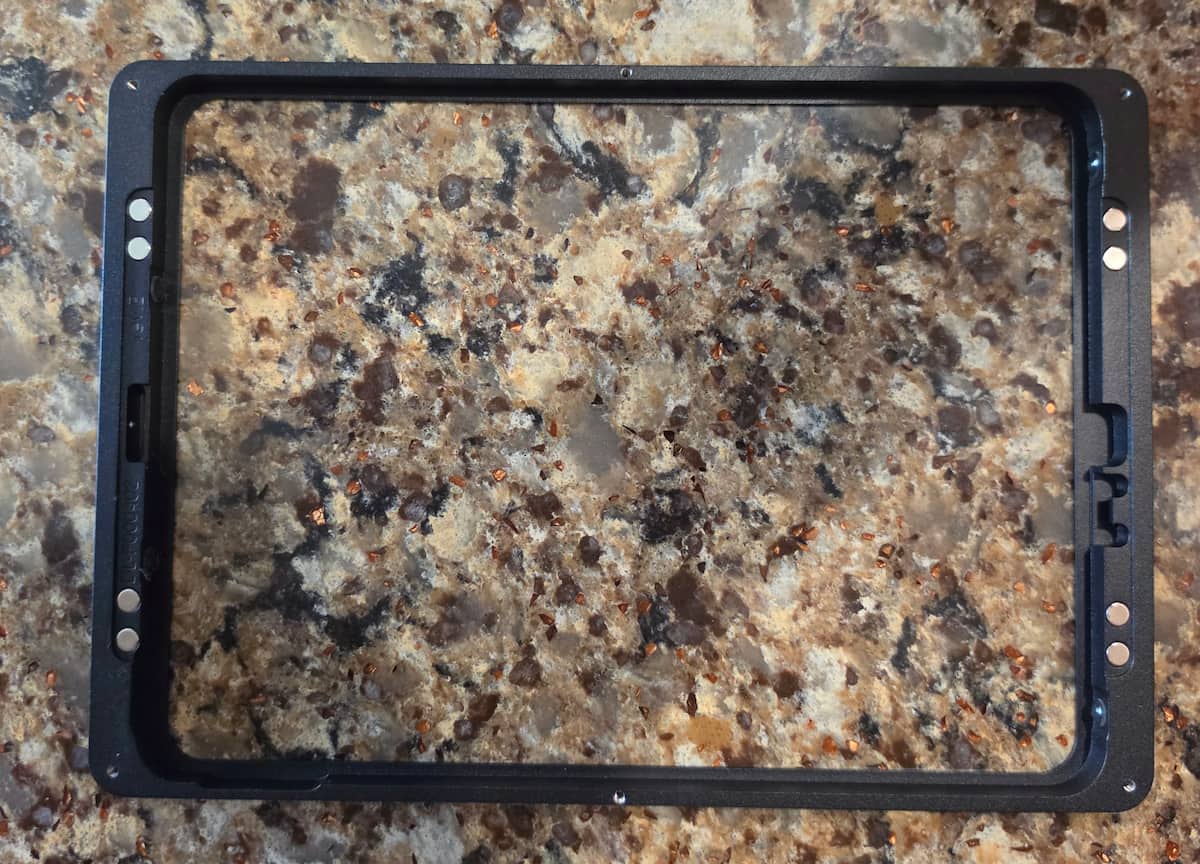
Our test unit came in the black powder-coated finish. Rather than a glossy paint that shows every smudge around a high-touch smart-home screen, the powder coating has a fine, even matte texture that feels substantial under your fingers and absorbs overhead room glare. Once mounted, the square-edged outer bezel completely covers the edges and aluminum chassis of the tablet inside.
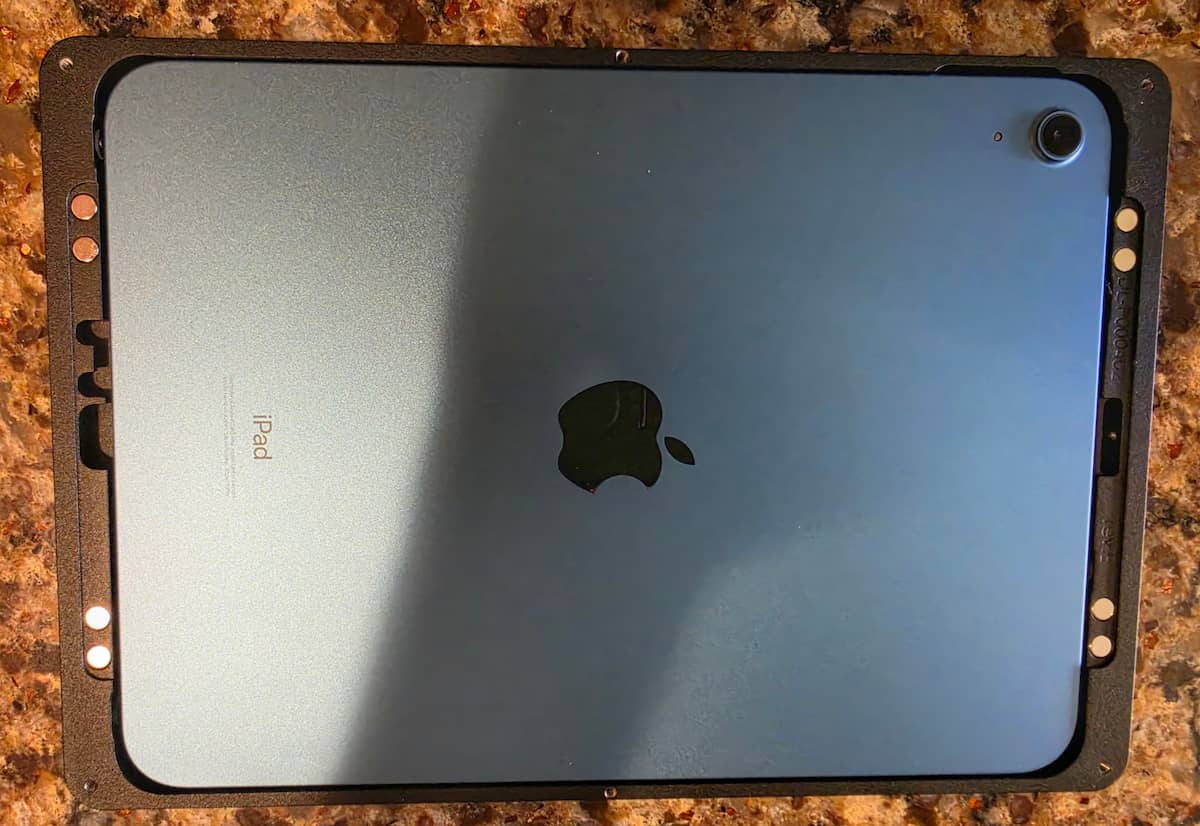
As you can see in our test-fit photo above, we used a bright blue iPad for this installation. When you lay the iPad face-down into the frame, the internal milled lip hugs the curved aluminum corners with roughly 4 millimeters of internal clearance. Once flipped around and snapped onto the wall, not a single millimeter of the blue iPad body is visible. Only the black glass screen and the matte black aluminum frame show on the wall, which is a major advantage if you are repurposing a brightly colored iPad (such as blue, yellow, pink, or starlight) for a clean hallway or living room dashboard.
How the Magnetic Grip and Snap-Over Frame Work
A common complaint with two-piece commercial tablet enclosures is that holding the tablet against the wall with one hand while trying to line up a heavy metal front cover and start tiny set screws with the other hand feels like a juggling act. Displine engineered around that frustration by combining an eight-magnet grip with a precision snap-over top bracket.
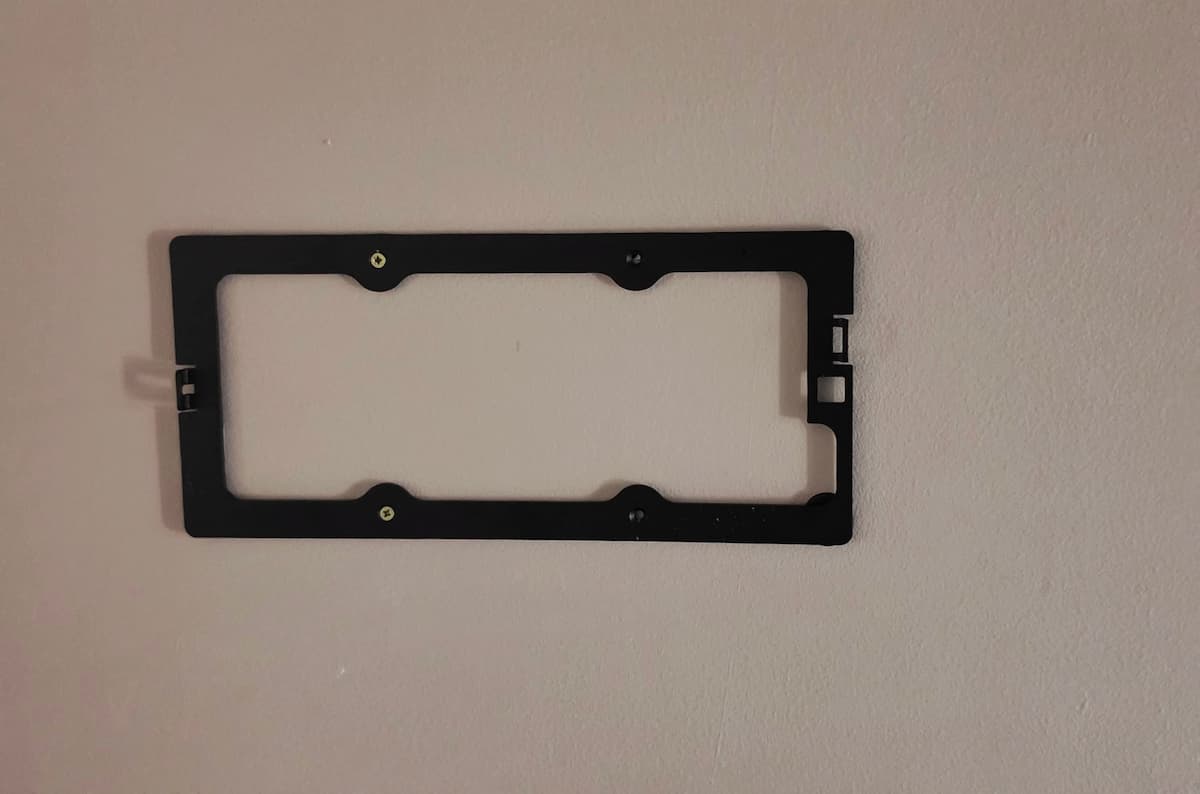
Here is how the physical assembly comes together on the wall:
- Fasten the rear backplate: Level the rear aluminum plate on your wall in either portrait or landscape orientation (we mounted ours horizontally above a two-gang light switch), mark the four mounting holes, drill for the included wall dowels, and drive the four countersunk screws into the wall.
- Stick the protective pads over the screws: Press the four included adhesive silicone/felt pads into the recessed pockets over the screw heads. Those soft pads prevent the metal screw heads from scratching the anodized back of your iPad and stop metal-on-metal vibration when you tap the screen.
- Connect the USB-C plug (if wiring) and seat the tablet: If you are wiring continuous power, plug the integrated low-profile right-angle USB-C connector into your tablet’s charging port and rest the tablet into the rear wall bracket.
- Snap the front frame over the magnetic grip: Bring the outer aluminum bezel over the top edge of the bracket and press it flush. The four pairs of internal neodymium magnets immediately grab and pull the front frame into alignment against the rear plate so nothing can slip while your hands are free.
- Install the anti-theft locking screw (optional for home use): If the mount is installed in a commercial lobby, rental property, retail kiosk, or office hallway, thread the small security locking screw into the concealed hole on the edge of the frame to lock the two halves together. In a private home where theft is not a concern, you can leave the screw out because the magnetic grip and mechanical snap fit hold the frame securely on their own while still letting you pop the bezel off by hand when needed.
Power and Cable Management: Hardwired vs. Periodic Recharging
One of the most important practical takeaways from our hands-on test involves the integrated USB-C charging cable and how you choose to power your tablet. Displine includes a custom ribbon-style USB-C cable with a flat 90-degree plug that seats directly into the milled recess on the inside of the frame. That low-profile right-angle connector keeps the plug head itself completely covered inside the bezel rather than sticking out the side of the tablet.
If you want the tablet powered 24/7, keep in mind that the cable is only truly hidden when you route power through the wall behind the mount. The short included lead is designed either to drop straight into a recessed in-wall USB-C power supply inside a single-gang wall box behind the bracket’s open center cutout, or to pass through the small side notch on the rear plate to connect to an external USB-C extension cord. If you do not fish the wire behind the drywall or mount over a recessed box, you will need to run an extension cable along the surface of the wall to reach an outlet.
However, you also have a much simpler zero-wire option for home use: you can fully charge the iPad beforehand, mount it without running any power cord at all, and simply pop the magnetic front bezel off to recharge the tablet periodically. Because the eight internal magnets let you remove and reattach the faceplate in seconds when you leave out the security screw, running the iPad on battery power with auto-sleep and Tap to Wake enabled gives you a 100 percent cord-free wall installation without cutting into your drywall or hiring an electrician.
Important Installation Tip: Decide how you want to handle power before drilling your mounting holes. For an always-on display, plan for either a recessed in-wall USB-C power supply directly behind the open center frame or a USB-C extension cable routed to an outlet. For an intermittent home dashboard where you want zero wiring, simply leave the locking screw out and pop the magnetic bezel off whenever the tablet needs a recharge.
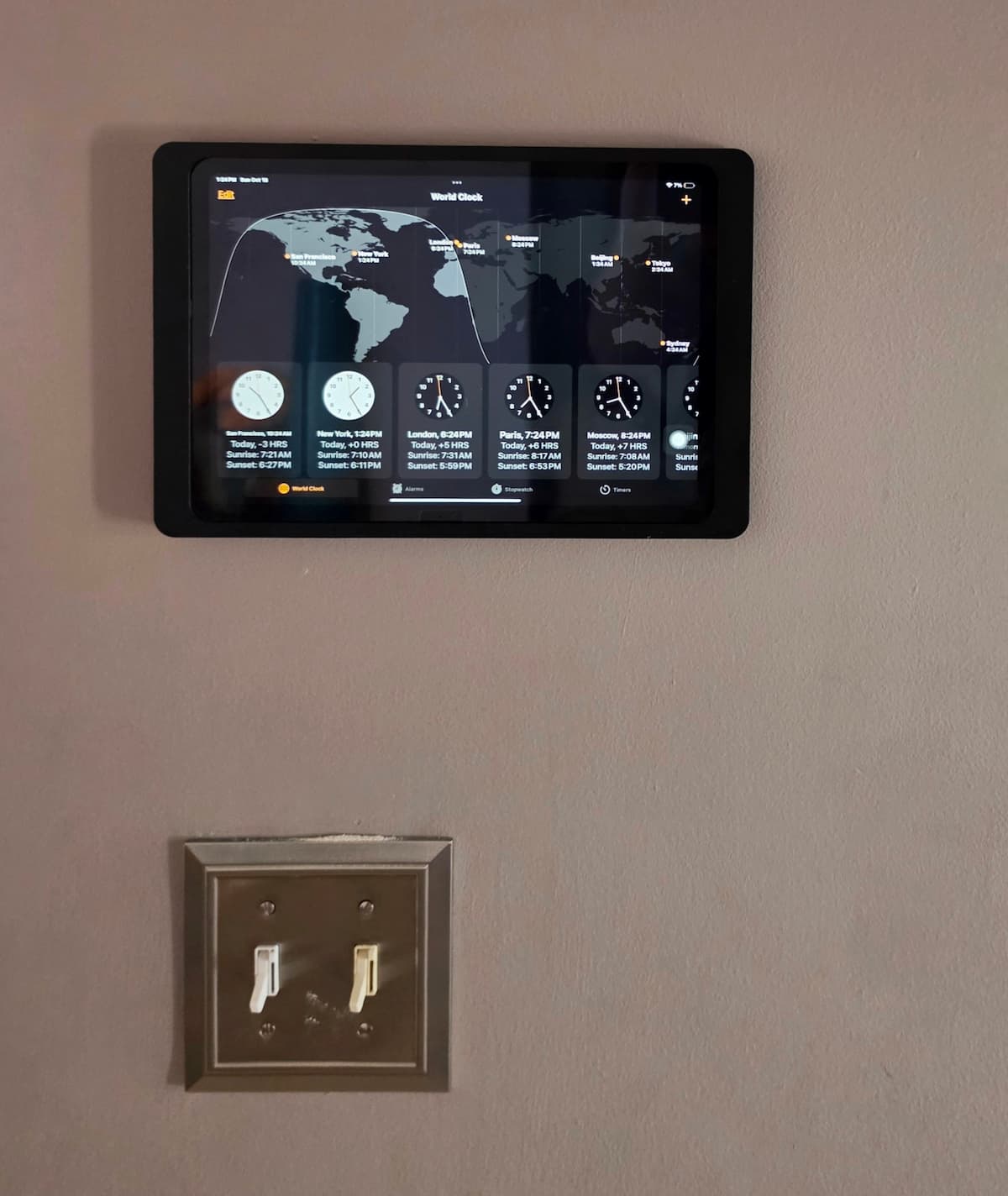
As shown in our finished wall photo above, mounting the Companion Wall 2.0 directly above an existing wall switch bay is a practical location in a home hallway or kitchen. Not only does that spot put the touchscreen at natural eye and hand height (roughly 52 to 58 inches off the floor), but it also places the mount along an existing vertical stud bay if you decide to add a recessed low-voltage power box behind the drywall later.
Companion Wall 2.0 vs. Companion Wall Home vs. Standard Wall Mounts
When shopping Displine’s catalog or comparing general tablet wall mounts for home, kitchen, and commercial use, it helps to understand where the Companion Wall 2.0 fits relative to Displine’s other models:
- Displine Companion Wall 2.0 (This Model): Features a fully enclosed, four-sided powder-coated aluminum bezel with an eight-magnet grip, snap-over top bracket, and an optional anti-theft locking screw. In a private home, you can skip the locking screw and pop the magnetic front bezel off by hand whenever you want to use or recharge the tablet, while keeping all four outer edges of the iPad completely hidden when docked.
- Displine Companion Wall Home: Uses an asymmetrical three-sided open frame that lets you slide the tablet in and out with one hand whenever you want to take the iPad to the couch, while leaving the charging connector docked in the frame. Choose the Home version if you slide the tablet out multiple times a day; choose the Companion Wall 2.0 if you want a four-sided enclosed frame that hides the entire tablet body and offers optional anti-theft locking.
- Displine Dame Wall 2.0: Uses an anodized (rather than powder-coated) aluminum finish and sits dead-flush with the glass surface of the tablet at a higher price point. In person, the powder-coated black Companion Wall 2.0 delivers the same solid CNC-machined metal feel and clean look on the wall for considerably less money.
Frequently Asked Questions
Can the Displine Companion Wall 2.0 be mounted vertically and horizontally?
Yes. During installation, you can bolt the rear aluminum backplate to the wall in either portrait (vertical) or landscape (horizontal) orientation. If you want the ability to rotate the tablet 90 degrees between portrait and landscape after it is already mounted on the wall, Displine sells a low-profile mechanical Rotation Unit that installs between the wall and the Companion Wall 2.0 backplate.
Does one Displine Companion Wall 2.0 fit every iPad?
No. Because the CNC-machined bezel is built to frame the screen with minimal clearance and hold the right-angle USB-C connector in exact alignment with the charging port, you must select the exact variant for your tablet family when ordering. For example, Displine offers dedicated versions for the iPad 10.9-inch (10th Gen) and 11-inch (A16), the iPad Air 10.9-inch and 11-inch series, the iPad Pro 11-inch series, and specific Samsung Galaxy Tab models. Always remove any protective case or skin before placing the tablet inside the frame.
How do you power the tablet with the short included cable?
You have three options. For the cleanest always-on installation, mount the bracket over a single-gang electrical box housing a recessed in-wall USB-C power adapter or PoE-to-USB-C converter so the short pigtail plugs in directly behind the frame. Second, if your outlet is farther away, you can connect a female-to-male USB-C extension cable to the short pigtail and route it behind (or along) the drywall. Third, if you do not want to run wiring at all in a residential setting, you can leave out the optional security screw, use the tablet on battery power, and pop the magnetic faceplate off periodically to recharge the iPad.
Can you still wake the iPad if the power button is covered by the frame?
Yes. Like most enclosed architectural and commercial kiosk frames, the outer bezel covers the top and side hardware buttons to prevent tampering and completely hide the tablet chassis. On any modern iPad or Samsung Galaxy Tab, enabling Tap to Wake (or Guided Access / Kiosk Mode with automatic screen wake) lets you wake and control the screen directly from the glass without touching the physical top button.
Bottom Line
After installing the black powder-coated unit on our own wall, our takeaway in this Displine Companion Wall 2.0 review is simple: if you want a tablet wall mount that looks and feels like precision architectural metalwork rather than an aftermarket plastic bracket, this is one of the best-made mounts you can buy. The CNC-milled aluminum frame, matte black finish that hides even a bright blue iPad chassis, eight-magnet grip, and snap-over top bracket are thoroughly engineered. Just make sure you order the exact frame variant for your tablet model and decide ahead of time whether you will pair the short built-in charging lead with a behind-wall adapter or extender, or simply pop the magnetic bezel off to recharge the tablet periodically.
If you are comparing removable or articulating options for other rooms, check out our guide to the best tablet wall mounts for home, kitchen, and commercial use, or browse our complete tablet mounts hub for vehicle, aviation, desk, and specialty mounting guides.
