
The Garmin DriveSmart 86 is one of the largest automotive GPS devices on the market. Its eight-inch screen puts it close to an Apple iPad Mini in overall footprint, which is great for visibility but creates real mounting challenges. Finding the right Garmin DriveSmart 86 mount means balancing a clear view of the screen with an unobstructed view of the road, all while making sure the mount itself can handle the weight and size of a device this large.
Owners moving up from a smaller Nuvi or Drive unit are often surprised that their old mount will not work at all. The DriveSmart 86 uses a completely different ball size than most Garmin GPS devices, which narrows the field of compatible mounts considerably. Below we cover why that matters, what ships in the box, and five solid alternatives depending on how and where you want to mount the device.
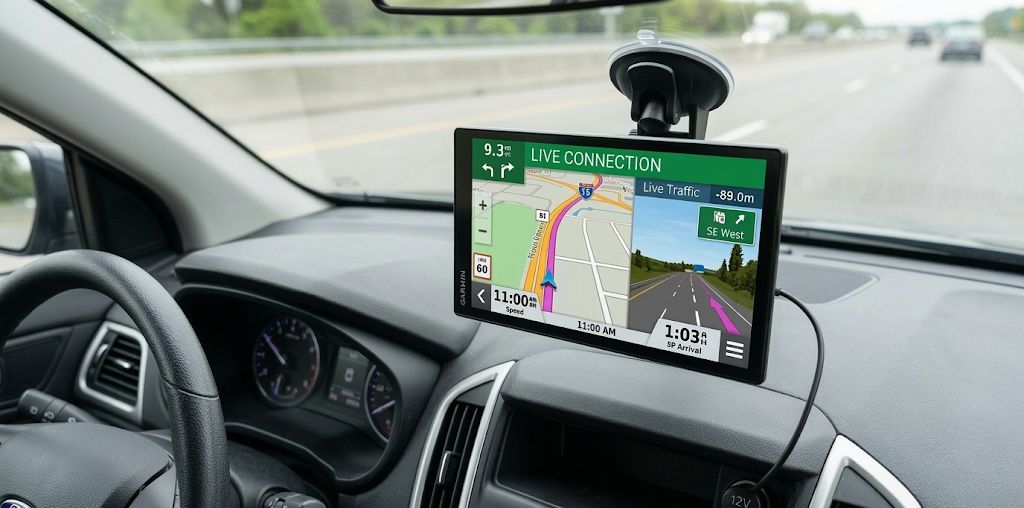
Table of Contents
| Mount | Best For | Mounting Style |
|---|---|---|
| Triplinger Beanbag Friction Mount | Drivers who want no-drill flexibility | Dashboard, dual 17mm/22mm neck |
| VAUBORTTI Aluminum Beanbag Mount | Sturdier positioning on uneven dashboards | Dashboard, 22mm aluminum arm |
| VAUBORTTI AMPS Drill-Down Mount | Permanent installs, RVs, work trucks | AMPS drill-down base, 22mm arm |
| 1Zero Heavy-Duty Suction Mount | SUVs and trucks needing extra reach and grip | Windshield suction, 22mm ball |
| Lycogear Dual-Ball Cup Holder Mount | Keeping the dash and windshield clear | Cup holder base, dual 17mm/22mm arm |
Why the Garmin DriveSmart 86 Needs a 22mm Ball Mount
The DriveSmart 86 breaks from nearly every automotive GPS Garmin has released over the past decade. Most Nuvi, Drive, DriveSmart, and dezl models use a cradle with a 17mm ball socket. The DriveSmart 86, along with Garmin’s larger RV and OTR units, uses a larger 22mm ball system instead.
That means legacy Garmin Nuvi and Garmin Drive mounts, and even some older DriveSmart mounts, will not fit this device. You need a mount built specifically for the 22mm socket. Our guide to 22mm versus 17mm mounts covers the full story, including which Garmin models fall on each side of the divide.
Garmin appears to be standardizing the larger ball size across any device with a screen above 7 inches. We’ve seen the same 22mm interface on mounts for the Garmin RV 890 and RV 1090, along with several newer OTR truck models. If you run more than one large-screen Garmin device between vehicles, a 22mm mount will likely cover all of them.
What’s Included in the Box
Garmin includes a suction cup mount with the DriveSmart 86. It’s similar to most other Garmin suction mounts except it uses the larger 22mm ball. A vacuum lever improves the seal, and the mount attaches to nearly any smooth, flat surface: windshield, dash, or a compatible friction base.
The included cradle is adequate for light-duty use in a standard passenger car, but the size and weight of the DriveSmart 86 push a lot of owners toward something longer, sturdier, or better suited to their specific dashboard. A short, stock suction arm holding an eight-inch screen has more leverage working against it than the same arm holding a phone, which is the main reason people start looking for an upgrade within the first few weeks of ownership.
Best Alternative Mounts for the Garmin DriveSmart 86
Native 22mm ball mounts are still less common than 17mm options, but the market has caught up considerably. Here are five solid picks depending on how you want to mount the device: two friction-fit dashboard options, one permanent drill-down option, one heavy-duty windshield suction option, and one cup holder option for keeping the dash clear entirely.
If your dashboard is flat or only slightly curved and you want to avoid drilling entirely, a beanbag friction mount is usually the easiest starting point. Between the two friction options below, the Triplinger is the better pick if you might switch between a 17mm and 22mm device over time, while the VAUBORTTI aluminum version is the sturdier choice if you’re mounting the DriveSmart 86 permanently and want a more rigid arm.
Triplinger Beanbag Friction Mount
This weighted beanbag mount requires no tools and no drilling. It grips flat or slightly curved dash surfaces and includes a built-in steel ball with an anti-skid bottom that holds the device steady through turns and sudden stops. What sets it apart is the dual mounting neck: it comes with both 17mm and 22mm sockets, so it works with the DriveSmart 86 as well as older Garmin devices you may already own. That flexibility makes it a good option for households with more than one GPS unit in rotation.
VAUBORTTI Aluminum Beanbag Mount
This mount pairs a weighted, non-slip beanbag base with an aluminum double-socket arm built specifically for 22mm ball devices. It offers full 360-degree rotation, tilt, and height adjustment, which helps on dashboards where the beanbag mounts above can’t quite find a stable, level footprint. It’s compatible with the DriveSmart 86, RV 895, RV 1090, and dēzl OTR 800 and 1000, so it works across most of Garmin’s larger-screen lineup if you ever upgrade or swap devices.
VAUBORTTI AMPS Drill-Down Mount
If you want a permanent installation rather than a friction-fit base, this mount uses the industry-standard AMPS pattern for a drill-down attachment to your dashboard, along with an adjustable double-socket arm built for the 22mm ball. It’s a strong choice for RVs, work trucks, and any vehicle where the mount needs to stay put permanently rather than move between vehicles. Because it bolts directly to the dash, it also tends to hold up better than friction or suction options in vehicles that see a lot of vibration on rough roads.
1Zero Heavy-Duty Suction Mount
This mount pairs a metal 22mm ball joint with a reinforced, rubberized double-ribbed aluminum arm for extra rigidity over a standard suction arm. The vacuum cup uses an 8-level suction adjustment with ratchet-type detents, which holds up well on bumpy roads where a basic suction mount can start to creep. A one-pull quick release and dual ball-head design give you full 360-degree rotation and angle adjustment. It’s a strong option for SUVs and trucks where the windshield sits farther from the driver and a longer reach is needed to bring the screen back into a comfortable viewing position.
Lycogear Dual-Ball Cup Holder Mount
This mount takes a different approach than the others on this list by moving the DriveSmart 86 off the dash and windshield entirely and into your cup holder. The adjustable base expands to grip most standard cup holders, and the arm carries both a 17mm and a 22mm ball connection, so the same mount works with the DriveSmart 86 as well as older 17mm Garmin units like the Nuvi or Drive series. It’s a strong pick for drivers who don’t want anything stuck to the glass or dash, or whose dashboard shape makes a beanbag or suction mount awkward to position.
Keep in mind cup holder mounts do use up that storage space, so it’s worth checking that your vehicle has a second cup holder free for drinks. For obvious reasons, cup holders don’t typically make optimal l0cations for glancing at a GPS. We prefer a spot nearer the line of sight.
Choosing Between These Five Mounts
All five mounts above use the same 22mm ball and cradle as the Garmin DriveSmart 86, so any of them will connect directly to the device without an adapter. Choosing between them mostly comes down to your dashboard shape, how permanent you want the setup to be, how far the mount needs to reach, and whether you’d rather keep the dash and windshield completely clear.
If your dashboard has a flat or gently curved surface near the base of the windshield, either beanbag mount will likely work well and can be moved between vehicles without leaving anything behind. If you’re setting up a dedicated vehicle, such as an RV or work truck, and don’t plan to move the mount again, the AMPS drill-down option gives you the most stable, permanent hold. If your windshield sits farther from the driver’s seat, which is common in larger SUVs and trucks, the heavy-duty suction mount’s extra reach and stronger vacuum grip will likely serve you better than a dashboard-based option.
And if you’d rather not attach anything to the dash or glass at all, or your dashboard shape just doesn’t cooperate with the other options, the cup holder mount solves the problem by using space you likely aren’t putting a drink in anyway.
Frequently Asked Questions
Do 17mm Garmin mounts fit the DriveSmart 86?
No. The DriveSmart 86 uses a 22mm ball, which is significantly larger than the 17mm ball found on most Nuvi, Drive, and standard DriveSmart models. You’ll need a mount built for the 22mm socket, or a dual-socket mount like the Triplinger or the cup holder mount above that supports both sizes.
Can I use a RAM Mount with the DriveSmart 86?
Some RAM mounts support a 22mm ball configuration, but always confirm the specific ball size on the listing before buying, since RAM’s lineup includes both 17mm and 22mm compatible options.
Will these mounts work in an RV or work truck?
Yes. The VAUBORTTI AMPS drill-down mount in particular is well suited to RVs and work trucks since it bolts permanently to the dashboard and won’t loosen from vibration the way a friction or suction mount can over time.
Is the OEM Garmin suction mount good enough on its own?
For light use in a standard passenger car, yes. Owners who drive frequently on rough roads, sit farther from the windshield, or simply want a sturdier hold tend to prefer one of the aftermarket options above.
Is a cup holder mount a good alternative to a dash or windshield mount?
Yes, especially for drivers who don’t want anything attached to the glass or dash. A cup holder mount uses space you’re likely not filling with a drink anyway, and it keeps the screen low and close to the center console.
