
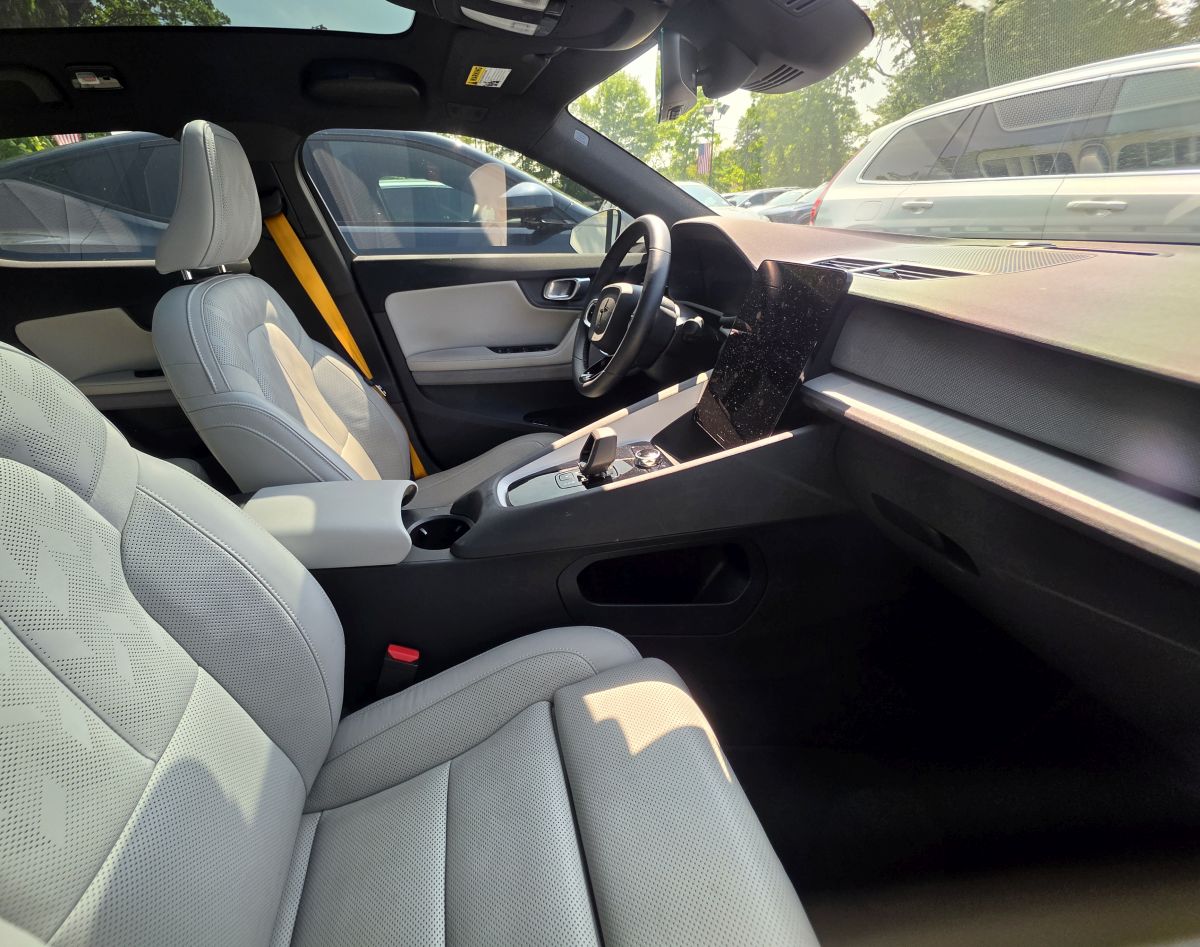
If you have tried to mount a phone in a Polestar 2, you already know the problem. The center console is dominated by a tall portrait touchscreen, the HVAC vents are slim vertical vanes instead of the round or wide horizontal vents most mounts are built for, and the wireless charging tray sits low in the console where it is easy to cover up by accident. Most universal mounts simply were not designed with this dashboard in mind.
We tested and researched the Polestar 2 phone mount options that actually work with the vehicle’s layout, along with a couple worth skipping. Below you will find our top picks, the best mounting locations, and answers to the questions Polestar 2 owners ask most often.
Why the Polestar 2 Is Hard to Mount a Phone In
Most cars give you at least one easy option: a big round vent, a flat stretch of dash, or a CD slot that doubles as a mounting point. The Polestar 2 has none of those. The interior is built around a single large portrait touchscreen with very little trim around it, the HVAC vents are narrow vertical slats rather than the round vents most clamps expect, and there is no CD slot to fall back on since the car does not have one. The wireless charging tray sits low in the console, which is convenient for setting a phone down but not useful if you want it visible while driving.
That combination is why so many owners end up trying two or three mounts before finding one that actually holds. It also explains why generic universal mounts tend to get poor results in this specific car even when they work fine everywhere else.
Best Polestar 2 Phone Mounts Compared
| Mount | Best For | Years/Trim |
|---|---|---|
| LUNQIN Vent Mount for Polestar 2 | Purpose built fit, gravity grip | 2022 and newer |
| iOttie Easy One Touch 6 | Multi vehicle drivers, strongest hold | 2020 and newer |
1. LUNQIN Vent Mount for Polestar 2
Most vent mounts fail in the Polestar 2 because they are built for round or wide horizontal vents, and the Polestar’s vanes are slim and vertical. LUNQIN built this mount specifically around that vane shape instead of using a universal clamp, so it locks onto the vent without the wobble that generic clips run into on this car.
It uses a gravity style cradle: you slide the phone in and the arms close automatically, then pull it straight out when you park. There is no button to press, which matters if you are juggling a coffee and a phone in one hand.
Pros
- Built specifically for the Polestar 2’s slim vertical vents
- Gravity cradle needs no button press
- Low profile, does not block the center screen
- Simple install with no drilling or adhesive
Cons
- Vent mounting means the phone sits slightly lower than a dash mount
- Not ideal for the heaviest phone and case combinations
2. iOttie Easy One Touch 6
If you split time between the Polestar 2 and another vehicle, a windshield or dashboard suction mount is the more practical choice since it moves with you instead of staying clipped to one car’s vents. The iOttie Easy One Touch 6 uses a strong suction base and a spring loaded cradle that closes with a single squeeze, and it holds most phones even with a case on.
Mount it low on the driver’s side of the windshield or on the dashboard just to the left of the center screen. Either spot keeps the phone in view without covering the touchscreen.
Pros
- Works across multiple vehicles, not locked to the Polestar 2
- One handed operation
- Strong, repositionable suction base
- Fits most phones with cases
Cons
- Not a custom fit, so it does not tuck away as neatly as the vent mount
- Suction base needs occasional cleaning to keep its grip
Want a Factory Look? Consider a Custom Dash Mount
If a fully integrated look matters more to you than an Amazon purchase, ProClip makes a center dash mount built specifically for the Polestar 2 that clips into the dashboard seam between the instrument panel and the center screen with no drilling. It pairs with a separate device holder, so it is a two part purchase, but it is the closest thing to a factory installed mount available for this car.
Do You Even Need a Phone Mount?
This is worth asking before you buy anything. The Polestar 2 runs Android Automotive with built in Google Maps, voice commands, and app support directly on the center screen, so a lot of owners never mount a phone at all. Apple CarPlay is also supported for iPhone owners who prefer it.
That said, plenty of drivers still want the phone visible for things the built in system does not cover well: Waze, rideshare apps, radar detectors, or just keeping a charging cable connected while navigating on the big screen. If any of that sounds like you, a mount still earns its place.
Where to Mount Your Phone in a Polestar 2
Placement matters as much as the mount itself, since the portrait touchscreen controls nearly everything in this car.
Good locations:
- On the driver’s side vent, angled away from the center screen
- Low on the driver’s side windshield
- Beside the center display using a dedicated dash mount
Locations to avoid:
- Directly in front of the center touchscreen
- The passenger side dashboard
- Low inside the center console, where it can block the wireless charging tray
Common Mistakes to Avoid
- Buying a generic universal vent clip. Standard vent mounts are built for round or wide horizontal vents and will not hold securely on the Polestar’s slim vertical vanes. Look for a mount engineered for this specific vane shape instead.
- Blocking the center touchscreen. The display handles climate, navigation, and most vehicle settings, so keeping it fully visible matters more here than in most cars.
- Ignoring cable routing. A charging cable left loose across the console can tangle with the shifter area or the wireless charging tray.
- Covering the wireless charging tray without meaning to. Some dash and console mount placements sit right above it, so double check clearance before you finalize a spot.
Frequently Asked Questions
Does the Polestar 2 support Apple CarPlay?
Yes. The Polestar 2 supports Apple CarPlay, and Android users get built in Android Automotive with Google Maps and voice controls on the center display.
Will a vent mount damage the Polestar 2’s vents?
A mount built for the Polestar’s specific vane spacing, like the LUNQIN pick above, is designed to grip without stressing the vanes. Generic universal clips are the ones more likely to cause problems, since they were not engineered for this vent shape.
Can I still use the wireless charging tray with a mount installed?
Yes, as long as you avoid mounting directly above or over the tray itself. All of the mounts recommended here leave it fully accessible.
Which mount looks the most factory installed?
The ProClip center dash mount is the closest to a factory look, since it is built specifically around the Polestar 2’s dashboard seams rather than clamping onto a vent or windshield.
Does the LUNQIN mount fit the Polestar 3 as well?
Yes. It is built for the same vane spacing used across current Polestar 2 and Polestar 3 models, so it works for owners of either car.
Will these mounts hold a large phone in a heavy case?
The iOttie is the better choice for larger phones and bulkier cases thanks to its spring loaded cradle and stronger clamping force. The LUNQIN vent mount handles most phones well but is better suited to lighter setups since it relies on a vent connection rather than a windshield or dash anchor.
Do I need a specific mount for each model year of the Polestar 2?
The interior layout has stayed consistent since the car launched, so mounts built for the Polestar 2 generally fit across model years without issue. If you drive a facelifted model, it is still worth double checking the listing before ordering.
Final Verdict
The Polestar 2’s minimalist interior rules out a lot of generic mounts, but it is not short on good options once you know what to look for. For most drivers, the LUNQIN vent mount is the easiest recommendation since it was purpose built for this car’s vane spacing and keeps the phone low and out of the way. If you split time between vehicles, the iOttie Easy One Touch 6 is the safer universal pick. And if a factory installed look is your top priority, the ProClip dash mount is worth the extra step of a two part purchase.
