
A recumbent bike is one of the most comfortable pieces of cardio equipment you can own. The reclined seat, back support, and low-impact pedaling motion make it a favorite for longer sessions, which means you need something to watch, listen to, or follow along with. The built-in display on most recumbent bikes handles basic metrics, but it was never designed to stream video or hold your phone. If you have tried propping a device on the console shelf or balancing a tablet against the display, you already know how that ends.
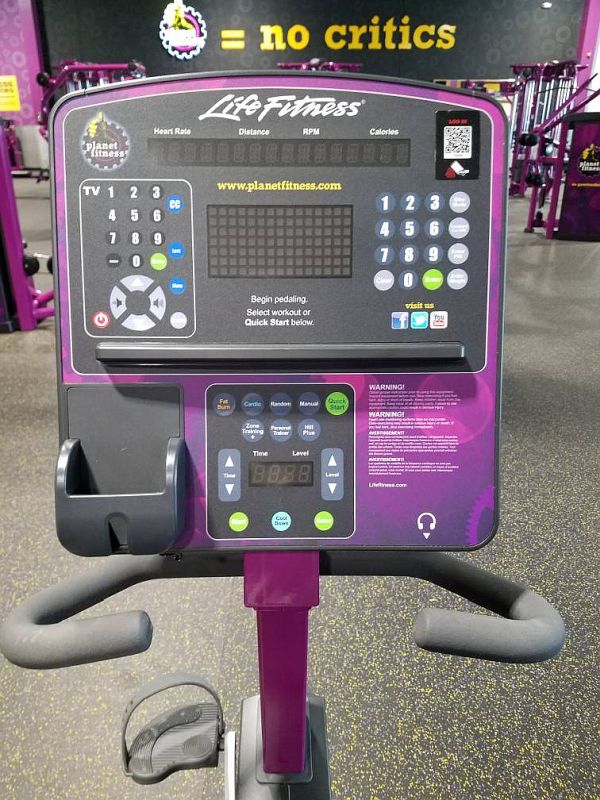
The handlebars on a recumbent bike are the only practical mounting location. Most recumbent bikes have two sets: the stationary handles flanking the seat, and the moving or fixed handles just below the display. The ones closest to you are the better target. They put the screen at a comfortable distance and keep it in your line of sight without blocking the console. Handlebar diameter on most recumbent bikes falls in the same range as a standard bicycle, so a wide selection of bike-compatible mounts will work.
Below are the three mounts that best fit the recumbent bike use case, covering phones, tablets, and MagSafe users.
Recumbent Bike Phone and Tablet Mount Comparison
| Mount | Best For | Device Type |
|---|---|---|
| A2C Gym Fitness Phone Mount for MagSafe | MagSafe iPhone users | Phone |
| KDD Spin Bike Tablet Holder Mount | Tablets up to 13 inches | Phone and Tablet |
| FPN Spin Bike Tablet Holder | Wider handlebar diameters, RAM compatible | Phone and Tablet |
Understanding the Mounting Challenge on a Recumbent Bike
Before getting into specific products, it helps to understand what makes a recumbent bike different from other gym equipment when it comes to mounting a device.
On a treadmill or elliptical, there is usually a wide console shelf or built-in tablet ledge at eye level. A recumbent bike is more compact. The display sits on a stem in front of you, and the handlebars extend out to the sides at roughly waist height. There is typically a small shelf or tray built into the console, but it almost always blocks the display when you put anything on it. Some recumbent bikes include a phone slot on the side of the console, but the opening is sized for a bare phone with no case, which rules it out for most people.
That leaves the handlebars. The inner pair, closest to the seat, works best. Mounting there puts your screen at a natural viewing angle without requiring you to turn your head. The outer handlebars, directly below the display, can also work but may feel slightly high depending on your riding position.
Handlebar diameter on a typical recumbent bike runs between 0.7 and 1.2 inches. This is similar to a standard mountain bike handlebar, and most clamp-style gym mounts are designed for exactly this range.
A2C Gym Fitness Phone Mount for MagSafe
If you use an iPhone 12 or newer with MagSafe, the A2C Gym Fitness Phone Mount is the cleanest solution for a recumbent bike. It attaches to the handlebar with an adjustable silicone strap rather than a clamp, which means it works on handlebars up to 1.5 inches in diameter and handles irregular or textured bar shapes that screw clamps sometimes struggle with.
The mount head uses 17 N54 magnets to create a strong hold for MagSafe-compatible iPhones. The connection is secure enough for the low-vibration environment of a recumbent bike, and the mount rotates 360 degrees so you can switch between portrait and landscape freely. If your phone does not have MagSafe, a metal ring is included in the package that adheres to the back of your case and provides the same magnetic hold.
One feature worth noting is the detachable design. The magnetic head separates from the strap base and includes an adhesive metal plate, so it can also mount to smooth flat surfaces like the console face or a nearby shelf. This gives you some flexibility if you decide the handlebar position does not suit your setup.
KDD Spin Bike Tablet Holder Mount
The KDD is the go-to option for anyone who wants to mount a tablet on a recumbent bike. It uses a spring-loaded cradle that opens wide enough to hold devices from 4.7 to 13 inches, covering everything from a phone to a full-size iPad Pro. The cradle is lined with rubber padding on all contact points, so neither the device nor the handlebar takes any scratches.
The clamp base attaches to handlebars between 0.55 and 1.33 inches in diameter, which covers the majority of recumbent bike handlebar sizes. Installation takes a few seconds: open the clamp, position it on the bar, and tighten. No tools required. The base features a ball joint that rotates 360 degrees and tilts up to 45 degrees in any direction, which gives you full control over the viewing angle from your reclined position.
One thing to be aware of: when mounting a phone in portrait mode, the device sits vertically in the cradle. Tablets wider than 9.8 inches can only be mounted horizontally. For a standard recumbent bike session this is unlikely to be a problem, but worth knowing before you buy.
The build quality is solid for the price. KDD uses a combination of PC, ABS, metal, and rubber throughout, and the clamp base has a wide contact area that stays put even if the bike vibrates during a harder session. The spring-loaded cradle opens with one hand and releases the device cleanly when you are done.
FPN Spin Bike Tablet Holder
The FPN is a direct competitor to the KDD with a few notable differences that may make it the better pick depending on your specific bike. The most meaningful is the wider clamp range: the FPN fits handlebars from 0.47 to 1.8 inches in diameter, giving it a meaningful edge on bikes with thicker bars. If you have a commercial-grade or heavy-duty recumbent bike where the KDD’s 1.33-inch maximum does not reach, the FPN covers the gap.
Like the KDD, the FPN holds phones and tablets from 4.7 to 13 inches, uses rubber padding throughout the cradle, and offers 360-degree rotation. Where it pulls ahead on adjustability is the triple ball joint system: three separate rotation points give you more articulation options than a single ball joint, which can be useful when you need to angle the screen to avoid glare from a nearby window or overhead light.
The FPN also uses a standard 1-inch ball base, which means it is compatible with RAM B-size accessories. If you already own RAM components from a vehicle or motorcycle setup, you can mix and match. This is a practical bonus for anyone who uses RAM gear elsewhere and wants consistency across mounts.
Construction is ABS, metal, and rubber, comparable to the KDD in overall durability. The spring-loaded cradle feels confident under load, and the clamp does not shift during use once tightened.
Which Mount Should You Buy?
The right answer depends on two things: what device you are mounting, and what your handlebar diameter is.
For phone-only use with an iPhone 12 or newer, the A2C MagSafe mount is the cleanest option. The strap attachment is fast, the magnetic hold is strong enough for the recumbent bike environment, and there are no cradle edges to deal with. If you use an Android phone or an older iPhone without MagSafe, the included metal ring adapter makes it work, though you lose some of the snap-and-go convenience.
For tablets, both the KDD and FPN are solid options. The KDD is the pick if your handlebar diameter is under 1.33 inches and you want a proven, well-reviewed option. The FPN is the better choice if your handlebars are on the thicker side, if you want more articulation from a triple ball joint, or if you have existing RAM accessories you want to integrate.
All three mounts install and remove in seconds without tools, which matters in a shared home gym or when you want to move the mount between machines. None of them require permanent attachment or leave marks on the handlebar.
Installation Tips for Recumbent Bike Mounts
Getting the mount positioned correctly makes a noticeable difference in comfort over a long ride. A few things to keep in mind before you clamp anything down.
Start by sitting on the bike in your normal riding position and extending your arm toward the handlebar location you are considering. The screen should sit at roughly eye level or slightly below, not above your sightline. Craning your neck upward for an hour-long session will undo any ergonomic benefit the recumbent position provides.
The inner handlebars closest to the seat are almost always the better choice over the outer bars near the display. They put the screen in your natural field of view without blocking the console metrics, and they keep the weight of the device closer to the center of mass.
Once the mount is positioned, do a quick shake test before loading your device. Apply a firm grip to the clamp and try to rotate it. If it moves, tighten the clamp further. A device dropping mid-session is both a safety issue and a fast way to crack a screen.
For wireless audio, a pair of earbuds removes the cable management problem entirely. If you use wired headphones, route the cable under the handlebar and behind the display stem to keep it away from your arms during the pedaling motion.
