
There are two types of people in the grocery store: people shopping, and people standing guard over the cart. If you have ever been parked in the cereal aisle while your partner disappears to “grab one thing,” you know the routine. Your phone comes out for the grocery list, store app, coupons, messages, or whatever keeps you occupied until the cart starts moving again.
Whether you call it a shopping cart phone mount, shopping cart phone holder, or grocery cart phone holder, the idea is the same: keep your phone visible and accessible without carrying it through the entire store.
Insert your photo
A shopping cart phone mount solves a surprisingly common problem. Instead of repeatedly pulling your phone out of a pocket or leaving it loose in the child seat, you can keep the screen visible directly on the cart handle. That is useful for grocery lists, digital coupons, scan-as-you-go apps, recipes and delivery apps.
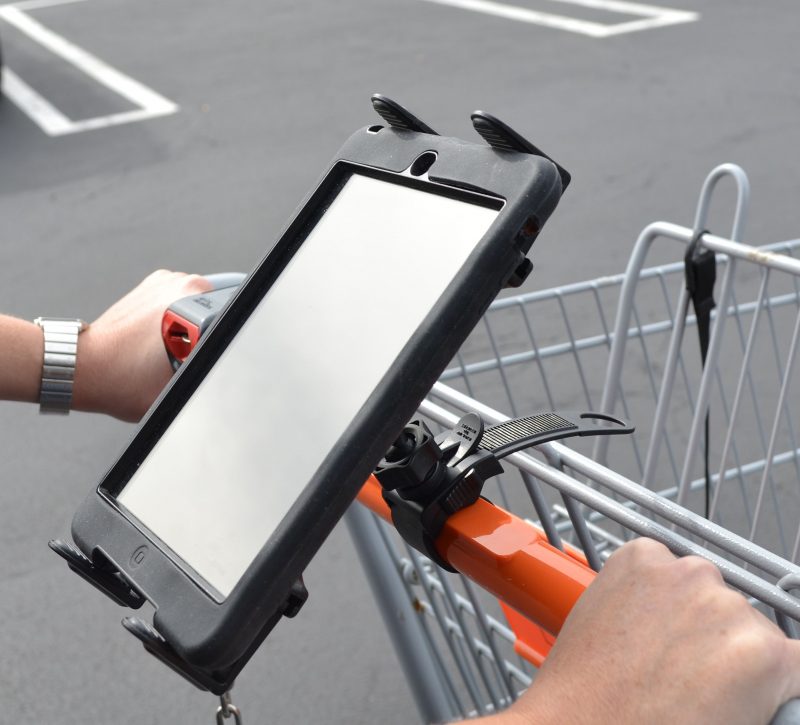
Better yet, there are now mounts designed specifically around grocery-cart use rather than simply repurposing a bicycle mount. For larger screens, a compact clamp-style tablet mount can work well too. The important part is choosing something that installs quickly, stays close to the handle and comes off just as easily when you reach checkout.
If you are looking for similar mounting ideas outside the supermarket, see our best stroller phone mounts and our broader phone mount guides.
Best Shopping Cart Phone Mounts and Holders
| Mount | Best For | Device Type |
|---|---|---|
| Maxby Shopping Cart Phone Holder | Best Overall / MagSafe | Phone |
| Dosvsi Shopping Cart Phone Holder | Physical Phone Cradle | Phone |
| OHLPRO Tablet Handlebar Clamp | Tablets and Larger Screens | Phone / Tablet |
What Makes a Good Shopping Cart Phone Mount?
A grocery cart is a strange mounting environment. The handle gives you a convenient horizontal bar, but the mount is going to encounter vibration, floor seams, door thresholds, abrupt stops and plenty of twisting as you steer a loaded cart.
That makes a shopping cart different from a bicycle, treadmill or stationary piece of equipment. You do not need maximum ruggedness. You need convenience.
- Fast installation: A cart mount should go on in seconds without tools.
- Fast removal: You should be able to take it off just as quickly when you reach checkout.
- Secure grip: The mount should resist rotating or sliding when the cart crosses uneven flooring.
- Low profile: Keeping the phone close to the cart handle reduces movement and keeps it out of your way.
- Adjustable viewing angle: Portrait orientation works well for shopping lists, while landscape can be useful for videos or larger app interfaces.
- Portable size: A phone mount should be small enough to toss into a purse, backpack, glove compartment or reusable shopping bag.
Maxby Shopping Cart Phone Holder – Best Overall
The Maxby Shopping Cart Phone Holder gets our top spot because it was designed specifically for this job rather than being a bicycle or exercise-equipment mount adapted to fit a grocery cart.
The mounting system uses an adjustable strap that wraps around a standard supermarket or warehouse-club cart handle. That is exactly the type of installation we want here because there are no tools, screws or complicated clamps to deal with before you start shopping.
The phone side uses a magnetic attachment designed for MagSafe-compatible phones and cases. Put the mount on the handle, place the phone against the magnetic face and you are ready to shop.
Maxby also includes a metal ring option for phones or cases that do not already provide compatible magnetic attachment. That broadens the usefulness beyond newer iPhones, although users who already have a MagSafe-compatible phone or case get the cleanest setup.
For grocery shopping, the magnetic approach has another advantage: you can remove the phone immediately. That matters when you need to scan a product barcode, answer a call, use a payment app or take a photo of something on the shelf.
Dosvsi Shopping Cart Phone Holder – Best Physical Cradle
Not everyone wants to trust a magnetic connection, and not every phone or case is designed around MagSafe. The Dosvsi Shopping Cart Phone Holder takes the more traditional route with a physical phone cradle.
Unlike many generic handlebar mounts, this product is specifically marketed for grocery-cart use. Its clamp is designed for handles and tubes measuring approximately 0.7 to 1.58 inches in diameter, a useful range for this application.
The cradle accommodates phones from approximately 4 to 7 inches and includes silicone around the phone contact areas. The mounting base also uses silicone to increase grip on the handle and help isolate some of the vibration created by a moving cart.
A 360-degree ball joint allows the phone to rotate between portrait and landscape orientation and lets you tilt the screen to reduce glare from overhead store lighting.
The physical cradle also provides a good option for shoppers who frequently use thicker cases. A one-button release helps make removing the phone easier when you need it.
OHLPRO Tablet Handlebar Clamp – Best Shopping Cart Tablet Mount
A tablet on a grocery cart sounds excessive until you think about who might use one. Parents may want a larger screen for a child riding in the cart. Delivery shoppers can benefit from more screen space. Someone following a recipe while shopping may prefer a tablet over repeatedly opening and closing information on a phone.
For those situations, the OHLPRO Tablet Mic Stand Holder and Handlebar Clamp is the most useful option of the three.
The OHLPRO is not marketed specifically as a grocery-cart product. It is a multi-purpose clamp mount designed for handlebars, stroller bars, treadmill rails, microphone stands and similar tubes. That construction happens to translate well to many shopping-cart handles.
The clamp is specified for round tubes approximately 0.5 to 1.57 inches in diameter and can also attach to certain flat surfaces. Device compatibility spans approximately 5 to 13 inches, covering smaller tablets through large iPads and Galaxy Tab models.
Two adjustable ball joints provide control over screen angle and orientation. More importantly, the arm is only about four inches long. That is preferable to a long gooseneck design on a moving cart because it keeps the tablet reasonably close to the attachment point.
The OHLPRO also works with phones, so someone who wants one mounting system for several devices could use it that way. For routine grocery shopping, however, the Maxby or Dosvsi is much smaller and easier to carry.
Shopping Cart Phone Mount vs. Regular Handlebar Mount
You can put many bicycle or stroller phone mounts onto a grocery-cart handle. The dimensions of the bars often overlap. That does not necessarily make a bicycle mount the best choice.
A bike mount is usually designed to remain installed for long periods. A shopping-cart mount needs to go on and come off repeatedly. That difference changes what features matter most.
A dedicated shopping-cart mount should favor a compact strap or quick clamp, simple removal and a low-profile phone position. You do not need a heavy-duty motorcycle-style mounting system just to push a cart through the produce aisle.
This is one reason the Maxby stands out. Its entire design is centered around putting it on a cart, attaching the phone and removing everything again when shopping is finished.
Who Gets the Most Use From One?
Almost anyone who shops from a digital list can benefit, but a few users have an especially strong case for mounting their phone.
- Instacart and delivery shoppers: The phone stays visible while moving continuously through a store.
- Digital-list users: Check items without repeatedly reaching for your phone.
- Scan-as-you-go shoppers: Keep the phone accessible between scans.
- Coupon users: Store apps and digital offers remain visible.
- Parents: A mounted screen can keep the phone away from small hands while remaining easy to access.
- Recipe shoppers: Keep ingredient lists visible as you move through different departments.
Professional grocery and delivery shoppers may get the biggest benefit. If you spend several hours a day navigating stores with an app open, repeatedly holding and pocketing the phone becomes annoying quickly.
What to Avoid on a Grocery Cart
Shopping carts are easy to mount to, but a few mount designs are poorly suited to the job.
- Long flexible goosenecks: They amplify bouncing and movement.
- Permanent screw-on mounts: They defeat the purpose when the mount has to come off after every trip.
- Large motorcycle mounting systems: Strong, but unnecessarily bulky for a grocery cart.
- Weak spring clips: A clip that works on a desk may rotate around a round cart handle.
- Oversized tablet arms: The farther the tablet sits from the handle, the more leverage it places on the clamp.
Can You Use These on a Stroller or Other Handlebar?
In many cases, yes. The same basic mounting principle applies to stroller handles, exercise equipment and other round bars. The exact fit depends on handle diameter and shape, so check the mounting range before buying.
If stroller use is your main reason for buying one, our stroller phone mount guide covers options designed specifically for that environment.
For the car, use a purpose-built vehicle mount instead. Our MagSafe car mount guide is a better starting point than trying to adapt one of these grocery-cart mounts to the dashboard.
Bottom Line
The Maxby Shopping Cart Phone Holder is the best overall choice here. It is compact, designed specifically for supermarket and warehouse-club cart handles and makes attaching and removing a MagSafe-compatible phone extremely simple. The included metal ring also gives it some usefulness beyond native MagSafe devices.
If you prefer a traditional phone cradle, the Dosvsi Shopping Cart Phone Holder has the right design for the job, including a silicone-lined clamp, 360-degree adjustment and support for a broad range of phone sizes. Its biggest drawback right now is simply that it is a newer product without the customer-review history we generally like to see.
For an iPad, Galaxy Tab or another larger device, the OHLPRO Tablet Handlebar Clamp remains the better choice. Its relatively short arm, wide device compatibility and clamp attachment make far more sense on a cart than a long flexible tablet arm.
A shopping cart phone mount is a small accessory, but for anyone who relies heavily on grocery apps, digital lists, coupons or delivery apps, it can make a trip through the store noticeably easier.
