
The Nissan Rogue is one of Nissan’s best-selling SUVs, and the mounting picture has changed a lot depending on which generation you own. Our Nissan Rogue phone mount guide covers a lot of ground.
The second-generation Rogue, sold from 2014 through 2020, has a single strong custom-fit option built around its dash. The current third-generation Rogue, sold from 2021 on, splits further by screen size: the S and SV trims use an 8-inch touchscreen with real custom mounts available, while the SL and Platinum trims moved to a 12.3-inch display starting with the 2024 refresh, a screen size that has not attracted a dedicated mount yet.
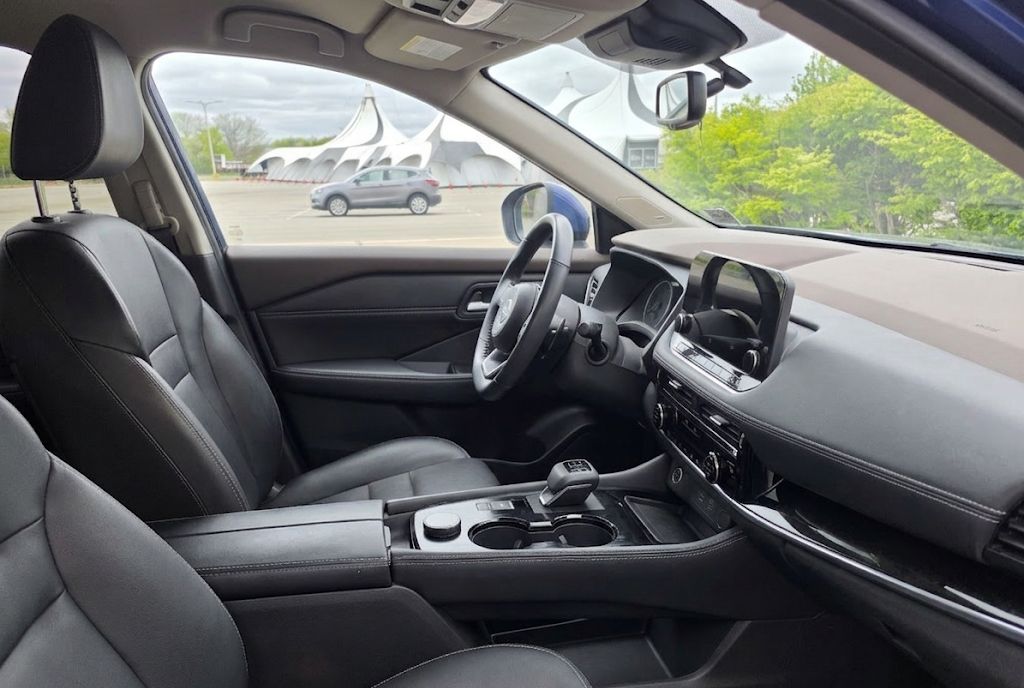
This guide covers the best mount for each situation, from the older second-generation dash to both screen sizes on the current Rogue. If you also drive a Nissan Kicks, our Nissan Kicks phone mount guide covers that subcompact SUV’s custom and universal options in the same format.
| Mount | Best For | Years/Trim |
|---|---|---|
| ELOHEI Custom Fit Mount | Second-generation owners who want a factory-look fit | 2014-2020, all trims |
| AbeeyGeomarn Magnetic Mount | Third-generation owners who want a simple magnetic hold | 2021-2026, S/SV trims (8-inch screen) |
| SKYLOTEC Wireless Charging Mount | Owners who want in-mount charging built in | 2021-2026, S/SV trims (8-inch screen) |
| WeatherTech CupFone | Drivers who want the dash and vents left untouched | 2014-2026, all trims and screen sizes |
| Andobil Air Vent Mount | Eye-level placement without a custom bracket | 2014-2026, all trims and screen sizes |
Best Custom-Fit Mount for the 2014-2020 Nissan Rogue
The second-generation Rogue ran from 2014 through 2020, and the ELOHEI custom mount is built around that specific dashboard. It uses a molded base shaped to match the trim around the center stack, so the mount sits close to the dash rather than reaching out on an arm the way a universal suction mount does. It holds phones between 4.7 and 7 inches, which covers the vast majority of modern smartphones with a case on.
Because the mount is shaped for the older dash, it will not fit a 2021 or newer Rogue. The third-generation redesign changed the center stack enough that this bracket has nothing to seat against in the newer cabin, so third-generation owners should skip ahead to the mounts built for their screen size.
Best Magnetic Mount for the 2021-2026 Rogue’s 8-Inch Screen
The S and SV trims of the current Rogue keep the 8-inch touchscreen, and that screen size has attracted a real custom-fit market. The AbeeyGeomarn mount clips into place around that display and holds the phone magnetically, with strong magnets built for MagSafe cases and included metal rings for phones without MagSafe. The 360-degree rotation lets you switch between portrait for navigation and landscape for video calls without unclipping anything.
This mount does not include a wireless charging coil, so if you want the phone to charge while it sits in the mount, the SKYLOTEC option below is the better fit. If charging is not a priority and you would rather keep the setup simple and lower cost, this is the easier of the two mounts to live with day to day.
Best Wireless Charging Mount for the 2021-2026 Rogue’s 8-Inch Screen
The SKYLOTEC mount fits the same 8-inch screen trims as the AbeeyGeomarn above, but it adds a 15-watt wireless charging coil built into an aluminum housing with a tempered glass panel. The magnetic attachment works the same way, snapping MagSafe phones into place directly and using an included metal ring for phones without MagSafe. Because the housing is aluminum rather than plastic, it manages the heat that builds up during charging better than an all-plastic mount would.
Keep in mind the mount only delivers its full charging speed with a car charger rated above 18 watts, so a basic USB port may charge more slowly than the mount is capable of. This is the pick for anyone who runs navigation for long stretches and wants to avoid a low battery by the end of the drive.
What About the 12.3-Inch Screen Trims?
Starting with the 2024 refresh, the SL and Platinum trims moved to a larger 12.3-inch touchscreen paired with a 12.3-inch digital instrument cluster. That screen and the surrounding trim are different enough from the 8-inch layout that the custom mounts above will not seat correctly, and there is currently no good custom-fit mount built for this screen size. The listings that claim to fit are either mislabeled 8-inch versions or generic mounts with poor fitment, and neither is worth buying.
Until that changes, the WeatherTech CupFone and Andobil Air Vent Mount below are the strongest choices for SL and Platinum owners, since both are built around locations that stay the same regardless of screen size.
Best Cup Holder Mount for Any Nissan Rogue
The WeatherTech CupFone works identically across every Rogue generation and screen size because it clamps into the cup holder using an expanding base rather than anything shaped around the dash. That makes it the simplest option for 12.3-inch screen owners, and it is also a solid choice for second and third-generation owners who would rather not attach anything to the dash or vents at all. The tradeoff is that it uses up one cup holder and keeps the phone lower in the cabin than a dash or vent position.
Best Air Vent Mount for Any Nissan Rogue
The Andobil Air Vent Mount is the pick for drivers who want the phone at eye level without committing to a screen-specific bracket. Its metal hook clip seats securely on both horizontal and vertical vent slats, which covers the vent styles used across every Rogue generation, and the ball-and-socket joint gives full rotation for portrait or landscape viewing. iPhone owners with MagSafe cases can use the Andobil MagSafe Air Vent Mount instead, which swaps the cradle for a magnetic plate. See our full Andobil review for a closer look at both versions.
Choosing Between These Nissan Rogue Phone Mounts
Start with your Rogue’s generation and, if you have a third-generation model, your screen size. Second-generation owners from 2014-2020 have one clear custom option in the ELOHEI mount. Third-generation owners with the 8-inch screen can choose between the AbeeyGeomarn for a simpler magnetic hold or the SKYLOTEC if wireless charging matters to you. Owners of the 12.3-inch screen trims should use the cup holder or vent mount until a dedicated bracket for that screen size becomes available.
If you drive another Nissan alongside your Rogue, our Nissan Murano phone mount guide covers that model’s curved dashboard, our Nissan Altima phone mount guide covers custom screen-frame options for that sedan, and our Nissan Pathfinder phone mount guide is useful if you cross-shop the two SUVs. For a compact sedan in the family, our Nissan Sentra phone mount guide covers that interior as well.
Installation Notes Across Generations
The custom mounts above rely on the trim around the center display to hold their shape, so a clean mounting surface matters more here than it does with a universal suction cup. Wipe down the clip contact points before the first install, and give any adhesive strips included with the SKYLOTEC mount a full 24 hours to cure before hanging a phone off them. Rushing this step is the most common reason a snap-in mount develops a wobble after a few weeks of driving.
If you switch phones or move the mount to a different vehicle down the road, the magnetic mounts make that transition easier than a clamp-style cradle would, since there is nothing to resize or readjust. Just confirm the new phone either has MagSafe built in or gets one of the included metal rings attached before your first drive with it.
Frequently Asked Questions
Will the ELOHEI mount fit a 2021 or newer Rogue?
No. It is shaped for the 2014-2020 dash. The third-generation redesign changed the center stack enough that the older mount will not seat correctly.
Can I use the AbeeyGeomarn or SKYLOTEC mount on the 12.3-inch screen trims?
No. Both are built specifically for the 8-inch screen used on the S and SV trims. The larger 12.3-inch display on the SL and Platinum trims uses different surrounding trim, so neither mount will fit correctly.
Is there a wireless charging option for second-generation Rogue owners?
Not among the custom mounts covered here. The ELOHEI mount holds the phone but does not charge it. A cup holder mount with a built-in charging coil is the closest workaround if charging matters more than a custom-fit look.
Will a vent mount block airflow in the Rogue?
It will partially cover whichever vent it attaches to, though the Andobil’s clip is designed to minimize contact with the vent fins. Suction mounts on the windshield or dash, and cup holder mounts, leave the vents fully open if that matters more to you.
