
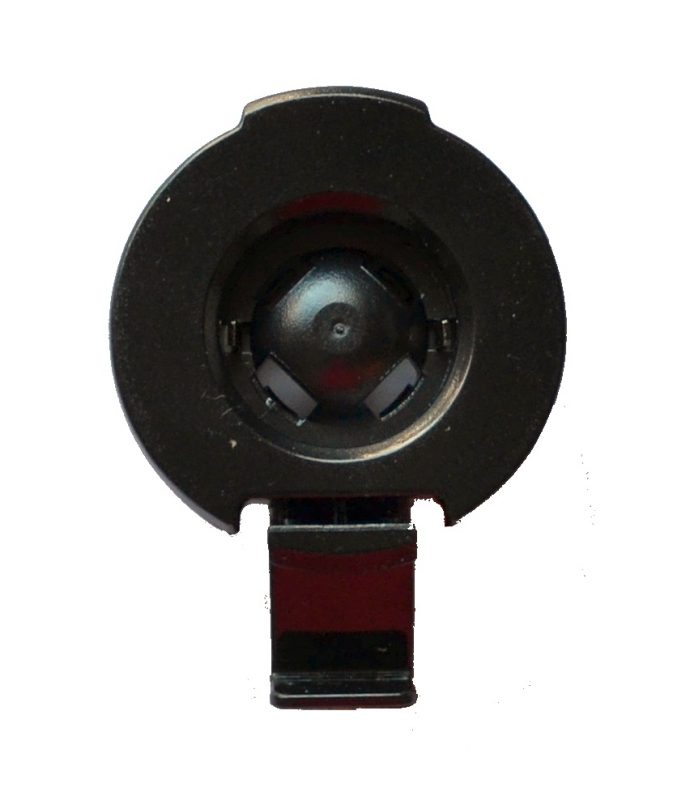
If you want to connect a Garmin GPS cradle to a RAM Mount or a Tackform mount, you need a Garmin GPS mount adapter first, because the ball sizes are not compatible out of the box. Garmin uses a 17mm ball socket on nearly every automotive GPS cradle, with a handful of newer large-screen models switching to a 22mm ball. RAM Mounts use a completely different 1 inch, or 25mm, B-size ball. Tackform uses its own 20mm ball. None of these connect directly to a Garmin cradle without the right adapter in between, and forcing an oversized ball into an undersized socket is a good way to crack the cradle.
Quick Comparison
| Adapter or Component | Best For | Ball Size |
|---|---|---|
| Arkon 25mm to 17mm Ball Adapter | Attaching a Garmin cradle to any RAM B-size arm | 25mm to 17mm |
| RAM Short Double Socket Arm | Adjustable positioning between base and adapter | 1 inch B-size |
| RAM Twist-Lock Suction Base | Secure windshield or dash mounting for a RAM setup | 1 inch B-size |
| Tackform 20mm to 17mm Ball Adapter | Attaching a Garmin cradle to any Tackform Enduro mount | 20mm to 17mm |
| Tackform 20mm to 17mm/22mm Combo Adapter | Garmin owners who are not sure which ball size they have | 20mm to 17mm and 22mm |
Which Garmin GPS Mount Adapter Do You Need
Garmin has used the same 17mm ball socket across its automotive GPS line for well over a decade. Every Nuvi, every Drive, and every standard DriveSmart cradle connects using this size, so the majority of readers need a 17mm-compatible adapter no matter which mount brand they are pairing it with.
A smaller number of newer, larger-screen Garmin units switched to a 22mm ball for added stability. This includes the DriveSmart 86, the dezl OTR trucking series, and the RV 890/1090 line. If you own one of these, look for an adapter that specifically lists 22mm compatibility. Using a 17mm adapter with a 22mm cradle will not seat properly, and it will not hold.
If you are not sure which ball size your Garmin uses, check the sticker or model number printed on the back of the cradle, or measure the ball itself with calipers. The 17mm and 22mm balls look similar at a glance but the difference is enough that they are not interchangeable.
Connecting a Garmin Cradle to a RAM Mount
RAM Mounts are built around a completely different standard from Garmin. Their B-size ball, used across the vast majority of RAM’s consumer and professional vehicle mount lineup, measures 1 inch in diameter, or 25mm. That is nearly 50 percent larger than Garmin’s 17mm socket, and there is no way to wedge a 1-inch RAM ball into a Garmin cradle. People try. It does not work.
Some of the confusion comes from RAM’s own marketing. RAM makes model-specific Garmin cradles that use a G-ball, which is RAM’s term for a 17mm-compatible ball built directly into the cradle. Those connect to a RAM arm with no adapter needed, but they only work with specific Garmin models and they do not let you keep your existing factory cradle.
The Arkon SP25MM17 has a 1-inch ball on one end and a 17mm ball on the other. One end clicks into any standard RAM B-size socket arm, and the other end pops into the 17mm socket on the back of your Garmin cradle. No drilling, no modification, nothing permanent.
Building the Full RAM Mount Setup
The adapter alone is not a complete mount. You need a base and an arm to go with it, and RAM’s modular system means you pick each piece separately.
The RAM Twist-Lock Suction Cup Base is the standard choice for windshield or dashboard mounting. It uses a 3.3-inch suction cup with a twist-lock mechanism that creates a strong, consistent hold on smooth glass, and it includes a 1-inch B-size ball built into the base plate so it connects directly to any RAM B-size arm. RAM backs it with a lifetime warranty.
The RAM Short Double Socket Arm sits between the suction base and the adapter. It has a 1-inch B-size socket at each end with a single adjustment knob in the middle, so you loosen the knob, rotate to the angle you want, and tighten it back down. At 2.42 inches overall it keeps the GPS close to the windshield. If your windshield sits farther from the driver, the medium-length version of the same arm works with the same base and adapter.
Assembly takes about two minutes. Attach the suction base to a clean glass surface using the twist-lock. Snap the arm onto the 1-inch ball on the base. Insert the 1-inch end of the adapter into the open socket on the arm and tighten the knob. Press the 17mm ball on the adapter into the socket on the back of your Garmin cradle until it clicks. To remove the GPS, squeeze the release on the cradle as you normally would; the base and arm stay on the windshield.
When to Use a Dedicated RAM Garmin Cradle Instead
If RAM makes a model-specific cradle for your GPS, a dedicated cradle connects directly to a 1-inch RAM ball with no adapter, which can give a slightly more rigid hold. The adapter approach is more versatile though, since it works with any Garmin cradle using the standard 17mm socket, and it carries forward if you upgrade to another Garmin model that uses the same socket.
Connecting a Garmin Cradle to a Tackform Mount
Tackform’s Enduro Series is built around a 20mm aluminum ball, used across their suction cups, table clamps, headrest clamps, and phone and tablet holders. That 20mm ball does not match Garmin’s 17mm or 22mm sockets, so a Tackform mount needs an adapter to work with a factory Garmin cradle, the same way a RAM mount does.
For standard Garmin units with a 17mm socket, the Tackform 20mm to 17mm adapter is a single-piece aluminum connector. One end snaps into any Tackform Enduro component, and the other end pops into the Garmin cradle.
If you are not certain whether your Garmin uses a 17mm or 22mm ball, or you own more than one Garmin device that uses different sizes, Tackform also sells a combo adapter with a 17mm end and a 22mm end in one package. It is a practical choice if you plan on swapping devices on the same mount over time.
Tackform mounts are known for their all-metal construction, which holds up better than the plastic mounts that ship in the box with most GPS units, especially in trucks and off-road vehicles where vibration is a factor.
Common Mistakes to Avoid
| Mistake | Why It Causes Problems |
|---|---|
| Forcing an oversized ball into an undersized cradle | Can crack or permanently damage the cradle |
| Buying the wrong ball size adapter | Leads to a loose, unstable connection |
| Assuming every Garmin uses a 17mm ball | Some larger, newer models use 22mm instead |
| Buying a base or arm alone and assuming it includes an adapter | RAM and Tackform components are modular and sold separately |
| Buying an unbranded adapter listing that does not specify exact ball sizes | Generic listings sometimes ship the wrong size despite the title |
Why Upgrade from the Stock Garmin Mount
The stock Garmin suction cup mount is functional but built to a price. The neck is usually fixed, so you get whatever angle the suction cup position gives you, and the push-lock suction mechanism tends to degrade over time with temperature cycling. Anyone who has seen a GPS drop off a hot windshield knows the feeling.
Both the RAM and Tackform builds described above give you an adjustable arm, a more reliable locking mechanism, and metal hardware that holds up better long term. The modular design also means the base and arm stay on the windshield if you ever upgrade your GPS. You either reuse the same adapter with the new cradle, or swap only the adapter if the new device uses a different ball size.
Frequently Asked Questions
Can I connect a Garmin cradle to a mount that uses a different ball size?
Yes. A ball size adapter is the standard fix, and it is a normal, widely used solution rather than a workaround. Just match the adapter to both your Garmin’s ball size and your mount brand’s ball size.
Will forcing a larger ball into a smaller Garmin cradle work if I push hard enough?
No. The socket is molded plastic and it can crack under pressure. A cracked cradle usually cannot be repaired and needs to be replaced.
How do I know if my Garmin uses a 17mm or 22mm ball?
Most Nuvi, Drive, and standard DriveSmart models use 17mm. Larger units like the DriveSmart 86, dezl OTR series, and RV 890/1090 use 22mm. If you are unsure, measure the ball on the back of your cradle or check the model listing.
Do these adapters work with GPS brands other than Garmin?
Any device using a standard 17mm or 22mm ball socket will work with the matching adapter, regardless of brand. Garmin is simply the most common example since its cradle standard has stayed consistent for years.
Is a RAM or Tackform setup better for a Garmin GPS?
Both are solid, metal-built systems. RAM has a larger accessory ecosystem and more dedicated Garmin cradle options. Tackform tends to run a bit more compact and lightweight for the same stability. Either works well once the correct adapter is in place.
