
The best aviation kneeboard depends on what you need within reach during a flight. A student pilot writing down radio frequencies may prefer a simple aluminum clipboard, while someone running ForeFlight on an iPad Mini needs a secure tablet holder. Pilots using full-size iPads or carrying paper charts have different requirements. This guide compares six aviation kneeboards, from traditional clipboards to rotating tablet folios and combination mounting systems.
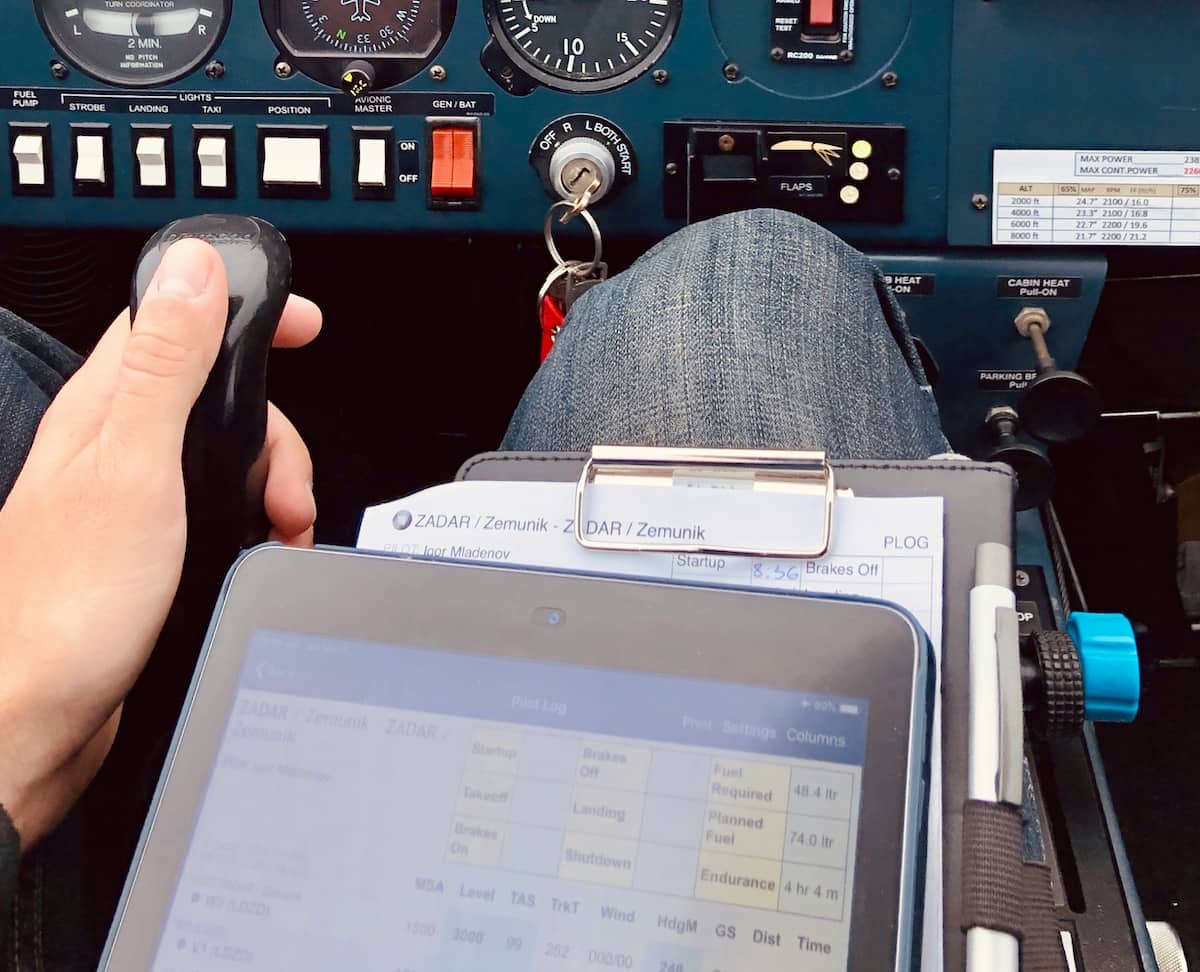
Kneeboards have been in use in the aviation industry for several decades now. However, their usage has evolved over time as pilots have started using electronic flight bags such as ForeFlight and Garmin Pilot. The pilot no longer needs to carry only printed copies of the navigation log and checklists. He can now use an iPad Mini or even a full-size tablet to carry charts, airport diagrams, flight planning, and weather data.
In this article, we will be looking at the different types of kneeboards, how they are mounted and retained, and where they are best suited. The key considerations will include the nature of information carried, the size of the device, and the space available in the cockpit.
Best Aviation Kneeboards at a Glance
These six products serve different cockpit needs. Some are writing surfaces, others secure tablets, and one offers several mounting configurations. The comparison below summarizes the differences before we examine each product.
| Kneeboard | Best For | Design | Main Consideration |
|---|---|---|---|
| ASA KB-1 VFR Kneeboard | Traditional notes and checklists | Rigid clipboard | No dedicated tablet holder |
| ASA KB-3 Tri-Fold | Charts and paper organization | Folding organizer | More space when opened |
| ASA iPad Mini Kneeboard | iPad Mini pilots | Microfiber-lined tablet folio | Flexible corner clips and leg strap |
| Flight Outfitters Deluxe iPad Flight Desk | Tablet plus working surface | Foldable flight desk | Requires more cockpit space |
| MYGOFLIGHT Folio C | Premium full-size iPad folio | Rotating folio and clipboard | Larger than a simple leg strap |
| FlightPro 3-in-1 Aviation Mount | Multiple cockpit mounting positions | Kneeboard, yoke, suction | Less paper organization |
1. ASA KB-1: Best Traditional Aviation Kneeboard
The ASA KB-1 VFR Kneeboard is a conventional aluminum clipboard with a retaining clip and adjustable leg strap. It gives pilots a rigid writing surface for notes, navigation logs, checklists, and other paper materials without introducing a large organizer into the cockpit.
Simplicity is its biggest advantage. All one needs to do is fasten the notepad or flight planning form to the board and take notes about frequencies, clearances, etc., without having to balance papers on the seat or instrument panel. The aluminum board offers a solid base for writing, while the strap ensures that the surface remains in the same position on the leg.
This design works particularly well for student pilots learning to manage radio communications, flight planning, and checklist procedures. It requires little setup, and the rigid surface is useful for handwritten information during a flight. Pilots who continue to use paper alongside electronic navigation equipment can also benefit from a dedicated writing area.
Another advantage is the small footprint. Compared with a large iPad folio or tri-fold organizer, the KB-1 occupies less space on the pilot’s leg. This is useful in compact general aviation aircraft where knee clearance and control movement leave little room for additional equipment.
Best for: Student pilots, VFR flying, handwritten notes, and anyone who prefers a compact clipboard-style kneeboard. Its primary limitation is that it does not provide a dedicated tablet retention system.
2. ASA KB-3: Best Tri-Fold Aviation Kneeboard
The ASA KB-3 Tri-Fold Kneeboard is designed for pilots who want more organization than a basic clipboard provides. Its folding layout combines a writing surface with additional panels for paperwork, charts, and flight materials.
A tri-fold design is useful when a pilot regularly switches between several documents. A navigation log can remain on the clipboard while checklists, flight planning notes, and airport information are stored in the organizer. Keeping these materials together reduces the need to search through a flight bag whenever a different document is needed.
For pilots flying with paper charts or following procedures that require frequent written notes, the extra organization can be worthwhile. The folding format also helps keep documents contained when the kneeboard is not in use.
The tradeoff is the space occupied by its additional panels. A tri-fold kneeboard may fit comfortably while closed but extend toward the center console, control stick, or adjacent seat when opened. In tighter cockpits, the available space may favor a simple clipboard instead.
It’s also important to distinguish document storage from tablet retention. A pocket that happens to accommodate an iPad is not necessarily designed to secure that tablet during flight. Pilots who use electronic flight bags as their primary source of charts will be better served by one of the dedicated tablet kneeboards below.
Best for: Pilots carrying printed charts, navigation logs, checklists, and multiple documents. Choose the KB-3 over the KB-1 when having organized paper storage matters more than minimizing size.
3. ASA iPad Mini Kneeboard: Best Compact Tablet Holder
The ASA iPad Mini Kneeboard combines a tablet holder with a protective portfolio-style case. Instead of relying on a rigid plastic cradle that surrounds the tablet, it uses flexible corner clips to hold a compatible iPad Mini in place while leaving most of the screen unobstructed.
The holder is made from microfiber leather with a soft gray interior that protects the tablet screen when the folio is closed. A wide adjustable hook-and-loop strap secures the assembly to the pilot’s thigh. The combination makes it useful both as a cockpit kneeboard and as a protective portfolio when the tablet is being carried outside the airplane.
ASA also incorporates a clip on the front for a notepad and elastic loops along the sides for a pen, pencil, or stylus. These details distinguish it from the minimalist straps that hold a tablet but provide nowhere to write down frequencies or clearances.
How Does It Hold the iPad Mini?
The flexible clips engage the tablet’s corners rather than covering its entire perimeter. This allows access to most of the screen while keeping the device retained inside the folio. Unlike a simple storage sleeve, the clips are intended to hold the tablet in position when the kneeboard is opened for use.
The hook-and-loop leg strap supports the folio independently of the tablet retention mechanism. That distinction matters because the tablet must stay inside the holder while the holder itself remains secured to the pilot’s leg. ASA’s design addresses both attachment points.
The iPad Mini’s smaller size also helps in compact cockpits. It occupies less space on the thigh than a full-size iPad, leaving more room for leg movement and adjacent equipment. The smaller display may be less convenient for split-screen applications, but it can be easier to manage in aircraft with limited interior space.
Best for: Pilots who use an iPad Mini for ForeFlight, Garmin Pilot, or other electronic flight bag applications and want a compact holder with notepad and pen storage. Compare your Mini and any protective case with ASA’s supported dimensions before purchasing.
4. Flight Outfitters Deluxe iPad Flight Desk: Best for Extra Working Space
The Flight Outfitters Deluxe iPad Flight Desk goes beyond a conventional leg-mounted tablet holder. It provides a larger working platform for pilots who use an iPad alongside notes, pens, and other small flight essentials.
The design incorporates a tablet-holding arrangement, foldable supports, and storage pockets. It is intended to combine several cockpit accessories into one organized workspace, making it attractive for pilots who use both electronic charts and written information.
A desk-style arrangement provides additional working area compared with a simple tablet strap. That can be useful when copying a clearance, working with a navigation log, or keeping frequently used materials together. Instead of balancing several individual items, the pilot has a more substantial platform for organizing them.
Its greater size is the primary tradeoff. A flight desk can be bulkier than a clipboard or compact iPad Mini holder, especially when opened. The extra surfaces are useful only when the cockpit has enough space for the assembly without interfering with leg movement or nearby controls.
For pilots using a small aircraft with limited knee clearance, a narrower kneeboard could be more comfortable. In a roomier cockpit, the Flight Outfitters design gives the pilot more flexibility to manage a tablet and paperwork at the same time.
Best for: Pilots who want an iPad holder with a larger working surface and additional organization. It is less suited to someone seeking the smallest and lightest possible kneeboard.
5. MYGOFLIGHT Folio C: Best Premium iPad Kneeboard
The MYGOFLIGHT Universal Folio C combines a rotating tablet holder, protective folio construction, and clipboard functionality. It is designed for pilots who want more than a basic tablet strap and prefer a kneeboard that can also function as a tablet case outside the aircraft.
One of its key features is the rotating cradle, which allows a compatible tablet to be repositioned between portrait and landscape orientations. This can be convenient when switching between navigation charts, airport diagrams, and other electronic flight bag screens.
The folio also provides a removable leg strap and a writing surface for notes. Pilots can keep electronic charts accessible while retaining a place to write frequencies, clearances, or other information. This combination of tablet positioning and clipboard functionality is the main reason to choose the Folio C over a simpler leg-mounted holder.
The standard Folio C is designed for compatible full-size tablets rather than being an iPad Mini-only holder. MYGOFLIGHT also makes other size configurations, so the specific tablet should be matched to the holder. A thick protective case can affect fit, particularly where the retention system engages the edges or corners of the device.
The Folio C’s disadvantage is its extra bulk. The rotating mechanism, folio cover, and clipboard provide useful features, but they occupy more space than a minimalist strap. In a compact cockpit, that difference can influence comfort and available knee clearance.
Best for: Pilots using a compatible full-size iPad who want screen rotation, written notes, and protective folio functionality in one accessory.
6. FlightPro 3-in-1: Best Hybrid Kneeboard and Aviation Mount
The FlightPro 3-in-1 Aviation iPad Mount offers a different approach from traditional kneeboards. Its system provides a kneeboard arrangement along with yoke and suction mounting configurations, allowing pilots to choose a different screen location depending on the aircraft.
This versatility can be useful for pilots who fly more than one airplane. A yoke mount may place the screen conveniently in one cockpit, while a kneeboard or suction installation may work better in another. The ability to change attachment methods avoids committing to a single mounting location.
The kneeboard configuration keeps the tablet on the pilot’s thigh without using an aircraft attachment point. When a suitable yoke or window location is available, the other mounting options can move the display closer to the pilot’s normal instrument scan.
There is a tradeoff in using a multi-configuration kit. The FlightPro concentrates on tablet mounting rather than paper organization, so it does not replace a traditional clipboard or tri-fold organizer for pilots who regularly work with handwritten notes and charts.
Best for: Pilots who want kneeboard, yoke, and suction mounting options in one system, particularly when moving between different aircraft.
For a closer look at cockpit-mounted tablet systems, our aviation iPad mounts guide compares yoke clamps, suction mounts, and kneeboards, including the clearance and positioning considerations that distinguish them.
How to Choose the Right Aviation Kneeboard
The choice should begin with how you use flight information. A clipboard works well for frequent handwritten notes, while a tablet holder is more useful when electronic charts and navigation applications are the primary tools. Pilots who regularly use both may prefer a combination folio or desk-style organizer.
Tablet Size and Protective Case
For an electronic kneeboard, the tablet’s physical dimensions matter more than the advertised screen diagonal. An iPad Mini, standard iPad, iPad Air, and iPad Pro can have different widths, thicknesses, and button locations. A thick protective case may also prevent the device from fitting a form-fitting cradle or corner-clip design.
Adjustable grips and elastic retaining systems offer some flexibility, while dedicated model-specific holders may provide a more tailored fit. Our tablet mounts guide explains these different retention methods and their advantages.
Leg Strap Comfort and Stability
The kneeboard should remain on the pilot’s thigh without slipping or requiring repeated adjustment. Wide elastic straps and hook-and-loop fasteners are common because they accommodate different leg sizes. Some designs add padding or nonslip material to improve stability.
Comfort becomes more important during longer flights. A rigid board pressing against the thigh or moving whenever the pilot operates the rudder pedals can become distracting. Larger flight desks need enough strap support to remain stable while their extra working surfaces are being used.
Screen Rotation and Viewing Position
Some tablet kneeboards support portrait and landscape orientation through rotating holders. This can help pilots position charts and electronic flight bag screens according to the application being used. The mechanism should remain secure once the desired orientation is selected.
A larger tablet also changes the available clearance when rotated. A kneeboard that fits comfortably in portrait orientation may extend toward the center console or flight controls when turned sideways.
Paper Storage and Writing Space
A kneeboard with document pockets, pen loops, and a clipboard can be useful even when the pilot primarily uses electronic charts. There are still situations where writing down a clearance or frequency is easier than entering it into an app.
For pilots who use paper frequently, the ASA KB-3 offers more organization than a simple tablet strap. The MYGOFLIGHT Folio C and Flight Outfitters flight desk provide alternatives for combining a tablet with writing space.
Aviation Kneeboard vs. Yoke Mount vs. Suction Mount
A kneeboard is not the only way to position an electronic flight bag. Some pilots prefer keeping the display closer to their normal instrument scan through a yoke or suction mount. Each method places the device differently and introduces its own clearance considerations.
| Factor | Kneeboard | Yoke Mount | Suction Mount |
|---|---|---|---|
| Screen position | Pilot’s leg | Near flight controls | Window or suitable smooth surface |
| Aircraft attachment | Not required | Yoke clamp | Suction base |
| Main clearance issue | Legroom and pedals | Control movement and instruments | Outside visibility |
| Paper notes | Available on many models | Usually separate | Usually separate |
| Moving between aircraft | Generally easy | Depends on yoke fit | Depends on surface |
A yoke mount can position the iPad nearer the instrument panel, but it places additional weight on the aircraft controls and requires careful clearance checks. A suction mount avoids weight on the yoke but depends on an appropriate surface and must not interfere with outside visibility.
A kneeboard avoids attachment to the aircraft, which is useful for pilots moving between airplanes. Its principal limitation is the lower viewing position, since reading the screen usually requires looking down toward the pilot’s leg.
Our aviation iPad mounting article provides a more detailed explanation of those mounting arrangements and the differences between full-size tablets and smaller iPad Minis.
VFR and IFR Kneeboards: What’s the Difference?
Traditional aviation kneeboards are sometimes sold as VFR or IFR models. The difference usually relates to the printed reference information, writing layout, and intended note-taking tasks rather than an entirely different attachment method.
A VFR kneeboard may include areas for navigation logs, frequencies, and flight planning notes. An IFR-oriented version may provide layouts suited to instrument clearances, approach information, and other paperwork associated with instrument flying.
A basic clipboard can be used for either type of operation when the pilot prefers a custom note-taking format. Printed reference information should also be checked for currency instead of being treated as a substitute for current charts or required aircraft documentation.
Using an Aviation Kneeboard Safely
A kneeboard does not require an aircraft mounting clamp, but its position still matters. A large tablet, folding panel, or loose strap can interfere with movement or become difficult to manage during flight.
Before using a kneeboard, confirm that the pilot can operate the rudder pedals, move the yoke or control stick through its required range, and access surrounding equipment without interference. Check the arrangement in both its closed and normal working positions, particularly when using a tri-fold organizer or flight desk.
Electronic kneeboards also require attention to charging cables. When a tablet is connected to external power, the cable should remain clear of moving controls and avoid loose loops around the pilot’s legs. The tablet should stay securely retained when the pilot moves or adjusts the kneeboard.
Comfort and viewing position are also relevant. The kneeboard should remain secure without constant adjustment, and the pilot should be able to access flight information without excessive distraction.
Frequently Asked Questions
What is the best aviation kneeboard for a student pilot?
A simple clipboard-style kneeboard such as the ASA KB-1 is a practical starting point. It provides a firm writing surface for frequencies, navigation logs, checklists, and notes without introducing a large organizer. Pilots needing additional document storage can consider the ASA KB-3.
How does the ASA iPad Mini Kneeboard hold the tablet?
The ASA holder uses flexible clips around the iPad Mini’s corners to secure it inside a microfiber-lined folio. A separate wide hook-and-loop strap holds the folio against the pilot’s leg. It also provides a notepad clip and loops for writing instruments.
Can an aviation kneeboard hold a full-size iPad?
Yes, when the kneeboard is designed for the tablet’s size and weight. The MYGOFLIGHT Universal Folio C and Flight Outfitters Deluxe iPad Flight Desk offer arrangements for compatible larger tablets. Full-size iPads occupy more cockpit space than an iPad Mini, so clearance remains important.
Is a kneeboard better than an iPad yoke mount?
A kneeboard is easy to move between aircraft and avoids placing hardware directly on the flight controls. A yoke mount can position the display closer to the pilot’s instrument scan when the aircraft provides suitable clearance. The preferred method depends on cockpit layout and how frequently the display is used.
Do pilots still use paper kneeboards?
Yes. Traditional kneeboards remain useful for written frequencies, clearances, navigation notes, and checklists. Some pilots use a clipboard alongside an electronic flight bag, while others prefer a folio with both tablet retention and writing space.
Can I use an aviation kneeboard in a helicopter?
A kneeboard may be suitable in a helicopter, but the cockpit layout must be considered carefully. The cyclic and other controls can operate close to the pilot’s legs, making large tablet folios and folding organizers less practical in some aircraft.
What is the difference between a VFR and IFR kneeboard?
The primary difference is usually the reference material or note-taking layout provided. Both can serve as writing surfaces or document organizers, and a general-purpose clipboard can accommodate either workflow.
Final Thoughts
The best aviation kneeboard depends on how the pilot organizes flight information and how much cockpit space is available. Traditional aluminum kneeboards remain useful for handwritten notes, while tri-fold organizers provide more storage. Dedicated tablet kneeboards and larger folios serve pilots who rely primarily on electronic flight bags.
The ASA KB-1 is a good starting point for straightforward paperwork, and the KB-3 adds organization for charts and documents. The ASA iPad Mini Kneeboard provides a compact tablet holder with flexible corner clips, while the Flight Outfitters Deluxe Flight Desk and MYGOFLIGHT Folio C offer more extensive working arrangements. The FlightPro 3-in-1 is suited to pilots who want multiple mounting positions.
Before purchasing, match the kneeboard to the intended tablet or paperwork, consider the available legroom, and make sure the complete arrangement stays clear of aircraft controls. A well-chosen kneeboard keeps important information accessible without adding unnecessary cockpit clutter.
