
If you have an old Garmin GPS mount sitting in a drawer, there is a good chance you can turn it into something useful again. Many Garmin Nuvi, Drive and DriveSmart mounting bases use a 17mm ball, and that same connection can accept phone holders, magnetic phone mounts, GoPro adapters and even standard camera adapters.
That means an old suction cup, dashboard base or weighted Garmin mount can become a Garmin phone mount without buying an entirely new garmin gps mount adapter setup.
Why Garmin 17mm Mounts Are Still Useful
Dedicated automotive GPS units are not as common as they once were, but a lot of their mounting hardware was extremely good.
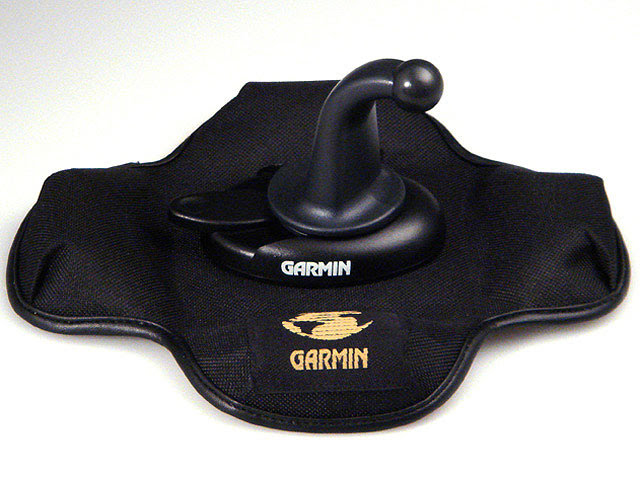
Garmin suction cup mounts were designed to support a GPS while dealing with road vibration, temperature changes and constant repositioning. The company’s old weighted dashboard and friction mounts were especially useful because they could sit on the dashboard without attaching anything permanently to the vehicle.
When the GPS eventually gets retired, the base often has plenty of life left. If you already browsed our Phone Mounts Hub looking for a garmin mount for phone use, this may save you a purchase entirely.
The secret is the ball on the end of the mount.
Many Garmin automotive mounts use a ball approximately 17mm in diameter. The GPS cradle snaps over that ball and provides the socket. Remove the Garmin cradle and you are left with a mounting connection that is supported by a surprisingly large aftermarket.
Instead of replacing the entire mount, you replace only the part that holds the device.
Garmin Phone Mount Conversion Options
If your goal is turning an old GPS base into a 17mm phone mount, you have two particularly simple options.
| Mount | Best For | Connection |
|---|---|---|
| DICMKY Universal 17mm Phone Holder | Most smartphones and cases | 17mm socket |
| EagleFlight 17mm Magnetic Phone Mount | MagSafe-compatible phones and cases | 17mm socket |
| ARKON GoPro Lateral Prong Adapter | GoPro HERO cameras | 17mm to GoPro prongs |
| Riddance Camera Adapter | Cameras and devices with tripod threads | 17mm to 1/4″-20 |
DICMKY Universal 17mm Ball Mount Phone Holder
For the simplest conversion, the DICMKY Universal 17mm Ball Mount Phone Holder is the place I would start.
Instead of using an adapter between the Garmin ball and another phone holder, this style of cradle already has the 17mm socket built into the back. Remove the original Garmin GPS cradle, push the new holder onto the ball and tighten it in position.
It is a much cleaner solution than stacking several adapters together, and it is one of the simplest 17mm phone mount conversions available.
The adjustable side grips make it suitable for a wide range of phones, and the mechanical cradle also makes sense for Android phones or iPhones where you do not want to depend on a magnetic case.
One thing to check is phone width. Large phones in thick cases can push the limits of some adjustable cradles, so compare the holder’s stated opening range with your phone before ordering.
EagleFlight 17mm Magnetic Phone Mount for MagSafe
If you want a more modern-looking garmin iphone mount, the EagleFlight 17mm Magnetic Phone Mount Base for MagSafe replaces the mechanical cradle with a magnetic mounting face.
It still connects directly to a 17mm ball, but the front is designed for MagSafe-compatible iPhones and compatible magnetic cases.
This is especially appealing if you already use magnetic mounts elsewhere because there are no side arms to open each time you get into the car. Place the phone against the mount and remove it when you leave.
A magnetic holder is only as secure as the magnetic interface between the phone and mount. A proper MagSafe case is preferable to relying on a weak generic magnetic plate, particularly on rough roads.
How to Turn a Garmin Mount Into a GoPro Mount
Phones are not the only reason to keep an old Garmin base.
The same 17mm ball can also make a surprisingly good starting point for a garmin gopro mount adapter setup.
This works particularly well with Garmin windshield and dashboard bases because you retain the adjustable ball joint while replacing the GPS cradle with a camera connection.
There are two ways I would do it.
ARKON 17mm GoPro Lateral Prong Adapter
The ARKON GoPro Lateral Prong Adapter is the cleanest garmin gopro adapter solution if the goal is specifically mounting a GoPro.
One end contains the socket for the 17mm mounting ball. The other provides the familiar GoPro-style prong connection.
The result is essentially:
Garmin base → 17mm ball → ARKON adapter → GoPro
There is no reason to add a generic camera adapter in the middle when you know a GoPro is the device being used. It is one of the more direct 17mm gopro adapter options on the market.
The short adapter is also preferable to building a tall stack of mounting components. Keeping a camera close to the base generally reduces movement and vibration.
Rigdance 17mm to 1/4″-20 Camera Adapter
The most versatile conversion of all is the Rigdance 17mm Ball to 1/4″-20 Camera Adapter.
A 1/4″-20 threaded connection is the standard tripod connection found on a huge range of cameras and accessories. ARKON specifically makes this adapter to turn a 17mm mounting ball into that camera connection.
That means an old Garmin mount can potentially support a compact camera, compatible action camera, webcam or another lightweight device equipped with a standard tripod socket.
This is the adapter I would buy if you are experimenting and do not yet know what device will end up on the mount. A 1/4″-20 connection gives you many more possibilities than a device-specific interface.
How to Tell If Your Garmin Mount Is 17mm
Do not order a garmin 17mm mount adapter just because the mount says Garmin.
The easiest check is to remove the device cradle and look at the ball at the end of the mounting arm.
If it is approximately 17mm, or about 0.67 inch, in diameter, these adapters are designed around that connection.
The 17mm ball is particularly common among Garmin’s traditional automotive units, including many:
- Garmin Nuvi models
- Garmin Drive models
- Garmin DriveAssist models
- Garmin DriveSmart models
But Garmin does not use 17mm across every product.
Garmin 17mm vs 22mm Mounts
This is the biggest compatibility trap.
Some larger Garmin navigation products use a 22mm ball instead of the traditional 17mm connection. That includes large-screen models and products intended for RV and trucking applications.
A 17mm socket will not properly fit a 22mm ball.
The Garmin DriveSmart 86 is one important example where you should not assume the traditional 17mm connection. Larger Garmin RV and dezl OTR products can also use the bigger mounting system.
If there is any doubt, see our complete Garmin 17mm vs 22mm mount compatibility guide before buying an adapter.
Which Old Garmin Bases Are Worth Reusing?
Not every 15-year-old suction cup deserves another decade of service.
There are, however, several Garmin mounting styles I would absolutely consider reusing.
Weighted and Friction Dashboard Mounts
These are probably the most interesting candidates.
The old Garmin friction and weighted dashboard mounts had enough mass to remain stable without being permanently attached to the dashboard. If you still have one in good condition, adding a new 17mm phone holder can give it a second life.
They are especially useful for someone who dislikes windshield suction mounts.
Garmin Suction Cup Mounts
A good suction cup mount is still perfectly usable.
Check the rubber first. If the cup has hardened, cracked, distorted or lost its ability to hold reliably, retire it rather than trusting it with an expensive phone or camera.
If the suction cup is still supple and maintains suction, replacing only the cradle makes sense.
For more mounting options, see our GPS Mounts Hub.
Permanent Dashboard Bases
If you already installed a Garmin-compatible base in the vehicle and it terminates in a 17mm ball, conversion is even more attractive.
There is little reason to remove a solid mounting base just because the device attached to it has changed.
Can I Use a Garmin Phone Mount Adapter With an iPhone?
Yes.
There is nothing Garmin-specific about the phone itself in this setup. The Garmin component is the 17mm mounting ball.
Once a compatible phone holder is attached to that ball, the holder determines which phones fit.
A conventional adjustable cradle works with many iPhone and Android models. A magnetic version works particularly well with MagSafe-equipped iPhones or other phones using a compatible magnetic case.
If you are starting from scratch rather than trying to reuse Garmin hardware, browse the Phone Mounts Hub for purpose-built alternatives.
Can I Use These Adapters With a Garmin Motorcycle GPS?
Be careful here.
Garmin’s automotive 17mm ball system should not be confused with the mounting hardware used by many Garmin Zumo motorcycle GPS units.
Powered motorcycle cradles commonly use the AMPS hole pattern on the back of the cradle rather than simply snapping onto the same 17mm automotive ball arrangement.
If you are working with a Zumo or another motorcycle GPS, our guide to the motorcycle GPS mounts explains that system in more detail.
What Else Can You Mount on a Garmin 17mm Ball?
Once you stop thinking of the Garmin base as a GPS mount and start thinking of it as a 17mm mounting platform, there are quite a few possibilities.
Depending on the adapter, it can be used for:
- Smartphones
- MagSafe-compatible phones
- GoPro cameras
- Insta360 and other action cameras with suitable adapters
- Compact cameras with 1/4″-20 tripod sockets
- Lightweight webcams
- Other lightweight electronics using standard camera mounting hardware
For more camera-specific mounting ideas, visit our Camera Mounts Hub.
Common Garmin Mount Conversion Mistakes
Most problems with these conversions come down to compatibility rather than installation.
Buying a 17mm adapter for a 22mm Garmin mount. Measure the ball or check the model before ordering.
Using an oversized phone with a small cradle. Check the holder’s maximum opening, especially if your phone has a thick protective case.
Trusting an old suction cup without testing it. Age and heat can harden rubber. Test an older mount before putting an expensive device on it.
Adding too many adapters. Every extra joint moves the device farther from the mounting base and can introduce additional vibration.
Mounting equipment that is too heavy. A 1/4″-20 thread may physically accept a fairly large camera, but that does not mean a small Garmin suction mount was designed to carry it.
Is Reusing an Old Garmin Mount Worth It?
If the base is still in good condition, yes.
The biggest reason is that you already own the difficult part of the mounting system.
A Garmin phone mount conversion may require nothing more than removing the GPS cradle and snapping a new phone holder over the existing 17mm ball. The same mounting base can also become a GoPro mount with a direct prong adapter or a small camera mount with a 1/4″-20 adapter.
For a normal phone conversion, I would choose the DICMKY 17mm phone holder.
For a magnetic setup, the EagleFlight 17mm magnetic holder is the cleaner option.
For GoPro cameras, the ARKON 17mm GoPro adapter provides the most direct connection.
And if you want maximum flexibility, the Rigdance 17mm to 1/4″-20 adapter opens the Garmin base to a much wider range of lightweight camera hardware.
That old Garmin mount may have outlived the GPS it came with, but the 17mm ball on the end of it is still surprisingly useful.
