
If you have ever propped a phone against a coffee mug five minutes before going live, you already know the problem. Phones are not built to stand on their own. Curved edges, camera bumps, and slim profiles mean that even a careful balancing act usually ends with the phone sliding flat, pointed at the ceiling, or angled straight up your chin instead of your face.
The real issue is not whether the phone can stand. It is whether it lands at the right height, angle, and distance for what you are filming. For a talking-head stream, that means eye level. For cooking, crafting, or any setup where the camera needs to look straight down at a counter, it means a completely different kind of phone stand for live streaming. The five options below cover both, from a five-minute casual stream to a serious daily broadcast.
| Mount | Best For | Setup Type |
|---|---|---|
| Cooper ChatStand | Quick, casual streams | Adjustable desk stand |
| Arkon 11-Inch Tripod | Most home and desk streamers | Adjustable tabletop tripod |
| SmallRig 22-Inch Magic Arm with Clamp | Crowded or glass-top desks | Clamp-mounted articulating arm |
| UBeesize Ring Light with Tripod | Daily or serious streamers | Tripod and ring light combo |
| Arkon Overhead Phone Stand | Cooking, crafting, top-down demos | Overhead desk stand |
Why Standing Your Phone Isn’t Enough
Set a phone flat on a desk and prop it upright, and the lens almost always ends up pointed too low. Instead of your face, the camera frames your chest, your chin, or the ceiling behind you. That low angle is the single biggest reason casual streams look amateur even when the lighting and audio are fine.
Part of the problem is physical. Most phones are taller than they are wide, so leaning one against a wall or a stack of books puts the lens somewhere around desk height, well below where a person’s face naturally sits when seated. A laptop webcam avoids this because it is built into the screen at eye level by default. A phone has no such built-in advantage, which is exactly why a mount matters more for phone streaming than it does for a laptop setup. Browse our full phone mounts hub if you need a mount for the car or desk beyond streaming use.
This is why most streamers move past “just standing the phone” fairly quickly and start using a dedicated mount or stand that holds the camera near eye level. The improvement is immediate: a better angle, a steadier shot, and a noticeably more professional look without changing anything else about the setup, the lighting, or the background.
Best Ways to Make Your Phone Stand for Live Streaming
1. Adjustable Desk Stand (Quickest Option)
The fastest way to get a phone off the desk and into a usable position is an adjustable desk stand like the Cooper ChatStand. It folds flat for storage, opens into a stable base, and adjusts in height and angle so the camera can sit closer to eye level instead of staring up from the desk surface.
- No tools or extra gear required
- Sets up and breaks down in seconds
- Compatible with most phone sizes and cases
The tradeoff is reach. A desk stand only raises the phone a few inches, so if your webcam-height target is higher than your desk allows, you will want a tripod instead. It also has no way to clamp onto a surface, so it depends entirely on its base for stability, which is fine on a solid desk but less reliable on a wobbly table.
This option suits anyone who streams occasionally rather than daily, or who needs to move the setup between rooms. Because it folds flat, it travels well, which makes it a reasonable pick for someone who streams from a coffee shop or a different desk each time rather than a permanent home studio.
2. Mini Tripod (Best Phone Tripod for Streaming)
For most people, a small tabletop tripod is the single best upgrade available. The Arkon 11-Inch Tripod raises the phone, lets you tilt it precisely, and holds that position without drifting mid-stream. Because the legs splay out and lock, it stays steady on desks, shelves, and most flat surfaces without needing anything to clamp onto.
- Adjustable height and tilt angle
- Stable on desks, shelves, and counters
- Works with nearly any phone, with or without a case
The reason it works for nearly everyone is flexibility. The legs adjust independently, so a tripod can sit level even on an uneven desk, and the head tilts far enough to aim slightly upward if your desk sits lower than your face. It also doubles as a travel tripod, so the same unit can move between a desk, a kitchen counter, or an outdoor setup without buying a second mount.
3. Clamp-Mounted Magic Arm (Best for Crowded or Glass Desks)
If desk space is tight or your surface is glass or uneven, a clamp-based mount solves the problem that tripods cannot. The SmallRig 22-Inch Magic Arm with Clamp bolts onto the edge of a desk or shelf and extends well above standard tripod height, putting the phone exactly at eye level without taking up any surface space at all.
- Clamps to desk or shelf edges, no surface footprint
- 22-inch reach for true overhead or eye-level positioning
- Double-ball joints hold position without drifting
This is also the better choice for anyone recording cooking, crafting, or product demos from above, since the arm extends far enough to shoot straight down onto a desk or counter.
The clamp itself is the real advantage here. Most desks have at least one edge a clamp can grip, whereas a tripod needs flat, open surface area that a busy desk with a keyboard, monitor, and notebooks often does not have. Once mounted, the arm can be repositioned in seconds without unclamping it, which makes it easier to switch between an eye-level shot and an overhead angle on the same desk.
4. Tripod and Ring Light Combo (Best for Regular Streamers)
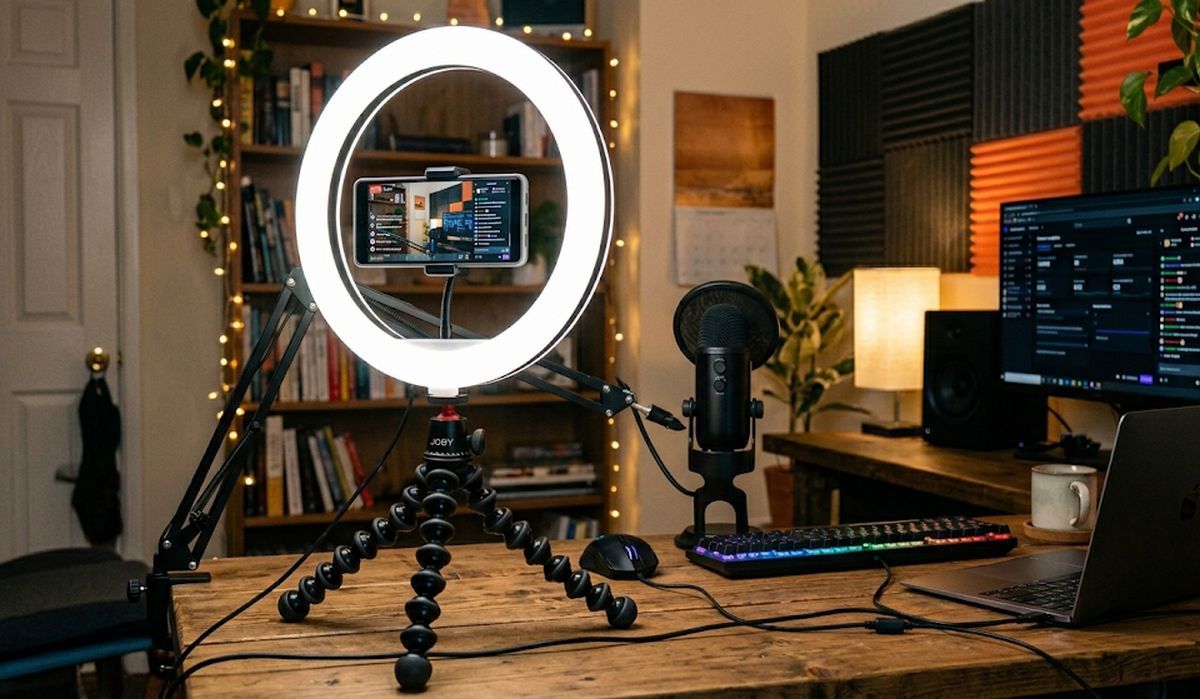
Once you stream often enough that lighting starts to matter, a combined tripod and ring light setup like the UBeesize Ring Light with Tripod closes that gap in a single purchase. The built-in phone holder sits at the center of the ring, so the light source and the camera angle line up automatically instead of fighting each other.
- Adjustable brightness and color temperature
- Tripod legs extend for floor or tabletop use
- One setup handles both lighting and positioning
Lighting matters more than most new streamers expect. A phone camera in a dim room will automatically boost its sensor gain to compensate, which introduces grain and washes out color. A ring light fixes that at the source instead of relying on software corrections, and because this one is built around the phone holder, there is no separate light stand to position or knock over mid-stream.
5. Overhead Stand (Best for Cooking, Crafting, and Top-Down Demos)
Not every stream is a talking-head shot. Cooking demonstrations, crafting tutorials, and unboxing videos all depend on a straight-down view of a counter or table, and none of the mounts above are built for that angle. The Arkon Overhead Phone Stand solves it directly: a weighted base sits on the counter while the arm extends up and over, holding the phone facing straight down at the work surface below.
- Purpose-built for top-down, overhead framing
- Weighted base stays put without clamping to anything
- Common choice for chefs, bakers, and tutorial creators
This is the one mount on this list that is not really interchangeable with the others. If your stream involves showing hands working on a surface rather than talking to the camera, this is the setup to get rather than trying to angle a tripod into the same shot.
It also frees up the entire desk surface for the actual work. A tripod or clamp arm aimed downward from the side still occupies space near the work area, and the angle is rarely a true overhead view. This stand’s arm sweeps over the top of the surface entirely, which is the same basic approach professional cooking channels use, just at a fraction of the cost and complexity.
What Really Matters for a Phone Holder for Live Streaming
The mount itself is only half the equation. These three factors decide whether a stream looks professional or amateur, regardless of which stand you choose:
- Height: Keep the lens at or near eye level, not angled up from below
- Angle: A slight upward tilt reads better than a flat, head-on shot
- Stability: Anything that wobbles or drifts during a stream is worse than no mount at all
Get those three right, and the specific mount becomes a matter of convenience rather than quality.
Common Mistakes to Avoid
A handful of small setup mistakes account for most streams that look worse than they need to:
- Placing the phone too low: shooting up at the chin or chest is the single most common issue, and it is also the easiest to fix with any of the mounts above
- Balancing the phone against random objects: books, mugs, and boxes work until they do not, and an unstable base risks the phone falling mid-stream
- Ignoring lighting until the stream already looks washed out: fixing exposure after the fact in software never looks as good as getting the light right at the source
- Choosing a fixed-angle case over an adjustable mount: a kickstand case solves the problem once, at one angle, while an adjustable mount solves it permanently across every future setup
Related Mount Guides
Bottom Line
Making a phone stand is the easy part. Making it stand in the right place, at the right angle, for what you are filming is what changes how a stream looks. For most talking-head setups, the Arkon mini tripod is the simplest upgrade with the biggest payoff. If you are filming hands-on work like cooking or crafting, skip straight to the overhead stand instead of fighting a tripod into an unnatural angle. Either way, a proper mount is the difference between a stream that looks improvised and one that looks intentional.
