
I have purchased many an Otterbox case over the years. Back when I upgraded to a brand new Apple iPhone, I instinctively ran out and purchased a new Otterbox Defender case, the one pictured below, brand new in the box. The phones have changed a lot since then, but if you buy a current Defender, the overall design and removal experience is still very familiar. If you have ever stood in your kitchen wrestling with one of these, wondering how to open an Otterbox Defender case without breaking a tab or your fingernail, you are in good company.
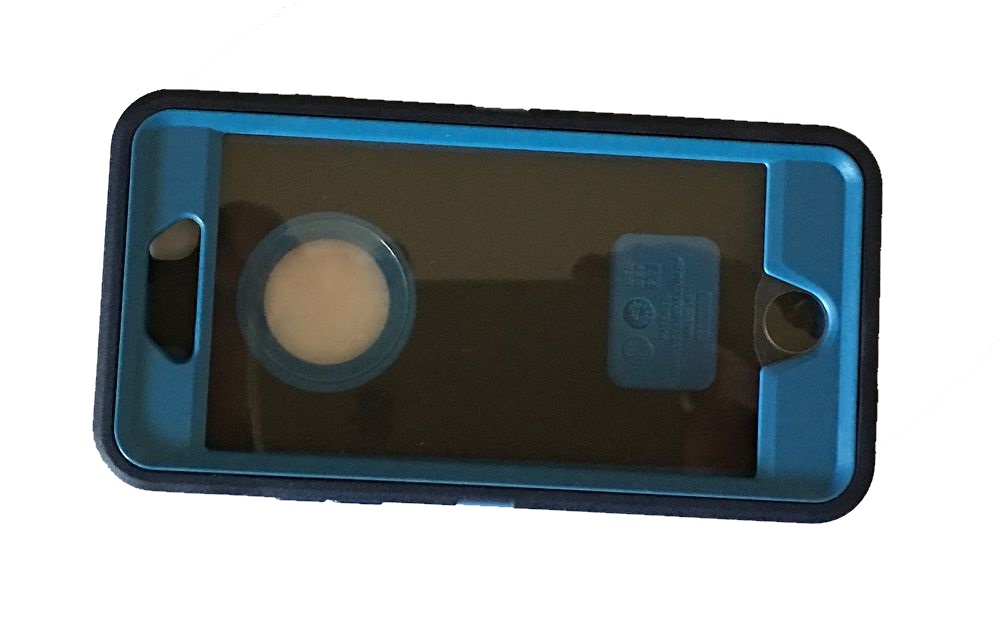
Why Defender Cases Are So Hard to Open
Like I already said, I have been through quite a few Otterbox cases over the years. This one, however, stumped me. As I went to take the rubber case off the plastic shell, I noticed the rubber was more stiff, rigid, and textured than prior Otterboxes I had owned. Great for drop protection and grip, not so great when you are trying to get the phone out.
The Defender line is built as three layers working together: a thin interior film over the screen, a hard polycarbonate shell that snaps around the phone, and a silicone outer skin that covers the whole thing and plugs the ports. Every layer locks into the next one, which is exactly why the case survives a six foot drop onto concrete and exactly why it fights you when it is time to take the phone out. There is no single trick that gets you out fast. It is a process, and rushing it is how tabs get cracked.
A quick search online confirms plenty of other people run into the same wall. Otterbox has posted its own removal videos, but some of the older tips, like pressing around the home button area, do not translate well to newer edge to edge screens or models with a thin film across the front. There is no magic push here and it pops off spot on any current Defender.
Step by Step: Removing the Outer Rubber Shell
After owning the Otterbox Defender for some time, I settled on a method that works on the older 6s Plus case and on current Defender and Defender Pro cases too:
| Step | What to Do |
|---|---|
| 1. Pick a corner | Start at a corner or along the side between the volume buttons and the top or bottom bezel. |
| 2. Lift the seam | Gently pull up the thin rubber strip that runs around the edge. You are trying to separate it from the hard plastic frame, not stretch it as far as it will go. |
| 3. Work around the edge | Move around the perimeter, lifting the rubber off each corner and side a little at a time until the whole outer shell peels away. |
Once that outer layer is off, life gets easier. On some Defenders you can also pop open the charging port cover and use that opening as a starting point to get your finger under the rubber seam. Again, the main idea is to use the case’s own flexibility instead of forcing something sharp between the layers.
Opening the Hard Inner Shell
Now you are looking at the hard plastic shell. Around the edges you will see small arrows that point to locking tabs. This part is the same idea across old and new Defenders:
- Start on one long side and slide a fingernail under the first tab where the arrow points.
- Gently pry that tab up until it pops open, and keep a finger there so it does not snap back down.
- Work your way around the case, opening each tab on the sides, top, and bottom.
- Once all tabs are free, the front and back pieces separate and your phone is exposed.
Reassembly is the reverse: phone into the shell, snap each tab fully closed, then stretch the rubber shell back over the frame and press it into the groove all the way around. Putting the Defender back on is always faster than taking it off.
Defender vs. Defender Pro vs. Defender XT: What Changed
Otterbox has split the Defender line into a few versions over the years, and the differences matter if you are shopping for a replacement rather than just trying to open the one you already own.
The original Defender is the design in this article: rubber skin, hard shell, port covers, holster clip. It is still sold for a range of current phones and it removes the same way described above. Defender Pro tightened up the port covers and reworked the belt clip holster so it doubles as a kickstand, but the core three layer removal process has not changed.
Defender XT is the newest version and the biggest departure. It drops the separate holster clip in favor of a built in MagSafe magnet ring, so the case snaps directly onto MagSafe chargers and MagSafe car mounts. XT cases open a little differently since the layers are bonded more tightly around the magnet ring, but the same corner first, work the seam approach still applies. If your case has a MagSafe logo or a metal ring visible through the back, you have an XT, and you can expect the shell to feel slightly stiffer coming apart than an older standard Defender.
Samsung and Pixel versions of the Defender line follow the same three layer construction, though tab placement shifts slightly to match the different camera bump and button layout on those phones. The removal logic is identical: start at a corner, lift the rubber seam first, then work the hard shell tabs.
Common Questions on How to Open an Otterbox Defender Case
My Defender case will not budge at all. What am I doing wrong?
Almost always this means you are trying to separate the hard inner shell before the rubber outer skin is fully off. Go back and check every corner and edge of the silicone layer first. If even one small section is still seated in its groove, the whole case will feel locked up no matter how hard you pull on the shell underneath.
I cracked one of the tabs. Can I still use the case?
One cracked tab usually will not compromise protection much since the surrounding tabs and the rubber skin still hold the shell together. Two or more cracked tabs on the same side is a different story and worth replacing the case, since that side can flex open on a drop.
Does this method work on Samsung and Pixel Defender cases?
Yes. Samsung and Pixel Defenders use the same rubber shell over hard shell over screen film construction as the iPhone versions, just shaped around a different button and camera layout. Work the outer rubber seam first, then the inner tabs, exactly as described above.
Is there a faster way with a tool instead of my hands?
A thin, non-metal pry tool or an old gift card can help you get under the rubber seam on the first corner, which is usually the hardest part. Skip anything metal or sharp. Once that first corner lifts, fingers work fine the rest of the way around.
Is the Otterbox Defender Still Worth It in 2026?
Short answer: yes, if you care more about not cracking your phone than keeping it razor thin. The Defender line has evolved into multiple versions, Defender, Defender Pro, Defender XT with MagSafe on current iPhones, but the core idea is the same: a rigid inner frame, a grippy outer shell, and serious drop protection that cheaper cases do not match.
It is more expensive than throwaway cases and bulkier than minimalist options, but you are protecting a device that can easily be your most expensive daily purchase. In that context, paying more for a rugged case that takes real abuse is still a smart trade. The only real downside is the extra effort required when you want the phone out of the case, which is exactly what this article helps with.
You can read our discussion on the Otterbox case differences here. If you are pairing a Defender with an in-vehicle setup, Best Phone Mounts for the Car is a great next read. Running a MagSafe case like the Defender XT? Check out our guide to MagSafe car mounts for options built to hold it securely on the road.
