
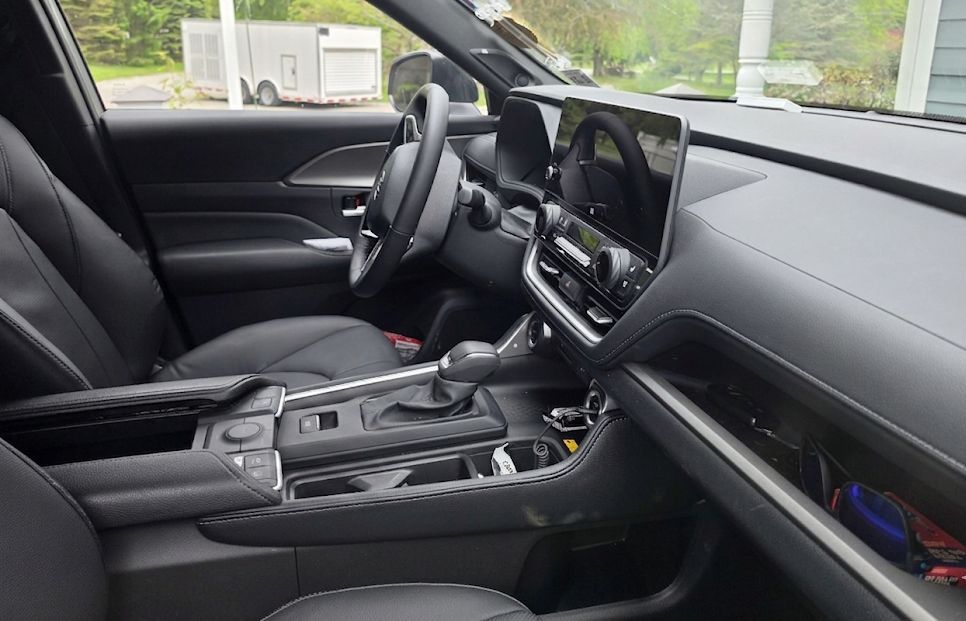
The Toyota Grand Highlander launched for 2024 as a larger, more premium alternative to the standard Highlander. It shares a platform but not an interior, and the 12.3-inch touchscreen that dominates the center stack creates both an opportunity and a constraint for phone mounting. The good news is that the aftermarket has responded quickly. There are now several custom-fit screen clip mounts built specifically for the Grand Highlander’s 12.3-inch display, and they are the best place to start for any owner who wants a clean, stable setup.
This guide covers the best custom-fit and universal phone mounts for the Toyota Grand Highlander and Grand Highlander Hybrid (2024-2026), what works in this interior, and what to skip.
Quick Comparison: Best Toyota Grand Highlander Phone Mounts
| Mount | Best For | Years / Trim |
|---|---|---|
| PZK Screen Clip with Wireless Charging | Best Overall / Wireless Charging | 2024, 2025, 2026 |
| PZK Screen Clip Cradle Mount | Best Custom Cradle (No Charging) | 2024, 2025, 2026 |
| AbeeyGeomarn Magnetic Screen Clip | Best MagSafe Screen Clip | 2024, 2025, 2026 |
| AbeeyGeomarn Magnetic Clip + Storage Tray | Best Magnetic + Storage Combo | 2024, 2025, 2026 |
| Andobil MagSafe Vent Mount | Best Universal MagSafe | All Years |
| Andobil Air Vent Mount | Best Universal Vent Mount | All Years |
The Grand Highlander’s 12.3-Inch Screen: Why It Matters for Mounting
The Toyota Grand Highlander comes standard with a 12.3-inch touchscreen across all trims. That screen sits in an elevated, angled position canted toward the driver, which limits traditional dash and adhesive mounting options. The good news is that this screen has become a very capable mounting surface in its own right.
Custom screen clip mounts built specifically for the Grand Highlander’s 12.3-inch display attach to the lower edge of the bezel without adhesive or drilling. They position your phone just to the side of or above the display, directly in the driver’s sightline, and do not block the air vents below. The aftermarket has moved quickly here since the Grand Highlander launched in 2024, and there are now multiple solid options across different use cases.
Best Custom Screen Clip Mounts for Toyota Grand Highlander
Best Overall: PZK Screen Clip with 15W Wireless Charging
The PZK wireless charging screen clip is the most feature-complete custom mount available for the Grand Highlander. It clips directly onto the 12.3-inch display bezel, positions your phone alongside the screen at a natural viewing angle, and delivers 15W fast wireless charging while you drive. A built-in smart chip prevents overheating and overcharging, which matters for daily use on longer commutes.
The magnetic hold uses N55 magnets and is MagSafe compatible for iPhone 12 and newer. A metal ring adapter is included for Android phones and non-MagSafe devices. The 360-degree ball joint lets you switch between portrait and landscape orientation, and the mount does not interfere with the vents or any controls below the screen.
One thing to note: you will need a car charger with at least 18W output on a single port to hit the full 15W charging speed. A standard 12W charger will still charge, just more slowly.
View PZK Wireless Charging Mount on Amazon
Best Cradle Option: PZK Screen Clip Auto-Lock Cradle
If you prefer a cradle-style grip over a magnetic hold, PZK also makes a non-wireless version of the same screen clip mount with an auto-lock cradle. The cradle opens to accommodate phones from 4.0 to 7.0 inches and works with any phone in any case without requiring a metal ring or MagSafe compatibility. One-hand placement and release works cleanly, and the 360-degree ball joint gives you full rotation.
This is the better pick if you use a thick protective case, frequently switch between multiple phones, or prefer the physical security of a cradle grip over a magnetic hold. The screen clip base is the same as the wireless version and clips onto the 12.3-inch bezel without any tools or adhesive.
View PZK Cradle Mount on Amazon
Best MagSafe Screen Clip: AbeeyGeomarn Magnetic Mount
The AbeeyGeomarn magnetic screen clip is purpose-built for the 2024-2026 Grand Highlander’s 12.3-inch screen. It clips to the screen bezel and uses a strong magnetic system compatible with MagSafe iPhones (12 through 16 and newer) directly, with metal ring adapters included for other phones. One-hand mounting and removal is fast, and the 360-degree rotation handles any viewing angle you prefer.
The build is sturdy ABS plastic and the clip design keeps it from touching or putting pressure on the display glass itself. If you are an iPhone user who wants the fastest one-hand drop-in experience, this is a strong alternative to the PZK options above.
View AbeeyGeomarn Magnetic Mount on Amazon
Best Magnetic + Storage Combo: AbeeyGeomarn Clip with Dashboard Tray
AbeeyGeomarn also makes a version of the Grand Highlander screen clip that includes a dashboard storage tray. The tray fits behind the infotainment screen and gives you a dedicated spot for sunglasses, cards, coins, or anything else that tends to migrate around the cabin. The magnetic phone mount sits above the tray, clipping to the screen bezel in the same way as the standard version.
If you find yourself constantly looking for small items in the center console, this combination mount and organizer is worth the slightly higher cost. The phone hold is MagSafe compatible and includes metal ring adapters for other devices.
View AbeeyGeomarn Tray Mount on Amazon
Dual Mount Option: AbeeyGeomarn Passenger Screen Clip
AbeeyGeomarn makes a passenger-side variant of the Grand Highlander screen clip that holds two phones simultaneously, one for the driver and one for the passenger. Both mounts clip to the 12.3-inch screen bezel and use the same MagSafe-compatible magnetic system. This is a niche option but a practical one for families or anyone who regularly needs navigation visible on both sides of the vehicle.
View AbeeyGeomarn Dual Mount on Amazon
Best Universal Vent Mounts for the Grand Highlander
The Grand Highlander has horizontal center vents positioned below the 12.3-inch screen. They sit at a reasonable height for a vent mount and accept standard horizontal-slat clip designs without any compatibility issues. If you prefer a universal vent mount over a custom screen clip, or if you frequently rent or switch vehicles, these are the picks.
Best MagSafe Vent Mount: Andobil MagSafe Air Vent Mount
The Andobil MagSafe vent mount uses a metal hook that clips onto the underside of the vent slat for a solid, rattle-free hold. The magnet array snaps a MagSafe iPhone into place instantly with one hand, and the 360-degree ball joint adjusts to any angle. Metal ring adapters are included for non-MagSafe phones. This is the best vent option for iPhone users who want fast, one-handed operation without a cradle.
View Andobil MagSafe Vent Mount on Amazon
Best Universal Vent Mount: Andobil Air Vent Mount
For drivers who want a cradle-style vent mount that works with any phone in any case, the Andobil Air Vent Mount is the most reliable pick. The metal hook clip grabs the underside of the vent slat rather than relying on friction alone, which keeps the mount stable over bumpy roads. The auto-clamping cradle holds phones from 4 to 7 inches wide, and the quick-release button on the back makes one-handed removal easy. A reserved charging port keeps your cable access clear.
View Andobil Air Vent Mount on Amazon
What Does Not Work in the Grand Highlander
Dashboard adhesive mounts are not practical in the Grand Highlander. The elevated, angled screen takes up most of the usable center dash space, and the remaining flat surfaces are limited. Adhesive mounts on curved or textured areas will lose grip over time, particularly in summer heat.
Windshield mounts work in a pinch but place the phone farther from the driver than a screen clip or vent mount. In a large SUV like the Grand Highlander, the windshield distance can make it harder to interact with navigation without taking your eyes off the road longer than necessary.
Cup holder mounts sit too low in this vehicle for comfortable active navigation use. The center console is deep and positions the phone well below eye level. Fine for passive use like music or podcasts, but not recommended for turn-by-turn navigation.
Seat bolt mounts are not easily accessible in the Grand Highlander. The mounting hardware under the front seats is difficult to reach without removing trim panels.
Installation Tips for Grand Highlander Screen Clip Mounts
All of the custom screen clip mounts for the Grand Highlander are tool-free installations. The clip base is designed to grip the lower edge of the 12.3-inch bezel, and the fit is snug enough that no adhesive is needed. That said, a few things are worth doing before you finalize the position.
Before clipping in, verify that the mount base seats fully on the bezel without making contact with the display glass itself. The clip should grip the plastic surround only. Any pressure on the screen over extended use can cause long-term damage.
Test the phone position from the driver’s seat before you call it done. The screen clip puts the phone near the infotainment display, which is ideal for sightline, but the exact angle depends on your seat position and height. Use the ball joint to dial in the viewing angle before your first drive.
For wireless charging mounts, make sure you are using a car charger with at least 18W single-port output. Lower-wattage chargers will still provide power but will not hit the rated 15W charging speed.
Frequently Asked Questions
Do these mounts fit the Grand Highlander Hybrid?
Yes. The Grand Highlander and Grand Highlander Hybrid share the same interior and the same 12.3-inch touchscreen. All of the custom screen clip mounts listed here are confirmed for both the standard and hybrid versions.
Will a Toyota Highlander screen clip mount work in the Grand Highlander?
No. The standard Highlander uses an 8-inch screen, while the Grand Highlander uses a 12.3-inch display. The bezel dimensions are different and the mounts are not interchangeable. Always confirm your vehicle and screen size before ordering any custom-fit mount.
Do I need a MagSafe iPhone to use these mounts?
No. All of the magnetic mounts listed here include metal ring adapters that attach to the back of any phone or case and add magnetic compatibility. The hold is slightly weaker than native MagSafe but fully adequate for everyday driving.
Can I use a screen clip mount and still access the touchscreen normally?
Yes. The clip attaches to the lower bezel edge and positions the phone alongside or just above the screen, not in front of it. You retain full access to the 12.3-inch display for navigation, climate controls, and media.
What year did the Toyota Grand Highlander launch?
The Grand Highlander is a 2024 model year vehicle. It was introduced as a distinct model from the standard Highlander, with a longer wheelbase, three-row seating, and a larger interior. All custom mounts for this vehicle are confirmed for 2024, 2025, and 2026 model years.
Is the windshield mount legal in my state?
Laws vary by state. Many states restrict objects mounted on the windshield that obstruct the driver’s view. Screen clip and vent mounts avoid this issue entirely since they do not attach to the windshield. Check your state’s vehicle code if you are considering a windshield mount.
Related Toyota Mount Guides
Looking for mounts for a different Toyota model? We have those covered too:
