
The Honda Civic has long been the gold standard for compact car ergonomics, but the recent interior redesigns, specifically the 10th generation (2016 to 2021) and the 11th generation (2022 to 2026), have created a real headache for anyone trying to find a reliable Honda Civic phone mount. On modern Civics, the traditional universal vent clip is your worst enemy. On 10th gen models, the aggressive dash angles make suction cups unreliable, and on 11th gen models the signature honeycomb mesh grille makes standard vent clips nearly impossible to attach without risking damage to the plastic mesh.
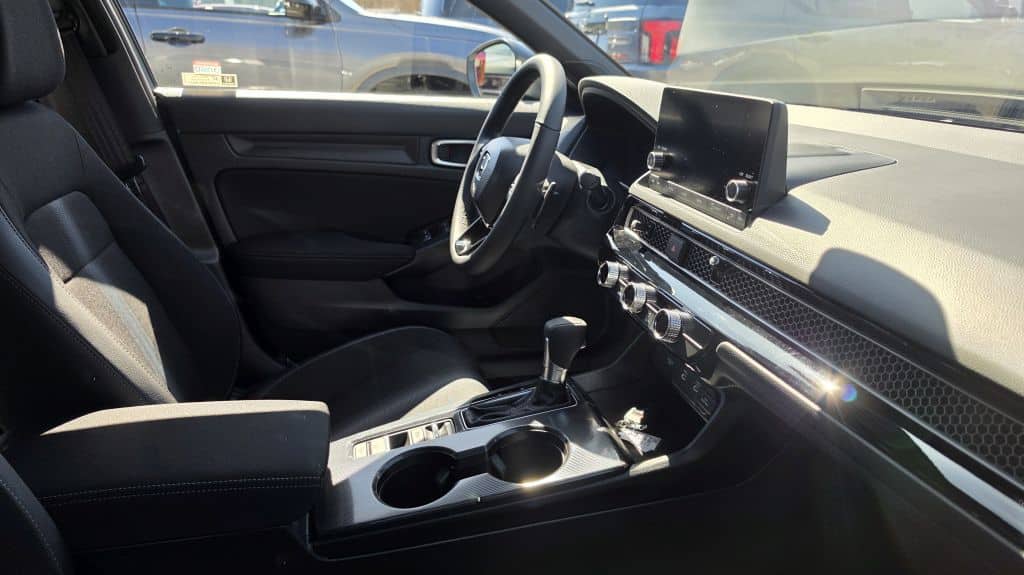
Whether you rely on Apple CarPlay or Android Auto for navigation, or you keep your phone screen active for rideshare apps, the mount has to hold up to spirited driving without touching the honeycomb mesh or wobbling on the dash. Below we cover the best vehicle-specific hardware for both Civic generations, along with the mounting locations and installation details that matter most in this particular interior.
Honda Civic Phone Mount Comparison Table
| Mount | Best For | Years/Trim |
|---|---|---|
| Karltys Magnetic Screen Mount | Honeycomb-safe, screen-mounted MagSafe or clip-in | 11th Gen, 2022 to 2026 |
| Skylotec Hazard Button Mount | Tool-free, centered on the grille | 11th Gen, 2022 to 2026 |
| PZK Magnetic Screen Mount | Integrated wireless charging | 10th Gen, 2016 to 2021 |
| Lamicall Steel Hook Vent Clip | Budget vent mounting on 10th gen | 10th Gen only |
| TORRAS Vacuum MagSafe Mount | Strong suction, universal windshield/dash | 10th and 11th Gen |
| iOttie Easy One Touch 6 | Deep windshield reach, universal | 10th and 11th Gen |
Honda Civic Mounting Locations, By Generation
Honda’s interior designers prioritized horizontal lines on the Civic dash, which looks clean but leaves very few flat surfaces for adhesive mounts. Here is how the two generations break down.
The Honeycomb Problem (2022 to 2026 Models)
On the 11th gen Civic, the air vents sit behind a long, decorative honeycomb metal mesh.
The Center Screen Bezel (2016 to 2021 Models)
The 10th gen Civic has a prominent infotainment screen with a thick plastic bezel, which is the best location for direct-fit brackets. By popping a small piece of trim, you can bolt a metal bracket directly to the dashboard frame. It is the cleanest look available and keeps the phone at eye level without blocking your view of the road.
Top Honda Civic Phone Mount Recommendations
1. Karltys Magnetic Screen Mount (11th Gen)
If you have a 2022 or newer Civic, this is the cleanest way to keep a mount entirely off the honeycomb grille. The Karltys bracket attaches with a low-profile adhesive pad to the trim around the touchscreen housing rather than the vents, then gives you a choice between a MagSafe head and a standard clip-in cradle, so it works whether or not your phone has a magnetic case. It includes a 360 degree rotating ball joint and a built-in sunglasses holder, and it holds phones from 4 to 7 inches with a case on.
2. Skylotec Hazard Button Mount (Niche 11th Gen Solution)
This is a clever, niche-fit option for 2022 to 2026 Civics. It is a custom plastic frame that snaps directly over the hazard light button in the center of the honeycomb grille, giving you a dedicated mounting point without tools or adhesive. It is a simple way to work around the no-vent-mount rule on the 11th gen while keeping the screen centered for navigation.
3. PZK Magnetic Screen Mount (10th Gen)
Built specifically for the 2016 to 2021 Civic, this is the pick for drivers who want a single, clean install. It clips directly to the display bezel and holds any MagSafe-compatible iPhone or an Android phone with a magnetic-ready case. It also includes an integrated 15 watt wireless charger, which makes it one of the more complete solutions available for the 10th gen dash.
4. Lamicall Steel Hook Vent Clip (Best Budget Option for 10th Gen)
We generally steer Civic owners away from vent mounts, but the Lamicall works for 10th gen owners because of its steel hook design. Instead of just clipping onto a vent blade, the hook wraps around the back of the blade and pulls the mount tight against the dash, which keeps it from sliding during hard turns, a common complaint in the Civic Sport and Type R trims.
5. TORRAS Vacuum MagSafe Mount (Universal Fit)
For Civic owners who like the simplicity of a magnetic mount but do not want a Civic-specific bracket, the TORRAS is the reliable fallback across both generations. Instead of adhesive tape, it uses a vacuum suction base rated for well over 90 pounds of hold, so it grips smooth sections of the windshield or dashboard without leaving residue behind if you move it. The arm folds down for storage and adjusts through 360 degrees, and the head is MagSafe compatible out of the box for iPhone users.
6. iOttie Easy One Touch 6 (Windshield/Dash)
The iOttie remains a staple for a reason. The Civic windshield sits fairly deep, which can make reaching a phone awkward, and the Easy One Touch 6’s telescopic arm extends an extra two inches to bring the phone closer to your fingertips. That extra reach matters most on the 10th gen Civic, where the dashboard has a deep shelf-style profile. Its gel pad is also one of the few that reliably holds a seal on the Civic’s textured dash material.
Common Mounting Problems in the Honda Civic
- Blocking the infotainment screen: Honda’s tablet-style screens sit high on both generations. Long-arm mounts can block the top-left corner of your backup camera feed or CarPlay icons. Shift into reverse before finalizing any adhesive placement to confirm the arm is clear.
- USB cable interference: Civic USB ports are tucked into a lower bridge console on 10th gen models or at the base of the dash on 11th gen models. A three-foot cable with a right-angle connector keeps the cord away from the shifter.
- Soft-touch dash peeling: High-suction mounts with aggressive adhesive can leave a ring or lift the soft-touch dash skin in hot climates if left in place for years. A mounting disk used as a buffer between the adhesive and the dash prevents this.
Installation Tips for Your Honda Civic Mount
- Warm the surface first: For mounts that use an adhesive pad, like the Karltys, lightly warming the surface with a hair dryer before applying helps the tape bond to textured plastic.
- Route the cable cleanly: Tuck the charging cable into the gap between dashboard panels to avoid a tangle of wires across the climate controls.
- Mind vent orientation: On older models using a vent mount, clip to the lowest slat you can. It reduces leverage on the vent assembly and keeps the phone from bouncing.
Honda Civic Phone Mount FAQ
Will a standard vent clip fit the 11th gen Civic?
No. The 11th gen’s honeycomb mesh grille is not built to handle the clamping pressure of a standard vent clip. Use a mount that grips the surrounding frame or the hazard button bezel instead.
Can I use the same mount across both Civic generations?
Only universal options like the TORRAS Vacuum MagSafe Mount or the iOttie Easy One Touch 6 work across both generations. Direct-fit mounts like the PZK and Karltys are built around the specific dash geometry of one generation and will not transfer.
Is a magnetic mount strong enough for daily driving?
Yes, as long as the phone or case includes a genuine MagSafe magnet array rather than a thin adhesive plate. A proper magnetic connection holds securely through normal acceleration, braking, and turns.
Do I need to remove any trim to install a Civic-specific mount?
No. None of the mounts in this guide require removing trim or drilling. The PZK screen clip and the Skylotec hazard button mount are both tool-free and snap into place, and the Karltys attaches with an adhesive pad rather than any hardware.
What is the safest mounting spot if I am worried about damaging the honeycomb grille?
Stick to the hazard button bezel or a bracket that clamps the frame around the mesh rather than the mesh itself. Any mount that pinches, clips, or applies pressure directly to the honeycomb slats risks cracking the plastic louvers behind it.
