
Choosing the right Garmin GLO 2 mount comes down to satellite line-of-sight and stability rather than screen angle. The Garmin GLO 2 (and the identically sized original Garmin GLO) is a compact, screenless Bluetooth GPS and GLONASS receiver that streams 10 Hz positioning data wirelessly to your iPad, iPhone, or Android device. Whether you are navigating backcountry overland trails, flying with ForeFlight or Garmin Pilot at altitude, or running marine charting apps on the water, securing your receiver face-up with an unobstructed view of the sky determines whether it locks onto satellites in seconds or slides across the dash and drops signal.
Garmin GLO & GLO 2 Mounting Rules at a Glance (0.70″ x 1.65″ x 3.04″ Puck)
1. Always Orient Flat Face-Up
Why It Matters: The internal patch antenna sits directly beneath the top housing where the Garmin logo and status LEDs are located.
Placement Rule: Mount the receiver with its flat top surface facing the sky. Mounting it upside down or tucked vertically behind a metal panel degrades satellite reception.
2. Match the Mount to Your Glass
Standard Dash & Glare Shield: Use the molded Garmin Portable Friction Mount (010-11832-00) (Pick #1) or a tacky silicone dash mat (Pick #5).
Coated Windshields & Side Windows: Use the Arkon BT010 (Pick #2) or Custom GLO 2 Suction Cradle (Pick #3) to place the unit in an uncoated glass zone.
Quick Answer: For most vehicle dashboards and flat cockpit glare shields, the official Garmin Portable Friction Mount for GLO/GLO 2 (part 010-11832-00) is the best all-around choice because its weighted silicone cradle is molded specifically to hold the receiver face-up without tools or adhesives. If your vehicle has a heat-reflective coated windshield or you want to stick the receiver directly to an aircraft side window, choose the Arkon BT010 Windshield Suction Mount (hook-and-loop platform) or the Custom-Fit Garmin GLO 2 Suction Cup Cradle (tape-free window holder). For modular cockpit, rail, or boat installations, use the RAM Universal Finger-Grip Suction Mount.
Do not have the receiver yet? You can check the Garmin GLO 2 Bluetooth GPS and GLONASS Receiver on Amazon before choosing your mounting hardware below. If you are mounting a screen-equipped navigator instead of a Bluetooth puck, visit our complete GPS mounts hub.
Garmin GLO 2 Mount Comparison
The five mounting options below cover every environment where the Garmin GLO and GLO 2 are used, from zero-install dashboard friction bases and windshield suction mounts to modular 1-inch ball systems.
| Mount | Fits / Attachment | Best For |
|---|---|---|
| Garmin Portable Friction Mount (010-11832-00) | Custom-molded silicone pocket for Garmin GLO & GLO 2; weighted non-skid dashboard base | Best overall setup for car dashboards and flat glare shields with zero tools |
| Arkon BT010 Windshield Suction Mount | 80mm lever-lock windshield suction base with 2.625″ x 2″ flat hook-and-loop platform | Best satellite signal and bypassing metallic or heated windshield films |
| Custom-Fit Garmin GLO 2 Suction Cup Mount | Form-fitted snap-in plastic cradle for Garmin GLO 2 with window suction cups (no tape required) | Pilots and drivers wanting a dedicated, tape-free window suction cradle |
| RAM Universal Holder with Suction Base | 3.3″ RAM Twist-Lock suction base, 1″ B-size socket arm, and universal side-clamping holder | Aviation cockpits, marine helms, and multi-surface RAM B-size setups |
| Non-Slip Silicone Dashboard Pad | Washable high-friction tacky silicone mat; grips flat-bottom electronics on mild dash slopes | Budget-friendly setup for rental cars, shared fleet vehicles, and extra gear |
Understanding the Garmin GLO 2 Hardware and Antenna Layout
Before picking a mount, it helps to look at the physical dimensions and antenna design of the receiver. Both the original Garmin GLO and the Garmin GLO 2 share the exact same compact footprint: 0.70 inches thick, 1.65 inches wide, and 3.04 inches long (1.78 x 4.19 x 7.72 cm), weighing just 2.12 ounces (60.1 grams) with the removable rechargeable battery installed. Because there is no screen to read and no 17mm ball socket or spine rail on the back, the GLO 2 does not care about being angled toward the driver’s eyes. It cares strictly about having an unobstructed view of the sky.
By combining American GPS and Russian GLONASS satellite constellations (up to 24 additional satellites compared to GPS-only receivers) with a 10 Hz update rate (10 position updates per second versus once per second on most phones and tablets), the GLO 2 locks onto satellites roughly 20% faster and tracks smoothly at highway or aircraft speeds. However, that hardware advantage depends entirely on placement. Tossing the receiver into a cup holder, center console tray, or flight bag pocket blocks line-of-sight to the horizon and degrades accuracy.
The GLO 2 pairs over Bluetooth with Garmin Pilot, ForeFlight, Apple Maps, Google Maps, onX Offroad, Aqua Map, and other location-based apps on iOS and Android. Because the bottom of the unit only has four tiny rubber feet on a smooth plastic battery door, an unmounted GLO 2 will slide off a dashboard or cockpit glare shield during your first sharp turn or bump.
Tip (Orient It Face-Up): The internal ceramic patch antenna sits directly beneath the top housing of the GLO 2 (the side with the Garmin logo and the blue and amber LEDs). Always mount the unit with that flat top face pointing toward the sky, not sideways or face-down. Mounting a puck receiver upside down on a windshield is the single most common setup mistake.
Best Garmin GLO 2 Mounting Options
1. Best Overall: Garmin Portable Friction Mount (010-11832-00)
The official Garmin Portable Friction Mount (part number 010-11832-00) is the most purpose-built dashboard and glare-shield solution for both the GLO 2 and the original GLO. Garmin engineered this mount specifically around the receiver’s 1.65-inch by 3.04-inch housing. It combines a weighted, non-skid silicone base that sits directly on your dashboard with a form-fitted center cradle that holds the GLO 2 face-up without adhesives, suction cups, or tools.
The pliable silicone base conforms to gentle dashboard curves and grips textured vinyl or leather surfaces during cornering and braking. Meanwhile, the molded pocket leaves the top antenna face and status indicator lights completely open to the sky while providing a cutout on the end so you can keep the mini-USB charging cable plugged in on long drives or cross-country flights.
Important (Check Part Number 010-11832-00): Garmin sells two completely different products named “Portable Friction Mount.” Make sure you get part number 010-11832-00 (linked below), which has the molded rectangular pocket for the GLO and GLO 2. Do not confuse it with Garmin’s automotive beanbag mount (010-10908-02), which terminates in a bare 17mm ball stud for Nuvi and DriveSmart screens and cannot hold a GLO 2 puck. Also note that if you bought the Garmin GLO 2 Aviation Bundle (010-02184-00) rather than the standard GLO 2 package (010-02184-01), this friction mount is already included in your box.
Why it works: Zero installation required, moves between cars or rental aircraft in seconds, leaves the charging port and LEDs accessible, and keeps the GLO 2 stable near the base of the windshield.
Watch out for: Steeply sloped dashboards or dusty surfaces smeared with greasy silicone dash dressings, where any friction mount can lose grip until the surface is wiped clean.
2. Best Signal & Coated Windshield Fix: Arkon BT010 Windshield Suction Mount
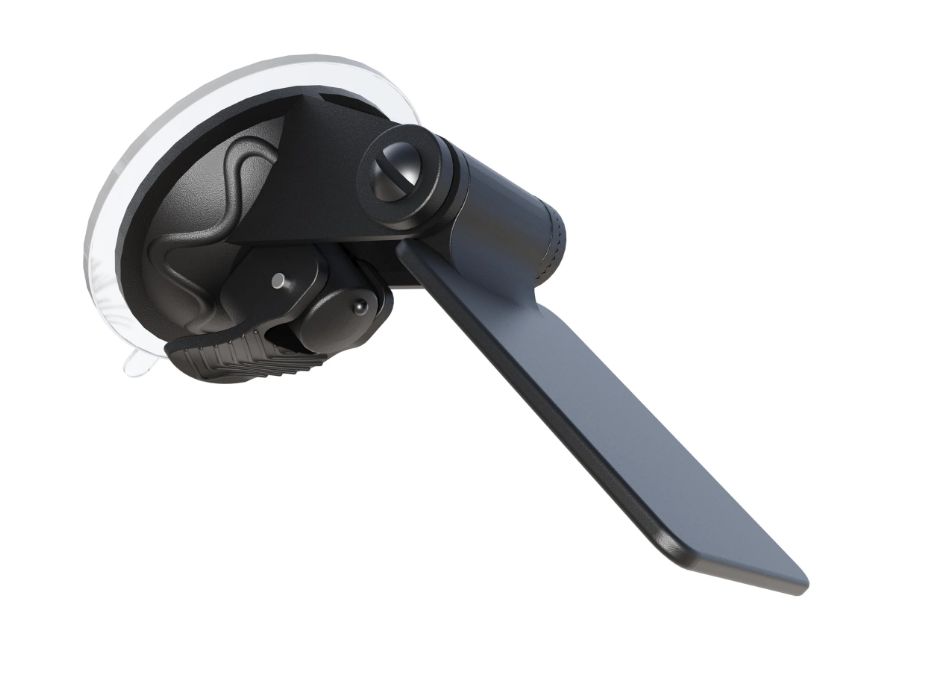
If you want maximum satellite visibility or lack a flat dashboard surface, mounting the GLO 2 directly to the windshield glass gives the receiver the widest possible horizon view. The Arkon BT010 Windshield Suction Mount (pictured in the hero card at the top of this guide) was built specifically for flat-bottom Bluetooth GPS receivers, radar detectors, and toll transponders, making it a natural match for the 2.12-ounce GLO 2.
The BT010 pairs an 80mm PVC lever-lock suction cup base with a flat 2-5/8-inch by 2-inch support platform. You attach one strip of the included hook-and-loop fastener tape to the platform and the mating strip to the flat bottom battery cover of the GLO 2. A notched vertical adjustment joint on the neck lets you level the platform horizontally against any windshield rake angle so the top antenna face of the GLO 2 points straight up toward the sky.
I have used this mount for several years. It holds small devices that have flat bottoms reliably without bulky side claws getting in the way. The included hook-and-loop tape creates a strong hold on a two-ounce receiver and is easy to replace if you ever want fresh tape. The kit also includes metal adhesive plates for older magnetic-bottom GPS antenna pucks.
Important (Coated and Heated Windshields): Many modern vehicles, particularly European luxury models and newer EVs, use metallic solar-reflective films or heated windshield grids that attenuate GPS and GLONASS signals. Those windshields almost always leave an uncoated pass-through zone near the upper rearview mirror frit. Using the Arkon BT010 lets you position the GLO 2 right inside that clear upper window zone to restore full satellite reception.
Why it works: Delivers the clearest sky view, solves signal drop-offs caused by metallic windshield coatings, keeps the dash clear, and detaches cleanly when switching vehicles.
Watch out for: Prolonged summer cabin heat can soften standard adhesive backing or loosen suction cups over time. Check suction seating seasonally and consider upgrading to 3M Dual Lock or industrial-strength Velcro in hot climates.
3. Best Tape-Free Window Cradle: Custom-Fit Garmin GLO 2 Suction Cup Mount
Some pilots and drivers want the high-visibility benefits of a windshield or cockpit side-window mount without sticking hook-and-loop tape onto the bottom battery door of their receiver. The Custom-Fit Garmin GLO 2 Suction Cup Mount solves that by pairing a form-fitted, rigid plastic cradle molded specifically to the GLO 2’s perimeter with integrated window suction cups.
Instead of relying on adhesive Velcro strips, the GLO 2 snaps directly into the custom cradle while leaving the flat top antenna surface, power button, and mini-USB charging port unobstructed. Because it attaches directly to smooth glass or cockpit plexiglass via compact suction cups, it is popular in light aircraft, gliders, ultralights, and passenger cars where you want to pop the bare GLO 2 in and out of the holder at the end of a trip.
Why it works: Custom-shaped around the GLO 2 chassis, requires zero Velcro or adhesive tape on your receiver, and sticks directly to car windshields or aircraft side windows.
Watch out for: Fixed window geometry means the receiver sits parallel to the glass surface, so choose a relatively upright side window or upper windshield spot for the best antenna angle.
4. Best Modular Setup for Aviation, Marine & Off-Road: RAM Universal Holder with Suction Base
When a simple dashboard friction pad or light duty suction cup is not rugged enough for turbulent flight, rough off-road washboard trails, or pounding boat chop, stepping up to RAM’s 1-inch B-size ball-and-socket ecosystem is the most durable path. The RAM Universal Holder with Twist-Lock Suction Base (RAM-B-166-UN4U) combines a 3.3-inch industrial Twist-Lock suction base, a medium 1-inch aluminum double-socket arm, and RAM’s universal side-clamping Finger-Grip cradle.
Standard smartphone X-Grip cradles are often too wide to grip a narrow 1.65-inch puck securely without the rubber caps pressing the side power button or overhanging the antenna face. By contrast, RAM’s universal Finger-Grip holder uses interchangeable rubber-coated side fingers that clamp down to 1.25 inches wide, gripping the sides of the GLO 2 firmly while leaving the entire flat top antenna face open to the sky. Even better, because it uses a standard 1-inch RAM ball, you can unclamp the arm from the suction cup base and move the holder onto a cockpit yoke clamp, a boat rail clamp, or a bolt-down AMPS base. You can compare more heavy-duty vacuum bases in our RAM suction cup mounts guide.
Why it works: Industrial-grade Twist-Lock suction base, infinite 1-inch ball angle adjustment to keep the GLO 2 dead-level on angled windows, and full compatibility with RAM aviation, marine, and off-road bases.
Watch out for: Larger footprint and higher cost than a simple friction pad, plus it takes a few minutes out of the box to bolt on the short side fingers that best clear the GLO 2’s power button.
5. Best Minimalist Option for Shared Vehicles: Non-Slip Silicone Dashboard Pad
If you frequently jump between rental cars, company fleet trucks, or shared club aircraft and want the flattest, easiest item to slip into a flight bag or glove box, a Non-Slip Silicone Dashboard Pad is a practical low-profile alternative to Garmin’s molded friction mount. The GLO 2’s four tiny built-in rubber feet have very little surface area on their own, which is why the bare unit skates across hard plastic dashboards.
Laying down a wide, tacky PU gel or silicone dash pad creates a high-friction landing zone on top of the dashboard or center console tray. You simply set the GLO 2 face-up on the mat, and the tacky surface holds both the receiver and its USB power cord in place without adhesives. When dust dulls the grip, rinsing the pad with warm water and mild soap restores its tackiness. For additional dash mounting ideas across different vehicle interiors, see our car dashboard mounts guide.
Why it works: Packs completely flat in a laptop or flight bag, costs less than any cradle mount, leaves zero residue, and leaves room next to the GLO 2 for a battery bank or sunglasses.
Watch out for: Offers no raised side walls on steep dashboard slopes or in heavy off-road bouncing, where the molded Garmin 010-11832-00 pocket (#1) or a suction mount (#2, #3, or #4) provides positive mechanical retention.
Where to Mount the Garmin GLO 2 by Environment
Placement matters more than the mount hardware itself. Even the strongest mount will deliver slow satellite locks and position drift if you install it under metal roof structure or next to high-draw electronics.
In a Car, Truck, or Overland Rig
The top of the dashboard near the base of the windshield is ideal for everyday driving, using either the Garmin Portable Friction Mount (#1) or a non-slip dash mat (#5). Direct windshield mounting with the Arkon BT010 (#2) or the Custom GLO 2 Suction Cradle (#3) provides an even wider sky view. If your vehicle has a solar-coated or heated windshield, place the suction mount inside the uncoated pass-through zone flanking the upper rearview mirror, or stick it to a non-coated rear quarter window within Bluetooth range (30 feet) of your tablet.
In an Aircraft Cockpit
Many general aviation and airline pilots pair the GLO 2 with a Wi-Fi iPad running ForeFlight or Garmin Pilot. In light aircraft, the Garmin Friction Mount (#1) sits cleanly on a flat glare shield, while the Arkon BT010 (#2), Custom Suction Cradle (#3), or RAM Twist-Lock Suction Mount (#4) secures the receiver to a smooth side window clear of flight controls and standby instruments. Always verify that any portable cockpit mount remains clear of yoke travel, defrost vents, and critical outside sightlines. To mount the tablet screen itself, see our best aviation iPad mounts guide.
On a Boat or Marine Helm
Wi-Fi-only iPads lack internal GPS hardware, making the GLO 2 a popular companion for boaters running Navionics, Savvy Navvy, or Aqua Map. Mount the GLO 2 on top of the helm console or inside a pilothouse window using the Garmin Friction Mount (#1) or RAM Suction Mount (#4). However, keep one critical limitation in mind: the Garmin GLO 2 is not waterproof (it lacks an IPX7 water-resistance rating). On an open center-console boat or wet flybridge, mount it under a hardtop dodger out of spray, inside the cabin near a fiberglass window, or sealed inside a clear waterproof dry pouch (plastic and fiberglass do not block GPS signals; only metal and carbon fiber do). For mounting your chartplotter tablet at the helm, check our marine iPad boat mounts guide.
Locations to avoid in all environments:
- Inside a closed center console, glove box, or zippered flight bag
- Underneath seats or behind metal dashboard bulkheads
- Face-down on a windshield where the top antenna patch points toward the floor
- Directly against high-power VHF radios, radar displays, or inverters that can cause RF interference
Practical Installation and Power Tips
- Test satellite lock before committing: Before applying hook-and-loop tape or routing power cords, pair the GLO 2 with your phone or tablet and check satellite lock speed and accuracy in your navigation app from your candidate spot.
- Keep it separated from RF interference: Leave a few inches of separation between the GLO 2 and dashcams, radar detectors, handheld transceivers, or large metal brackets to prevent Bluetooth and GNSS interference.
- Route and strain-relieve the mini-USB power cable: The GLO 2 runs up to 13 hours on its internal battery and charges via a rear mini-USB port (both a USB cable and a 12/24V vehicle power adapter come in the box). If you leave it plugged in continuously, secure the cord with a small dash clip so cable weight does not tug the receiver off its mount over bumps.
- Upgrade to industrial hook-and-loop in hot cabins: If you use the Arkon BT010 platform in a vehicle parked in intense summer sun, upgrading the included strips to 3M Dual Lock or industrial-grade Velcro prevents adhesive creep on the battery cover.
- Clean glass and reseat suction cups seasonally: Wipe both the windshield glass and the suction cup pad with isopropyl alcohol before locking the lever, and re-seat windshield mounts at the start of summer and winter as temperature swings change vacuum pressure.
Does the Garmin GLO 2 Still Make Sense?
With modern smartphones and cellular tablets offering capable built-in GPS chips, casual commuters rarely need an external receiver for everyday turn-by-turn street directions. Where the Garmin GLO 2 still shines is on Wi-Fi-only iPads (which have zero internal GPS hardware from Apple) and in demanding environments where a phone’s 1 Hz internal antenna lags or drops lock.
Because the GLO 2 pulls in both GPS and GLONASS constellations (accessing up to 24 additional satellites) and updates position 10 times per second (10 Hz), it delivers faster lock times and smoother track logs in aircraft cockpits, offshore waters, deep canyon trails, and vehicles with thermal windshields. If you need the receiver itself, you can pick up the Garmin GLO 2 Bluetooth GPS/GLONASS Receiver on Amazon and pair it with any of the mounts above.
Check Garmin GLO 2 Receiver on Amazon →
Frequently Asked Questions
Can I use a standard phone mount with the Garmin GLO 2?
Most spring-loaded phone cradles and standard phone X-Grips are built for devices 2.25 to 3.5 inches wide, which is too wide to grip the GLO 2’s narrow 1.65-inch body securely without pressing the side power button or blocking the top antenna. Purpose-built options like the Garmin 010-11832-00 Portable Friction Mount (#1), the Arkon BT010 platform (#2), the Custom GLO 2 Suction Cradle (#3), or the narrower RAM Finger-Grip (#4) fit its compact puck shape properly.
Does the Garmin GLO 2 need to face a specific direction?
Yes. The internal patch antenna is located directly beneath the flat top face (the side with the Garmin logo and status LEDs). Always mount the GLO 2 with that flat top surface facing upward toward the sky. Mounting it upside down or sideways degrades satellite reception.
Can I use the GLO 2 in a vehicle with a heated or metallic-coated windshield?
Yes, as long as you place it carefully. Metallic solar films and heated windshield grids block satellite signals through the main glass area. Use a suction mount like the Arkon BT010 (#2) or the Custom GLO 2 Suction Mount (#3) to position the receiver in the uncoated pass-through strip near the upper rearview mirror, or place it on a non-coated side or rear window.
Is the original Garmin GLO mount compatible with the GLO 2?
Yes. The original Garmin GLO and the Garmin GLO 2 share the exact same housing dimensions (0.70″ x 1.65″ x 3.04″). The official Garmin Portable Friction Mount (010-11832-00) and all custom GLO 2 cradles fit both generations interchangeably.
Do I need to hardwire the Garmin GLO 2?
No. The GLO 2 includes a removable rechargeable lithium-ion battery rated for up to 13 hours of continuous use. For long road trips or flights, you can run it off the included mini-USB cable and 12/24V vehicle power adapter to keep the battery topped off.
Bottom Line
Giving your Garmin GLO 2 mount setup a clear view of the sky and keeping the receiver oriented flat face-up is where its 10 Hz GPS and GLONASS performance lives. For most car dashboards and flat aircraft glare shields, the official Garmin Portable Friction Mount (010-11832-00) is the easiest zero-install solution. If you want maximum sky visibility or need to place the receiver in the uncoated upper strip of a thermal windshield, choose the Arkon BT010 Windshield Suction Mount (platform with hook-and-loop tape) or the Custom-Fit Garmin GLO 2 Suction Cup Mount (tape-free snap-in cradle). For pilots, boaters, and off-roaders who want modular 1-inch ball hardware, go with the RAM Universal Holder with Suction Base, and keep a Non-Slip Silicone Dashboard Pad in your bag for quick rental-car trips.
If you are outfitting additional cockpit or dashboard gear, see our Uniden SDS100 and SDS150 scanner mounts guide, our complete aviation mounts hub, and our marine mounts hub.