
The Chevy Blazer looks incredible inside—but from a mounting perspective, it’s one of the trickier interiors in its class.
Between the aggressive dash angles, circular turbine-style vents, and forward-positioned infotainment screen, many traditional phone mounts either don’t fit well or don’t perform reliably over time.
This isn’t a vehicle where you can just grab a generic mount and expect a clean install. To get this right, you need to understand how the Blazer’s interior actually works—and choose a mount that fits that layout.
The good news: once you dial in the right mounting location and style, the Blazer can support a very clean, OEM-looking setup.
- Custom mounts near the center stack are the best overall solution
- MagSafe mounts are ideal for daily use
- Dash mounts are the most flexible fallback
- Vent mounts should be avoided entirely
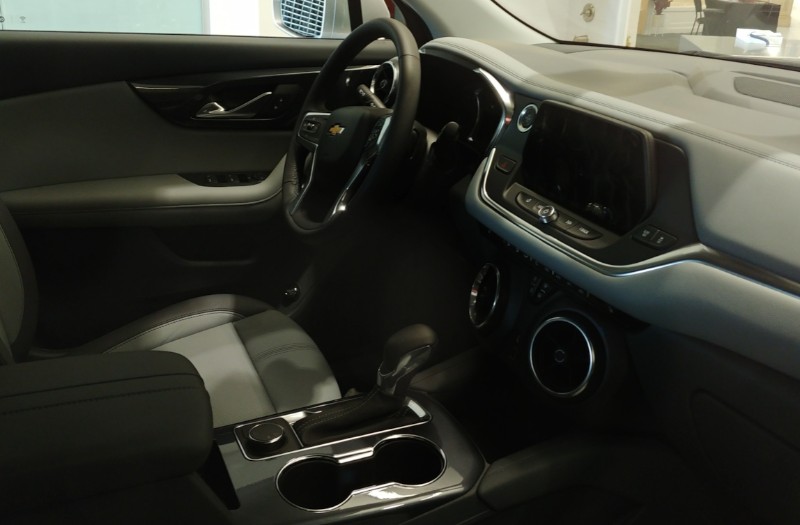
Chevy Blazer Interior Breakdown (LT, RS, Premier + EV)
From 2019 through the current model year, the gas-powered Chevy Blazer has remained largely consistent across trims. Whether you’re driving an LT, RS, or Premier, the core dashboard layout is the same—and that’s what matters for mounting.
The biggest differences between trims are cosmetic, but they still influence mounting slightly:
- LT: More forgiving materials and slightly less aggressive trim finishes
- RS: Sportier layout with tighter spacing around vents
- Premier: More refined finishes but same structural limitations
The real issue across all trims is the turbine-style air vents. These vents are round, angled, and smooth, which makes them one of the worst designs for traditional clip-style mounts.
Most vent mounts either slip, rotate, or block airflow in this vehicle. Even if they “fit,” they’re not stable enough for long-term use.
Blazer EV (2024+): This is a completely different interior with a flatter dash and large horizontal display. Mounting options are significantly easier, and we expect more custom mounts to emerge specifically for that platform.
Best Phone Mount Types for Chevy Blazer
| Mount Type | Stability | Ease of Use | Best For |
|---|---|---|---|
| Custom Mount | Very High | High | Best overall |
| MagSafe Mount | High | Very High | Clean daily use |
| Dash Mount | High | High | Universal fallback |
| Vent Mount | Low | Medium | Not recommended |
Best Custom Mount for Chevy Blazer
If you want the cleanest and most stable setup in the Blazer, a custom-fit mount is the way to go.
This mount is designed to position your phone directly next to the infotainment screen, which is exactly where you want it for both visibility and reach.
Why this works so well in the Blazer:
- No reliance on vents or weak adhesive points
- Optimized for the center dash layout
- Keeps phone at eye level without blocking the screen
- Much cleaner look than universal mounts
This is the closest thing to an OEM-style solution currently available. The only drawback is portability. It’s vehicle specific, so unless you rent a Blazer, or your second veicle is this model, this mount is staying put.
Where to Mount Your Phone in a Chevy Blazer
Mount selection is only half the equation. Placement is just as important—and in the Blazer, it can make or break your setup.
Best Location: Beside the Infotainment Screen
This is the sweet spot. It keeps your phone within your natural line of sight without blocking airflow or controls.
Second Best: Upper Dashboard
A suction or adhesive mount can work well here, especially if you prefer a slightly higher viewing angle.
Avoid: Air Vents
The turbine vents are simply not designed for mounts. Even if you force it, the result will be unstable.
Avoid: Cup Holder
Too low and too far back—this turns your phone into a distraction rather than a tool.
MagSafe Mounts (Best Everyday Setup)
MagSafe mounts are one of the best upgrades you can make for daily driving in the Blazer.
Instead of dealing with clamps, you get a clean magnetic connection that makes it incredibly easy to attach and remove your phone.
MagSafe mounts come in all locations. We will be recommending a windshield mount from a company called andobil as it features an extension arm to make up for the longer reach in this SUV.
Pair this with a dash or custom mount base, and you get the best of both worlds—clean aesthetics and maximum usability.
Dashboard Mounts (Best Universal Backup)
If you don’t want to go with a custom mount, a high-quality dashboard mount is your next best option.
The prior mount works effectively on most dashboards but some prefer an adhesive mount. Here’s a solid choice for adhesive fans.
Look for mounts with strong adhesive bases or suction systems designed for textured surfaces.
The key is positioning—keep it close to the center stack for the most natural viewing angle.
Common Mounting Problems in the Chevy Blazer
- Vent mounts slipping or rotating
- Adhesive mounts failing on angled surfaces
- Blocking the infotainment screen or controls
- Poor placement leading to unsafe reach
Installation Tips
- Clean the surface thoroughly before mounting
- Test placement before committing to adhesive
- Keep the mount within easy reach without obstructing controls
FAQ
What is the best phone mount for Chevy Blazer?
Custom mounts positioned near the infotainment screen provide the best overall setup.
Do vent mounts work in the Blazer?
No, the turbine-style vents make them unreliable.
Are MagSafe mounts worth it?
Yes, especially for daily drivers who want convenience and a clean setup.
Bottom Line
The Chevy Blazer requires a more strategic approach than most SUVs when it comes to phone mounting.
Custom mounts are the best option, followed by MagSafe and dash mounts for flexibility.
If you avoid the vents and focus on proper placement near the center stack, you can achieve a setup that looks clean, works reliably, and feels like it belongs in the vehicle.
Related Mount Guides
- Phone Mounts by Vehicle
- Best MagSafe Mounts
- Best Windshield Mounts
