
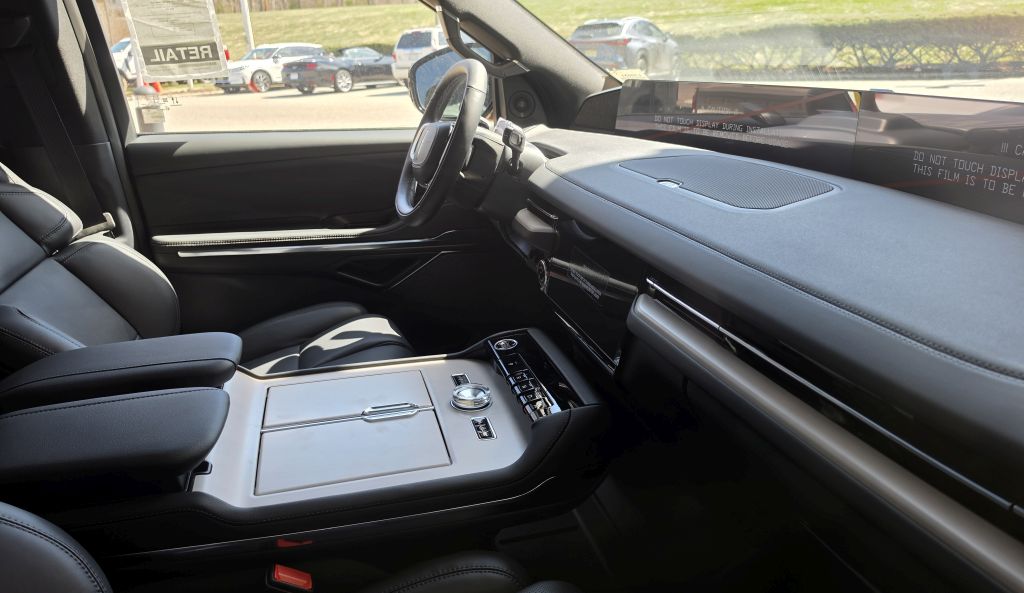
Finding the right Lincoln Navigator phone mount is not as simple as it looks. The cabin is wide, the dash is deep, and a large center display already dominates the stack, so surfaces that work fine in a smaller SUV often sit too far away or too low to be useful here. A mount that feels perfect in a midsize sedan can feel completely wrong in a full-size luxury SUV like this one.
The real question on the Navigator is not which mount is strongest. It is where the phone should live so it stays easy to see, easy to reach, and out of the way of the screen, vents, and controls. That is why this vehicle is a much better candidate for a custom-fit mount than a generic vent clip.
The good news is that Navigator owners are no longer stuck with generic solutions. There are now custom-fit dash and screen mounts built specifically for recent model years, alongside solid universal fallbacks if you would rather not commit to a vehicle-specific bracket.
This guide breaks the Navigator down by generation, walks through the strongest custom and universal options in detail, and ends with a clear decision framework so you can pick a mount based on how you use your phone in the car day to day, not on marketing copy alone.
Best Lincoln Navigator Phone Mounts at a Glance
| Mount | Best For | Years / Trim |
|---|---|---|
| LUNQIN Custom Navigator Mount | Best overall fit | 2018–2024 |
| YEGZA Custom Navigator Mount | Alternate custom-fit design | 2018–2024 |
| iOttie Cup Holder Mount | Best universal option | All years |
| iOttie Easy One Touch 6 | Drivers who want dash/windshield flexibility | All years |
Why the Lincoln Navigator Needs a Different Approach
A lot of large SUVs are easy to mount in because they have broad, flat dashboards and simple center stacks. The Navigator is not that kind of vehicle. It gives you space, but not necessarily the right kind of space. The center area is dominated by a large display and upscale trim, so the usual “stick it to the dash” advice does not hold up well here.
Four things make generic mounts a poor fit in this SUV:
- The dash is deep. A windshield mount that works fine in a midsize vehicle can leave the phone too far away in the Navigator.
- The center screen matters. The Navigator already has a large built-in display, so the phone mount has to complement it, not compete with it.
- Vent placement is weak. Vent mounts tend to sit too low, too far inward, or too flimsy for a heavier modern phone.
- The console is big, but low. Cup holder mounts work well here, but they still sit lower than a good custom screen mount.
This is why custom-fit mounts matter more in the Navigator than in most ordinary SUVs, and why the approach differs from what works in a smaller Lincoln like the Lincoln Aviator, where the console sits closer to the driver’s hand. If a mount can anchor near the display without blocking it, you get a cleaner sight line and a more factory-built result.
Best Lincoln Navigator Phone Mount Options in Detail
1. LUNQIN Custom Navigator Mount: Best Overall
This is the clear lead recommendation because it solves the exact problem the Navigator creates. Instead of a compromise like a universal suction cup or a flimsy vent clip, it is designed specifically for the Navigator dashboard and display area, with separate versions for the 2018–2021 and 2022–2024 body styles.
The biggest advantage is location. A custom mount around the screen area places the phone closer to your natural line of sight. In a big SUV, that matters for navigation, traffic alerts, or a quick glance at a message. You want the phone higher than the cup holders, but not so high that it fights the factory screen, and that is exactly the balance a vehicle-specific mount is built to hit.
2. YEGZA Custom Navigator Mount: Best Alternate Custom Choice
One of the mistakes people make with custom mounts is assuming there is only one option. The YEGZA mount is a second path for owners who want a custom bracket but prefer a different clamp style, and like the LUNQIN it is offered in versions matched to the 2018–2021 and 2022–2024 Navigator.
It works on the same principle: keep the phone near the screen area instead of pushing it down onto the console. In a full-size SUV with a wide cabin, that higher placement feels more natural, and a custom bracket tends to look less like an afterthought than a clamp hanging off a vent.
3. iOttie Cup Holder Mount: Best Universal Option
If you would rather not commit to a custom bracket, the cup holder is the next smartest place to start in the Navigator. Cup holder mounts are not always the right default in every vehicle, but the Navigator’s center console is large, stable, and well-positioned enough to make this a strong option rather than a fallback.
The strength here is simplicity. You are not fighting the soft-touch dash, clipping onto questionable vent blades, or relying on a long windshield reach that may still land the phone farther away than ideal. The tradeoff is height: even a well-designed cup holder mount sits lower than a custom screen mount, so it suits drivers who want stability first and sight line second.
4. iOttie Easy One Touch 6: Best Windshield/Dash Universal Mount
The iOttie remains a useful fallback because it is flexible and familiar, but in the Navigator it is worth being honest about what it is and is not. It is not a purpose-built luxury-SUV solution. It is a universal mount that works well if you place it carefully.
The deep dashboard is the issue. In many vehicles, a windshield mount puts the phone comfortably in reach. In the Navigator, depending on placement, it can still feel farther away than ideal. That does not make it a bad mount, just a less elegant one than a custom-fit bracket. It suits drivers who want the option to move the mount between vehicles or are not ready to commit to a Navigator-specific setup.
How to Choose the Right Mount for Your Navigator
If you use your phone mainly for navigation, a custom screen-adjacent mount is the best fit. It keeps the phone where your eyes already go and avoids wasting the big center console, which is the right answer for most owners.
If you want something easy to move between vehicles, a windshield mount makes more sense, but be prepared for the phone to feel farther away than ideal because of the deep dash. And if your top priority is stability over a higher position, the cup holder is the safest universal answer since the location is usable enough in this SUV to be a real choice. The same logic applies across most Lincoln SUVs; the Lincoln Corsair follows a similar custom-first hierarchy despite its smaller cabin.
Generation matters more than most owners expect. The 2018–2021 Navigator and the 2022–2024 redesign use different dash geometry around the display, which is why custom mounts are sold as separate year-specific versions rather than one universal bracket. Buying the wrong year’s version is the most common mistake with a custom-fit mount, so double-check your model year against the listing before ordering.
Installation Tips for the Lincoln Navigator
- Do not rush custom-fit installation. Check the phone’s final position before fully committing.
- Keep the phone far enough from the main screen that both stay readable at a glance.
- If using a cup holder mount, make sure it does not block drive-mode controls, storage access, or drinks you plan to carry.
- If using a windshield mount, check the reach from the driver seat before you commit. The Navigator’s depth can make a mount feel fine in the driveway and too far away in real driving.
- Avoid cheap vent clips in this vehicle. They are almost always the weakest visual and functional fit.
Frequently Asked Questions
What is the best phone mount for a Lincoln Navigator?
A custom-fit mount built around the center display area is the strongest choice for most owners, since it places the phone high and close to the driver without crowding the factory screen.
Do I need a different mount for the 2018–2021 versus the 2022–2024 Navigator?
Yes. The dash and display layout changed enough between those generations that custom-fit mounts are sold as separate year-specific versions.
Is a cup holder mount a good option in the Navigator?
It is a solid universal fallback. The Navigator’s console is large and stable enough to support it well, though the phone will sit lower than with a custom screen mount.
Are vent mounts a good choice for the Navigator?
Not usually. Vent placement in this SUV tends to sit too low and too far inward, and vent clips are typically the weakest fit both functionally and visually.
