
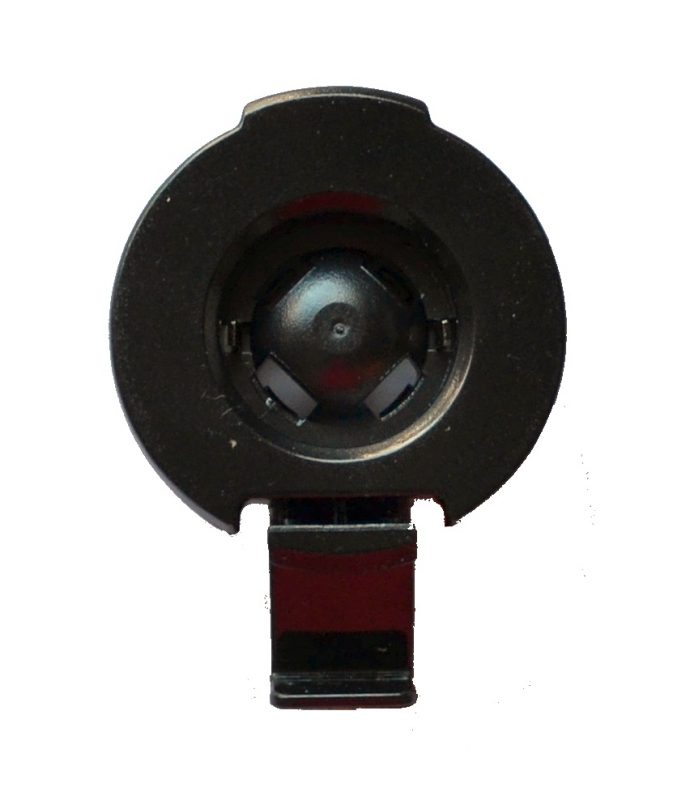
Garmin has released hundreds of vehicle GPS models over the past decade, but one thing has remained mostly consistent: the mounting system. Most Garmin automotive GPS units still rely on a 17mm ball-and-socket connection built into the cradle.
That consistency is helpful—until trying to pair a Garmin cradle with a Tackform mount. Tackform mounts are known for durability and metal construction, but they typically use a 20mm ball system. That size mismatch is where problems begin.
This guide explains exactly how to connect a Garmin cradle to a Tackform mount safely, without forcing parts together or damaging the cradle.
Garmin Mount Basics
Nearly every Garmin automotive GPS includes two parts:
- The mount (windshield, dash, or accessory mount)
- The cradle (device-specific holder)
The connection between them is almost always a 17mm ball on the mount and a matching socket on the cradle.
This design has been used across Garmin Nuvi, Drive, and DriveSmart models for years, with only a few newer exceptions using a larger 22mm ball.
That standardization is helpful—but it does not match Tackform’s system.
Why Garmin and Tackform Don’t Fit Together
| System | Ball Size | Compatibility |
|---|---|---|
| Garmin (most models) | 17mm | Works with Garmin cradles |
| Garmin (larger models) | 22mm | Used on newer large-screen units |
| Tackform | 20mm | Does NOT fit Garmin directly |
How to Attach a 17mm Garmin Cradle to a Tackform Mount
The vast majority of Garmin devices use the 17mm system. The correct solution is a 20mm-to-17mm adapter.
This adapter is made by Tackform with this purpose in mind. It connects directly to the Tackform mount on one side and snaps into the Garmin cradle on the other.
Why this works:
- Matches Tackform’s 20mm system perfectly
- Converts to Garmin’s 17mm standard
- Maintains full adjustability
- Prevents damage to the cradle
This is the correct and safest way to use a Garmin GPS with a Tackform mount.
How to Attach a 22mm Garmin Cradle to a Tackform Mount
Some newer Garmin models—especially larger units like the DriveSmart series—use a 22mm ball for added stability.
These require a different adapter.
When this is needed:
- Larger GPS screens (7″–8″ models)
- Heavier Garmin units
- Cradles that feel loose on 17mm mounts
This adapter ensures the correct fit without compromising stability.
Common Mistakes to Avoid
| Mistake | Why It’s a Problem |
|---|---|
| Forcing a 20mm ball into a 17mm cradle | Can crack or damage the cradle permanently |
| Buying the wrong adapter size | Leads to loose or unstable mounting |
| Assuming all Garmin mounts are the same | Some newer models use 22mm instead of 17mm |
Why Use a Tackform Mount with Garmin?
Tackform mounts are known for their durability and metal construction. Compared to the lightweight plastic mounts that often come with GPS units, they offer a much more stable platform—especially in trucks, off-road vehicles, or rough driving conditions.
With the correct adapter, a Tackform mount becomes a significant upgrade in both stability and long-term reliability.
Bottom Line
Garmin and Tackform mounts are not directly compatible due to different ball sizes, but the solution is simple. Using the correct adapter allows a Garmin cradle to connect securely without damage.
For most users, a 20mm-to-17mm adapter is the correct choice. Larger Garmin models may require a 22mm adapter instead.
Once connected properly, a Tackform mount provides a much more stable and durable mounting solution than the standard mount included with most GPS units.
