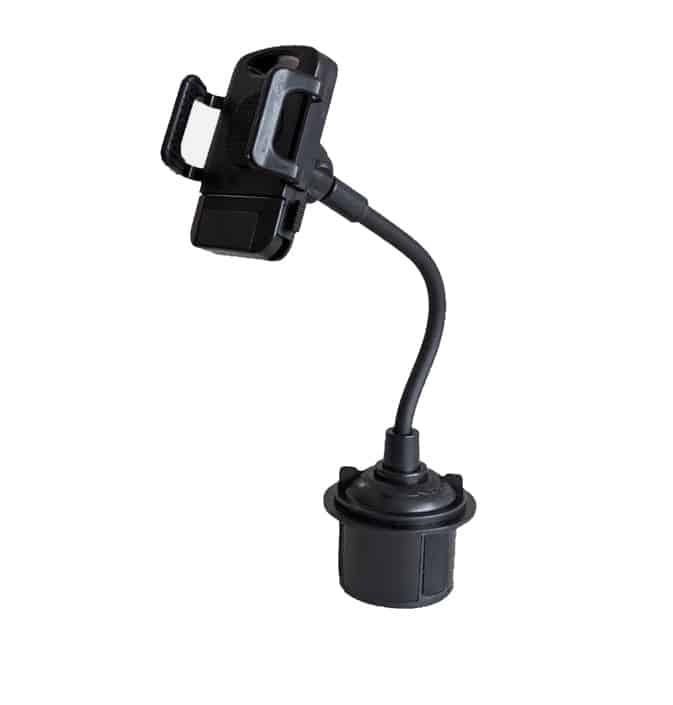
Modern vehicles have more cup holders than most drivers will ever use. What started as a place for a coffee cup has quietly become one of the most reliable mounting points in the car, and for good reason: it works when everything else fails.
Floating infotainment screens, soft-touch dashboards, and unusually shaped vents have made traditional mounting positions harder to use, not easier. Cup holder mounts bypass all of that. No adhesives, no clips, no damage to your interior. The base drops in, expands, and holds.
One honest caveat worth stating up front: the cup holder is a low mounting position. For passive use, set-it-and-go apps, or passenger entertainment, it works well. For active GPS navigation while driving, you will be looking down rather than forward, which is not ideal. Keep that tradeoff in mind as you read.

This guide covers phones and tablets separately because the requirements are genuinely different. A good phone mount and a good tablet mount share almost nothing in common beyond the cup holder base. We have verified that every product listed here is currently available on Amazon with at least 4 stars.
Best Cup Holder Phone & Tablet Mounts (2026)
| Mount | Best For | Device Type |
|---|---|---|
| Andobil Military-Grade Cup Holder Mount | Daily drivers, all vehicles | Phone |
| LISEN Cup Holder Phone Holder | Drivers who hate gooseneck wobble | Phone |
| APPS2Car Heavy Duty Tablet Cup Holder Mount | iPads and large tablets up to 12.9″ | Tablet |
| Cellet Heavy Duty Cup Holder Mount | Rear seat passengers and shared family vehicles | Tablet / Phone |
| Mount-It! Premium Aluminum Cup Holder Tablet Mount | Commercial use, ELD devices, heavy tablets | Tablet |
Why Cup Holder Mounts Work When Others Fail
Dash mounts rely on adhesive pads that soften in summer heat. Vent mounts grip plastic fins not designed to carry weight. Windshield mounts use suction cups that can fail over time, and in many newer vehicles the windshield is so raked that a mounted phone ends up an arm’s length away from the driver. Cup holders have none of those problems.
The base of a good cup holder mount expands against the inside of a rigid structure. That structure does not move, warp, or lose grip. You get a fixed anchor point that works whether the cup holder is in the center console, between the seats, or in the rear.
A few reasons this location has become more popular as interior design has changed:
- No adhesives or suction: Nothing to reapply, no pads to replace, no residue left on the interior.
- Works in almost every vehicle: Cup holders are standardized enough that a good expandable base fits across nearly all cars, trucks, and SUVs.
- Better for heavier devices: The low center of gravity helps with tablet weight in ways that vent and windshield mounts cannot match.
- Shared vehicle friendly: Easy to install and remove without tools, which matters if multiple people drive the same car.
Phones vs. Tablets: Why the Requirements Are Different
The most common mistake people make with cup holder mounts is buying a phone mount and assuming it will work for a tablet. It almost never does.
Phone Mount Requirements
Phones are light enough that the main variables are reach, arm stiffness, and cradle grip. A phone mount that works will position the device at a usable height without excessive wobble on rough roads. The biggest failure mode is an arm that is either too long (amplifies vibration) or too stiff to adjust into a useful angle.
What to look for: an expandable base that fits your specific cup holder diameter, an arm length that clears any gear shift or console controls, and a 360-degree rotating head so you can get the angle right. Most quality phone mounts in this category check those boxes.
Tablet Mount Requirements
Tablets are a different problem entirely. A 10-inch iPad weighs roughly three times what a modern phone weighs, and it creates significant leverage at the end of any arm. That leverage amplifies every bump and vibration, which means a mount designed for phones will bounce, sag, or tip under a tablet.
For tablets, the design priorities shift: you need a wider cradle that supports the device from the side without relying entirely on spring tension, a shorter or stiffer arm to minimize the lever effect, and a base large enough to anchor without rocking inside the cup holder. Mounts that skip any of these will fail on anything rougher than a smooth highway.
Best Cup Holder Phone Mounts
1. Andobil Military-Grade Cup Holder Phone Mount (Best Overall for Phones)
The Andobil cup holder mount is one of the most consistently well-reviewed options in this category, and it has earned that position by solving the right problems rather than just competing on price. The aluminum-alloy gooseneck adjusts from 7 to 13 inches of height, which is a meaningful range. At 7 inches, the phone clears most center consoles without extending into gear shift territory. At 13 inches, it brings the device up to a usable viewing angle in trucks and large SUVs where the cup holder sits well below dashboard level. That range covers the majority of real-world install scenarios without requiring a separate purchase for different vehicle types.
The anti-shake stabilizer built into the gooseneck base addresses the most common complaint about flexible-arm mounts. Standard goosenecks transfer road vibration directly to the phone because the arm has no damping mechanism. The Andobil design adds a reinforced collar at the base of the neck that absorbs some of that movement before it reaches the device. It is not a perfect solution on genuinely rough roads, but on normal pavement it makes a noticeable difference compared to a plain gooseneck.
The expandable base grips from 2.7 to 3.7 inches, which covers the large majority of standard cup holders in cars, crossovers, and most trucks. Installation takes about 30 seconds: drop the base in, twist the expansion ring until snug against the cup holder walls, position the arm, and lock the cradle angle. The base removal is equally quick, which matters if you move the mount between vehicles or share a car with someone who prefers to keep the cup holders clear.
The cradle swivels 360 degrees independently of the arm adjustment, so portrait and landscape orientation are both accessible without repositioning the entire arm. It accommodates phones from 4 to 7 inches wide, covering every current flagship including the larger iPhone 17 Pro Max and Samsung Galaxy S25 Ultra with standard cases. Battery cases thicker than about 0.6 inches may not fit the cradle at full extension.
This mount works particularly well in SUVs and trucks where the cup holder sits lower in the console, giving the arm enough vertical height to bring the phone up without over-extending. In compact cars where the cup holder is positioned higher relative to the seat, a shorter arm extension works better and keeps vibration low.
2. LISEN Cup Holder Phone Holder (Best for Reducing Bounce)
LISEN’s third-generation cup holder mount takes a fundamentally different approach to stability than the Andobil. Rather than a flexible gooseneck, it uses a rigid long-neck rod with two adjustable locking knobs positioned along the arm. You bend the neck to the angle you want, tighten both knobs, and that is where it stays. There is no flex left in the system once it is locked, which is exactly the property that reduces bounce on rough roads. A gooseneck arm, even a well-made one, retains some residual give. The LISEN design eliminates that.
The tradeoff is that repositioning takes slightly more effort than just bending a gooseneck. You loosen the knobs, adjust, retighten. For most drivers who set the mount once and leave it, that is a non-issue. For drivers who frequently switch between portrait and landscape or pass the phone between front seats, the extra step is worth knowing about in advance.
The arm extends up to 12.5 inches, which gives it useful reach in larger vehicles where the cup holder sits several inches behind the driver’s shoulder. The base expands from 2.6 to 4.0 inches, a slightly wider range than the Andobil and one of the broader expansion ranges in this category. That extra margin helps in trucks and SUVs with oversized cup holders where a narrower base would rock rather than grip.
The triangle-structure support design at the base distributes clamping force to three contact points rather than two, which is a more stable geometry than a simple two-sided squeeze. On worn or slightly irregular cup holder interiors, this matters. The cradle accommodates phones from 4 to 7 inches and rotates 360 degrees. Single-handed phone insertion and release work reliably once the arm position is set.
Bottom line: if you have used a gooseneck mount and found yourself re-centering the phone after every stretch of rough road, this is the mount to switch to. The rigid arm design solves that problem directly.
Best Cup Holder Tablet Mounts
3. APPS2Car Heavy Duty Cup Holder Tablet Mount (Best for iPads)
APPS2Car has built a strong reputation in the tablet mount category specifically because their designs account for the weight problem that most brands in this space gloss over. Tablet mounts that use a gooseneck or thin plastic arm tend to fail within months under the constant leverage of a 10-inch or larger device. The APPS2Car cup holder version avoids that by using a solid 1-inch rigid rod as the primary arm rather than a flexible or multi-joint design. The rod does not bend under load, which is the correct engineering decision for anything heavier than a phone.
The base uses an extra-wide expandable design that accommodates cup holder diameters from 3 to 4.6 inches. That upper limit is notably generous and covers most truck and SUV cup holders that would reject a narrower base. The base also sits deep enough in the cup holder to resist lateral rocking, which is the other common failure mode for tablet mounts: the base pivots inside the cup holder rather than the arm flexing.
The cradle adjusts to fit devices from 4.7 to 12.9 inches diagonally, covering the full current iPad lineup: the iPad mini 6, iPad 10th generation, iPad Air 11-inch and 13-inch, and iPad Pro 11-inch and 12.9-inch. It also handles most Android tablets in the same size range. Height adjustment uses a pull-and-push mechanism with no separate tool required. The rotating head supports both portrait and landscape without repositioning the rod.
For vehicles where the front cup holder sits tightly against the gear shift or armrest, rear cup holders are often a better installation point for large tablets. A 12.9-inch iPad positioned in a tight front console leaves very little clearance for the driver’s elbow and can conflict with gear selection in manual transmission vehicles. APPS2Car notes this in their own specifications. Rear seat use or front passenger use in vehicles with more console room is where this mount performs without compromise.
One additional note: this is the mount to consider if you are equipping a minivan or three-row SUV for road trips. Set up in the second-row cup holder, it puts a large tablet at a stable viewing height for middle-row passengers without requiring any headrest attachment hardware.
4. Cellet Heavy Duty Cup Holder Mount (Best for Rear Seat Use)
The Cellet heavy duty cup holder mount earns its spot on this list by being genuinely well-suited for rear seat entertainment, a use case that the phone-optimized mounts above were not designed for. The distinction matters. A rear passenger using a tablet for a road trip has different requirements than a driver who wants their phone at dashboard height: they need a wider cradle that can hold a larger device, a height that puts the screen at seated eye level from the back, and a base that fits the rear cup holder configuration, which often differs from the front console in both diameter and depth.
The Cellet base accommodates cup holders from 2.5 to 4 inches, which covers rear holders in most sedans, crossovers, and SUVs. The rubberized extendable arm grips secure the device from both sides and include non-slip backing that prevents scratching. Unlike spring-tension designs that rely on constant pressure to hold position, the rubberized grip conforms to the device without requiring the springs to work against gravity at an angle, which is what causes most rear-seat tablet mounts to sag forward over time.
The 360-degree swivel at the cradle head is smooth enough to reposition without loosening the arm. Rear passengers can switch between portrait video and landscape for games or browsing without asking the driver to pull over. The 13-inch total mount height is enough to clear the armrest between rear seats and bring a tablet to a comfortable viewing angle for an adult seated normally.
This mount also works for front passenger use in vehicles where the front console cup holder is accessible and not needed for drinks. Some front passengers prefer their own screen for navigation on their device while the driver uses a separate system, and the Cellet handles that setup without requiring any permanent hardware. The quick-release button makes single-handed device removal easy when exiting the vehicle.
One size limitation to note: the cradle on the standard Cellet heavy duty mount accommodates tablets up to about 9.7 inches in screen width. For a full-size iPad Pro 12.9, the APPS2Car above is the more appropriate choice.
5. Mount-It! Premium Aluminum Cup Holder Tablet Mount (Best for Commercial Use and Heavy Devices)
Mount-It! does not have the brand recognition of APPS2Car or Andobil in this category, but the construction on this mount reflects engineering priorities that most consumer-grade options skip. The arm is aluminum with locking gear grooves at each joint rather than friction-fit plastic. That distinction has real consequences over time: plastic friction joints develop play as the contact surfaces wear, which is why many plastic tablet mounts that feel solid on day one are noticeably looser after six months of daily use. Aluminum gear grooves do not compress or deform under load. The mount holds its position the same way in month six as it did on day one.
The double-jointed arm provides 180 degrees of swivel at two separate pivot points plus 360 degrees of rotation at the cradle head. That combination covers essentially any angle a driver or passenger would need, including positions that single-joint arms cannot reach without repositioning the entire base. Tightening knobs at each joint lock the position without tools. The knobs are large enough to operate with gloves, which matters for fleet and commercial vehicle applications where drivers may be loading and positioning devices in cold weather.
The tray-style cradle expands to hold tablets from 7 to 11 inches in screen size and supports devices up to 3.3 pounds. That weight rating is higher than most consumer cup holder mounts and puts it in range for older iPad Pro models, Microsoft Surface Go, and commercial ELD devices that run heavier than consumer tablets. The tray locks with an adjustable knob rather than relying on spring pressure, which is the correct approach for anything in the upper weight range.
The base fits cup holders from 2.75 to 3.5 inches in diameter. That range is slightly narrower than the APPS2Car option, which matters in trucks with oversized cup holders. If your vehicle has a standard-dimension holder, it is a non-issue. If you drive a larger pickup or commercial van where the cup holders run wide, measure before ordering.
The use cases where this mount makes the most sense: delivery drivers running a tablet for routing software who need the device to stay in exactly one position all day, fleet vehicles where the same mount gets used by multiple drivers on different shifts, and anyone who has burned through two or three plastic tablet mounts already and wants something built to last longer than a product cycle.
What to Check Before You Buy
Cup holder mounts fail in predictable ways, and most of those failures are avoidable if you check a few things before purchasing.
Cup holder diameter. Standard car cup holders range from about 2.5 to 3.5 inches. Trucks, SUVs, and some newer vehicles run wider, sometimes up to 4.5 inches. The base range listed in the specs matters: a base that only expands to 3.5 inches will rock in a 4-inch cup holder no matter how well the rest of the mount is built.
Cup holder depth. A shallow cup holder gives the mount less grip surface. If your cup holders are decorative rather than functional, a mount that relies entirely on base expansion may not be as secure as it would be in a deeper holder. Check the base length in the specs and compare it to your actual holder depth.
Console clearance. In vehicles where the cup holder sits between a gear shift and a center armrest, a full-length arm may not have room to extend at a useful angle. Measure the open space above your cup holder before choosing a mount with a fixed-length arm.
Arm type for your device weight. Gooseneck arms work well for phones. For tablets, stick to mounts with locking joints or rigid rod designs. The weight difference matters more than most product descriptions acknowledge.
Common Problems and How to Avoid Them
Wobble during driving. Almost always caused by one of three things: an arm that is too long for the device weight, a base that is not fully expanded, or a cup holder with significant interior wear that has lost its grip surface. Short the arm if wobble is an issue, re-expand the base, and if the cup holder itself is worn, a rubber shim around the base can take up the slack.
Tipping toward the passenger side. Usually a weight distribution issue on a gooseneck arm. Position the cradle closer to vertical and reduce the lateral offset of the arm. Some mounts are better balanced than others, and this is one area where the rigid-arm LISEN design has an advantage over a flexible gooseneck.
Blocking the gear shift. Mount placement in the driver-side cup holder can put the arm directly in the path of gear shift movement. Either use the passenger-side cup holder or choose a mount with a shorter arm. Rear cup holders are another option when the goal is passenger entertainment rather than driver reference.
Tablet sag over time. Spring-tension cradles that grip from the sides are the main culprit here. The springs compress gradually under the weight of a heavy tablet and the device sags forward. Locking tray designs and rubberized clamping arms degrade more slowly. The Mount-It! and APPS2Car tablet mounts both use designs that hold up better over repeated use than spring-tension alternatives.
Who Should and Shouldn’t Use a Cup Holder Mount
Cup holder mounts are the right choice for drivers with modern interiors where dash and vent mounts are not viable, for passengers who want their own screen without interfering with the driver’s setup, and for anyone who wants a no-tools, no-damage solution they can move between vehicles.
They are not the right choice for drivers who need to glance at a navigation app constantly. The low mounting position requires more downward eye movement than a vent or dash mount positioned higher in the cabin. For active GPS use, a windshield or vent mount positioned near the driver’s forward sightline is the better option.
If your primary use case is music control, podcast playback, or occasional map reference, the cup holder location works well and the mounts on this list are stable enough for daily highway driving.