
The Garmin Zumo series has been the gold standard for motorcycle GPS units for over a decade—and the Zumo 595LM remains one of the most versatile models ever released.
Even though newer Zumo models have entered the market, the 595LM still sees strong usage thanks to its rugged design, glove-friendly touchscreen, and reliable navigation features.
Note: This guide also applies to the Garmin Zumo 590LM, which uses the same mounting system.
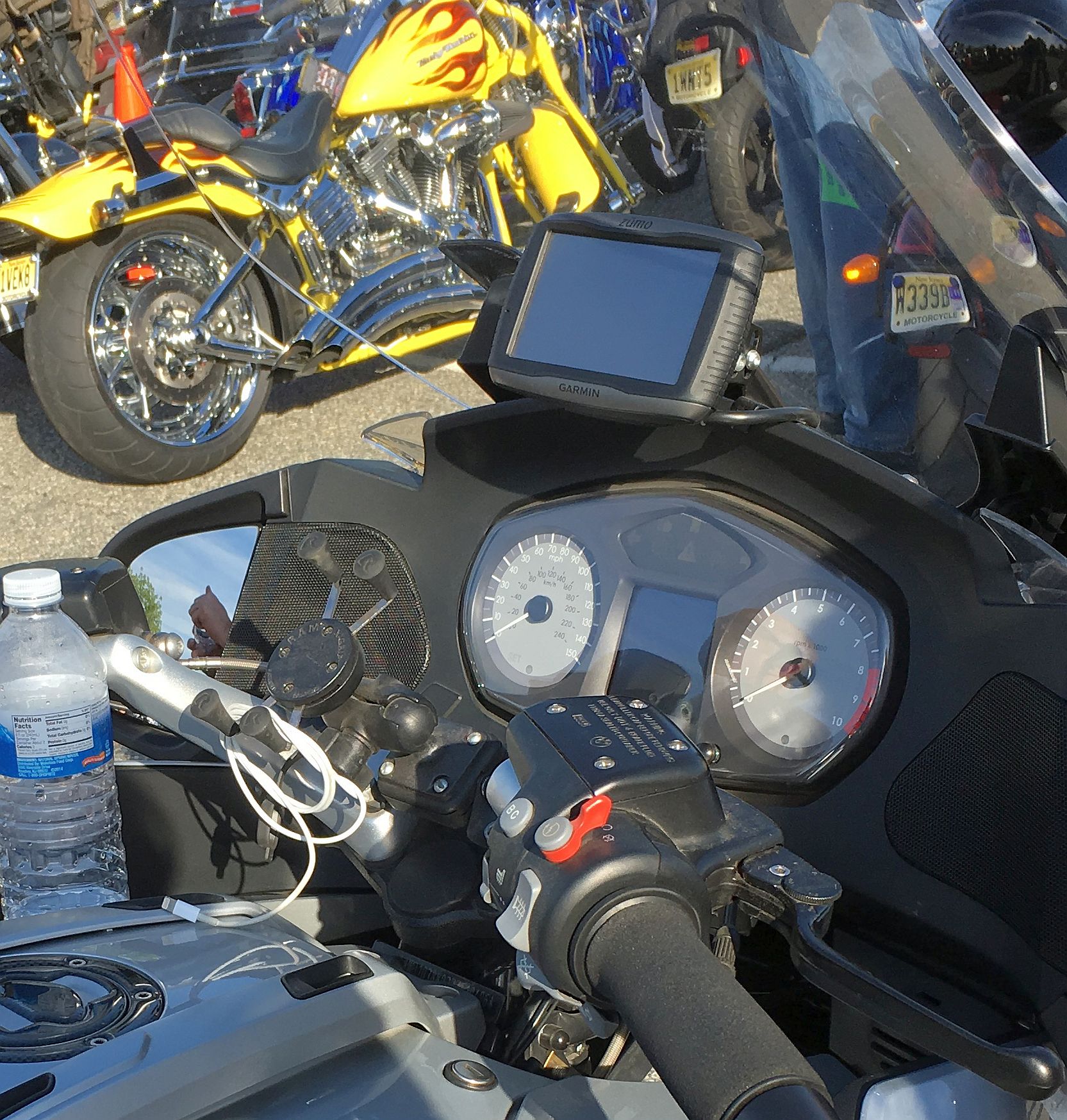
Unlike standard automotive GPS devices, the Zumo lineup is purpose-built for motorcycles. That means waterproof construction, vibration resistance, and mounting systems designed to handle real-world riding conditions.
In this guide, we’ll break down the best mounting options for the Garmin Zumo 595LM—both on motorcycles and in cars—and how to get the most stable setup possible.
What About the Garmin Zumo 590LM?
The Garmin Zumo 590LM uses the same mounting system as the 595LM, including the AMPS hole pattern and RAM-compatible hardware.
If you’re upgrading from a 590LM, the good news is that most mounting components can be reused. In many cases, you can simply swap the cradle and keep the rest of your setup intact.
Because of this shared platform, mount recommendations for the 595LM apply directly to the 590LM.
🔥 Explore More Garmin Zumo Guides
Looking for newer models or comparisons? Check out these guides:
What Comes with the Zumo 595LM / 590LM?
One of the biggest advantages of the Zumo 595LM is that it includes both a motorcycle mount and a car mount right out of the box.
This makes it one of the most flexible GPS units available—you can move it between your bike and your car without buying additional hardware.
The motorcycle cradle uses the industry-standard AMPS mounting pattern, while the car cradle uses a 17mm ball socket, opening the door to a wide range of mounting options.
Best Motorcycle Mount Setup
🥇 Included Mount System (Best Overall)
Garmin wtill offers the mount that came with the original setup.
The included setup uses a ball-and-socket design with an AMPS plate that connects directly to the back of the Zumo cradle.
Why this setup works:
- Extremely stable at highway speeds
- Fully adjustable viewing angles
- Proven durability in all weather conditions
The included U-bolt base fits most handlebars up to 1.25 inches in diameter, making it compatible with the majority of motorcycles.
Best Mount Locations for the Zumo 595LM / 590LM
Choosing the right mount is only half the battle—where you place your Zumo matters just as much.
🏍️ Handlebar Mount (Most Common)
This is the default setup using the included U-bolt mount.
- Easy installation
- Works on most bikes
- Highly adjustable
Best for: Everyday riders and general use.
🎯 Fork Stem Mount (Cleanest Setup)
This places the GPS directly in your line of sight above the triple tree.
- Centered viewing position
- Clean cockpit layout
- Popular on sport bikes
View Price on Amazon →
Best for: Riders who want a factory-style look.
🔧 Mirror / Control Mount (Best for Touring Bikes)
Uses an existing bolt location near the handlebars for a very clean and stable install.
- No handlebar clutter
- Strong mounting point
- Common on BMW and Harley models
View Price on Amazon →
Best for: Touring and cruiser riders.
⚠️ Where to Avoid Mounting
- Too low near the tank (forces you to look down)
- Loose mounts without proper tightening
- Positions that block gauges or controls
Pro tip: Always prioritize visibility and minimal head movement while riding.
Using the Zumo 595LM / 590LM in a Car
The included car cradle opens up a completely different mounting ecosystem thanks to its 17mm ball socket.
This means you can use a wide range of aftermarket mounts originally designed for Garmin Nuvi devices.
Best Car Mount Option
Why this works:
- Strong suction with vacuum lock
- Includes dash mounting option
- Compatible with Zumo cradle
This is a solid upgrade over basic suction mounts and provides a more stable experience on rough roads.
Understanding the AMPS Mounting System
The key to the Zumo mounting system is the AMPS hole pattern, a standardized 4-hole layout used across many mounting systems.
This allows you to mix and match components from different brands and mounting styles without compatibility issues.
👉 Learn more here:
The AMPS Mounting Pattern Explained
Reducing Glare on the Zumo Screen
One common issue with motorcycle GPS units is screen glare—especially in direct sunlight.
Simple add-ons like sun visors can significantly improve visibility.
👉 See our recommendation here:
DigiCharge GPS Sun Shade
Is the Zumo 595LM Still Worth It?
Even though newer models like the Zumo XT and XT2 offer updated features, the 595LM still holds up well for riders who want a proven, reliable GPS.
If you already own one, there’s no reason to upgrade purely for mounting—the ecosystem is already mature, flexible, and highly reliable.
For new buyers, however, it’s worth considering newer models with brighter screens and faster processors.
Garmin Zumo 595LM vs XT vs XT2
If you’re deciding whether to stick with the Zumo 595LM or upgrade, it helps to understand how it compares to newer models.
| Feature | Zumo 595LM | Zumo XT | Zumo XT2 |
|---|---|---|---|
| Screen Brightness | Good | Very Bright | Excellent |
| Processing Speed | Moderate | Fast | Very Fast |
| Connectivity | Bluetooth + Apps | Improved | Advanced Group Ride |
| Mounting System | AMPS + 17mm | AMPS | AMPS |
| Weather Resistance | Yes | Yes | Yes |
Bottom line: The Zumo 595LM still holds up well, especially if you already own one. But if you want a brighter screen, faster performance, and newer features, the XT or XT2 are worth considering.
👉 Read more here:
Garmin Zumo XT, XT2 and XT3 Mounts
Bottom Line
The Garmin Zumo 595LM remains one of the most flexible GPS units ever made thanks to its dual mounting system and compatibility with both AMPS and 17mm ball mounts.
Whether you’re riding or driving, the key is choosing the right mounting position and taking advantage of the robust ecosystem built around the Zumo platform.
